Super Mario Party Jamboree: Hard-to-find secrets

Super Mario Party Jamboree turns things up to 11 with the amount of new content it brings to the long-standing Mario Party formula. New mini-games, new characters, fun boards, simple mechanics, and a variety of modes are what make it so appealing to so many people.

Super Mario Party Jamboree: Hard-to-find secrets

But within all this new content, and even in the outside world, Super Mario Party Jamboree's secrets are hidden everywhere—some obvious, some taking a little digging to find, including references to Nintendo and its games, secret characters, and even hidden interactions when playing as a specific character.

Secret Characters Ninja and Pauline

Super Mario Party Jamboree: Hard-to-find secrets

There are a total of 22 characters you can play as in Super Mario Jamboree, including secret characters. You start the game with 20 unlocked characters and can unlock two more as you start playing the game.

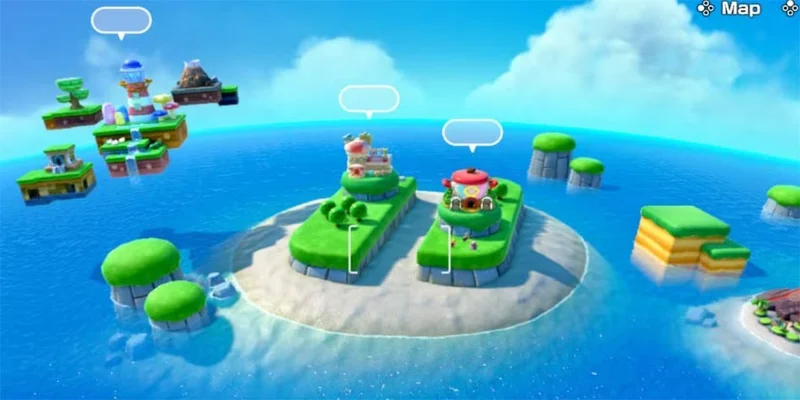
Ninji, who first appeared in Super Mario Bros. 2, and Pauline, the mayor of New Donk City and “damsel in distress” from Donkey Kong, can both be found in the world above. Take the hot air balloon to the game mode selector and use your binoculars to find both Ninji and Pauline – Ninji is on a floating platform, while Pauline is on an island in the middle of the ocean.

All you have to do is look around, zoom in on them once you’ve located them, and you’ll automatically unlock both characters. No other steps are required – unlike the new Mario Party Jamboree boards, these new characters aren’t tied to the Ranking system.

Donkey Konga

Super Mario Party Jamboree: Hard-to-find secrets

A new feature in Super Mario Party Jamboree is the Jamboree Buddy system. Jamboree Buddies can appear on any Mario Party map and provide players with passive benefits that they are after. When you encounter a Jamboree Buddy, they will initiate a special minigame themed around that character.

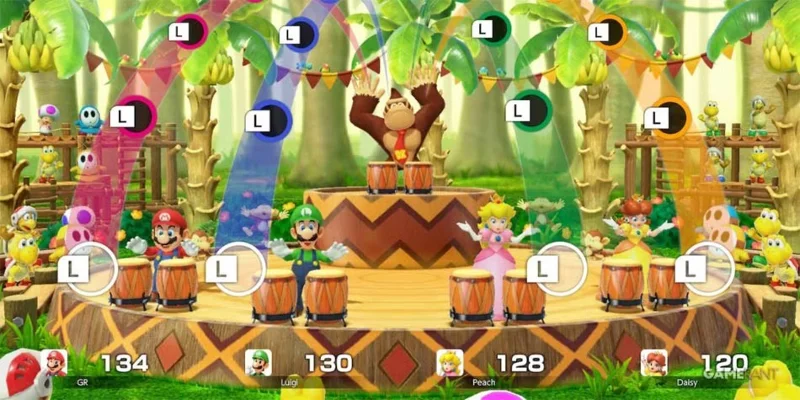
Donkey Kong's Jamboree Buddy minigame is DK's Konga Line, a minigame directly inspired by the Donkey Konga series, a classic rhythm game from the Donkey Kong series, using a special Bongo controller to match the on-screen rhythm.

This is a really cool reference to one of the most unique Nintendo games of its time, but you won't get to play this one very often as there's only a small chance that Donkey Kong will appear as a Jamboree Buddy.

Nintendo Switch Joycon Island

Super Mario Party Jamboree: Hard-to-find secrets

In Super Mario Party Jamboree, players select a mode by looking around the outside world with binoculars after taking off from the Party Plaza. In addition to Ninji and Pauline, players can find another secret from the balloon – an island shaped like two Nintendo Switch Joy-Cons.

Not only is the island's design a neat reference, but it's also home to three unique game modes that only use motion controls. On Motion Island, you can play Toad's Item Factory, Paratroopa Flight School, and Rhythm Kitchen – all multiplayer-focused games that can only be experienced here.

Toad's Item Factory and Rhythm Kitchen are located in the Joy-Con's analog stick position, while Paratroppa Flight School can be found in the sky.

Big Bob-Omb in Defuse Or Lose

Super Mario Party Jamboree: Hard-to-find secrets

Among Super Mario Party Jamboree's 100+ new (and old) minigames, many of them reference past Mario games and characters. In the Defuse Or Lose minigame, where players try to extinguish a series of fuses before reaching a giant bomb, you might spot a familiar face: King Bob-Omb from Mario 64.

King Bob-Omb appears more prominently in Super Mario Party and can be seen in the middle of King Bob-Omb's Powderkeg board.

The salesman respects the royal family.

Super Mario Party Jamboree: Hard-to-find secrets

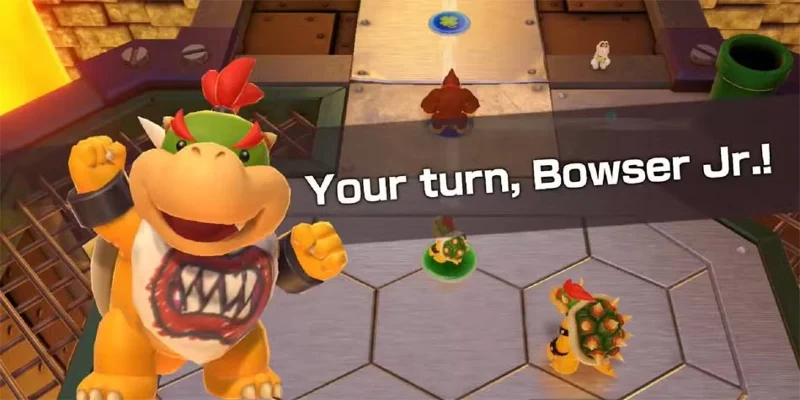
In Super Mario Party Jamboree, playing as certain characters will unlock unique dialogue with various vendors in the Shop on every board. Since they are all run by Koopas, who ultimately serve Bowser, they will be more respectful to players who play as Bowser or Bowser Jr.

For example, vendors will call both characters "Lord Bowser," but they won't offer special discounts on the lords' Mario Party items.

There are a few examples of this unique type of dialogue throughout the game. If you come across Boo's steal tile, but you're playing as Boo, the game will say "look in the mirror" before asking for your target.

Leave a Comment

Solving Microsoft Teams Web Error 503 Service Unavailable

Solving Microsoft Teams Web Error 503 Service Unavailable

Tired of Microsoft Teams Web Error 503 Service Unavailable blocking your meetings? Discover quick, step-by-step fixes to resolve the 503 error fast – no tech skills needed! Clear cache, check status, and get back to collaborating seamlessly.

Troubleshooting Microsoft Teams Update Error 0x80070002

Troubleshooting Microsoft Teams Update Error 0x80070002

Stuck with Microsoft Teams Update Error 0x80070002? Discover proven troubleshooting steps to resolve this frustrating issue quickly and get your Teams app updated seamlessly for uninterrupted collaboration.

Solving Microsoft Teams Error AADSTS50020: User Account Conflict

Solving Microsoft Teams Error AADSTS50020: User Account Conflict

Tired of Microsoft Teams Error AADSTS50020 blocking your sign-in? Discover step-by-step fixes for user account conflicts, backed by the latest Azure AD solutions. Get back to work fast!

How to Fix Microsoft Teams Microphone Error No Sound

How to Fix Microsoft Teams Microphone Error No Sound

Tired of Microsoft Teams microphone error with no sound? Discover quick, step-by-step fixes for Teams mic not working on Windows, Mac, and more. Restore crystal-clear audio in minutes!

How to Fix Microsoft Teams Task Management Error

How to Fix Microsoft Teams Task Management Error

Tired of the Microsoft Teams "Task Management" Error disrupting your workflow? Discover proven fixes like clearing cache, updating Teams, and troubleshooting permissions to get back to seamless collaboration in minutes. Updated with the latest solutions.

How to Fix Microsoft Teams How to Teams Help Error

How to Fix Microsoft Teams How to Teams Help Error

Frustrated by the Microsoft Teams 'How to Teams' Help Error? Discover proven, step-by-step solutions to fix it quickly and restore smooth help access. Latest 2026 updates included for seamless teamwork.

Solving Microsoft Teams Room Error Syncing

Solving Microsoft Teams Room Error Syncing

Struggling with Microsoft Teams "Room Error" Syncing? This ultimate guide provides step-by-step fixes for Microsoft Teams Room Error Syncing issues, ensuring seamless meetings and quick resolutions. Updated with the latest tips.

Troubleshooting Microsoft Teams Workflows Power Automate

Troubleshooting Microsoft Teams Workflows Power Automate

Master troubleshooting Microsoft Teams Workflows Power Automate issues with step-by-step fixes for common errors. Get your automations running smoothly – no more frustration! Proven solutions for triggers, permissions, and more.

Solving Microsoft Teams Restart Error (2026)

Solving Microsoft Teams Restart Error (2026)

Struggling with Microsoft Teams "Restart Error" in 2026? Discover proven, step-by-step fixes to resolve the endless restart loop quickly. Clear cache, reset app, and more for seamless collaboration. Get back online fast!

How to Create Breakout Rooms in Microsoft Teams Before a Meeting

How to Create Breakout Rooms in Microsoft Teams Before a Meeting

Master how to create breakout rooms in Microsoft Teams before a meeting with this easy guide. Pre-assign participants, boost collaboration, and elevate your virtual sessions effortlessly.

How to Fix Microsoft Teams Layout Error: Sidebar Missing

How to Fix Microsoft Teams Layout Error: Sidebar Missing

Tired of Microsoft Teams sidebar missing? Get instant fixes for layout errors. Step-by-step guide with latest tips to restore your Teams sidebar fast and frustration-free.

Solving Microsoft Teams Download Error for Macbook

Solving Microsoft Teams Download Error for Macbook

Struggling with Microsoft Teams Download Error on MacBook? Get step-by-step fixes for smooth installation on the latest macOS. Solve download failed issues quickly and easily.

Solving Microsoft Teams Error J Accounts

Solving Microsoft Teams Error J Accounts

Tired of Microsoft Teams Error J blocking your accounts? Get instant fixes for Error J in Teams with step-by-step guides, cache clears, and account resets. Regain access fast—no tech skills needed!

Rethinking Document Management to Streamline Your Workflow

Rethinking Document Management to Streamline Your Workflow

Work slows down when files sit in too many places, approval steps feel confusing, and people spend more time searching than actually finishing tasks. Strong document management can bring order back without making daily work feel complicated.

How to Fix Microsoft Teams Whiteboard Error Login

How to Fix Microsoft Teams Whiteboard Error Login

Frustrated by the Microsoft Teams Whiteboard Error Login? Discover proven, step-by-step fixes to resolve it quickly and get back to seamless collaboration. Latest solutions for desktop, web, and mobile. No tech skills needed!