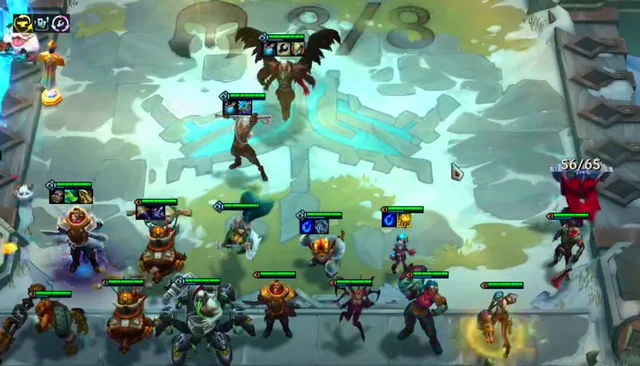
TFT Recycle Squad Guide Season 13

Recycle still uses the complete equipment buff mechanism from DTCL season 6 until now. Unfinished items when in the hands of Recyclers will become complete items, along with that, Recyclers will receive Shields.

Although it has the advantage of self-completed equipment, Recycling does not have additional power buffs in DTCL season 13. If you want more suggestions for Recycling Truth Arena season 13, please scroll down below.

TFT Recycle Build Season 13

Early game

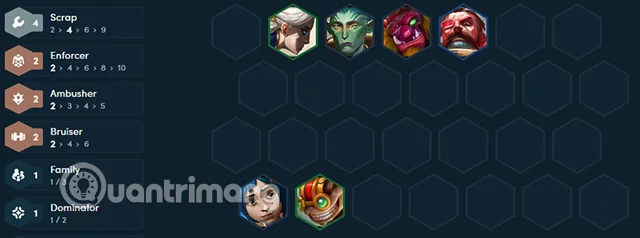
Include Recycled champions combined with early game champions, maybe Steb and Camille to get more buffs. Throw magic items for Powder and start building tank items for Steb, if rolling for Powder, save money from the beginning of the game, don't level up and save money. If you decide to find higher priced champions to be damage dealers, level up to 4 in round 2-1.

TFT Recycle Squad Guide Season 13

Mid game

If you choose to roll for Gangplank, level up to 6 on round 3-2, then level up to 7 when possible and save up over 50 gold to slowroll Gangplank to 3 stars at level 7.

Another option is to get Corki and Rumble late game, skip slowrolling for Gangplank if you want Corki and Rumble. Level up to 8 as fast as you can to get Corki, and for Rumble, take good care of Corki and get Rumble at level 9.

TFT Recycle Squad Guide Season 13

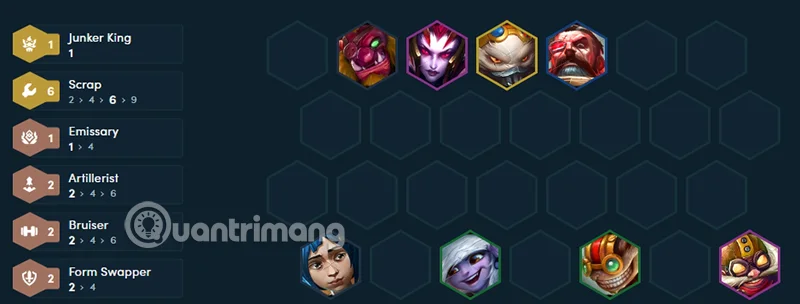
Gathering 9 Recyclers is a bit difficult, so lower your team's standard by 1 level, 6 Recyclers, and use the surrounding champions to add buffs to main damage dealers like Rumble, Ekko, and Corki.

TFT Recycle Squad Guide Season 13

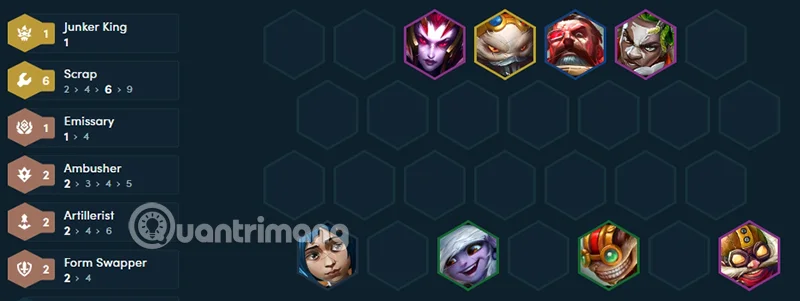
Elise is a great champion to add to your team because she can trigger 2 more traits. She also stuns and deals good damage. So if you see her appearing a lot, add her to your team at level 8 with Corki and Ekko.

TFT Recycle Squad Guide Season 13

If you can jump to level 9, you can add high-cost, multi-star generals to make your team stronger. 5-gold generals sometimes don't add any more clans to your team, but if you see a lot, just throw them all in, who knows, you might be able to add a 3-star, 5-gold general.

TFT Recycle Squad Guide Season 13

Items for Recycled Champions

Gangplank and Corki have the same physical damage items, Trundle has the tank items. Ekko will need some good support items like Hand of Justice, Lightning Bolt, Jeweled Gauntlet, and Royal Crown. These items are also suitable for Rumble, Rumble only needs Bloodthirster if he wants to heal more. As for the magic items like the one below, you can put them all on Ziggs and Powder.

TFT Recycle Squad Guide Season 13

Recycling Buff

TFT Recycle Squad Guide Season 13

At the start of combat, Recycler's item components temporarily become full items. Recycler then gains a shield for 30 seconds for each of your team's item components, including full items.

General Milestone:

  • 2 Recycle: 1 ingredient, gain 25 Shields.
  • 4 Recycle: 3 ingredients, get 40 Shields.
  • 6 Recycle: All components and equipment complete! Get 65 Shields.
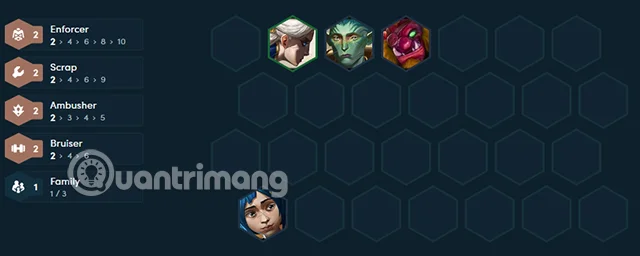
  • 9 Recycle: Spawns Light equipment! Gains 70 Shields.

Champions: Corki, Ekko, Gangplank, Powder, Rumble, Trundle, Ziggs.

Leave a Comment

What Young Riders Should Know About Moving Their Motorcycles Across Cities

What Young Riders Should Know About Moving Their Motorcycles Across Cities

Long-distance travel can involve heavy traffic, changing weather conditions, and rider fatigue. If you are also dealing with the responsibilities of moving home, such as packing belongings or coordinating accommodation, a long ride may add unnecessary pressure to an already busy schedule.

Solving Microsoft Teams Shortcut Error Not Opening

Solving Microsoft Teams Shortcut Error Not Opening

Tired of Microsoft Teams shortcut error preventing you from opening the app? Follow our expert, step-by-step guide with the latest fixes for instant resolution. Works on Windows, Mac & web – no tech skills needed!

Solving Microsoft Teams Task Management Sync Error

Solving Microsoft Teams Task Management Sync Error

Tired of Microsoft Teams Task Management Sync Error halting your workflow? Follow our proven, step-by-step fixes to resolve sync issues fast and restore seamless task collaboration. No tech expertise needed!

Troubleshooting Microsoft Teams Wiki Error Formatting

Troubleshooting Microsoft Teams Wiki Error Formatting

Struggling with Microsoft Teams Wiki Error Formatting? This step-by-step guide reveals proven fixes for common wiki tab issues, ensuring smooth editing and collaboration in Teams. Get back to productive wikis fast!

How to Fix Microsoft Teams Installation Error for Linux

How to Fix Microsoft Teams Installation Error for Linux

Struggling with Microsoft Teams installation error on Linux? Discover step-by-step fixes for Ubuntu, Fedora & more. Resolve dependency issues, crashes, and errors quickly with our ultimate guide. Get Teams running smoothly today!

Solving Microsoft Teams Error Page Not Loading

Solving Microsoft Teams Error Page Not Loading

Struggling with Microsoft Teams "Error Page" not loading? Get step-by-step fixes for desktop, web, and mobile. Solve Microsoft Teams Error Page issues quickly and resume seamless teamwork today.

Solving Microsoft Teams Error Screenshot Issues

Solving Microsoft Teams Error Screenshot Issues

Tired of Microsoft Teams "Error Screenshot" blocking your workflow? Get proven, step-by-step solutions to resolve screenshot errors in Teams instantly and boost productivity. No tech skills needed!

How to Fix Microsoft Teams Error U User

How to Fix Microsoft Teams Error U User

Tired of Microsoft Teams "Error U" User blocking your chats? Get proven, step-by-step fixes to clear cache, reset, and restore seamless collaboration instantly.

Where are Microsoft Teams Registry Keys Located on Windows 11?

Where are Microsoft Teams Registry Keys Located on Windows 11?

Unlock the precise locations of Microsoft Teams registry keys on Windows 11. Step-by-step guide to find, access, and safely tweak them for optimal performance and troubleshooting. Essential for IT pros and Teams enthusiasts.

How to Fix Microsoft Teams Training Error Video Lag

How to Fix Microsoft Teams Training Error Video Lag

Tired of Microsoft Teams "Training Error" Video Lag ruining your meetings? Follow our step-by-step guide with the latest fixes for smooth video calls—no more frustration!