When to Start Decorating for Halloween in 2026

Use a simple 2026 Halloween decorating timeline for indoor décor, outdoor displays, and fresh pumpkins, with practical adjustments for weather and events.
Samsung launched the Galaxy S25 Ultra with Corning Gorilla Armor 2 glass, which is said to be more resistant to drops than the Armor glass on the S24 Ultra. But that's not all: replacement parts for repairing the screen are also significantly cheaper than previous generations.
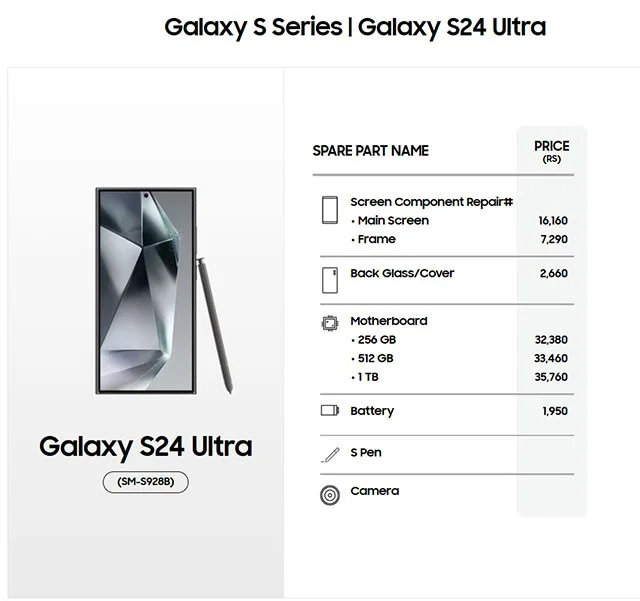
Take the Galaxy S25 Ultra, for example. Samsung India’s website lists the screen repair/replacement price for this year’s flagship Galaxy S model at Rs 11,950 (about $137.80). Meanwhile, users will have to shell out Rs 16,160 (about $186) to replace the screen for the Galaxy S24 Ultra.
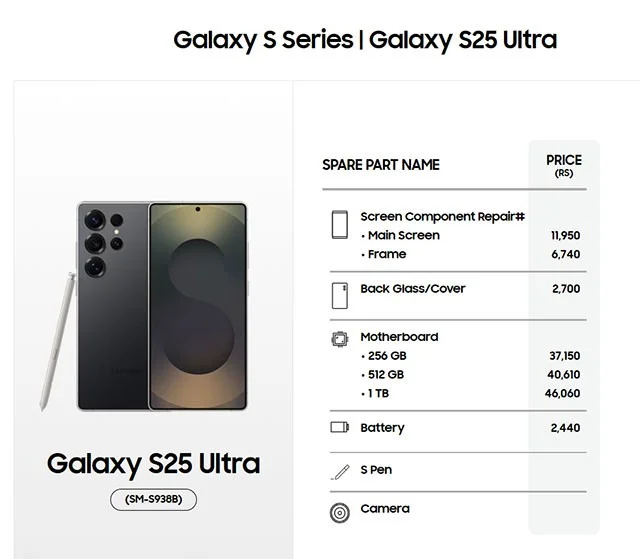
First, it’s worth clarifying that Samsung is using the same display panel as last year for all three Galaxy S25 models. This has probably helped the company keep costs down and also made repairs more affordable. However, the cost of replacing the glass back has still increased slightly, which suggests that the price reduction has less to do with the glass and more to do with the lack of innovation in the display panel.
Replacing the motherboard, mid-frame and battery is more expensive
The motherboard on the Galaxy S25 Ultra is over Rs 4,000 (roughly $46) more expensive than the Galaxy S24 Ultra, most likely due to the Snapdragon 8 Elite chip. Surprisingly, battery replacements on all S25 models are also slightly higher than the previous generation, despite the fact that neither the capacity nor the internal design has changed this year.
The same goes for the mid-frames on the base and Plus models. The redesigned mid-frame of the Galaxy S25 Ultra—one of the few hardware changes—now costs less than the S24 Ultra. Is this a cost-cutting measure? Just kidding—the main purpose is probably to differentiate it from the previous generation.
Other improvements
In other aspects, the Gorilla Armor 2 on the S25 Ultra has a better anti-reflective coating, which improves outdoor visibility even though the maximum brightness and HBM remain the same. The new chip offers higher peak performance and a more powerful NPU for faster and more efficient AI processing.
While the battery capacity remains the same, with a more energy-efficient chip and improved performance optimization on One UI 7, all S25 models have significantly better battery life than the previous generation.
Use a simple 2026 Halloween decorating timeline for indoor décor, outdoor displays, and fresh pumpkins, with practical adjustments for weather and events.
Mix five vivid, approachable Halloween cocktails with measured recipes, simple prep tips, and an alcohol-free option for your party guests.
Find 15 office-friendly Halloween costume ideas for 2026, with practical checks for dress codes, respectful themes, comfort, and workplace safety.
Plan a fun elementary school Halloween party with easy crafts, games, inclusive treats, costume tips, and a sample 75-minute classroom schedule.
Compare realistic side hustles for 2026 by startup cost, fees, flexibility, and income control, with current tax and scam guidance from official sources.
Upgrade your home office ergonomics with current OSHA and NIOSH guidance on chair fit, monitor height, laptop setup, lighting, and movement.
Learn why emotional intelligence matters in leadership, where it helps most, how to strengthen it, and how to tell whether your approach is working.
A practical roadmap for moving into tech without a degree: choose an accessible role, build job-ready skills, prove them with projects, and use hiring feedback to improve.
Build a credible LinkedIn personal brand in 2026 with current profile, content, newsletter, analytics, verification, and visibility guidance from LinkedIn.
Quiet quitting and quiet firing are catchy labels, not diagnoses. Learn what is verified, what depends on context, and what employees and managers can do next.








