Troubleshooting Microsoft Teams Room Basic vs Pro Errors

🔧 Frustrated by glitchy Microsoft Teams Rooms? Whether you're running the free Basic version or the feature-packed Pro license, errors can disrupt meetings and productivity. This guide dives straight into troubleshooting Microsoft Teams Room Basic vs Pro errors, comparing key differences and delivering actionable fixes. You'll be back to seamless collaboration in no time—let's dive in! ✅
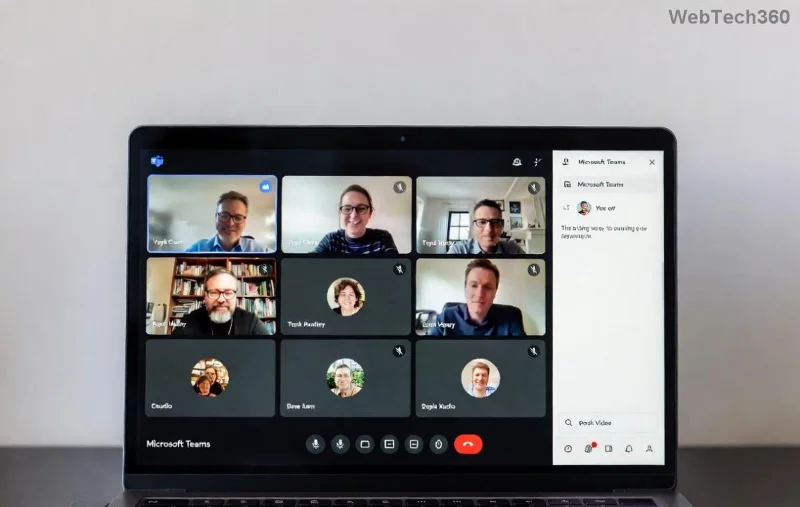
Microsoft Teams Rooms setup dashboard showing Basic vs Pro interface

Microsoft Teams Rooms Basic vs Pro: Key Differences That Impact Errors

Understanding the gap between Basic and Pro is crucial for effective troubleshooting. Basic offers essential features for small setups, while Pro unlocks advanced capabilities like intelligent cameras and analytics.

Feature Basic Pro
Licensing Free with Microsoft 365 Paid subscription (~$40/room/month)
Intelligent Cameras ❌ Limited ✅ Full support (people tracking)
OneTouch Join ✅ Basic ✅ Advanced with proximity detection
Resource Accounts ✅ Required ✅ With premium management
Analytics & Reports ❌ None ✅ Detailed usage insights
Update Channel Monthly Current + preview options

Pro tip: Basic errors often stem from free-tier limitations, like missing AI features, while Pro issues tie to complex integrations. Check your license first via the Teams admin center.

Common Troubleshooting Microsoft Teams Room Basic vs Pro Errors

Here's a focused breakdown of frequent errors, with tailored fixes for each version. We've prioritized the most reported issues from recent Microsoft updates.

1️⃣ Sign-In and Licensing Errors (Error Code 0xCAA20003 or "Invalid Credentials")

  • Basic: Often due to shared resource account limits. Fix: Verify the account in Microsoft Teams Admin Center and enable "Teams Rooms" mode.
  • Pro: License sync delays. Solution: Run Remove-TeamsRoomLicense in PowerShell, then reassign via admin portal. Restart the console.

2️⃣ Connectivity & Network Errors (No Audio/Video or "Server Unreachable")

Both versions suffer here, but Pro adds VPN complexities.

Error Type Basic Fix Pro Fix
UDP Port Blocked Open ports 3478-3481 + QoS policies for AI traffic
DNS Resolution Flush DNS: ipconfig /flushdns Custom DNS for cloud proxy
Wi-Fi Drops Switch to wired Ethernet Enable Wi-Fi 6 with Pro certs
Troubleshooting network errors in Microsoft Teams Rooms Basic and Pro

3️⃣ Update and App Crashes (Error 80070002 or "Update Failed")

Basic sticks to stable channels, reducing crashes but delaying fixes. Pro gets previews—great for features, risky for stability.

  1. Check status: Open Settings > About > Check for updates.
  2. Basic: Force via USB recovery image from Microsoft.
  3. Pro: Use Intune for managed updates. Run dism /online /cleanup-image /restorehealth if stuck.

4️⃣ Hardware & Peripheral Issues (Camera/Mic Not Detected)

  • Basic: Plug-and-play limits. Test USB devices individually.
  • Pro: Companion mode conflicts. Disable in registry: HKEY_LOCAL_MACHINE\SOFTWARE\Microsoft\TeamsRooms\DisableCompanionMode = 1.

Pro users: Leverage Pro's intelligent framing—ensure firmware is latest via device manager. 😊

Hardware troubleshooting for Teams Rooms Pro advanced features

Advanced Troubleshooting Microsoft Teams Room Basic vs Pro Errors Steps

For stubborn issues:

  1. Logs First: Access via Settings > Troubleshooting > Collect logs. Upload to Microsoft support.
  2. PowerShell Magic:
    Get-TeamsRoomSystemInfo
    Set-TeamsRoomNetworkProfile -Name "Corporate" -DnsSuffix "yourdomain.com"
    
  3. Reset to Factory: Hold power + volume down during boot. Pro users, backup certs first!
  4. Version-Specific: Basic—avoid custom certs. Pro—integrate with Azure AD for SSO.

Still stuck? Open a ticket at Microsoft Teams Support. Mention your version for faster resolution. 👏

Prevent Future Teams Rooms Errors: Best Practices

  • ✅ Schedule weekly checks: License, updates, peripherals.
  • 📊 Monitor with Pro analytics or third-party tools.
  • 🔒 Secure networks: Firewall rules per Microsoft's latest guidelines.
  • 🆙 Stay current: Enable auto-updates in both versions.

Mastering these troubleshooting Microsoft Teams Room Basic vs Pro errors will save hours and keep your rooms humming. Got a unique issue? Drop it in the comments—we're here to help! 🚀
Leave a Comment

Troubleshooting Microsoft Teams Room Basic vs Pro Errors

Troubleshooting Microsoft Teams Room Basic vs Pro Errors

Struggling with Troubleshooting Microsoft Teams Room Basic vs Pro Errors? Get step-by-step fixes for common issues, comparisons, and pro tips to resolve connectivity, licensing, and setup problems fast in both versions.

How to Fix Microsoft Teams Screen Sharing Lag in 2026

How to Fix Microsoft Teams Screen Sharing Lag in 2026

Tired of Microsoft Teams screen sharing lag ruining your 2026 meetings? Get instant fixes for lag, freezes, and poor quality. Proven steps to optimize performance and share screens flawlessly. Boost productivity today!

Troubleshooting Microsoft Teams Installation Errors on macOS

Troubleshooting Microsoft Teams Installation Errors on macOS

Struggling with Microsoft Teams installation errors on macOS? This ultimate guide provides proven, step-by-step fixes for common issues like Gatekeeper blocks, permission errors, and download failures to get Teams running smoothly on your Mac. Updated with the latest solutions.

How to Create and Manage a Bot in Microsoft Teams (2026)

How to Create and Manage a Bot in Microsoft Teams (2026)

Master how to create and manage a bot in Microsoft Teams (2026) with this expert guide. From setup to advanced management, unlock productivity boosts using the latest Bot Framework and Azure tools.

Troubleshooting Microsoft Teams Remote Control Request Error

Troubleshooting Microsoft Teams Remote Control Request Error

Tired of Microsoft Teams "Remote Control" Request Error blocking your meetings? Follow our proven, step-by-step troubleshooting guide with the latest fixes to restore seamless remote control and boost productivity instantly.

How to Fix Microsoft Teams Planner Error: Tasks Not Loading

How to Fix Microsoft Teams Planner Error: Tasks Not Loading

Struggling with Microsoft Teams Planner error where tasks not loading? Discover step-by-step fixes for Microsoft Teams Planner Error: Tasks Not Loading. Quick solutions for instant relief in Teams Planner. Updated with latest troubleshooting tips.

Troubleshooting Microsoft Teams Version History Errors

Troubleshooting Microsoft Teams Version History Errors

Tired of Microsoft Teams version history errors disrupting your workflow? This step-by-step troubleshooting guide covers common issues, quick fixes, and pro tips to restore seamless file versioning in Teams. Updated with the latest solutions!

Solving Microsoft Teams Error 2400: Unable to Connect to Servers

Solving Microsoft Teams Error 2400: Unable to Connect to Servers

Tired of Microsoft Teams Error 2400 blocking your connection? Follow our proven, step-by-step fixes to solve "Unable to Connect to Servers" and get back to productive meetings fast.

Where is My Microsoft Teams Recording Saved? Find Your Files Fast

Where is My Microsoft Teams Recording Saved? Find Your Files Fast

Struggling to locate your Microsoft Teams recording? Discover exactly where Teams saves meeting files in OneDrive or SharePoint, plus quick steps to find and access them instantly. No more lost recordings!

How to Fix Microsoft Teams Error G Audio

How to Fix Microsoft Teams Error G Audio

Struggling with Microsoft Teams "Error G" audio? Discover step-by-step fixes for microphone and speaker issues. Quick, easy solutions to get back to seamless meetings without frustration. Works on Windows, Mac & more!

Fixing Microsoft Teams Vcruntime140.dll Missing Error

Fixing Microsoft Teams Vcruntime140.dll Missing Error

Tired of the frustrating Microsoft Teams Vcruntime140.dll missing error crashing your meetings? Discover proven, step-by-step fixes to resolve it fast and restore smooth teamwork. No tech skills needed!

How to Fix Microsoft Teams Undefined Error (2026)

How to Fix Microsoft Teams Undefined Error (2026)

Struggling with Microsoft Teams 'Undefined Error' (2026)? Discover proven, step-by-step fixes like clearing cache, updating the app, and more. Get back to seamless collaboration fast!

How to Disable Microsoft Teams at Startup for Better PC Performance

How to Disable Microsoft Teams at Startup for Better PC Performance

Discover simple, step-by-step methods to disable Microsoft Teams at startup and unlock better PC performance. Faster boot times, less resource drain—perfect for Windows users seeking smooth operation.

How to Fix Microsoft Teams Network Error Offline

How to Fix Microsoft Teams Network Error Offline

Stuck with Microsoft Teams "Network Error" offline? Discover proven, step-by-step solutions to fix Microsoft Teams network error offline quickly. Get back online fast—no tech skills needed!

Solving Microsoft Teams Error 4oggx

Solving Microsoft Teams Error 4oggx

Struggling with Microsoft Teams Error 4oggx? Discover proven fixes to resolve sign-in failures, crashes, and connectivity issues fast. Get back to productive calls without frustration!









