What is CapCut? Is it safe to use CapCut?

What is CapCut? Is music on CapCut copyrighted? Let's find out with Download.vn what you need to know about CapCut !

What is CapCut?  Is it safe to use CapCut?

CapCut is the leading video editing app for TikTok today

If you regularly use TikTok, you've probably heard of the name CapCut - a trending app on CH Play and App Store . Almost all of us are easily attracted to a "hot" application, but whether to install it or not is an issue that needs to be considered. Here are the things you need to know before installing CapCut .

What you need to know before using CapCut

What is CapCut?

What is CapCut?  Is it safe to use CapCut?

CapCut helps you capture moments and make clips special

CapCut is a free video editing application on Android and iOS. It provides a few useful features, allowing you to edit videos on your smartphone to share on platforms like Instagram, TikTok ...

However, there are many other video editing apps available, so why is CapCut so popular?

CapCut is a video editor that isn't exactly unique, but it's easy to use and includes a music library of copyrighted & exclusive songs that you can use for videos. Furthermore, this application does not show ads. This is a great advantage.

Outstanding features of CapCut

  • Easy to use: Cut, reverse, change speed... It's all extremely easy. You can choose to only post great moments on TikTok.
  • High quality: Advanced filters and beauty effects, blemish removal... CapCut opens up countless options to refine your work to make it more impressive.
  • Incredible music library: Rich music library with exclusive songs, only available on CapCut.
  • Stickers and text: Collection of the hottest trending stickers and fonts, allowing you to express all your emotions in your videos.
  • Effects: Create clips with a variety of magical effects.

Who created CapCut?

CapCut is a product of ByteDance, the "parent company" of TikTok. Made in China, it was initially only available to users in this region under the name Jianying.

After being renamed CapCut in 2020, ByteDance officially brought it to the world. After only 1 year, 2021, it has climbed to the top of the rankings on the App Store and Google Play Store.

Founded by the company behind TikTok, many people are concerned about CapCut's privacy protection.

Data CapCut collects from users

Most apps on the Store today collect a bit of data from users. For example, TikTok's privacy policy allows it to collect biometric data. Very few people pay attention to this part because most people only care about the agreement and conditions of use.

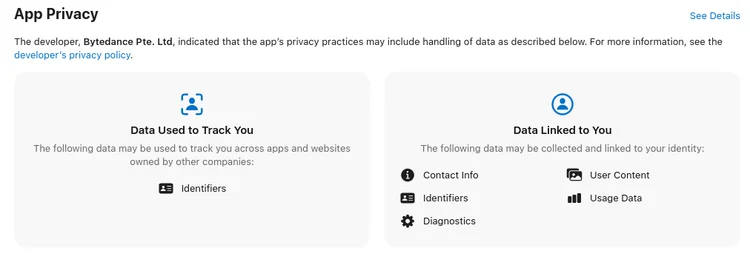
That's why you need to know what data CapCut collects when you install and use it on your device. On each Apple App Store page, CapCut collects the following data:

CapCut collects identifying characteristics such as how you use the device, IP address, connection, device manufacturer information... It can store additional contact information, diagnostic information, even content User-generated content. It's all linked directly to you.

What is CapCut?  Is it safe to use CapCut?

Information CapCut collects from users

In fact, a video editing app does not need to collect personal information. But in this case, CapCut collects significant user data.

If you're comfortable sharing that information, you can continue to use CapCut. If not, consider before installing CapCut . Compared to CapCut, InShot collects less data. This might be a good alternative for you.

What is CapCut?  Is it safe to use CapCut?

Inshot data collected from users

Note before using CapCut

CapCut is not an app that contains malicious code, but it collects user data. There are a few things about privacy you need to know:

  • Data may be saved inside or outside the country you are in.
  • Data collected through CapCut may be shared with all ByteDance-owned services, including TikTok.
  • Personal data may be shared with third party services.

CappCut keeps the information collected “ for improvement, development and management of the service. Use your information to keep you safe .” If still in doubt, please read CapCut's privacy policy carefully at: https://www.capcut.net/clause/privacy.

Above is everything you need to know before using CapCut. Hopefully this article helps you make the choice whether or not to use CapCut more accurately.

Leave a Comment

How to Fix Microsoft Teams Error Logs Not Loading

How to Fix Microsoft Teams Error Logs Not Loading

Struggling with Microsoft Teams error logs not loading? Follow our proven, step-by-step guide to clear cache, update Teams, fix permissions, and resolve the issue fast for smooth troubleshooting. Works on latest versions!

How to Update Microsoft Teams to the Latest Version in 2026

How to Update Microsoft Teams to the Latest Version in 2026

Master how to update Microsoft Teams to the latest version in 2026 effortlessly. Step-by-step for desktop, mobile, and web – boost security, features, and performance now!

Microsoft Teams vs Slack: Which is Better for Work in 2026?

Microsoft Teams vs Slack: Which is Better for Work in 2026?

Discover Microsoft Teams vs Slack in 2026: in-depth comparison of features, pricing, integrations, and AI tools. Find out which is better for your work team productivity and collaboration.

Troubleshooting Microsoft Teams Video call Error

Troubleshooting Microsoft Teams Video call Error

Struggling with Microsoft Teams video call error? Discover proven, step-by-step troubleshooting fixes for video issues, camera problems, and more. Get seamless calls back in minutes!

Solving Microsoft Teams Mac Error Keychain Issues

Solving Microsoft Teams Mac Error Keychain Issues

Struggling with Microsoft Teams Mac Error Keychain Issues? Discover proven, step-by-step fixes to resolve Keychain errors on Mac, restore smooth login, and boost productivity fast. No tech expertise needed!

Solving Microsoft Teams Hard Error (2026 Guide)

Solving Microsoft Teams Hard Error (2026 Guide)

Tired of Microsoft Teams crashing with "Hard Error"? This 2026 guide delivers step-by-step fixes for seamless video calls and chats. Clear cache, update, reinstall—solve it now!

How to Fix Microsoft Teams DLL Missing Errors (msvcp140.dll)

How to Fix Microsoft Teams DLL Missing Errors (msvcp140.dll)

Tired of Microsoft Teams crashing due to msvcp140.dll missing errors? Discover proven, step-by-step fixes to restore smooth video calls and chats. Works on Windows 10/11 with latest updates.

How to Fix Microsoft Teams Meeting ID Not Working

How to Fix Microsoft Teams Meeting ID Not Working

Tired of Microsoft Teams Meeting ID not working? Get instant fixes for join errors on desktop, mobile, or web. Step-by-step troubleshooting with latest updates to rejoin meetings seamlessly. No tech skills needed!

How to Fix Microsoft Teams Welcome Error Startup Loop

How to Fix Microsoft Teams Welcome Error Startup Loop

Struggling with Microsoft Teams "Welcome Error" startup loop? Discover step-by-step fixes to resolve the issue quickly. Clear cache, reset app, and more for seamless Teams experience. Updated with latest solutions.

How to Fix Microsoft Teams Disabled Error Account Blocked

How to Fix Microsoft Teams Disabled Error Account Blocked

Stuck with Microsoft Teams "Disabled Error" Account Blocked? Discover proven, step-by-step solutions to fix the issue fast, regain access, and prevent future blocks. No tech skills needed!

How to Use Microsoft Teams Copilot for AI-Powered Meetings

How to Use Microsoft Teams Copilot for AI-Powered Meetings

Master how to use Microsoft Teams Copilot for AI-powered meetings. Step-by-step guide with latest tips to generate recaps, answer questions, and boost productivity effortlessly. Transform your Teams experience today!

Microsoft Teams Breakout Rooms Tutorial for Beginners (2026)

Microsoft Teams Breakout Rooms Tutorial for Beginners (2026)

Master Microsoft Teams Breakout Rooms with this beginner-friendly tutorial. Step-by-step guide to creating, managing, and optimizing breakout rooms for dynamic 2026 meetings and workshops. Boost engagement now!

Solving Microsoft Teams Recording Save Error

Solving Microsoft Teams Recording Save Error

Stuck with Microsoft Teams Recording Save Error? Get instant, step-by-step fixes for saving recordings effortlessly. Proven solutions for all common issues – no tech skills needed!

How to Create a Wiki Page in Microsoft Teams

How to Create a Wiki Page in Microsoft Teams

Discover how to create a Wiki page in Microsoft Teams effortlessly. This ultimate guide covers step-by-step instructions, tips, and best practices to boost your team's knowledge sharing and productivity. Perfect for beginners!

How to Fix Microsoft Teams Error S Screen

How to Fix Microsoft Teams Error S Screen

Stuck on Microsoft Teams "Error S" screen? Discover proven, step-by-step solutions to fix Microsoft Teams Error S fast. Clear cache, restart, update & more for seamless teamwork. Works on latest versions!