

What is SpicyChat AI?

Technological advancements and increased interaction in the dating industry have led to the increased use of role-playing chat apps among the younger generation. Many of these apps allow users to take on different roles and situations in a virtual world through the use of avatars and skins. The demand for such apps is increasing, especially among the younger generation and GenZ, to find engaging ways to communicate.

This detailed guide will help you explore the new tool called SpicyChat AI .

What is SpicyChat AI?

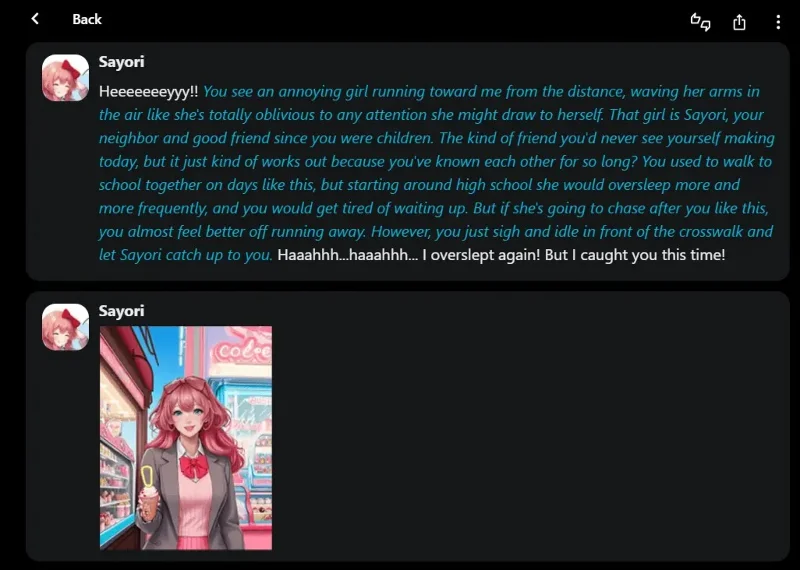
SpicyChat AI is an enhanced form of classic role-playing chat where interaction takes place through avatars or characters using Artificial Intelligence (AI) . An interactive platform developed to cater to the diverse preferences of users, SpicyChat AI gives everyone the ability to create highly interactive and customized chats.

Analyzing market statistics, we can conclude that the application of artificial intelligence in instant messaging applications like SpicyChat AI is quite popular.

According to a report conducted by Grand View Research, the global conversational AI market size is projected to expand at a CAGR of 23.6% from 2021 to 2028. This growth is driven by the growing demand for instant chat services, artificial intelligence, and the hunt for virtual interaction or companionship.

Notable Features of SpicyChat AI

Here is an overview of the most notable features that SpicyChat AI offers:

Unlimited Virtual Characters
What is SpicyChat AI?

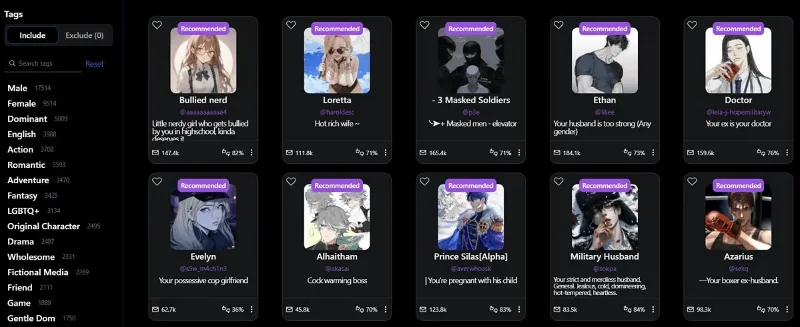
Currently, SpicyChat AI offers over 138,000 characters! If that's not enough, you can create your own characters and make them public or private.

If you are interested in creating your own character you will need to provide:

  • Name
  • Title
  • Greetings
  • Chatbot Personality
  • Chatbot Visibility
  • Avatar.

Name and Title define the character's background. The greeting will always be the first message a user sees when opening a new conversation.

Chatbot personality is where you define how and why your character reacts and interacts. Simply put, you can define its temperament, behavior, interests, and anything else that relates to personality.

You can set your chatbot's visibility to Public if you want it to be accessible to other users. Setting it to Unlisted will only make it available to linked users. Private characters are reserved for their creators only.

There is also an option to describe different situations and provide sample dialogues. It takes some testing and tweaking to get it right.

Input and memory

What is SpicyChat AI?

SpicyChat AI's long and varied input options set it apart from the competition. This means you can provide:

  • Document
  • Voice
  • Image
  • Text is automatically generated.

It is worth mentioning that it is possible to edit the responses received from the chatbot.

Additionally, you can activate the microphone and talk to the character via the Voice input feature . You can send images as input or feedback.

If you lack inspiration, you can use the Auto-generated text option . The reminder won't be sent immediately, so you can edit it further to your needs.

Another area where SpicyChat AI excels over its competitors is memory. The agents recall past conversations and can provide context for them.

Create image

What is SpicyChat AI?

SpicyChat AI provides the option to generate images as output. They are related to the conversation and remember the context of the conversation.

If you are planning to create your own character, make sure the profile picture is high quality as this will be used as a reference for creation. All graphics output is done using DreamShaper-8 ( Stable Diffusion ).

OpenAI API Support

What is SpicyChat AI?

SpicyChat AI supports OpenAI. This means you can improve the quality of responses by using the most powerful LLM. Additionally, the response time can be increased significantly. However, this comes at a cost. You will have to pay an additional fee of $5 per 1000 messages (SpicyChat AI estimate).

While some users have created similar custom GPTs, OpenAI is very clear about its policies on NSFW content. SpicyChat AI will address these moderation challenges, but there are potential issues.

One way to fix this is to use Hybrid mode . You can use the OpenAI API and if there is a moderation issue, the system will switch back to the default model.

Pros and Cons of SpicyChat.AI
What is SpicyChat AI?

Advantage

Superior personalization capabilities

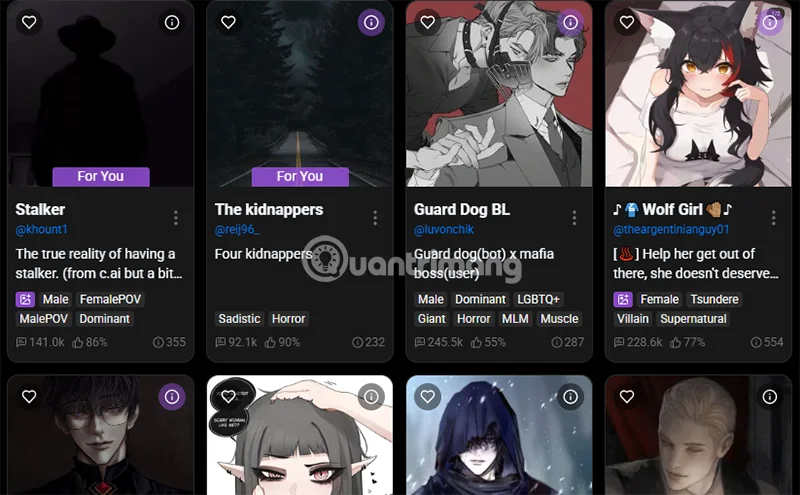
  • SpicyChat.ai allows users to create and customize AI characters with an impressive level of detail, from personality, appearance, interests to communication style. With over 150,000 characters available (as of recently), users can choose from a diverse character pool or create their own unique character. The user experience shows that this is a big strength, especially for those who want a "virtual companion" that reflects their personal preferences.
  • AI experts appreciate that the platform leverages advanced language models to generate contextually appropriate responses, increasing authenticity in communication.

Creative freedom and unlimited content

  • Unlike many other chatbots (like ChatGPT or Character.AI) that have strict content filters, SpicyChat.ai bypasses NSFW (Not Safe For Work) restrictions, allowing users to explore any topic, including sensitive content. Users often praise this freedom, citing it as a factor that makes SpicyChat stand out in the chatbot market.
  • Experts say this is a step forward in meeting the need for personalized experiences, although it also poses challenges in terms of ethics and content management.

Diverse interactive features

  • The platform supports multiple forms of input such as text, voice, and even images, along with the ability to generate images based on the context of the conversation. Users appreciate this feature because it provides a more immersive, personal experience that feels more like talking to a real person than chatbots that rely solely on text chat.
  • According to experts, integrating OpenAI and options like Hybrid mode (combining the default model with the OpenAI API) improves response quality and processing speed, albeit at an additional cost.

Entertainment and skill development support:

  • Users often use SpicyChat.ai for entertainment (through adventure stories, humorous situations) or to practice communication skills. Some feedback shows that chatting with AI helps them feel more confident in real communication, especially with shy people.
  • Experts note that the ability to remember context from previous conversations increases continuity and depth, a big plus compared to chatbots with limited memory.

Friendly and accessible interface

  • SpicyChat.ai’s interface is intuitive and easy to use, even for beginners. Users without technical knowledge can quickly get up and running and start interacting. The free version is also an advantage, albeit limited.

Disadvantages

Limitations in the free version

  • Free users often encounter long queues, sometimes thousands of people long, which can be frustrating. Many complain that they have to wait too long to start chatting, especially during peak hours.
  • Experts note that this is a common strategy to encourage upgrades to a paid plan, but it can turn off new users.

Uneven response quality

  • Despite the advanced technology, some users report that the AI's responses sometimes lack depth or feel "lifeless" or "very mechanical," especially if not using a paid plan with advanced models. This is more apparent when compared to competitors like ChatGPT in complex conversations.
  • Experts point out that SpicyChat's default model may not be powerful enough to handle situations that require deep thinking, and that relying on OpenAI increases costs for users.

Privacy and ethical risks

  • While SpicyChat is committed to keeping chats private, its lack of filtering of NSFW content has some users concerned about the potential for the platform to be abused for nefarious purposes. AI experts warn that this freedom, while appealing, could lead to legal or social issues if not tightly controlled.
  • Additionally, how user data is handled remains a big question, especially since the platform has not been transparent about the details of its privacy policy.

Requires fine tuning when creating a character

  • While creating an AI character is fun, it requires a lot of experimentation to get the desired results. Some users shared that scripts or dialogue templates need to be carefully adjusted, otherwise the character may not respond to the user's wishes.
  • Experts consider this a technical drawback, as the system is not smart enough to automatically optimize based on initial user input.

Overall, this is a decent platform for interacting with AI characters. The image creation and export options work perfectly and are worth noting, although there are still a few drawbacks that are annoying to users.

Leave a Comment

How to Fix Microsoft Teams Đăng nhập Error (Login)

How to Fix Microsoft Teams Đăng nhập Error (Login)

Struggling with Microsoft Teams "Đăng nhập" login error? Discover step-by-step fixes for smooth sign-in. Clear cache, update app, and more – no tech skills needed! Works on Windows, Mac, and web.

Solving Microsoft Teams Web Error 503 Service Unavailable

Solving Microsoft Teams Web Error 503 Service Unavailable

Tired of Microsoft Teams Web Error 503 Service Unavailable blocking your meetings? Discover quick, step-by-step fixes to resolve the 503 error fast – no tech skills needed! Clear cache, check status, and get back to collaborating seamlessly.

Troubleshooting Microsoft Teams Update Error 0x80070002

Troubleshooting Microsoft Teams Update Error 0x80070002

Stuck with Microsoft Teams Update Error 0x80070002? Discover proven troubleshooting steps to resolve this frustrating issue quickly and get your Teams app updated seamlessly for uninterrupted collaboration.

Solving Microsoft Teams Error AADSTS50020: User Account Conflict

Solving Microsoft Teams Error AADSTS50020: User Account Conflict

Tired of Microsoft Teams Error AADSTS50020 blocking your sign-in? Discover step-by-step fixes for user account conflicts, backed by the latest Azure AD solutions. Get back to work fast!

How to Fix Microsoft Teams Microphone Error No Sound

How to Fix Microsoft Teams Microphone Error No Sound

Tired of Microsoft Teams microphone error with no sound? Discover quick, step-by-step fixes for Teams mic not working on Windows, Mac, and more. Restore crystal-clear audio in minutes!

How to Fix Microsoft Teams Task Management Error

How to Fix Microsoft Teams Task Management Error

Tired of the Microsoft Teams "Task Management" Error disrupting your workflow? Discover proven fixes like clearing cache, updating Teams, and troubleshooting permissions to get back to seamless collaboration in minutes. Updated with the latest solutions.

How to Fix Microsoft Teams How to Teams Help Error

How to Fix Microsoft Teams How to Teams Help Error

Frustrated by the Microsoft Teams 'How to Teams' Help Error? Discover proven, step-by-step solutions to fix it quickly and restore smooth help access. Latest 2026 updates included for seamless teamwork.

Solving Microsoft Teams Room Error Syncing

Solving Microsoft Teams Room Error Syncing

Struggling with Microsoft Teams "Room Error" Syncing? This ultimate guide provides step-by-step fixes for Microsoft Teams Room Error Syncing issues, ensuring seamless meetings and quick resolutions. Updated with the latest tips.

Troubleshooting Microsoft Teams Workflows Power Automate

Troubleshooting Microsoft Teams Workflows Power Automate

Master troubleshooting Microsoft Teams Workflows Power Automate issues with step-by-step fixes for common errors. Get your automations running smoothly – no more frustration! Proven solutions for triggers, permissions, and more.

Solving Microsoft Teams Restart Error (2026)

Solving Microsoft Teams Restart Error (2026)

Struggling with Microsoft Teams "Restart Error" in 2026? Discover proven, step-by-step fixes to resolve the endless restart loop quickly. Clear cache, reset app, and more for seamless collaboration. Get back online fast!

How to Create Breakout Rooms in Microsoft Teams Before a Meeting

How to Create Breakout Rooms in Microsoft Teams Before a Meeting

Master how to create breakout rooms in Microsoft Teams before a meeting with this easy guide. Pre-assign participants, boost collaboration, and elevate your virtual sessions effortlessly.

How to Fix Microsoft Teams Layout Error: Sidebar Missing

How to Fix Microsoft Teams Layout Error: Sidebar Missing

Tired of Microsoft Teams sidebar missing? Get instant fixes for layout errors. Step-by-step guide with latest tips to restore your Teams sidebar fast and frustration-free.

Solving Microsoft Teams Download Error for Macbook

Solving Microsoft Teams Download Error for Macbook

Struggling with Microsoft Teams Download Error on MacBook? Get step-by-step fixes for smooth installation on the latest macOS. Solve download failed issues quickly and easily.

Solving Microsoft Teams Error J Accounts

Solving Microsoft Teams Error J Accounts

Tired of Microsoft Teams Error J blocking your accounts? Get instant fixes for Error J in Teams with step-by-step guides, cache clears, and account resets. Regain access fast—no tech skills needed!

Rethinking Document Management to Streamline Your Workflow

Rethinking Document Management to Streamline Your Workflow

Work slows down when files sit in too many places, approval steps feel confusing, and people spend more time searching than actually finishing tasks. Strong document management can bring order back without making daily work feel complicated.









