How to Play Fortnite on a Chromebook
Given the fact that the game is free and downloadable on almost every platform, Fortnite is a great game to play with friends.
Fortnite has collaborated with a number of popular franchises over the years. This season, players will see Fortnite collaborate with Mortal Kombat. You can earn familiar MK character skins, use themed weapons, and even explore popular Mortal Kombat locations.
What is Dead Pool?

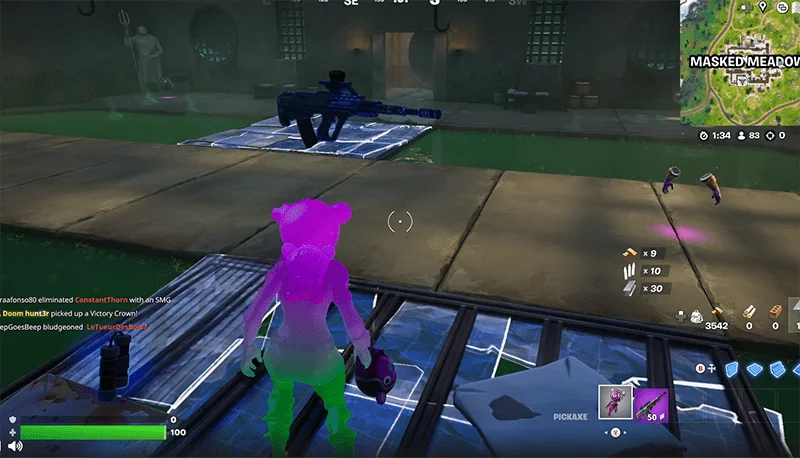
Dead Pool is one of the Mortal Kombat-themed areas added to Fortnite since the v34.21 update. It's not a Deadpool skin from Marvel, as Dead Pool is a common location rather than a marked spot on the map, so you won't see it on the map and have to "find it" if you don't happen to get lost there. The guide below will show you how to get to Dead Pool to enjoy the "extreme MK" atmosphere.
So how do you find your way to Dead Pool?
First, you need to get to Masked Meadows. If you've been here this season or last, you probably remember that Daigo's workshop used to be under Masked Meadows.
Originally, in Chapter 6 Season 2, Daigo's workshop was connected to the hallway leading to the bank. However, after the Mortal Kombat update, this path was "blocked" because Dead Pool has now moved to the other side.
Step 1: Find Ascender

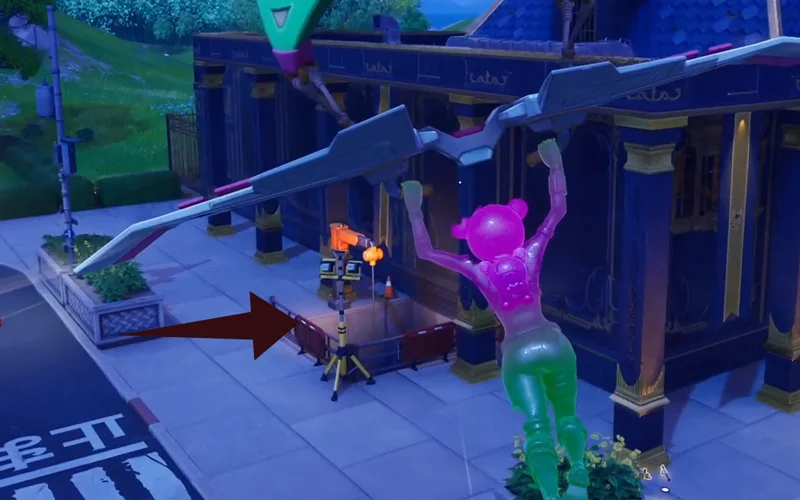
You need to find the ascender located near the "hole" in the eastern corner of the bank building in Masked Meadows. Climb up this ascender to go underground.

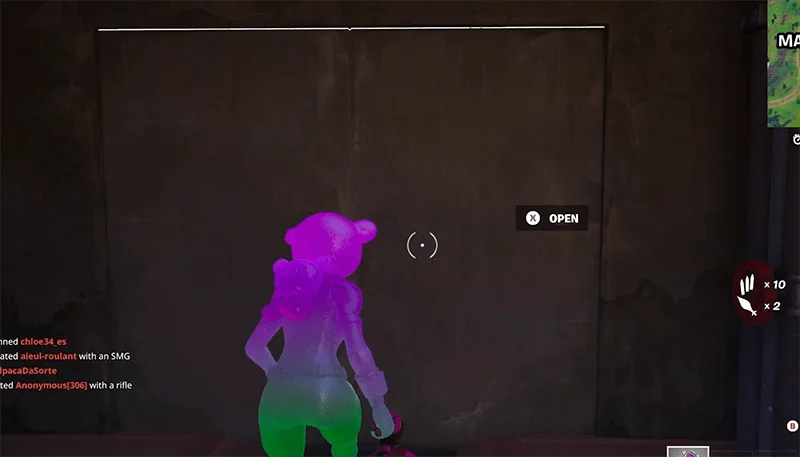
Step 2: Once you get down, you will follow a sewer pipe and it will lead to a secret door. Open that door and you will immediately see the Dead Pool.

Note: The water in Dead Pool looks attractive but it is similar to the Dead Pool water in MK. One step in and you will lose health immediately.

Search in Deadpool
In the second Mortal Kombat mission, you'll need to "hunt" for weapons in the Dead Pool. There aren't many weapons here, so make sure you get there early when the match starts:

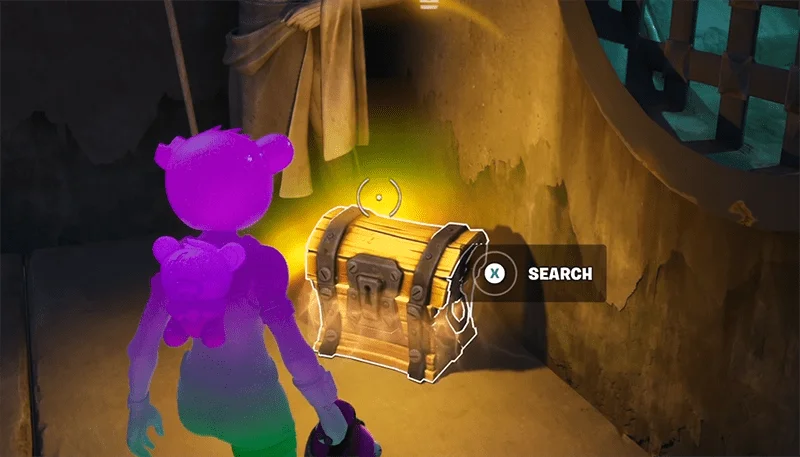
In the middle of the Dead Pool, there will be 2 guaranteed Kombat Kit spawns, but note that these do not count towards the quest. On opposite sides of the Dead Pool, there are 2 chests. You must open them and pick up all the loot inside.
Given the fact that the game is free and downloadable on almost every platform, Fortnite is a great game to play with friends.
Fortnite: Summary of keyboard shortcuts and terms to know when playing games, Using keyboard shortcuts when playing Fortnite will help you operate faster and easier to win. In the post
Fortnite is more than just shooting and building. The list below will help you find the 5 most secret areas on the Fortnite map easily.
Compared to other sections, the challenge series at Fortnite Week 2 is quite simple, with a few exceptions. What else is waiting for you in the latest Fortnite? Let's explore together.
Playing Fortnite with friends brings an amazing to an extraordinary experience. You will have something special to find, communicate and connect with old friends in challenging but fun environments or discover new allies on the changing battlefield.
These Cloud Gaming services act as streaming applications, replay the images being played on a computer located elsewhere, and users can interact on the game playing right on the phone. through them th
Instructions for downloading Fortnite and installing Fortnite on the most detailed PC.
Struggling with Microsoft Teams "Mac Error" Keychain issues? Discover proven, step-by-step troubleshooting fixes for macOS to get back to seamless collaboration. Quick solutions inside!
Struggling with Microsoft Teams camera not working in meetings? Discover quick, step-by-step fixes for camera issues, permissions, drivers, and more. Get back to seamless video calls today!
Tired of Microsoft Teams Error 1200 crashing your calls on phone? Discover quick, step-by-step fixes for iOS and Android to get back to seamless teamwork fast—no tech skills needed!
Tired of Microsoft Teams errors crashing your Android device? Get the ultimate 2026 fixes for connection issues, app crashes, and notifications. Step-by-step guide to seamless teamwork.
Tired of Microsoft Teams microphone error where others can’t hear you? Discover quick, proven fixes for Teams mic not working issues. Step-by-step guide with latest tips to get your audio crystal clear in meetings.
Struggling with Microsoft Teams "Browser Error" Cookies? Discover step-by-step fixes to resolve Teams browser cookies issues quickly. Clear cache, reset settings & more for seamless video calls. Works on Chrome, Edge & Firefox!
Frustrated by Microsoft Teams Error CDL_WORKER_FAILURE? Discover proven, up-to-date fixes to resolve it quickly. Step-by-step guide with cache clearing, updates, and more for seamless Teams experience.
Struggling with Microsoft Teams login error on Chromebooks? Discover step-by-step fixes to resolve login issues quickly. Clear cache, update apps, and more for seamless teamwork. Works on latest Chrome OS!
Struggling with Microsoft Teams "Error V" version issue? Discover quick, reliable fixes to resolve it fast. Step-by-step guide with latest solutions for smooth video calls and collaboration. No tech skills needed!
Stuck with Microsoft Teams Error Code 657Rx and 9Hehw? Discover proven, step-by-step solutions to fix these frustrating errors quickly. Restore smooth video calls and chats today—no tech expertise needed!
Tired of the frustrating Microsoft Teams "For Business" Error blocking your meetings? Get proven, step-by-step fixes to resolve it fast and boost productivity. Latest solutions inside!
Struggling with Microsoft Teams Error AADSTS50011? Discover the exact Redirect URI fix for seamless authentication. Step-by-step guide with screenshots to resolve it fast—no more login headaches!
Frustrated with Microsoft Teams Breakout Rooms not creating? Discover proven fixes for "Breakout Rooms Not Erstellen" errors. Step-by-step guide ensures smooth meetings every time.
Stuck with Microsoft Teams "Error T" today? Get proven, step-by-step troubleshooting for Microsoft Teams "Error T" with quick fixes, causes, and solutions to get back to seamless collaboration. Works on desktop, web, and mobile!
Tired of Microsoft Teams "On iPhone" App Error crashing your meetings? Discover proven fixes for sign-in failures, crashes, and glitches on the latest iOS. Step-by-step guide with quick wins!