YouTube is testing music remixes created by AI
YouTube is testing a new feature that lets creators use AI to remix the style of licensed songs for their short films.
It only takes a few seconds for a “skip ad” button to appear on a YouTube video, but sometimes that wait can feel like an eternity. Unfortunately, some users have had to wait much longer, reporting that YouTube has served them ads that last for hours. Worst of all, there’s no skip button.
People are seeing hours-long ads on YouTube
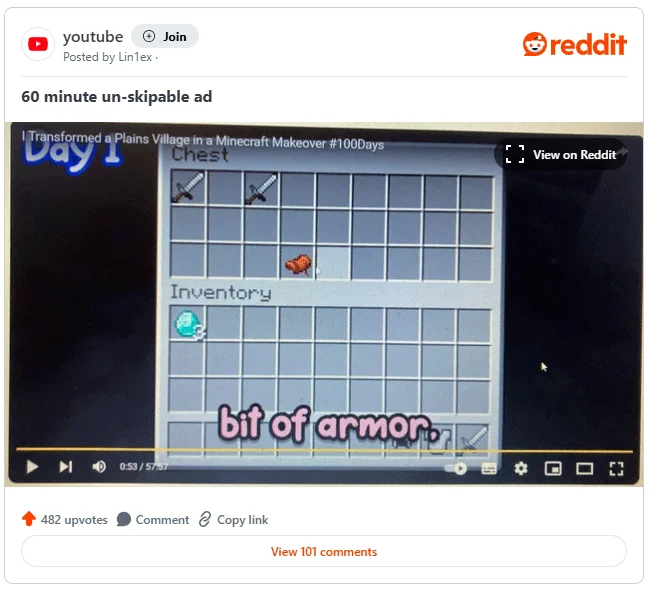
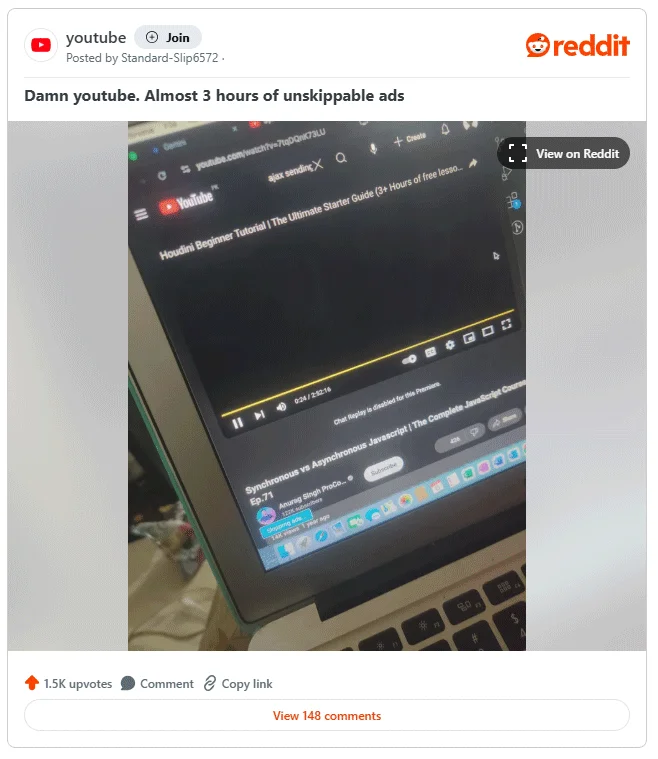
Reports began on the YouTube subreddit after people posted about the unreasonably long ads they were receiving. It started more than two weeks ago when a user posted a thread showing a three-hour ad with no skip button.

Then someone else posted an hour long ad that I got. Again, no skip button.

So what’s going on? It’s easy to assume this is YouTube’s big ploy to get people to sign up for its ad-free Premium plan. After all, what better way to get people to pay than to serve hours of ads for a five-minute video?
Well, things may not be as bad as you think. If you look at both of these examples, you can see the text “skip ad” in the bottom left corner of the first image, implying that the user has an ad blocker installed. In the second case, the original poster stated that they had an ad blocker enabled.
So this may only affect people using YouTube with ad blockers. It's possible that any ad blocker actions to skip ads aren't working properly and are instead leaving people with really long ads with no way to skip them.
If you really want to get rid of ads, you might want to consider the cost of YouTube Premium and subscribe if it feels worth it. In fact, YouTube Premium subscribers have recently received improved audio tools, so this is a good sign that the company will continue to add more perks to its subscription service.
YouTube is testing a new feature that lets creators use AI to remix the style of licensed songs for their short films.
Sharing your YouTube channel access link just got a whole lot easier thanks to a newly introduced feature.
Downloading YouTube music or downloading MP3 from YouTube helps you put music on your phone or computer to listen when there is no internet, set as ringtone,... With these 12 ways to download MP3 music from YouTube, you will get music from YouTube extremely quickly.
In a new update announced late yesterday, YouTube attracted attention when it launched a feature called “gifts” with a method of operation quite similar to TikTok's famous Live Gifting feature.
While the majority of YouTube's most viewed videos are music videos, there are plenty of other types to choose from. Let's take a look at each of these options!
The new policy will take effect from March 31 and is expected to bring more fairness to content creators when comparing video performance across different platforms.
Your favorite apps don't just collect information for their own use; they also share it with third parties, all for profit.
Many YouTubers and other digital content creators are selling their unused video footage to Artificial Intelligence (AI) companies looking for exclusive videos to better train their AI algorithms.
People used to watch YouTube on their computers, then they mostly watched it on their phones. But today, when people think of YouTube, they think of TV.
A YouTube video claims to be able to remove water from your iPhone. Tests show it actually works to some extent.
Given the workload that Windows computers handle, they need maintenance to run smoothly. Without regular maintenance, performance can suffer, security can be at risk, and hardware issues can go unnoticed.
YouTube has just rolled out a change to ad skipping on both desktop and mobile apps.
YouTube has a new subscription plan that lets users say goodbye to ads without spending a fortune.
Learn how to turn off YouTube title translation with these simple steps. YouTube automatically translating video titles can be inconvenient, and this guide provides effective solutions.
Tired of Microsoft Teams Error 2400 blocking your connection? Follow our proven, step-by-step fixes to solve "Unable to Connect to Servers" and get back to productive meetings fast.
Struggling to locate your Microsoft Teams recording? Discover exactly where Teams saves meeting files in OneDrive or SharePoint, plus quick steps to find and access them instantly. No more lost recordings!
Struggling with Microsoft Teams "Error G" audio? Discover step-by-step fixes for microphone and speaker issues. Quick, easy solutions to get back to seamless meetings without frustration. Works on Windows, Mac & more!
Tired of the frustrating Microsoft Teams Vcruntime140.dll missing error crashing your meetings? Discover proven, step-by-step fixes to resolve it fast and restore smooth teamwork. No tech skills needed!
Struggling with Microsoft Teams 'Undefined Error' (2026)? Discover proven, step-by-step fixes like clearing cache, updating the app, and more. Get back to seamless collaboration fast!
Discover simple, step-by-step methods to disable Microsoft Teams at startup and unlock better PC performance. Faster boot times, less resource drain—perfect for Windows users seeking smooth operation.
Stuck with Microsoft Teams "Network Error" offline? Discover proven, step-by-step solutions to fix Microsoft Teams network error offline quickly. Get back online fast—no tech skills needed!
Struggling with Microsoft Teams Error 4oggx? Discover proven fixes to resolve sign-in failures, crashes, and connectivity issues fast. Get back to productive calls without frustration!
Encountering the frustrating Microsoft Teams "Remove Account" Data Error? Discover quick, reliable fixes like clearing cache, resetting the app, and more to get back to seamless collaboration without losing data. Updated with the latest solutions.
Tired of the frustrating Microsoft Teams "Layout Error" Sidebar? Follow our proven, step-by-step troubleshooting guide with the latest fixes to get your Teams sidebar working smoothly again. No tech skills needed!
Stuck with Microsoft Teams offline error in 2026? Discover proven troubleshooting steps, common causes, and quick fixes to restore your connection fast. No tech skills required!
Tired of Microsoft Teams crashing with "Error M" memory issues? Follow our step-by-step guide to fix Error M in Teams, clear cache, update software, and boost performance—no tech skills required!
Discover the easiest step-by-step guide to setting up Microsoft Teams Town Hall events. Host massive virtual gatherings effortlessly with pro tips for seamless execution. Perfect for leaders and organizers!
Struggling with Microsoft Teams "Download Error" on PC? Discover proven, step-by-step fixes to resolve download failed issues quickly. Get back to seamless collaboration in minutes—no tech skills needed!
Stuck with Microsoft Teams "Error L" License error? Follow this step-by-step troubleshooting guide to resolve licensing issues quickly, restore access, and boost productivity without IT hassle. Updated with latest fixes.