Home
» Wiki
»
Why is Adobe Express the ultimate tool for digital artists and creators?
Why is Adobe Express the ultimate tool for digital artists and creators?
Not everyone has the time (or patience) to master Photoshop . With a wealth of tools for digital creators, Adobe Express is the ultimate all-around creative tool for everyone — and it's not going anywhere.
1. Use on multiple devices and platforms
Many creative tools are limited when it comes to accessing the full program across multiple devices. But Adobe Express is different—it's the same across both browsers and mobile devices, with a similar interface that makes it easier to navigate.
You can use Adobe Express from any desktop browser—with the benefit of accessing Express Add-Ons on the browser version—and it's available as mobile apps on every major device platform: iPhone, iPad, Android, and Windows tablets.
Canva on iPad and Adobe Express on iPhone
Not only can you access Express across all of these platforms, but your accounts are also linked, so you can always keep track of all your files and tasks. If you need to switch between mobile and desktop, you can update your projects without delay. This makes managing social media projects easier.
2. Integrate animation and video
Adobe Express is a great app for creating and editing videos as part of your content creation workflow. It takes advantage of all the other tools in Express, as well as some video editing features, saving you from having to switch back and forth between different editing apps.
You can do some light editing of your video footage using the timeline provided by Adobe Premiere. While there are no sophisticated video editing tools, integrating video into your Express projects is a seamless experience.
Adobe Express video timeline
With the timing layer in the timeline, you can add elements to the audio beat. Editing the speed of the footage, as well as applying effects like fades, blend modes, flips, and other Express effects, make this tool worthwhile.
Express has an animation panel for basic animation elements to enter and exit or loop. There is also an AI-powered Animate All feature that takes the hard work out of it and applies intelligent animations based on your project content. You can then further tweak it for the best results.
3. Tools for eye-catching text
The text tools in Adobe Express are very popular. You can access Adobe Font libraries when creating in Adobe Express and the super cool AI text effect generator is included in Adobe Express.
You’ll also find more basic text tools that can be used in a traditional way to achieve beautiful design results. There are drop-down menus for typeface, font, and size, along with options for styling highlighted text, alignment, and spacing features, including advanced settings like character spacing, line spacing, and more.
Adobe Express Text Tools
The Text tool also offers pre-made text layouts, all of which can be edited to fit your design. This is one of my favorite Express features; it saves me a lot of time when trying to create an eye-catching text-based design. This is a great option for anyone with a little design knowledge, as the text layouts are pre-made to look great, so you don’t have to worry about the design aspect.
Note : For any text you add to your Express project, you can also apply other effects like drop shadows, shapes, animations, opacity, text reflection, or borders.
4. Built-in calendar and content scheduling tool
Adobe Express’s calendar gives you another reason to use it for social media. Not only can you design most of your digital marketing or creative assets directly in Express, but you can also use it to take the burden off of posting your creations.
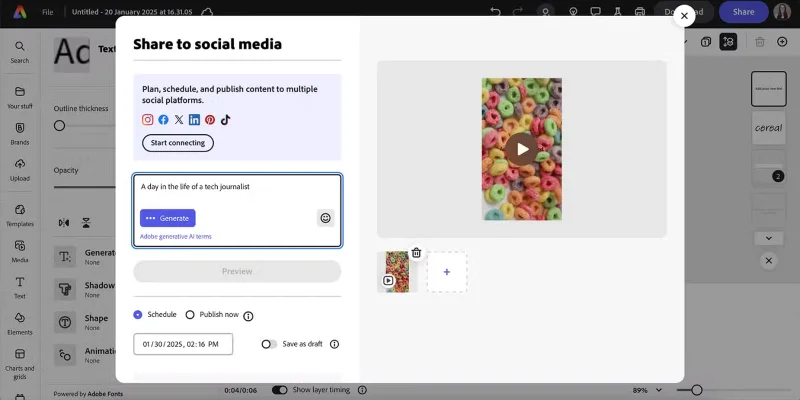
Once your design is ready to share, you can schedule or publish it directly from Express. You'll need to connect your social media accounts to your Adobe Express account first.
5. Use other Adobe tools with Express
Because Express is part of the Adobe ecosystem, you benefit from cross-tool access. Many features in Adobe Express are supported by other Adobe products, such as video editing powered by Premiere and AI features powered by Adobe Firefly. You can use these features in Adobe Express regardless of whether you have a Creative Cloud subscription.
Adobe Express tool integration
6. The Most Accessible AI Image Generator
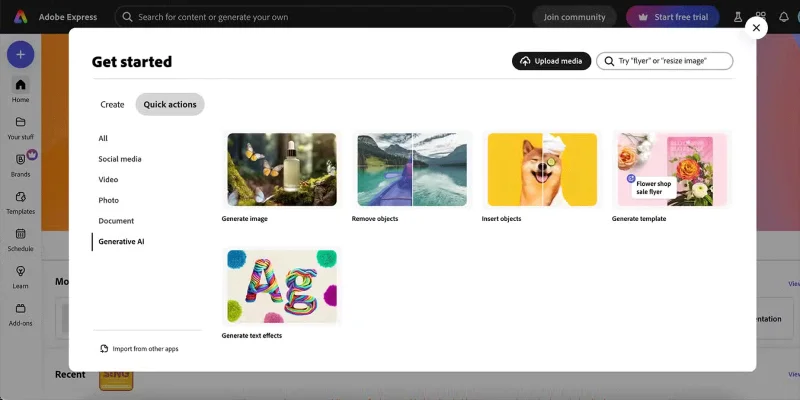
Adobe’s Firefly AI model is one of the best AI image generators available today. It is integrated directly into Adobe Express and is used in many Express features such as the Generative Image tool, Remove Object, Insert Object, Generate Template, and Generate Text Effects.
Adobe Express AI Quick Actions
Adobe's Firefly AI model is the first commercially available AI generator and is easily accessible through Adobe Express. It generates high-quality, accurate images that are perfect for your text prompts.
7. Trending Design Templates and Elements
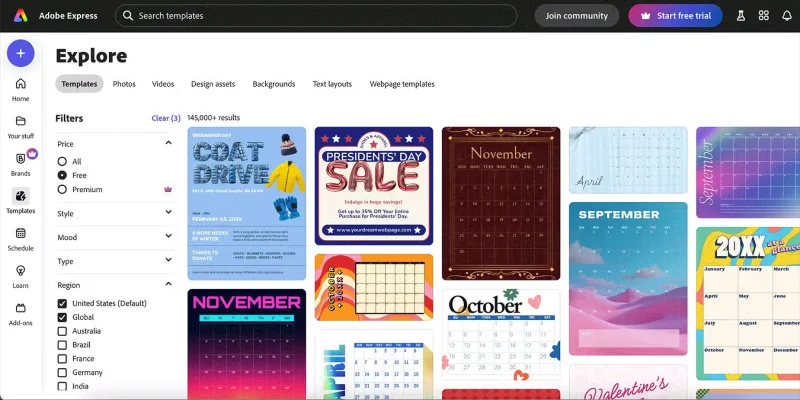
Similar to Canva , Adobe Express has a huge library of trending templates for a variety of social media platforms. It’s easy to find the right size for Instagram, Facebook, or TikTok without having to remember dimensions.
Adobe Express Template Library
Once you’ve chosen your template — or created one from scratch — you’ll also benefit from the thousands of design elements and stock assets available on Express. Of course, you can easily import your own images, videos, vectors, or other assets, but having a ready-to-use library of design elements available on the marketplace is a great option.
8. Resizable for any use and platform
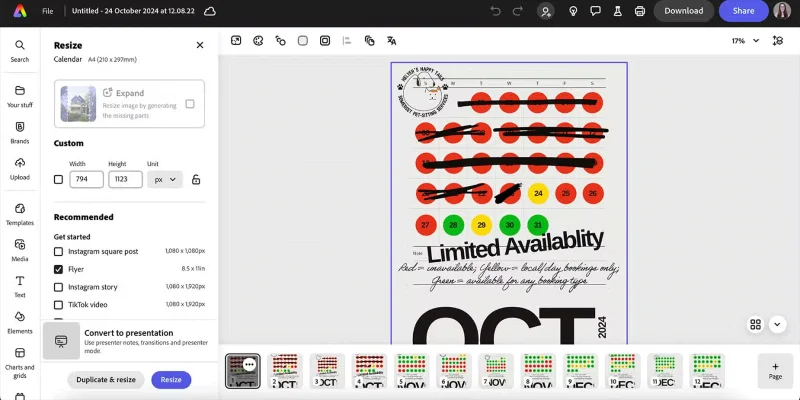
When creating content for social media, redesigning for all the different sizes and use cases can be frustrating. Adobe Express Premium offers a handy Resize tool. With a single click, you can decide which other platforms or custom sizes to resize your design to, with the option to replace or duplicate.
Resize Tool in Adobe Express
While this tool doesn’t rearrange your design elements to fit the resized layout, it does use AI to scale the background to fit the new size. This saves you half the effort, at least. That way, it’s much easier to just resize your text or images and move the other elements around to fit the new space.