5 parameters that are no longer important on smartphones

When choosing to buy a new phone, the first thing many people often do is refer to the specification table. This is basically not wrong, however, there are some details that you should not pay too much attention to because they no longer reflect the actual experience, which can make you fall into the "marketing spiral" of the manufacturer.

1. Benchmarks: Don't trust the numbers too much

People are holding onto their phones for longer periods of time before upgrading, so they need processors that are powerful enough to keep them running smoothly over the years. However, benchmarks aren’t a perfect measure of real-world performance. Android manufacturers have been caught optimizing their devices for high benchmark scores when their actual performance is worse (for example, the Samsung Galaxy S22 was banned by Geekbench in 2022).

In fact, modern phones—even budget ones—are powerful enough to handle most everyday tasks. The smoothness of flagships doesn't come from faster chips, but from careful software optimization—something that doesn't show up in specs.

2. Peak brightness: marketing trick
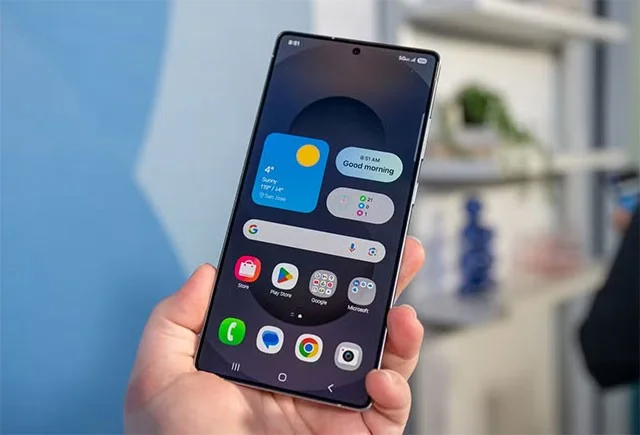
5 parameters that are no longer important on smartphones

Manufacturers often boast of "huge" brightness like 4500 nits on OnePlus 13 or 6500 nits on Realme GT 7 Pro. But these are only measured values ​​in laboratory conditions when displaying HDR content, on a small part of the screen.

What matters is the brightness you actually use in everyday life (typical brightness) and the high brightness mode in sunlight (HBM). However, manufacturers rarely publish these numbers because they are often lower to save battery and protect eyes. Instead, look for reviews from real users.

3. Camera "dots": don't be fooled

More megapixels (MP) doesn't necessarily mean better photos. Higher MPs give you better digital zoom, but they also mean larger file sizes, more storage space, and grainy photos in low light.

In fact, phone cameras often default to shooting at a resolution lower than the sensor’s maximum capabilities because it’s enough for everyday use. Furthermore, photos shared via social media or text messages are compressed, rendering the details of high-resolution photos meaningless.

The deciding factor in image quality is sensor size. Larger sensors capture more light, improve dynamic range, and reduce image noise. However, due to design limitations, companies often use software to compensate.

4. Tempered glass: don't believe the hype

Expensive phones don't necessarily have more durable screens than mid-range phones. The Gorilla Glass on flagships and mid-range phones is similarly tough, as finding the right balance between scratch resistance (hardness) and shatter resistance (flexibility) is nearly impossible.

5 parameters that are no longer important on smartphones

As Professor William L. Johnson (Caltech) explains, " Tempering glass makes the screen more resistant to bending when dropped, but it reduces its hardness—its scratch resistance. " In fact, it's the angle at which the screen is dropped that determines whether it will shatter or not. Despite the hype, use a case and screen protector if you don't want your phone to get scratched quickly!

5. Screen refresh rate: 120hz is enough for smartphones

120Hz refresh rates are now standard on most smartphones (except non-Pro iPhones and budget Androids). Some gaming consoles bump it up to 144Hz, 165Hz, and even 240Hz, but the difference from 120Hz is negligible.

Similarly, Quad-HD (1440p) displays on Android flagships don't offer a noticeable difference compared to Full-HD (1080p), but they do drain more battery. That's why Samsung defaults to 1080p resolution on its high-end Galaxy S/Xiaomi series.

Tip: Don't let flashy specs fool you. Focus on real-world experience, battery life, and manufacturer software optimization!


Leave a Comment

Troubleshooting Microsoft Teams Remote Control Error

Troubleshooting Microsoft Teams Remote Control Error

Struggling with Microsoft Teams Remote Control Error? Discover step-by-step troubleshooting for Remote Control issues in Teams. Quick fixes, common causes, and expert tips to get back to seamless collaboration. Updated with the latest solutions.

Solving Microsoft Teams Media Error Microphone

Solving Microsoft Teams Media Error Microphone

Struggling with Microsoft Teams "Media Error" Microphone? Get instant fixes for crystal-clear audio. Step-by-step solutions for permissions, drivers, and more – no tech skills needed!

How to Fix Microsoft Teams Error on Desktop Shortcut

How to Fix Microsoft Teams Error on Desktop Shortcut

Tired of the frustrating Microsoft Teams "Error" on your desktop shortcut? Discover proven, step-by-step solutions to resolve it fast and restore smooth teamwork. No tech skills needed!

Troubleshooting Microsoft Teams Error P Password

Troubleshooting Microsoft Teams Error P Password

Stuck with Microsoft Teams "Error P" password error? Discover quick, effective troubleshooting steps to resolve login issues and get back to seamless collaboration in minutes. Updated with the latest fixes.

How to Fix Microsoft Teams Welcome Screen Stuck Error 2026

How to Fix Microsoft Teams Welcome Screen Stuck Error 2026

Frustrated with Microsoft Teams "Welcome" screen stuck on Error 2026? Discover proven, step-by-step fixes to resolve it fast and get back to seamless collaboration. Updated with the latest tips!

Troubleshooting Microsoft Teams Action Required Login Error

Troubleshooting Microsoft Teams Action Required Login Error

Struggling with Microsoft Teams "Action Required" login error? Discover step-by-step troubleshooting fixes, clear cache methods, and quick solutions to get back to seamless collaboration. Updated with the latest tips for instant relief.

How to Fix Microsoft Teams Webinar Registration Error

How to Fix Microsoft Teams Webinar Registration Error

Facing Microsoft Teams Webinar Registration Error? Follow our proven, step-by-step guide to fix it quickly and get back to seamless webinar registrations. Latest troubleshooting tips included!

How to Fix Microsoft Teams Joining Error Meeting Full

How to Fix Microsoft Teams Joining Error Meeting Full

Tired of Microsoft Teams "Joining Error: Meeting Full"? Get proven, step-by-step solutions to bypass the error and join instantly. Latest fixes for seamless meetings!

Solving Microsoft Teams Recording Error: Permission Required

Solving Microsoft Teams Recording Error: Permission Required

Tired of the frustrating Microsoft Teams recording error: Permission Required? Follow our expert, step-by-step guide to regain recording access instantly with the latest Teams policies and fixes. No tech skills needed!

Troubleshooting Microsoft Teams Error Report Not Sending

Troubleshooting Microsoft Teams Error Report Not Sending

Tired of Microsoft Teams Error Report Not Sending? Discover quick, effective troubleshooting steps to resolve it fast and get back to seamless collaboration. Expert tips included!

Troubleshooting Microsoft Teams Disabled Error Account Blocked

Troubleshooting Microsoft Teams Disabled Error Account Blocked

Struggling with Microsoft Teams "Disabled Error" or Account Blocked? Discover step-by-step fixes, common causes, and prevention tips to get back online instantly. No tech skills needed!

Solving Microsoft Teams Network Error on Wi-Fi

Solving Microsoft Teams Network Error on Wi-Fi

Struggling with Microsoft Teams "Network Error" on Wi-Fi? Discover step-by-step fixes for solving Microsoft Teams Network Error on Wi-Fi, from cache clearing to DNS tweaks. Get back to seamless calls now!

Troubleshooting Microsoft Teams Joining Error via Link

Troubleshooting Microsoft Teams Joining Error via Link

Struggling with Microsoft Teams "Joining Error" via link? Discover quick, step-by-step troubleshooting fixes for smooth meeting joins. Updated with the latest solutions for desktop, web, and mobile.

How to Fix Microsoft Teams MS Team Error 2026

How to Fix Microsoft Teams MS Team Error 2026

Frustrated by Microsoft Teams "MS Team Error" 2026? Discover proven, step-by-step solutions to get back online instantly. Latest 2026 updates included for seamless fixes.

How to Fix Microsoft Teams Loading Error Infinite Loop

How to Fix Microsoft Teams Loading Error Infinite Loop

Struggling with Microsoft Teams "Loading Error" infinite loop? Follow our expert, step-by-step guide to fix it quickly. Clear cache, update app, and more for seamless teamwork. Works on Windows, Mac & web.








