Pop Culture Costume Ideas That Will Dominate Halloween 2026

Plan a recognizable Halloween 2026 look with pop culture costumes inspired by Spider-Man, Supergirl, Toy Story 5, Moana, Mario, and Wednesday.
Updated January 5:
NASA's Parker Solar Probe has "phoned" home, meaning the spacecraft survived its closest-ever mission to the Sun earlier this week.
"After a record-breaking close approach to the Sun, the Parker Solar Probe has transmitted a beacon signal back to Earth, indicating that its condition is stable and all instrument systems are functioning normally," the US National Aeronautics and Space Administration said in a statement on its official website.
The data-gathering spacecraft flew past the sun on Tuesday at 430,000 mph — the fastest any man-made object has ever reached — and came within 3.7 million miles of the planet’s surface. But the spacecraft’s position relative to Earth led to a temporary loss of communications, meaning the mission team at the Johns Hopkins Applied Physics Laboratory in Laurel, Maryland, will have to wait until now to find out for sure whether the spacecraft survived the “hot encounter.”
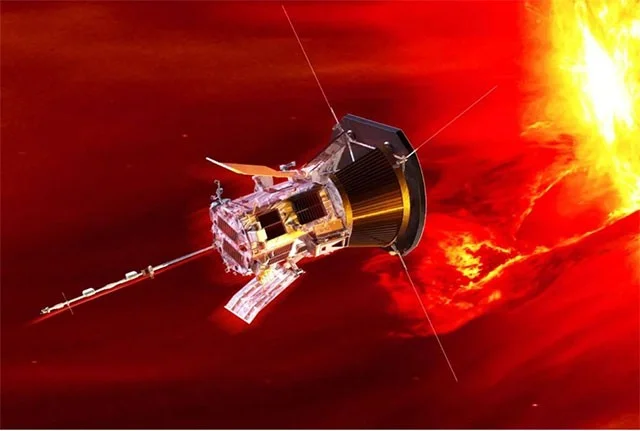
Scientists received a signal from Parker Solar Probe late on the night of January 2. The spacecraft is expected to send back detailed data on its actual condition in the next few days. The next two approaches by Parker Solar Probe are scheduled for March 22 and June 19, 2025, carrying the mission to send back to Earth new information about a "sky" that humanity has never set foot on.
We all know the importance of preventing electronic devices from overheating while in use, but nothing compares to the extremely hot working conditions that NASA's Parker Solar Probe is about to endure as it makes its closest ever flyby to the Sun.
Launched in 2018, the spacecraft has flown past our host star 21 times. With each approach, Parker Solar Probe gets closer to the center of the solar system, aiming to discover why the Sun’s atmosphere appears to be even hotter than the surface. Scientists also hope the data will help them better understand the solar wind, the stream of particles that collide with Earth’s magnetic field, creating beautiful auroras but sometimes causing problems with power grids and communications systems on Earth.
The Parker Solar Probe is currently on its way to a destination just 3.8 million miles (about 6.1 million kilometers) from the Sun's surface, literally immersed in the star's outer atmosphere—also known as the corona.
If you think 6.1 million kilometers doesn’t sound too close, consider this: Earth is 93 million miles (150 million km) from the Sun. That means the Parker probe will be 24 times closer to the Sun than we are, battling intense radiation and temperatures of 1,400ºC (2,552ºF). With such a narrow margin of error, NASA scientists will have to hold their breath to find out if the probe survived the ordeal of the Sun’s “hellfire.” The results will be available after December 27—when communications signals are expected to be returned to Earth—to see if it’s still working.
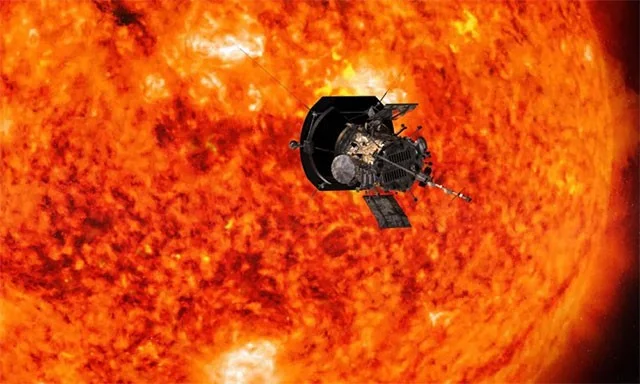
The Parker spacecraft—named after Dr. Eugene N. Parker, a pioneer in solar research—will travel at a blistering speed of 430,000 mph (692,000 km/h). This means it will enter and exit the Sun's corona as quickly as possible, minimizing exposure to harsh conditions while still having enough time to use its four sets of instruments to collect data about the star.
If successful, Parker will set a record for being the probe that will fly seven times closer to the Sun than any spacecraft in the past, is expected to travel faster than any previous man-made object and is our first attempt to enter the star's corona. Speaking to the BBC, NASA's Chief Scientist Dr Nicola Fox said the probe is "a tough, tiny spacecraft" that is "designed to withstand all these harsh, extreme conditions".
Plan a recognizable Halloween 2026 look with pop culture costumes inspired by Spider-Man, Supergirl, Toy Story 5, Moana, Mario, and Wednesday.
Sort leftover Halloween candy safely, share or repurpose sealed treats, and choose food use or compost for pumpkins based on their condition.
Compare workplace Halloween costume choices by respect, dress code, mobility, and safety—and learn when a subtle accessory or a policy check is the better option.
Find a couples costume that fits your style, budget, and comfort level, from Addams Family classics to original inside-joke duos.
Need a last-minute high school Halloween costume? Compare 10 easy closet-based ideas by prep time, comfort, school-day practicality, and simple safety checks.
Use a simple 2026 Halloween decorating timeline for indoor décor, outdoor displays, and fresh pumpkins, with practical adjustments for weather and events.
Mix five vivid, approachable Halloween cocktails with measured recipes, simple prep tips, and an alcohol-free option for your party guests.
Find 15 office-friendly Halloween costume ideas for 2026, with practical checks for dress codes, respectful themes, comfort, and workplace safety.
Plan a fun elementary school Halloween party with easy crafts, games, inclusive treats, costume tips, and a sample 75-minute classroom schedule.
Compare realistic side hustles for 2026 by startup cost, fees, flexibility, and income control, with current tax and scam guidance from official sources.








