Desk Decorating Ideas for a Spooky Office Cubicle

Create a spooky office cubicle with Halloween desk decor ideas that keep your workspace usable, tidy, and mindful of workplace safety.
An estimated 25% of smartphones shipped globally in 2024 will have an average retail price (ASP) of $600 or more. New data from Counterpoint Research shows that the trend of “premiumization” in the smartphone market is accelerating, with more people opting for more expensive models than before.
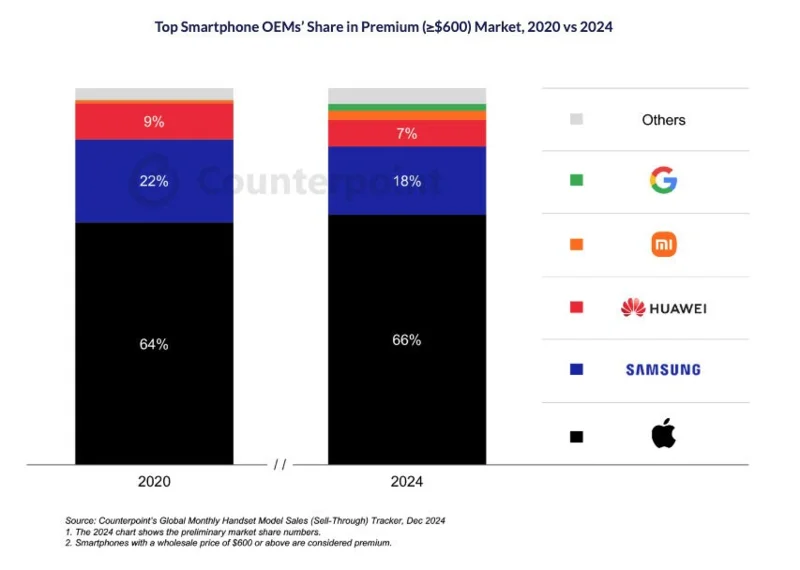
The premium smartphone market share has increased from 15% in 2020 to 25% in 2024, as the premiumization trend attracts a large number of buyers who want to own feature-rich devices.
Apple will continue to lead this segment in 2024, accounting for more than 67% of the global premium phone market share, down 6% from 2023. Behind them are a series of familiar names from the Android world, including Samsung, Huawei, Xiaomi and Google. The rise of these companies has slightly reduced Apple's market share, but not enough to shake the position of the Apple.
Super Premium Segment Growing Strongly
In the premium price segment, the market share of "ultra-premium" phone models (ASP >= 1,000 USD) has exceeded 40% for the first time, as more and more people want to buy the most advanced versions.
When it comes to ultra-premium devices, Apple once again took the lead, with the average selling price of its iPhone surpassing $900 for the first time. The Counterpoint Research report notes that device makers have begun to prioritize revenue over volume, and the 8% year-over-year growth in the premium segment even outpaced the 5% growth of the overall smartphone market.
US and China Lead the Luxury Market
While the US may not have the fastest internet in the world, it does have the highest share of the premium phone market. The report says the US will be the largest contributor to the premium segment in 2024, with a 25% share, closely followed by China at 24%.
Meanwhile, India, one of the largest smartphone markets by volume, has seen a five-fold growth in the premium segment since 2020 as customers favor top brands. While some customers may not be able to afford expensive phones in one go, simpler financing schemes and trade-in offers have made expensive phones accessible to the majority.
The Trend of Premiumization Continues
“The premiumization trend is expected to continue, albeit at a slightly slower pace, as emerging regions continue to move into higher price segments. The premium segment is expected to continue to grow in China, driven by the integration of smartphones into subsidy programs,” the report said.
Reasons Why High-End Smartphones Are Popular
There are many reasons why premium smartphones are more accessible to more customers despite their high price tags. People looking for a better overall user experience often opt for premium features like more powerful processors, better cameras, high-quality displays, and GenAI features.
The important takeaway is that manufacturers are trying to offer multi-year software support and future-proof hardware to ensure the longevity of their products. Samsung and Google have started offering up to seven years of software support for their Pixel and Galaxy flagship devices, surpassing even Apple’s five-year support for the iPhone.
In Apple’s case, the report said ecosystem engagement played a key role in luring users away from cheaper phones. Apple CEO Tim Cook also said on the Q1 2025 earnings call that iPhone 16 models are selling better in markets where Apple Intelligence is deployed.
Create a spooky office cubicle with Halloween desk decor ideas that keep your workspace usable, tidy, and mindful of workplace safety.
Plan a recognizable Halloween 2026 look with pop culture costumes inspired by Spider-Man, Supergirl, Toy Story 5, Moana, Mario, and Wednesday.
Sort leftover Halloween candy safely, share or repurpose sealed treats, and choose food use or compost for pumpkins based on their condition.
Compare workplace Halloween costume choices by respect, dress code, mobility, and safety—and learn when a subtle accessory or a policy check is the better option.
Find a couples costume that fits your style, budget, and comfort level, from Addams Family classics to original inside-joke duos.
Need a last-minute high school Halloween costume? Compare 10 easy closet-based ideas by prep time, comfort, school-day practicality, and simple safety checks.
Use a simple 2026 Halloween decorating timeline for indoor décor, outdoor displays, and fresh pumpkins, with practical adjustments for weather and events.
Mix five vivid, approachable Halloween cocktails with measured recipes, simple prep tips, and an alcohol-free option for your party guests.
Find 15 office-friendly Halloween costume ideas for 2026, with practical checks for dress codes, respectful themes, comfort, and workplace safety.
Plan a fun elementary school Halloween party with easy crafts, games, inclusive treats, costume tips, and a sample 75-minute classroom schedule.








