Home
» Today
»
NVIDIA Explained: How Its AI Technology and Products Shape the Consumer Tech Market
NVIDIA Explained: How Its AI Technology and Products Shape the Consumer Tech Market
You may be comparing a gaming laptop, a new desktop graphics card, or an “AI PC” and wondering whether NVIDIA is a feature you need—or just a name attached to marketing. The answer depends on what you want the device to do. NVIDIA’s influence reaches beyond the graphics card: it supplies the hardware and software behind many PC games, local AI tools, and cloud gaming sessions. A few checks, starting with your actual use case, can show which parts matter and which are optional.
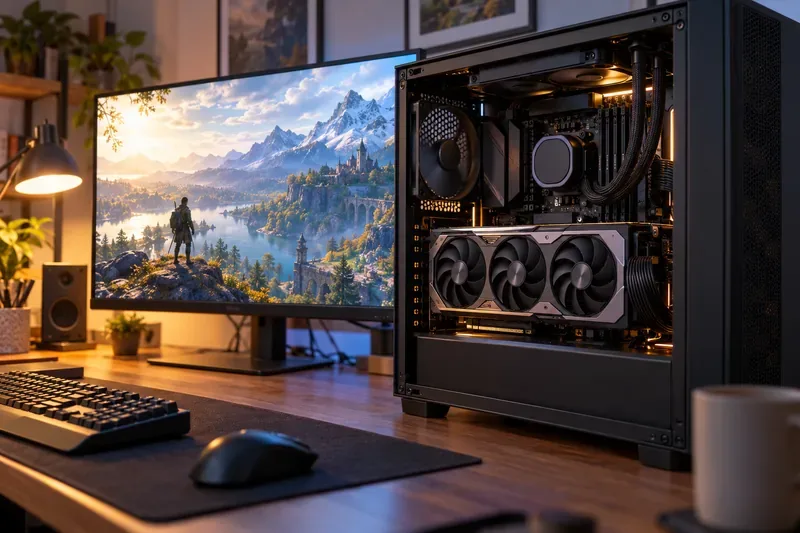
A desktop graphics card sits inside an open PC beside a monitor showing a game scene; the GPU processes graphics locally before the finished frames appear on screen.
First, separate NVIDIA’s products into three consumer paths
NVIDIA is known for graphics processing units (GPUs), chips designed to handle many calculations in parallel. That makes them useful for rendering game graphics and for certain AI workloads. The company also builds software and systems around its chips. For consumers, that stack usually shows up in one of three ways.
Local PC hardware: GeForce RTX graphics cards and laptops run games, creative applications, and compatible AI workloads on the computer itself.
AI-assisted software: technologies such as DLSS use machine-learning models to help render supported games, while local AI applications can use RTX hardware to run compatible models.
Cloud access: GeForce NOW runs selected games on remote NVIDIA-powered servers and streams the result to a supported device. It can reduce the need to buy a gaming PC, but depends on internet quality, service availability, game support, and plan limits.
These options are related but not interchangeable. A powerful local GPU can work without a cloud gaming subscription; a cloud service can stream to a modest computer, but it does not give that computer the same local computing ability.
Check what you actually need, from simplest to most involved
1. Start with your current device and your main task
Write down the games or applications you use, the screen resolution you want, and whether you need the work to happen offline. If your computer already runs the programs smoothly, there may be no practical reason to upgrade just because a newer model advertises AI features. For creative work, check the software maker’s recommended hardware and supported GPU features. For games, look up the titles you actually play and their graphics options.
This first check often narrows the decision. Casual play, web use, and streaming video do not automatically call for a discrete GPU. Demanding PC games, 3D work, video editing, or local model experimentation may benefit from one, but the benefit depends on the specific application.
2. Decide whether the workload should run locally or in the cloud
Local processing can work without a fast internet connection and may be useful for files you prefer to keep on your own device. Yet “runs locally” does not guarantee privacy: an application can still send information to an online service, so check its settings and privacy terms. Local models also have limits. Their speed and size depend on GPU performance, available video memory (VRAM), system memory, and the model’s requirements.
GeForce NOW is a different trade-off. NVIDIA says the service streams games from its cloud infrastructure and supports devices including computers, phones, tablets, and TVs, subject to system requirements. Before paying, check whether your device and region are supported, whether the games you own are available, and whether your home connection is stable enough. A subscription buys access to a service tier; it does not buy a GPU for offline use.
3. Treat DLSS as a supported-game feature, not a universal speed switch
Deep Learning Super Sampling (DLSS) is NVIDIA’s suite of AI-assisted rendering features. Depending on the game and GPU generation, it can use a lower internal rendering resolution and reconstruct an output image, generate intermediate frames, or improve effects such as ray reconstruction. NVIDIA’s current DLSS materials describe newer Multi Frame Generation features for GeForce RTX 50 Series cards, while support and available options vary by game and GPU.
Generated frames can make motion look smoother, but they are not the same as frames rendered directly from new game inputs. The underlying frame rate, latency, image quality, and artifacts still matter. Check the game’s supported settings and compare a scene with the feature on and off. If controls feel less responsive or moving objects look distorted, use a different setting or disable it. NVIDIA Reflex can reduce system latency in supported games, but it does not make every setup identical.
4. Compare the complete PC, not only the GPU name
A graphics card’s model number alone does not tell you whether it fits your use. Compare its price, VRAM, power draw, physical size, cooling, warranty, and the rest of the system. In a laptop, the GPU’s power configuration and the machine’s cooling design can affect performance; two laptops carrying a similar GPU label may behave differently. Make sure the power supply and case can accommodate a desktop upgrade, and check the monitor’s resolution and refresh rate.
AI capability needs the same scrutiny. Ask which application and model you intend to run, whether it uses the GPU, how much memory it needs, and whether processing happens locally or through a cloud account. “AI-ready” is too broad to be a useful specification by itself.
Why NVIDIA affects the wider consumer technology market
The company’s reach comes from combining chips with software tools and a developer ecosystem. CUDA, NVIDIA’s parallel-computing platform, gives developers a way to write software for NVIDIA GPUs. RTX hardware adds specialized capabilities for graphics and AI workloads. When game makers and software vendors build around these tools, consumers can see wider support for features such as ray tracing, DLSS, GPU-accelerated editing, and local AI. The trade-off is that a feature may depend on a specific graphics generation, software version, or application; another brand’s GPU may use different technology or offer a different level of support.
The market story is also increasingly shaped by data centers rather than living-room devices. In its Form 10-Q for the quarter ended July 26, 2026, NVIDIA reported $96.2 billion in total revenue, including $89.0 billion from Data Center. Its filing also said Edge Computing revenue was $7.2 billion and noted that strong workstation sales were partly offset by slower consumer PC sales amid elevated memory and system prices. These figures show where the company’s business is concentrated; they do not prove that demand for AI chips alone caused any particular retail price or shortage. Components, manufacturing capacity, product cycles, and demand across several markets can all affect what shoppers pay.
That distinction matters when reading search results about NVIDIA stock. A successful product platform and fast company growth can explain why the company attracts attention, but they do not by themselves establish whether NVDA shares are fairly valued or suitable for a particular investor. The article explains technology and consumer products; it is not investment advice.
Use this quick decision check before you buy
Name the job: Is the goal gaming, creative production, local AI, or streaming games on existing hardware?
Confirm support: Verify the exact GPU, game or application, software version, and feature compatibility in the manufacturer’s documentation.
Check the constraints: Compare total price, memory, power, cooling, screen, network quality, and whether a subscription is required.
Judge the result: After setup, test the actual workload. Look for a clear improvement in frame smoothness, render time, model response, or convenience—not just a higher advertised number.
Change course if needed: If the feature is unsupported, costs more than the improvement is worth, or creates worse latency or image quality, lower the setting, choose another configuration, or keep your current device.
Self-check: If you can name the task, identify the specific NVIDIA feature that improves it, confirm your device supports that feature, and describe the improvement you expect to observe, you have a solid basis for comparing options. If one of those answers is missing, verify it before spending more.