Restore Bluetooth Headset Microphone Input on Ubuntu 24.04
Get your Bluetooth headset mic working by selecting the right input, using a hands-free audio profile, and checking Ubuntu’s PipeWire route.
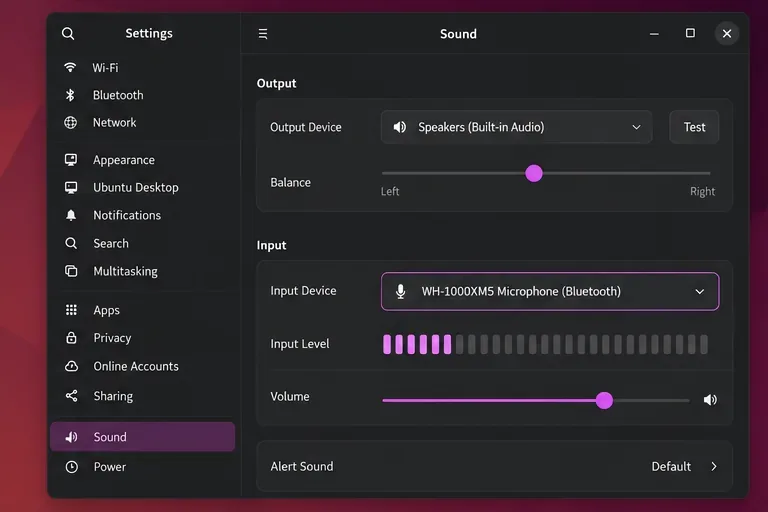
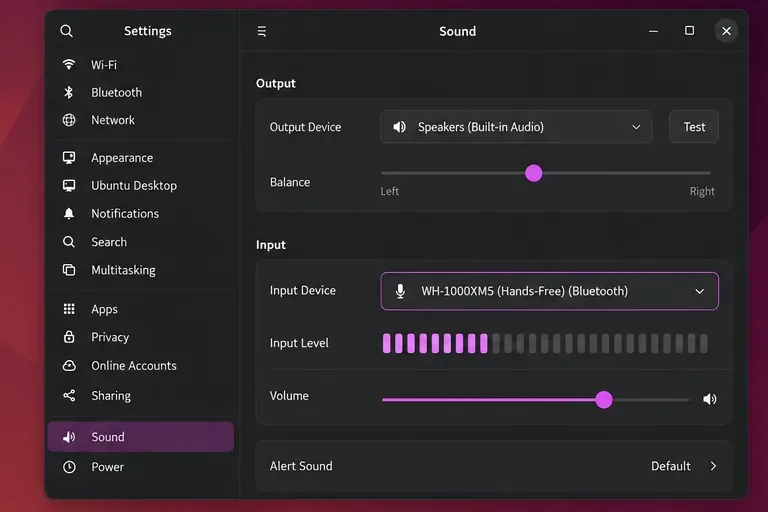
If your Bluetooth headset plays sound but other people cannot hear you on Ubuntu 24.04, first select its microphone in Settings > Sound > Input. If the headset is missing there, switch its Bluetooth audio profile to a hands-free or headset mode, then reconnect it. The headset’s stereo playback profile and its microphone profile are different routes, so being connected does not guarantee that the microphone is active.
Ubuntu Desktop 24.04 uses PipeWire for desktop audio, with WirePlumber managing devices and routes. Bluetooth supports separate audio roles: A2DP is primarily for stereo playback, while HFP/HSP hands-free profiles provide two-way call audio. When the headset is using an output-only profile, its microphone may not appear as an input. Switching to hands-free mode can reduce playback quality while the microphone is in use; that is a normal profile tradeoff, not proof that the headset is broken. The Noble PipeWire device reference lists the Bluetooth roles and the installed Ubuntu package version, while Ubuntu’s desktop audio overview explains PipeWire’s role in the audio path.
If the meter responds in Settings but the app does not, the Bluetooth connection is already providing microphone audio. Quit and reopen the app, select the headset under its microphone or audio-device settings, and check any app-specific mute control or microphone permission.
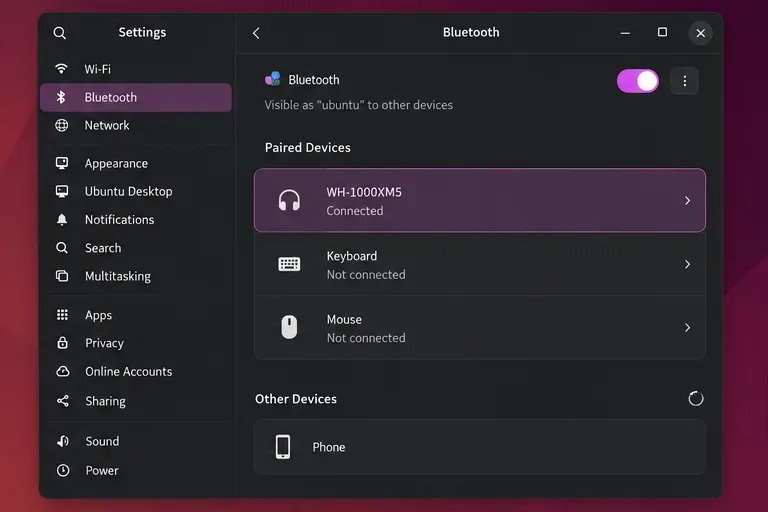
If you can hear audio but no headset microphone appears, open Settings > Bluetooth and confirm the headset says Connected. Then return to Settings > Sound. Depending on the headset and Ubuntu’s device controls, you may see a hands-free/headset choice in the input list or a Bluetooth profile selector. Choose the option labeled Headset, Hands-Free, HFP, or HSP, then select its microphone under Input. The exact wording varies, so do not look for a single label that must appear on every system.
Expect music to sound less full while the headset microphone is active. A2DP is designed mainly for stereo playback; HFP/HSP is for bidirectional voice. If you need high-quality music and a microphone at the same time, use the headset for output and the laptop, webcam, or a USB mic for input.
Use the command line only if the microphone is present but the wrong device keeps receiving audio, or if Settings does not make the active source clear. Ubuntu 24.04 includes wpctl, WirePlumber’s control tool.
wpctl statusUnder Sources, find the headset microphone and note its current numeric ID. IDs can change after reconnecting, so read the current output instead of copying an ID from an example. Set the headset source as the default with:
wpctl set-default IDReplace ID with the number beside the headset microphone. Then check that the default source is not muted:
wpctl get-volume @DEFAULT_SOURCE@
wpctl set-mute @DEFAULT_SOURCE@ 0
The first command reports the source volume and mute state; the second unmutes it. The wpctl manual documents status, default-source selection, and mute controls. If the headset microphone does not appear under Sources at all, changing the default cannot create it; continue to the recovery step.
Close voice-chat, browser-call, and recording apps first so they release the device. Restart the per-user audio services:
systemctl --user restart wireplumber pipewire pipewire-pulseReconnect the headset and repeat the Input check. This briefly interrupts all desktop audio. If the command reports that a service is missing, do not install or enable a second sound server as a guess; confirm which audio stack is active and update Ubuntu through Software Updater.
If the microphone is still absent, open Bluetooth settings, remove or forget the headset, put it back into pairing mode, and pair it again. A headset connected to a phone or another computer may reserve its hands-free connection; disconnect it from those devices during the test. Some headset models or Bluetooth adapters may have compatibility issues that a profile switch cannot fix.
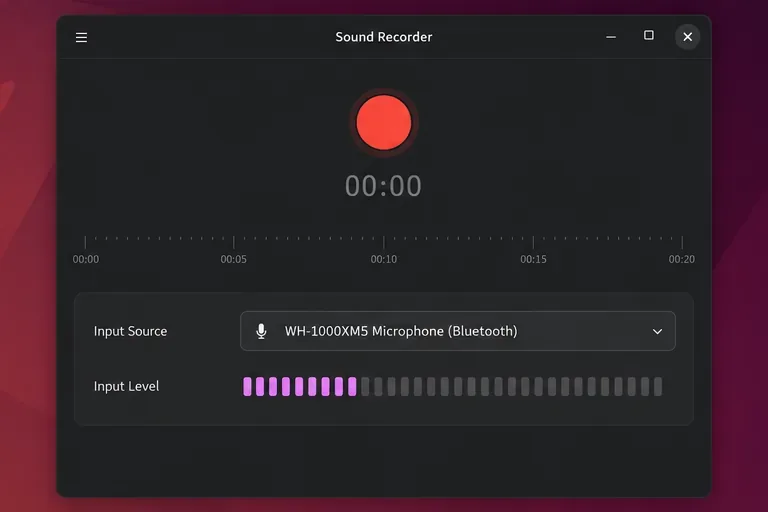
Open Settings > Sound > Input, select the Bluetooth headset microphone, and speak. The input meter should move. Make a short recording or join a test call and confirm that the recording or call uses the headset mic rather than the laptop mic. If the system meter moves but the app test is silent, focus on that app’s selected input, mute, and microphone-access settings. If no input source appears even after reconnecting and restarting the audio session, record the headset model, Bluetooth adapter, Ubuntu updates, and the output of wpctl status before seeking device-specific support.
For reference, see Ubuntu 24.04 PipeWire Bluetooth device roles, the Ubuntu audio overview, Ubuntu’s microphone input instructions, and the WirePlumber wpctl manual for command behavior. The upstream manual may describe a newer WirePlumber release than Ubuntu 24.04; consult the local man wpctl if command details differ on your installed package.
Get your Bluetooth headset mic working by selecting the right input, using a hands-free audio profile, and checking Ubuntu’s PipeWire route.
Learn why Flatpak apps may ignore Ubuntu 24.04 GTK themes and follow safe steps to check theme extensions, refresh Flatpak apps, and diagnose portal issues.
Install Ubuntu 24.04 alongside Windows 11 with BitLocker safely. Compare separate-drive and shared-drive paths, recovery keys, partitioning, and boot checks.
Diagnose NVIDIA driver failures after an Ubuntu kernel update. Check DKMS and Secure Boot, rebuild the matching module, enroll a MOK, and verify the fix.
Fix Ubuntu 24.04 Wi-Fi drops after suspend with checks for NetworkManager, radio blocks, updates, power saving, and drivers—then verify each resume.
Learn why tracker-miner-fs-3 uses high CPU in Ubuntu GNOME and how to check indexing, exclude folders, update Ubuntu, or safely rebuild the search index.
Fix Debian’s UEFI boot error by checking boot mode, the EFI System Partition, GRUB files, and firmware boot order—without reinstalling Debian first.
The Outlook Inbox Repair Tool fixes corrupted PST files quickly so you can recover emails and restore normal Outlook function. Follow these exact steps to run scanpst.exe without data loss.
Get the Adobe PDF Installer Offline to install Acrobat Reader on any PC without needing internet during setup. Follow these exact steps for the full standalone package.
Learn how to Chromecast from laptop to TV with this step-by-step guide. Stream browser tabs, videos, or your full screen from Windows or Mac to your TV in minutes.