Leftover Halloween Candy and Pumpkins: What to Do Next

Sort leftover Halloween candy safely, share or repurpose sealed treats, and choose food use or compost for pumpkins based on their condition.
Using a computer security key is the best way to authenticate your identity, but not all security keys are created equal. USB, NFC, and Bluetooth security keys all have their own advantages and disadvantages.
What is a security key?
It may seem odd to use a physical key to log into a device or access a program, but that’s exactly what a security key does. A computer security key is a pocket-sized key that provides encryption, authentication, and authorization services. After you log into your account with your username and password, you’ll use the key to perform multi-factor authentication.
|
Features |
FIDO U2F |
FIDO2 (WebAuthn + CTAP) |
|---|---|---|
|
Authentication Type |
Second factor authentication (requires password + security key) |
Passwordless authentication (supports both two-factor authentication and passwordless login) |
|
Main use cases |
Enhance security by adding an extra layer (2FA) |
Passwordless login, strong multi-factor authentication, and advanced security across multiple devices |
|
Cryptographic method |
Public key encryption with ECC (NIST P-256) |
Public key encryption with ECC (NIST P-256) or RSA (2048 bit or longer) |
|
Hash function |
SHA-256 |
SHA-256 |
|
Encryption |
Mainly use ECC to deliver request information |
Use ECC to pass request information and AES to encrypt communication (in some implementations) |
|
Device verification |
Not explicitly supported |
Supported to prove device authenticity |
|
Supported Protocols |
FIDO U2F |
FIDO2 (WebAuthn for browsers, CTAP for authenticators) |
|
Backward compatibility |
N/A |
Backward compatible with FIDO U2F keys |
|
Authentication Flow |
Challenge-response (give requested information with private key) |
Challenge-response (supports both challenge-response and confirmation) |
|
Supported Devices |
Mainly desktop browsers and some mobile devices |
Multiple browsers, mobile devices, platforms and apps |
|
Security benefits |
Protection against Phishing and Man-in-the-middle attacks |
Protection against Phishing and Man-in-the-middle attacks, credential theft; supports device authentication |
Security keys are secure in part because they use Fast Identity Online (FIDO) technology. FIDO is a set of protocols designed to work with passwords during authentication. With FIDO, you don’t need to remember dozens of passwords or even use a password manager to log in. With passwordless authentication, you just enter and tap your security key to authenticate.
All FIDO protocols use public key cryptography for authentication. This type of encryption uses two keys to protect data: a public key and a private key. Your private key decrypts information and is not shared.
Unfortunately, it is not possible to use physical security keys to authenticate every account. Although this technology has existed since 2008, it is still being adopted at a slow pace.
There are three types of security locks. While each type of lock is extremely secure, some offer more security than others.
USB Security Key
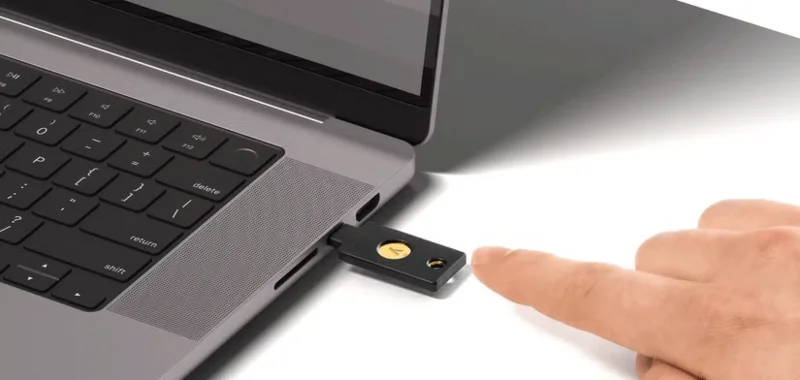
USB security keys are the most secure of all the keys. By being physically attached to your computer, the chances of the data being sent being intercepted by someone eavesdropping on your network are much lower. Even if a cyber-spy were to capture the data being sent using your physical key, they would still need to go through the arduous task of decrypting it. Brute-Forcing a FIDO-compliant USB security key can take a very long time, depending on the length of the key.
NFC Security Key
NFC stands for near field communication. While you may have never heard of NFC, you use it every time you tap to pay with a credit card or phone. The same technology is also in computer security keys. For NFC to work, you need to be within about 2 inches of the device you are trying to communicate with. This means that in order to pick up the signal, the intruder would have to be very close to you.
While this is unlikely, it is possible. However, keep in mind that FIDO-compliant security keys use extremely strong encryption, so even if this data is intercepted, you still have to decrypt it. If the private key is compromised, the NFC protocol makes it difficult to impersonate the user by requiring both parties to verify their identity before sending sensitive information, while encrypting the physical security key makes it extremely difficult to compromise your data.
While NFC hardware security keys are extremely secure, the good news is that most NFC-enabled security keys also offer USB connectivity.
Bluetooth Security Key
We use Bluetooth when sharing files and connecting to speakers, and now we can use it when authenticating with security keys. At first glance, Bluetooth may seem insecure because of its 33-foot broadcast radius. While this creates a very low risk of man-in-the-middle attacks , the chances of your information being stolen are extremely small. Hardware security keys use a Bluetooth Secure Simply Pairing mechanism that is designed to address the man-in-the-middle attacks that made older pairing mechanisms vulnerable.
Even if a hacker defies all odds and intercepts your private key, current computing power makes it impossible to decrypt it. Hackers can intercept whatever they want, but the data they collect is useless if they can't decrypt the cipher.
While each type of security lock has its own pros and cons, it's important to remember that each is extremely secure. Using any of these locks ensures that your information is kept safe — unless, of course, you lose the lock.
Sort leftover Halloween candy safely, share or repurpose sealed treats, and choose food use or compost for pumpkins based on their condition.
Compare workplace Halloween costume choices by respect, dress code, mobility, and safety—and learn when a subtle accessory or a policy check is the better option.
Find a couples costume that fits your style, budget, and comfort level, from Addams Family classics to original inside-joke duos.
Need a last-minute high school Halloween costume? Compare 10 easy closet-based ideas by prep time, comfort, school-day practicality, and simple safety checks.
Use a simple 2026 Halloween decorating timeline for indoor décor, outdoor displays, and fresh pumpkins, with practical adjustments for weather and events.
Mix five vivid, approachable Halloween cocktails with measured recipes, simple prep tips, and an alcohol-free option for your party guests.
Find 15 office-friendly Halloween costume ideas for 2026, with practical checks for dress codes, respectful themes, comfort, and workplace safety.
Plan a fun elementary school Halloween party with easy crafts, games, inclusive treats, costume tips, and a sample 75-minute classroom schedule.
Compare realistic side hustles for 2026 by startup cost, fees, flexibility, and income control, with current tax and scam guidance from official sources.
Upgrade your home office ergonomics with current OSHA and NIOSH guidance on chair fit, monitor height, laptop setup, lighting, and movement.








