Desk Decorating Ideas for a Spooky Office Cubicle

Create a spooky office cubicle with Halloween desk decor ideas that keep your workspace usable, tidy, and mindful of workplace safety.
Square root is one of the important knowledge in mathematics used throughout the learning process of students. The following article will introduce to you the definition of square root, how to calculate the square root of a number? Please refer to it.
Table of Contents
The square root of a number a is a number x such that x2 = a, or in other words, the number x whose squared value = a.
For example, 2 and −2 are square roots of 2 because 2² = (−2)² = 4.
The radical sign is denoted by √.
For example, the arithmetic square root of 16 is 4, denoted by √16 = 4, because 4² = 4 × 4 = 16 and 4 is a non-negative number.
Every positive number a has two square roots: √a is the positive square root and −√a is the negative square root. They are both denoted by ± √a.
Remember some basic and most common square numbers so that when you take square roots, you can calculate faster in your head:
0² = 0
1² = 1
3² = 9
4² = 16
5² = 25 6² = 36
7² = 49
8² = 64
9² =
81 10² =
100
11² = 121 12²
= 144
13² = 169
14² = 196
15² = 225
16² = 256
17² = 289
Some basic square root formulas that everyone should remember include:
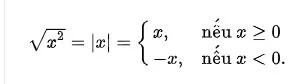
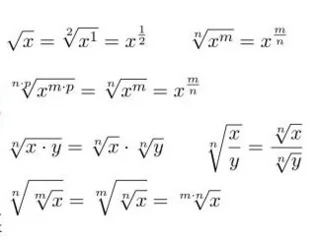
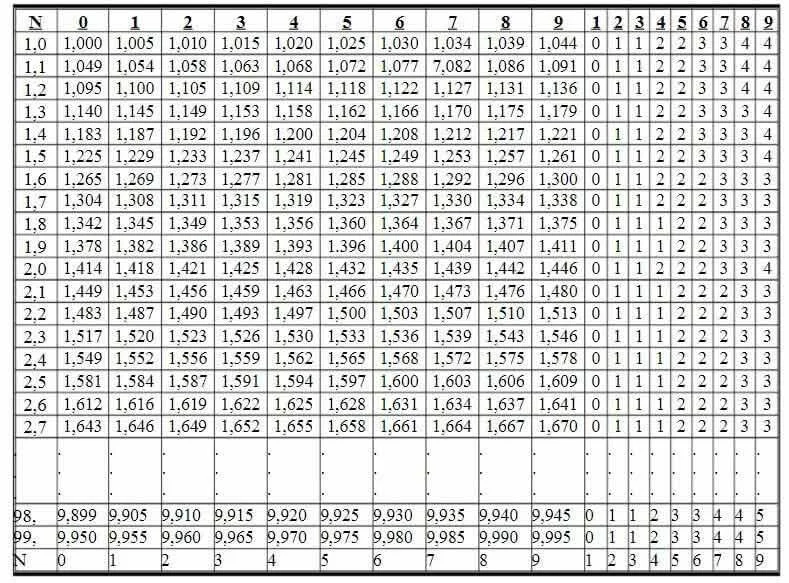
The square root table is divided into rows and columns, allowing to directly find the square root of numbers greater than 1 and less than 100.
The square roots of numbers written with no more than three digits from 1.00 to 99.9 are given in the table in columns 0 to 9. Next are nine correction columns used to correct the last digit of the square roots of numbers written with four digits from 1.000 to 99.99.
Example 1: Find
→ Solution:
At the intersection of rows 1,4 and column 1 we see the number 1,187
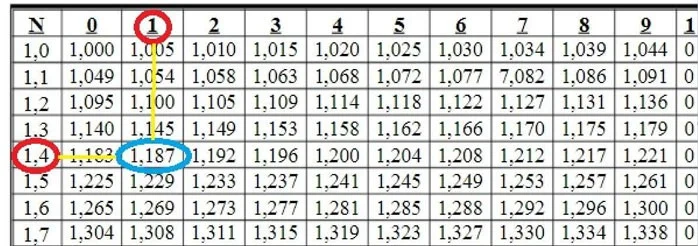
So
Example 2:
Find
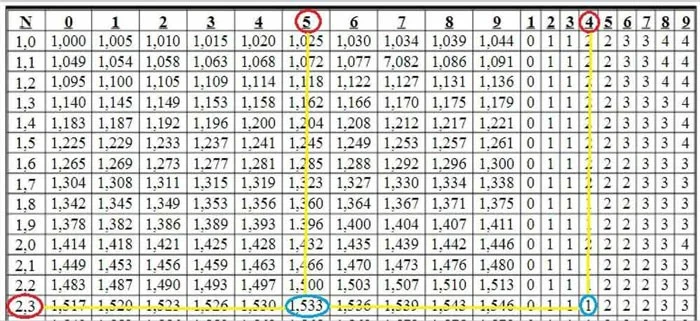
At the intersection of rows 2,3 and column 5 we see the number 1.533. We have
Next, at the intersection of rows 2,3 and column 4, we see the number 1. This number 1 is used to correct the last digit in the number. That is: 1.533 + 0.001 = 1.534
So
Find square root by multiplication.
The square root of a number is the number that, when you multiply the number by itself, gives you the original number.
So that means “What number can you multiply by itself to get the number you already have?”
For example:
The square root of 1 is 1 because 1 times 1 equals 1 (1 X 1 = 1).
The square root of 4 is 2 because 2 times 2 equals 4 (2 X 2 = 4).
The square root of 9 is 3 because 3 x 3 = 9.
Use division to find square root
To find the square root of an integer, you can divide the integer by successive numbers until you find a quotient that is exactly the same as your divisor.
For example:
16 divided by 4 is 4 so 4 is the square root of 16.
4 divided by 2 is 2, so 2 is the square root of 4.
Guess and then use the process of elimination.
Example: Find the square root of 20.
Meanwhile, we know that 16 is a perfect square number with square root 4 (4X4=16).
25 also has a square root of 5 (5X5=25).
So we would guess that the square root of 20 would be somewhere between 4 and 5.
We can guess the square root of 20 is 4.5 and try squaring 4.5 to check. That is, take 4.5 x 4.5, if the answer is not 20, we will see if the result is greater or less than 20 to calculate. If it is less than 20, we will continue to try with 4.6 and larger numbers. If the result is greater than 20, we will try with 4.4 and smaller numbers until we get the correct result.
The result of this calculation is 4.475 X 4.475 = 20.03. When you round down, the answer is 20.
With any 2 positive numbers a and b
If a = b then
If a > b then
If a < b="" then="">
For example:
Compare and
Because 21 < 31,
Hopefully the above article has helped you grasp the knowledge about square roots, how to calculate, how to compare... to solve exercises about square roots as well as other related exercises.
Create a spooky office cubicle with Halloween desk decor ideas that keep your workspace usable, tidy, and mindful of workplace safety.
Plan a recognizable Halloween 2026 look with pop culture costumes inspired by Spider-Man, Supergirl, Toy Story 5, Moana, Mario, and Wednesday.
Sort leftover Halloween candy safely, share or repurpose sealed treats, and choose food use or compost for pumpkins based on their condition.
Compare workplace Halloween costume choices by respect, dress code, mobility, and safety—and learn when a subtle accessory or a policy check is the better option.
Find a couples costume that fits your style, budget, and comfort level, from Addams Family classics to original inside-joke duos.
Need a last-minute high school Halloween costume? Compare 10 easy closet-based ideas by prep time, comfort, school-day practicality, and simple safety checks.
Use a simple 2026 Halloween decorating timeline for indoor décor, outdoor displays, and fresh pumpkins, with practical adjustments for weather and events.
Mix five vivid, approachable Halloween cocktails with measured recipes, simple prep tips, and an alcohol-free option for your party guests.
Find 15 office-friendly Halloween costume ideas for 2026, with practical checks for dress codes, respectful themes, comfort, and workplace safety.
Plan a fun elementary school Halloween party with easy crafts, games, inclusive treats, costume tips, and a sample 75-minute classroom schedule.








