Skype Free Phone Calls

Skype Free Phone Calls let you connect with friends and family worldwide at no cost. Follow this guide to set up and start making free calls quickly and easily.
If you are wondering which component of the motherboard needs the most attention, there are certainly many, but one of them called VRM will be the one we need to pay attention to because VRM focuses on helping for stable power of CPU and GPU. So what is VRM and how does it work? Let's learn about this article with WebTech360 .
The VRM (Voltage Regulator Module) circuit is the voltage regulator in the motherboard. With the presence of VRM, the CPU and GPU will be provided with clean power to operate stably.
The VRM circuit is capable of converting DC power to a lower value. For example, the VRM can convert +12VDC or +5VDC power to +1.3VDC or 1.1VDC so that CPU and RAM can work properly. This voltage level is also kept at different limit, they are also known as “DC to DC converter”.
The conversion of voltages into different levels is not a new technology. However, it plays a very important role to ensure the normal operation of electrical and electronic systems.
When the VRM circuit is poor, it will affect the performance of the processor when it loads tasks. More seriously, the computer system can be turned off suddenly, especially when OC. Therefore, users need to pay more attention to this part to help the computer work well.
A modern computer power supply (PSU) typically supplies 12V to the motherboard. However, CPUs and GPUs cannot withstand that voltage. At that time, the VRM will work its magic when adjusting the source to about 1.3V, 1.1V or lower so that the GPU/CPU works in the best state.
The VRM circuit must work correctly to avoid unfortunate incidents, especially those affecting the CPU. This explains why its structure is much more complicated than that of conventional transformers.
Basically, a VRM circuit is a buck converter - a type of device that can drop exactly the desired voltage level. The structure of the circuit consists of 3 main parts which are:
- MOSFET: Metal-Oxide Semiconductor Field-Effect Transistor.
- Inductor
- Capacitor
In addition, they are also integrated with control ICs (also known as PWM controllers). There are two common types of VRM circuits: single-phase and multi-phase. In particular, most computers today are equipped with multiphase circuits with the following schematic diagram:
The phases of the VRM circuit will take turns supplying power to the CPU for short and staggered intervals. Therefore, at a time, only 1 phase is active, but the total power generated for the supply remains stable. This is an important factor for the computer to work well and promote the performance of the CPU/GPU.
Using a multiphase VRM circuitry also brings a pretty big benefit in terms of heat dissipation. The transmission of power over a larger area reduces local heat generation. This reduces pressure on system components, improving power and operating costs.
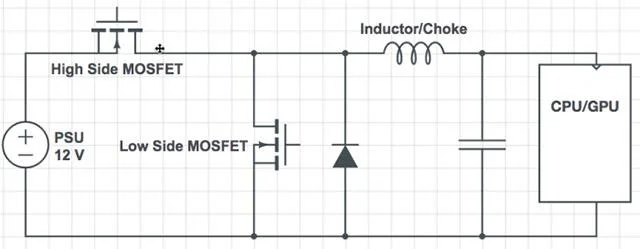
VRM Single Phase
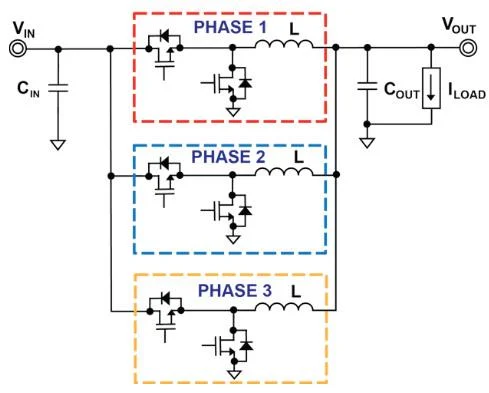
Multi-Phase VRM
Multiphase VRM circuits are sold with the symbol “ 6+2” or “8+3” . The number before the plus sign is the number of phases dedicated to providing power to the CPU. The other number indicates the number of phases to supply voltage to other components of the motherboard such as RAM.
In case the first number is greater than 8, namely “12 + 1” or “18 + 1” , the actual number of phases is not so large. The manufacturer will use a voltage doubler (doubler) with the operating method is to split the power between the two lanes of MOSFET, capacitor and inductor available in each phase.
Thanks to the doublers, the manufacturer will take advantage of the benefits of the current phase without having to install additional physical phases, thus saving a lot of costs. However, mirrored phases will not be quite as efficient as real ones. The frequency of the supply current will be halved and there will be a certain delay. Moreover, at a time, only 1 of 2 phases can be turned on. Therefore, the way to create a VRM circuit with multiple phases using a doubler is just a way of marketing sales of the manufacturers, not bringing too much effect in reality.
Example: A VRM with 6 phases mirrored (to 12 phases) will typically perform less efficiently than a real 7 or 8 phase VRM.
With a basic VRM, it was possible to ensure the power source for the mid-range CPU to operate in a state. But when you need to overclock or perform performance-intensive tasks, then the quality of the VRM circuit will become more important.
The reason is because with 2 power supplies of the same power level, the one with VRM can give you a higher maximum power level of each line. As a result, power-intensive tasks will be quickly responded to by the VRM circuit. Users also do not have to invest in a larger power supply to meet the operation of the machine.
Hope this article helped you visualize the importance of VRM as well as answer questions related to this important component. Wish you will choose a quality motherboard as well as know which is a good motherboard to build a quality computer set at the best price!
Skype Free Phone Calls let you connect with friends and family worldwide at no cost. Follow this guide to set up and start making free calls quickly and easily.
Stuck in the Discord Update Failed Loop? Follow these targeted fixes to break the cycle and complete the update without repeated failures or reinstalls.
Travel planning used to mean folders full of printed confirmations, handwritten notes, guidebooks, and a slightly terrifying number of browser tabs. Now, pretty much everything you need for a trip can live on the device already in your pocket.
Discover how Canva Free for Teachers gives educators full access to premium design tools at no cost. Verify your status and start creating classroom materials in minutes.
Skype How to Call International is simple and cost-effective once you set up credit and use the right country codes. Follow this guide to place clear calls from anywhere.
Make Skype to Skype Calls Free in minutes with this clear guide. Set up your account, add contacts, and start unlimited voice and video calls at no cost.
Fix the Your Connection is Not Private Chrome error quickly with these exact steps. Restore secure browsing by addressing certificate and settings issues in minutes.
Record heat has lifted air-conditioning demand while gas-market shocks have returned volatility to power prices. That creates a real risk of painful bills—but not a guaranteed, Europe-wide price explosion.
Large format printing has long faced criticism for its environmental impact. Traditional substrates, solvent-based inks, and short-lived promotional campaigns have all contributed to the perception that eye-catching graphics come at a high environmental cost.
Long-distance travel can involve heavy traffic, changing weather conditions, and rider fatigue. If you are also dealing with the responsibilities of moving home, such as packing belongings or coordinating accommodation, a long ride may add unnecessary pressure to an already busy schedule.





