When to Start Decorating for Halloween in 2026

Use a simple 2026 Halloween decorating timeline for indoor décor, outdoor displays, and fresh pumpkins, with practical adjustments for weather and events.
When downloading illegal media, there's always a risk that you'll end up downloading more than you bargained for. Malware developers love to attach their malware to fake media files to trick people into downloading them.
Now, a new attack called Peaklight is going viral and targeting people who download movies illegally.
What is Peaklight?
Peaklight is a malicious application – but it can’t cause any damage on its own. Instead, it acts as a downloader that installs damaging processes onto your PC. If you imagine Peaklight as a gun and the bullets it fires as malware, you’ll get an idea of what it does.
Google has reported that Peaklight attacks on people's systems have increased dramatically. And unfortunately for copyright violators, it specifically targets people who want to download movies illegally.
How does the Peaklight attack work?
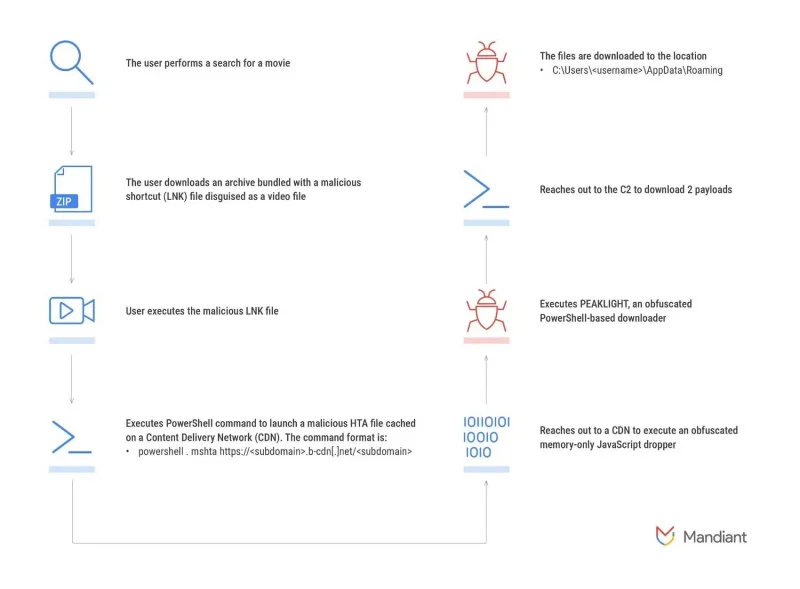
The Peaklight downloader gets into people’s systems using a sneaky trick. A malicious actor uploads an LNK file with a custom icon disguised as a movie file. The LNK file itself is not malicious, but the malware publishers can program it to perform malicious actions. In this case, the LNK file is programmed to open PowerShell and use it to download Peaklight.
Once the malicious agent sets up the trap, it's time for them to wait for someone to trigger it.
Victims of pirated movie downloads
The attack starts when someone searches online for a movie to illegally download. They visit a website that performs an automatic download, and then the Peaklight attack is injected into their system as a ZIP file.
Inside the ZIP file is an LNK file disguised as a movie file. The victim may believe they have downloaded the movie they are looking for and double-click the file to open the "movie". This will trigger the script in the LINK file.
Victim activates downloaded LNK file
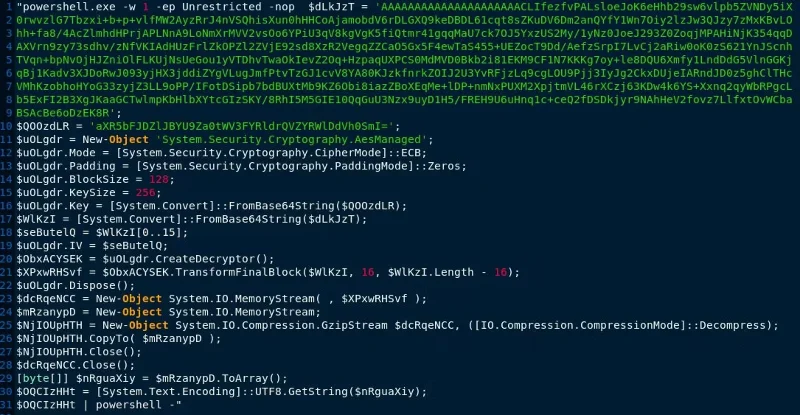
Now that the LNK file is active, it will open PowerShell and issue a command to download Peaklight. It uses special tactics to confuse anti-virus applications to hide its purpose.
Peaklight runs entirely in the computer's memory to hide its tracks, rather than running in the target's memory. This is a particularly effective trick the malware uses to make itself harder to detect, as the system's antivirus software must actively scan the RAM to detect Peaklight's presence.
Peaklight downloads its payloads to the target PC
When Peaklight runs on a target PC, it does a quick check to see if the payloads are installed. If not, it starts downloading and running malicious services. Google found it downloading LUMMAC.V2, SHADOWADDER, and CRYPTBOT, all of which are focused on stealing information like cryptocurrency wallets.
How to avoid getting infected with Peaklight
Unfortunately, pirating movies and software online is dangerous, not to mention illegal. There are many malicious actors on the Internet who aim to exploit people searching for popular movies online and trick them into downloading malicious files. So, if you’re not pirating, you’ll want to stay away from Peaklight.
Even if you don't download illegal files, this is a good lesson in how to handle automatic downloads. If you visit a website and find that it automatically downloads something to your computer without your permission, proceed with extreme caution.
Sometimes automatic downloads are perfectly safe. For example, if you find a PDF file in a Google search and click the link, your browser may automatically download the file to your hard drive. However, if the downloaded file contains something you can execute or run, it's best to delete it.
The Peaklight malware is particularly dangerous because it targets people looking for an easy way to get a free movie. If you're worried about your system being infected with malware, always enjoy media through legal means and make sure anyone else who uses your PC does the same.
Use a simple 2026 Halloween decorating timeline for indoor décor, outdoor displays, and fresh pumpkins, with practical adjustments for weather and events.
Mix five vivid, approachable Halloween cocktails with measured recipes, simple prep tips, and an alcohol-free option for your party guests.
Find 15 office-friendly Halloween costume ideas for 2026, with practical checks for dress codes, respectful themes, comfort, and workplace safety.
Plan a fun elementary school Halloween party with easy crafts, games, inclusive treats, costume tips, and a sample 75-minute classroom schedule.
Compare realistic side hustles for 2026 by startup cost, fees, flexibility, and income control, with current tax and scam guidance from official sources.
Upgrade your home office ergonomics with current OSHA and NIOSH guidance on chair fit, monitor height, laptop setup, lighting, and movement.
Learn why emotional intelligence matters in leadership, where it helps most, how to strengthen it, and how to tell whether your approach is working.
A practical roadmap for moving into tech without a degree: choose an accessible role, build job-ready skills, prove them with projects, and use hiring feedback to improve.
Build a credible LinkedIn personal brand in 2026 with current profile, content, newsletter, analytics, verification, and visibility guidance from LinkedIn.
Quiet quitting and quiet firing are catchy labels, not diagnoses. Learn what is verified, what depends on context, and what employees and managers can do next.








