Download and Install the Latest Unikey Version in 2024 and 2025 to Type Vietnamese

UniKey is an exceptionally effective and compact software designed for Vietnamese typing, easy to install, and it does not consume computer resources like other Vietnamese typing applications. It surpasses similar tools like Vietkey, GoTiengViet, and FVIK by offering powerful features such as character set conversion, spell checking, and abbreviation functionalities.

If you're interested in trying this Vietnamese typing tool but feel unsure about your computer skills, don't worry! This article provides step-by-step instructions on how to download and install Unikey effectively.

Steps to Download and Install the Latest Unikey Version (2024, 2025) to Type Vietnamese

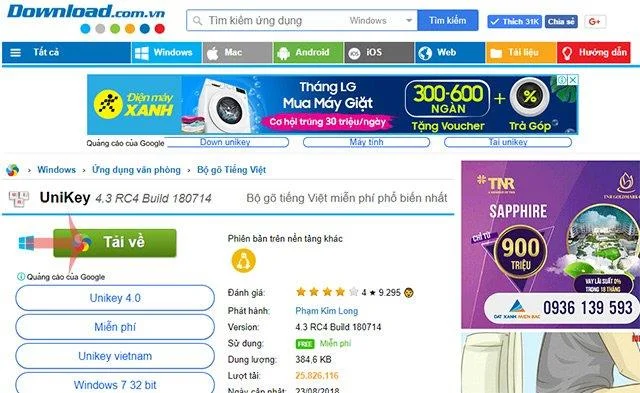
Step 1: Download the latest version of Unikey (4.3 RC4) on your computer.
Unikey
Download Unikey 2024
Step 2: Click the Download button to download Unikey on your computer.
Download Unikey latest version
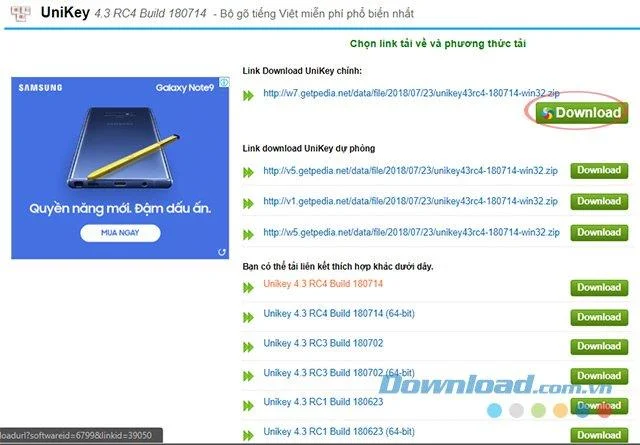
Step 3: Click the blue Download button next to the appropriate version to start downloading.
Click to download Unikey
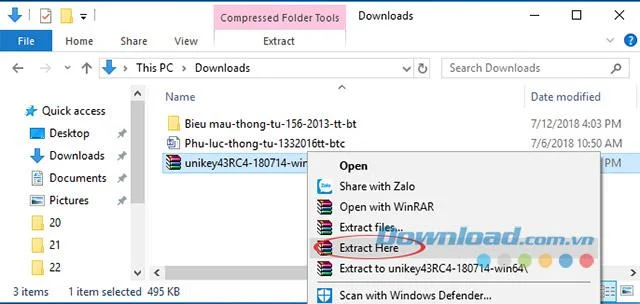
Step 4: After successfully downloading, extract the file by right-clicking and selecting Extract Here...
Extract Unikey file
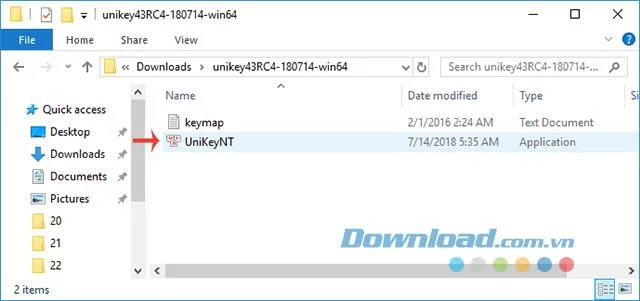
Step 5: Once extracted, double-click the UniKeyNT file to launch the program.
Run UniKey program

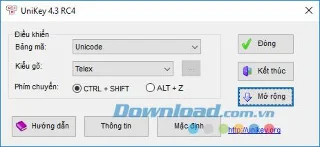
Congratulations! You've successfully installed Unikey, and even if you're not very tech-savvy, this guide has provided clear instructions for you.

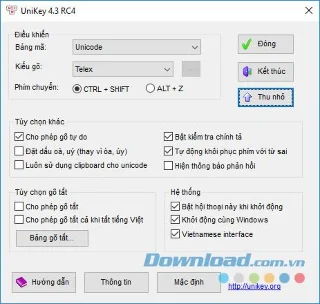
Unikey interface

How to Use Unikey for Vietnamese Typing

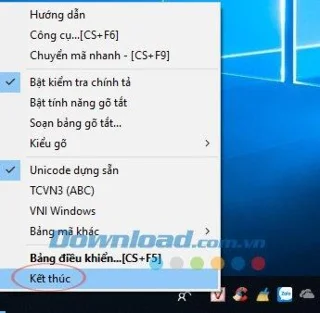
To use Unikey, simply launch the software. Once you see a pink V-shaped icon in the taskbar, you can switch between Vietnamese typing mode (pink V) and English mode (blue E) by clicking on the icon. For quick switching, you can use the default keyboard combinations: CTRL + SHIFT or ALT + Z.

Switching between typing modes in Unikey

Unikey supports the most widely used international standard encoding and offers various typing methods with different character sets, with Unicode and Telex typing method being the most popular. Below are some examples of how to type Vietnamese accents using Unikey:

Typing Example Result
aa â
oo ô
ee ê
dd đ
ow ơ

You can also use the VNI typing method as follows:

Typing Example Result
a8 ă
a6 â
d9 đ
e6 ê

Unikey also offers additional features in the Extensions section, including spell check and startup options, making it a highly versatile tool for Vietnamese typing. Installation does not require an internet connection, ensuring convenience for all users.

With the provided instructions, you can now confidently download, install, and utilize the most popular Vietnamese typing tools available today!
Leave a Comment

What Young Riders Should Know About Moving Their Motorcycles Across Cities

What Young Riders Should Know About Moving Their Motorcycles Across Cities

Long-distance travel can involve heavy traffic, changing weather conditions, and rider fatigue. If you are also dealing with the responsibilities of moving home, such as packing belongings or coordinating accommodation, a long ride may add unnecessary pressure to an already busy schedule.

Solving Microsoft Teams Shortcut Error Not Opening

Solving Microsoft Teams Shortcut Error Not Opening

Tired of Microsoft Teams shortcut error preventing you from opening the app? Follow our expert, step-by-step guide with the latest fixes for instant resolution. Works on Windows, Mac & web – no tech skills needed!

Solving Microsoft Teams Task Management Sync Error

Solving Microsoft Teams Task Management Sync Error

Tired of Microsoft Teams Task Management Sync Error halting your workflow? Follow our proven, step-by-step fixes to resolve sync issues fast and restore seamless task collaboration. No tech expertise needed!

Troubleshooting Microsoft Teams Wiki Error Formatting

Troubleshooting Microsoft Teams Wiki Error Formatting

Struggling with Microsoft Teams Wiki Error Formatting? This step-by-step guide reveals proven fixes for common wiki tab issues, ensuring smooth editing and collaboration in Teams. Get back to productive wikis fast!

How to Fix Microsoft Teams Installation Error for Linux

How to Fix Microsoft Teams Installation Error for Linux

Struggling with Microsoft Teams installation error on Linux? Discover step-by-step fixes for Ubuntu, Fedora & more. Resolve dependency issues, crashes, and errors quickly with our ultimate guide. Get Teams running smoothly today!

Solving Microsoft Teams Error Page Not Loading

Solving Microsoft Teams Error Page Not Loading

Struggling with Microsoft Teams "Error Page" not loading? Get step-by-step fixes for desktop, web, and mobile. Solve Microsoft Teams Error Page issues quickly and resume seamless teamwork today.

Solving Microsoft Teams Error Screenshot Issues

Solving Microsoft Teams Error Screenshot Issues

Tired of Microsoft Teams "Error Screenshot" blocking your workflow? Get proven, step-by-step solutions to resolve screenshot errors in Teams instantly and boost productivity. No tech skills needed!

How to Fix Microsoft Teams Error U User

How to Fix Microsoft Teams Error U User

Tired of Microsoft Teams "Error U" User blocking your chats? Get proven, step-by-step fixes to clear cache, reset, and restore seamless collaboration instantly.

Where are Microsoft Teams Registry Keys Located on Windows 11?

Where are Microsoft Teams Registry Keys Located on Windows 11?

Unlock the precise locations of Microsoft Teams registry keys on Windows 11. Step-by-step guide to find, access, and safely tweak them for optimal performance and troubleshooting. Essential for IT pros and Teams enthusiasts.

How to Fix Microsoft Teams Training Error Video Lag

How to Fix Microsoft Teams Training Error Video Lag

Tired of Microsoft Teams "Training Error" Video Lag ruining your meetings? Follow our step-by-step guide with the latest fixes for smooth video calls—no more frustration!