NTLite 2.0.0 - Customize Windows Installation ISO file - Latest Version for 2024, 2025

NTLite 2.0.0 Full is an advanced Windows configuration tool that allows users to edit and include settings directly from the original Windows installation ISO file. With NTLite, creating a personalized version of Windows becomes a straightforward task, enabling you to install only the necessary features and components.

Windows installations typically come with numerous pre-installed features and applications that may not be useful for everyone. This can lead to a bloated system. If you're determined to optimize your Windows setup by removing default software, NTLite is the ideal solution, especially for Windows 10 and newer versions. In addition to removing unwanted software, NTLite also allows for efficient editing of Windows settings to ensure a quicker installation process that consumes fewer system resources.

Main Features of NTLite

Feature Description
Managing Copies (Images) NTLite offers powerful, user-friendly tools for managing duplicates with flexible presets, catering to various copy formats.
Live Editing Mode Edit settings and remove components from installed Windows without reinstalling. Changes take effect immediately.
Automatic Installation Facilitates automated installation processes, including options for user account setup, network joining, and drive formatting.
Driver, Updates, Languages Integration Seamlessly integrates drivers, updates, languages, and service packs into the installation process.

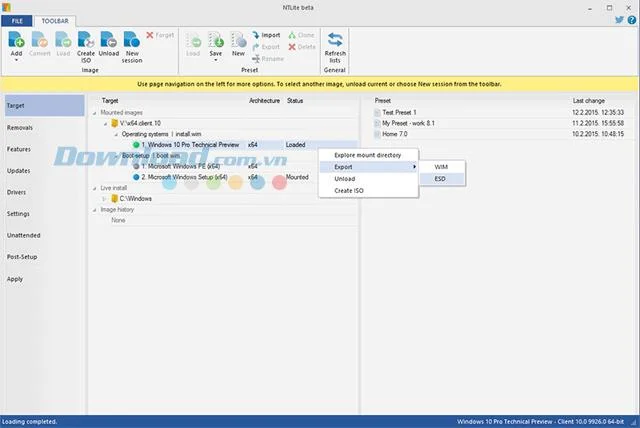
NTLite 2.0.0 Interface
NTLite's intuitive interface enhances the user experience.

Latest NTLite Update

NTLite 2.0.0 (Released: 2024)

  • New Features:
    • Enhanced performance for faster system boot times.
    • Support for Windows 11 integration.
    • Improved user interface and user experience elements.
  • Bug Fixes:
    • Resolved issues with network drivers integration.
    • Fixed crashes during automated installations.

Previous Version Highlights

NTLite 1.9.0.7501 (Released 2023) was a milestone version that introduced several significant new features, including:

  • Enhanced Live Editing capabilities to modify existing installations without needing to reinstall.
  • Expanded support for various Windows versions and improved customization options.

In conclusion, NTLite remains a robust and indispensable tool for customizing Windows installations, allowing users to tailor their systems according to their specific needs. With the advent of the latest version in 2024, now is the perfect time to download NTLite and start optimizing your Windows environment.


Leave a Comment

How to Fix Microsoft Teams Error M Memory

How to Fix Microsoft Teams Error M Memory

Tired of Microsoft Teams crashing with "Error M" memory issues? Follow our step-by-step guide to fix Error M in Teams, clear cache, update software, and boost performance—no tech skills required!

Step-by-Step: Setting Up Microsoft Teams Town Hall Events

Step-by-Step: Setting Up Microsoft Teams Town Hall Events

Discover the easiest step-by-step guide to setting up Microsoft Teams Town Hall events. Host massive virtual gatherings effortlessly with pro tips for seamless execution. Perfect for leaders and organizers!

How to Fix Microsoft Teams Download Error for PC

How to Fix Microsoft Teams Download Error for PC

Struggling with Microsoft Teams "Download Error" on PC? Discover proven, step-by-step fixes to resolve download failed issues quickly. Get back to seamless collaboration in minutes—no tech skills needed!

Troubleshooting Microsoft Teams Error L License

Troubleshooting Microsoft Teams Error L License

Stuck with Microsoft Teams "Error L" License error? Follow this step-by-step troubleshooting guide to resolve licensing issues quickly, restore access, and boost productivity without IT hassle. Updated with latest fixes.

Troubleshooting Microsoft Teams Video Call Freezing

Troubleshooting Microsoft Teams Video Call Freezing

Tired of Microsoft Teams video call freezing mid-meeting? Follow this proven troubleshooting Microsoft Teams video call freezing guide with quick fixes, advanced tips, and real solutions to restore smooth video instantly.

How to Fix Microsoft Teams Download Failed Due to Unexpected Error

How to Fix Microsoft Teams Download Failed Due to Unexpected Error

Frustrated by Microsoft Teams 'Download Failed Due to Unexpected Error'? Discover proven, step-by-step solutions to fix this common issue quickly and get back to seamless collaboration. Updated with the latest fixes for peak performance.

Why Did My Microsoft Teams Recording Fail? Common Reasons

Why Did My Microsoft Teams Recording Fail? Common Reasons

Frustrated because your Microsoft Teams recording failed? Uncover the top common reasons like permissions issues, storage limits, and network glitches, plus step-by-step fixes to prevent future failures and record flawlessly every time.

Solving Microsoft Teams Error B Connection

Solving Microsoft Teams Error B Connection

Struggling with Microsoft Teams "Error B" connection? Discover step-by-step fixes for smooth connectivity. Clear cache, check networks, and more in this ultimate guide to resolving Error B instantly.

How to Fix Microsoft Teams Application Is In A Bad State Error

How to Fix Microsoft Teams Application Is In A Bad State Error

Tired of the frustrating Microsoft Teams "Application Is In A Bad State" error crashing your meetings? Discover proven, step-by-step fixes to resolve it quickly and restore smooth teamwork. Updated with the latest solutions.

How to Check Microsoft Teams Version History and Build Number

How to Check Microsoft Teams Version History and Build Number

Discover simple steps to check your Microsoft Teams version history and build number on desktop, web, and mobile. Stay updated with the latest features and fixes effortlessly. Perfect for IT pros and everyday users.

How to Fix Microsoft Teams Uninstall Error Stuck

How to Fix Microsoft Teams Uninstall Error Stuck

Tired of Microsoft Teams "Uninstall Error" Stuck? Discover proven, step-by-step fixes to completely remove Teams from your PC. Works on latest Windows versions – no tech skills needed!

Troubleshooting Microsoft Teams Where is My Team? Error

Troubleshooting Microsoft Teams Where is My Team? Error

Facing the frustrating Microsoft Teams "Where is My Team?" error? Discover step-by-step troubleshooting tips, common causes, and quick fixes to resolve it instantly and resume seamless collaboration. Updated with the latest solutions.

How to Fix Microsoft Teams VDI Error on Virtual Machines

How to Fix Microsoft Teams VDI Error on Virtual Machines

Tired of Microsoft Teams VDI errors crashing your virtual machine calls? Get step-by-step fixes for audio glitches, video freezes, and optimization issues on Citrix, VMware, or RDP setups. Boost productivity now!

How to Fix Microsoft Teams Error AADSTS70011

How to Fix Microsoft Teams Error AADSTS70011

Struggling with Microsoft Teams Error AADSTS70011? Discover step-by-step fixes for invalid scope errors, clear cache tips, and quick authentication resets to get back to seamless collaboration in minutes. Updated with latest Teams patches.

Troubleshooting Microsoft Teams Unknown Error: Something Went Wrong

Troubleshooting Microsoft Teams Unknown Error: Something Went Wrong

Stuck with Microsoft Teams unknown error "Something Went Wrong"? Discover quick, effective troubleshooting steps to resolve it instantly. Updated with the latest fixes for seamless collaboration.