Leftover Halloween Candy and Pumpkins: What to Do Next

Sort leftover Halloween candy safely, share or repurpose sealed treats, and choose food use or compost for pumpkins based on their condition.
Some people have stopped using VPNs after relying on them for years, trading their complexity for a simpler solution: Private Tabs With Tor. While not perfect, it has become a top choice for everyday privacy. But should you use Brave's privacy mode instead of a VPN?
VPNs Are Not the Perfect Solution Many People Expect
There are many reasons to use a VPN. People are often attracted by the promise of complete anonymity, enhanced security, and the ability to access content from anywhere in the world. And while VPNs do provide some of these benefits, they come with a host of problems that make us question their value.

First is trust. Not all VPN providers are transparent about their practices. Some have been caught logging user data despite advertising a “no-logs” policy. For example, in 2022, NordVPN updated its terms to explain under what circumstances it would comply with law enforcement requests for information, contradicting its previous privacy statements. Incidents like this leave many wondering whether they are truly as anonymous as they claim to be.
Cost is another sticking point. Free VPNs often have significant limitations, such as data caps, intrusive ads, or even worse, selling user data to third parties. Premium VPNs, while more reliable, can be expensive, especially if you pay for features you don’t need. For those who just want to browse the web securely without having to overcome barriers, a VPN can feel like overkill.
Finally, there’s the complexity. Setting up and managing a VPN isn’t always straightforward. From configuring the right settings to troubleshooting connection issues, users need some level of technical knowledge to use the service effectively.
All of these factors lead people to explore alternatives. And that's when they stumble upon Brave's Tor-integrated private tabs.
Private Tabs With Tor: A Simpler Way to Maintain Privacy
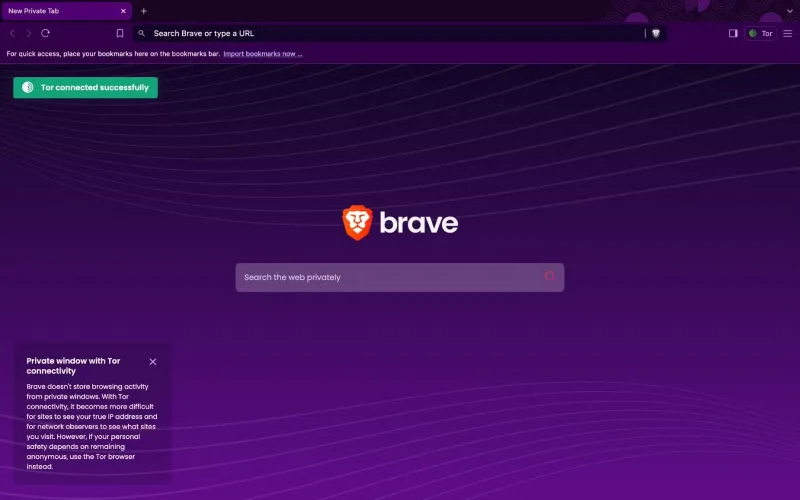
Brave's Private Window with Tor works like a miniature Tor browser inside Brave . Instead of simply hiding your IP like a VPN, it routes your traffic through the Tor network, encrypting your data and passing it through multiple volunteer-run servers before it reaches its destination. This makes it much harder for websites, advertisers, or even your Internet Service Provider (ISP) to track your online activity.
One of the things that I appreciate about this feature is how easy it is to use. Unlike setting up a VPN, which usually requires installing an app, logging in, and selecting a server, Brave’s Tor mode is available in just a few clicks. You just open Private Window with Tor and you’re automatically connected to the network. There’s no need to configure settings or worry about subscription fees.
It's important to manage expectations, however. Brave's private tabs don't offer complete anonymity like Tor Browser , which routes all your traffic through Tor and includes additional security features. For example, Brave's implementation doesn't completely isolate your browsing session like Tor Browser, so there's still a small risk. However, for most everyday users, the level of privacy it provides is more than enough.
Compare with VPN
Brave's Private Window with Tor and VPNs both enhance privacy, but they serve different purposes. VPNs are powerful, but they often feel like overkill for everyday browsing. Brave's Private Tabs strikes a balance between privacy and ease of use that fits perfectly with many people's habits.
Trust is another factor. VPNs require you to rely on a third-party provider to protect your data. While many providers claim to have a “no-logs” policy, these claims can’t always be verified. Brave, with its open-source, privacy-focused code, doesn’t rely on a middleman. That transparency gives you confidence that your data isn’t being logged or sold to third parties.
VPNs have their strengths, however. They’re faster than Tor, making them better for streaming or gaming. They also offer more server options, which is handy for bypassing geo-restrictions. But for everyday browsing, these features often seem unnecessary.
The biggest appeal of Brave's Private Tab with Tor is its simplicity. It provides a level of privacy that's sufficient for most tasks, without the complexity or expense of a VPN.
Sort leftover Halloween candy safely, share or repurpose sealed treats, and choose food use or compost for pumpkins based on their condition.
Compare workplace Halloween costume choices by respect, dress code, mobility, and safety—and learn when a subtle accessory or a policy check is the better option.
Find a couples costume that fits your style, budget, and comfort level, from Addams Family classics to original inside-joke duos.
Need a last-minute high school Halloween costume? Compare 10 easy closet-based ideas by prep time, comfort, school-day practicality, and simple safety checks.
Use a simple 2026 Halloween decorating timeline for indoor décor, outdoor displays, and fresh pumpkins, with practical adjustments for weather and events.
Mix five vivid, approachable Halloween cocktails with measured recipes, simple prep tips, and an alcohol-free option for your party guests.
Find 15 office-friendly Halloween costume ideas for 2026, with practical checks for dress codes, respectful themes, comfort, and workplace safety.
Plan a fun elementary school Halloween party with easy crafts, games, inclusive treats, costume tips, and a sample 75-minute classroom schedule.
Compare realistic side hustles for 2026 by startup cost, fees, flexibility, and income control, with current tax and scam guidance from official sources.
Upgrade your home office ergonomics with current OSHA and NIOSH guidance on chair fit, monitor height, laptop setup, lighting, and movement.








