Microsoft pushes full-screen ads about Windows 10 end of support

Microsoft plans to end official support for Windows 10 on October 14, 2025, leaving consumers and business users with a few options: Either upgrade to Windows 11, pay for additional updates, or just continue using Windows 10 without any updates (the Extended Security Update program). In other words, after that date, Windows 10 users who don't pay will no longer receive any support services or important security updates from Microsoft.

Of course, Microsoft wants people to choose the first option, especially since Windows 11 has a fairly low market share compared to Windows 10. To achieve its goal, the Redmond company is heavily promoting Windows 11 in Windows 10.

According to new reports, Microsoft has dramatically increased the number of full-screen advertisements on Windows 10 systems to inform users about the OS's end-of-life roadmap. Interestingly, none of these banners mention the Extended Security Updates program, instead focusing on the various benefits of upgrading to Windows 11. The Extended Security Updates program allows regular customers to continue receiving security updates for another year for a small fee of $30 (business and education customers can use the program for up to three years).

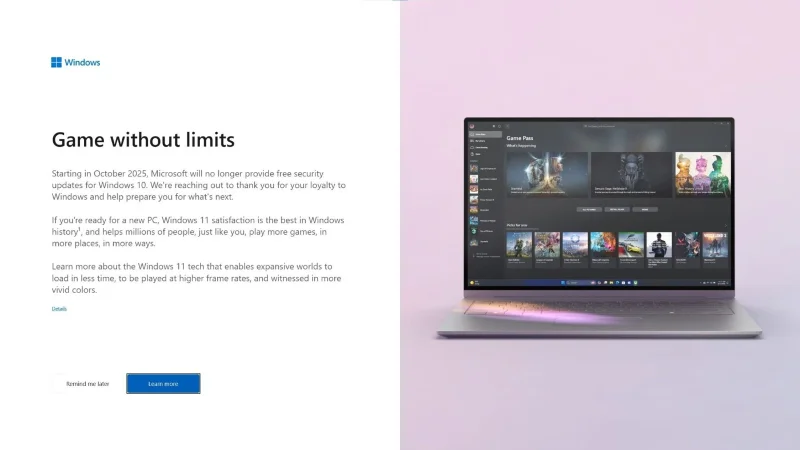
For example, ARS spotted a full-screen ad promoting Windows 11's gaming features, but without any specific mention of them. Microsoft simply used vague descriptions like "technology that allows large worlds to load in less time," "higher frame rates," and "more vibrant colors." Of course, there's no obvious "No, thanks" button. Instead, users have to hit "Learn more" or ask for the ad to appear later.

Microsoft pushes full-screen ads about Windows 10 end of support

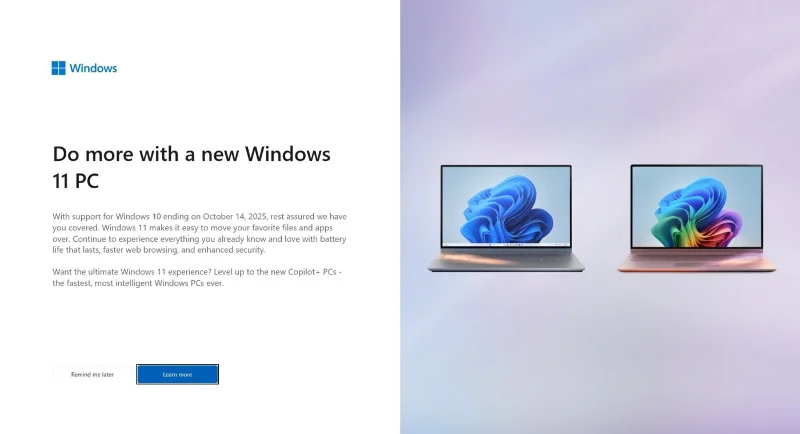
Additionally, some users are seeing ads focused on Windows Backup and how it can help migrate files from Windows 10 to a new Windows 11 computer. There are also cases where ads are advertised for Copilot+ PC promotions. All of this makes it a bit frustrating for those who don't want to/can't afford to upgrade to Windows 11.

Microsoft pushes full-screen ads about Windows 10 end of support

In addition to not mentioning the Extended Security Update program, these ads also say absolutely nothing about the hardware requirements that users must meet to be eligible for the Windows 11 update. So it seems like Microsoft's sole goal in this campaign is to force users to buy new computers, even though many people are perfectly fine with the experience they're having.

In fact, these ads are nothing new, and were first seen back in April of this year. The only change seems to be that Microsoft has increased the scope of the rollout.

While there's nothing wrong with letting users know that their operating system is nearing the end of its support period, could Microsoft, for the benefit of the user community as a whole, make those notifications less confusing and more transparent?
Sign up and earn $1000 a day ⋙

Leave a Comment

Microsoft: PCs running Windows 11 21H2/22H2 will be forced to update to 23H2 next month

Microsoft: PCs running Windows 11 21H2/22H2 will be forced to update to 23H2 next month

Windows 11 version 21H2 is one of the major original releases of Windows 11 that began rolling out globally on October 4, 2021.

Microsoft spams Copilot QR codes on Windows 11 lock screen to lure users

Microsoft spams Copilot QR codes on Windows 11 lock screen to lure users

The year 2023 saw Microsoft betting heavily on artificial intelligence and its partnership with OpenAI to make Copilot a reality.

Microsoft details Bluetooth LE Audio requirements and support for Windows 11, 10

Microsoft details Bluetooth LE Audio requirements and support for Windows 11, 10

Microsoft introduced Bluetooth LE (low energy) Audio support with Windows 11 22H2 KB5026446 (build 22621.1778), also known as Moment 3, in May 2023.

Microsoft Launches New Sticky Notes App for Windows 11

Microsoft Launches New Sticky Notes App for Windows 11

After keeping things the same for years, the Sticky Note update in mid-2024 changed the game.

Microsoft announces list of CPUs supported by Windows Server 2025, allowing multiple virtual machines to share a single CPU

Microsoft announces list of CPUs supported by Windows Server 2025, allowing multiple virtual machines to share a single CPU

Today, Microsoft officially announced the general availability of Windows Server 2025 along with System Center 2025.

What a Classic 90s-Style Windows 11 Interface Would Look Like

What a Classic 90s-Style Windows 11 Interface Would Look Like

There's always something incredibly cool about the nostalgic user interface of 90s versions of Windows.

Microsoft: TPM 2.0 in Windows 11 is mandatory and non-negotiable

Microsoft: TPM 2.0 in Windows 11 is mandatory and non-negotiable

More than three years ago, when Microsoft announced Windows 11, the operating system immediately caused a lot of controversy.

Windows 11 Market Share Is Quickly Catching Up to Windows 10

Windows 11 Market Share Is Quickly Catching Up to Windows 10

The October 2024 report provides an overview of Windows 11's market share compared to other versions of Windows.

Microsofts foldable smartphone wont have a crease

Microsofts foldable smartphone wont have a crease

Microsoft is said to be getting closer to launching its first foldable smartphone when it was granted a patent for a foldable phone with the ability to fold 360 degrees but without creating wrinkles on the screen on October 1.

Microsoft is about to stop deploying WSUS driver synchronization, users take note!

Microsoft is about to stop deploying WSUS driver synchronization, users take note!

In a new post on its Tech Community website, Microsoft has announced plans to discontinue WSUS driver synchronization in favor of its latest cloud-based driver services.

How to Set Windows Photo Viewer as Default Photo Viewer on Windows 11

How to Set Windows Photo Viewer as Default Photo Viewer on Windows 11

Windows Photo Viewer was first released alongside Windows XP and has quickly become one of the most frequently used tools on Windows.

Windows 11 is about to add a system configuration advice section

Windows 11 is about to add a system configuration advice section

The latest previews of Windows 11 that Microsoft released this week include an improved About section in the Settings app, where users can get more information about the hardware inside their computer.

Windows 11 now lets users easily type with an Xbox controller

Windows 11 now lets users easily type with an Xbox controller

To address common issues faced by PC gamers, Microsoft has finally made the Windows operating system easier to navigate with an Xbox controller.

Windows 11 updates silently create a mysterious folder on the C drive

Windows 11 updates silently create a mysterious folder on the C drive

The April security updates for Windows 11 silently created a new empty folder on the C drive.

Microsoft will continue to invest heavily in OpenAI at a valuation of more than $100 billion

Microsoft will continue to invest heavily in OpenAI at a valuation of more than $100 billion

Microsoft has invested billions of dollars in OpenAI since 2019, although the Redmond-based software giant is by no means the primary investor in the innovative AI startup.

Fix Windows Error Code 0xc0000098: Backup ACPI.sys to Prevent Boot Failure

Fix Windows Error Code 0xc0000098: Backup ACPI.sys to Prevent Boot Failure

Error code 0xc0000098 in Windows causes a blue screen error on startup. The ACPI.sys driver is often to blame, especially on unsupported versions of Windows 11 like 23H2 or 22H2 or Windows 10.

Quickly fix Windows 10/8/7 computer error that freezes and cannot exit Safe Mode

Quickly fix Windows 10/8/7 computer error that freezes and cannot exit Safe Mode

In some cases, sometimes you start your computer in Safe Mode and the computer freezes. So how to fix the error in this case, please refer to the article below of WebTech360.

How to fix Snipping Tool keeps showing error

How to fix Snipping Tool keeps showing error

Snipping Tool is a powerful photo and video capture tool on Windows. However, this tool sometimes has some errors, such as constantly displaying on the screen.

How to get the fastest internet connection from your router

How to get the fastest internet connection from your router

Every network has a router to access the Internet, but not everyone knows how to make the router work better. In this article, we will introduce some router tips to help speed up the wireless connection in the network.

Common Mistakes When Performing Internet Speed ​​Tests

Common Mistakes When Performing Internet Speed ​​Tests

If the results seem slower than expected, don't be too quick to blame your ISP - mistakes when performing the test can skew your numbers.

What is QoS? How to use QoS for faster Internet speeds when you need it most

What is QoS? How to use QoS for faster Internet speeds when you need it most

In the article below, we will introduce and guide you to learn about the concept of QoS - Quality of Service on router devices.

Why cant this built-in Credential Manager feature in Windows replace a password manager?

Why cant this built-in Credential Manager feature in Windows replace a password manager?

Windows has a built-in Credential Manager, but it's not what you think it is—and certainly not a replacement for a password manager.

How to install free HEVC codecs on Windows 10 (for H.265 video)

How to install free HEVC codecs on Windows 10 (for H.265 video)

Microsoft charges for its official codecs and doesn't include them in Windows 10. However, you can get them for free without pulling out your credit card and spending $0.99.

Instructions to fix Access Denied error when accessing files or folders on Windows

Instructions to fix Access Denied error when accessing files or folders on Windows

While having trouble accessing files and folders can be frustrating, don't panic—with a few simple tweaks, you can regain access to your system.

How to check if USB Boot has been created successfully?

How to check if USB Boot has been created successfully?

After creating a USB boot to install Windows, users should check the USB boot's performance to see if it was created successfully or not.

4 Types of Windows Data That Are Growing in Size: How to Control Them?

4 Types of Windows Data That Are Growing in Size: How to Control Them?

Although Windows Storage Sense efficiently deletes temporary files, some types of data are permanent and continue to accumulate.

How to turn off background apps in Windows 11, reduce RAM consumption on Win 11

How to turn off background apps in Windows 11, reduce RAM consumption on Win 11

You can turn off Windows 11 background apps to optimize performance, save battery and reduce RAM consumption.

Instructions to fix the error “Network path was not found” in Windows

Instructions to fix the error “Network path was not found” in Windows

When a computer, mobile device, or printer tries to connect to a Microsoft Windows computer over a network, for example, the error message network path was not found — Error 0x80070035 may appear.

How to block Internet connection of Windows 10 software and applications

How to block Internet connection of Windows 10 software and applications

We can block Internet access for any application or software on the computer, while other programs can still access the network. The following article will guide readers on how to disable Internet access for software and applications on Windows.

How to Stay Safe on Windows 10 Until 2030

How to Stay Safe on Windows 10 Until 2030

Instead of paying $30 for a year of security updates, keep Windows 10 safe until 2030 with this simple solution.