When to Start Decorating for Halloween in 2026

Use a simple 2026 Halloween decorating timeline for indoor décor, outdoor displays, and fresh pumpkins, with practical adjustments for weather and events.
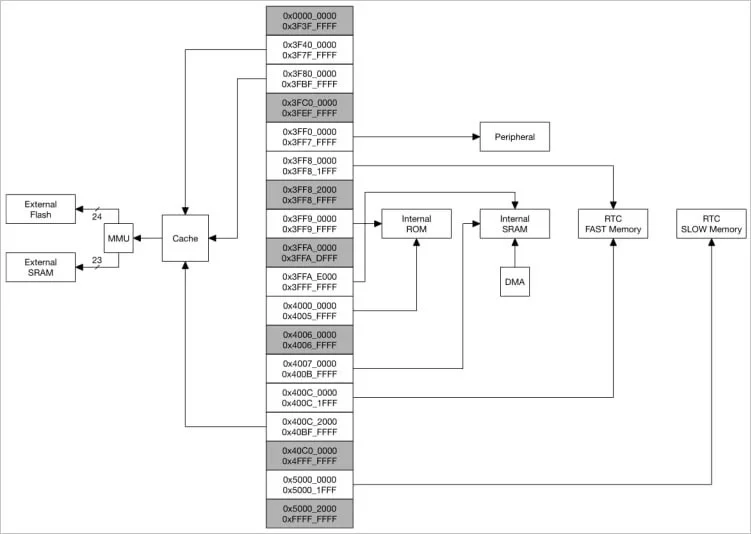
The ESP32 is an extremely popular low-cost chip from Chinese manufacturer Espressif, which is estimated to be used in over 1 billion devices worldwide by 2023, and contains an undocumented "backdoor" that can be exploited for attacks.
These undocumented commands allow for impersonation of trusted devices, unauthorized access to data, redirection to other devices on the network, and the ability to establish persistence.
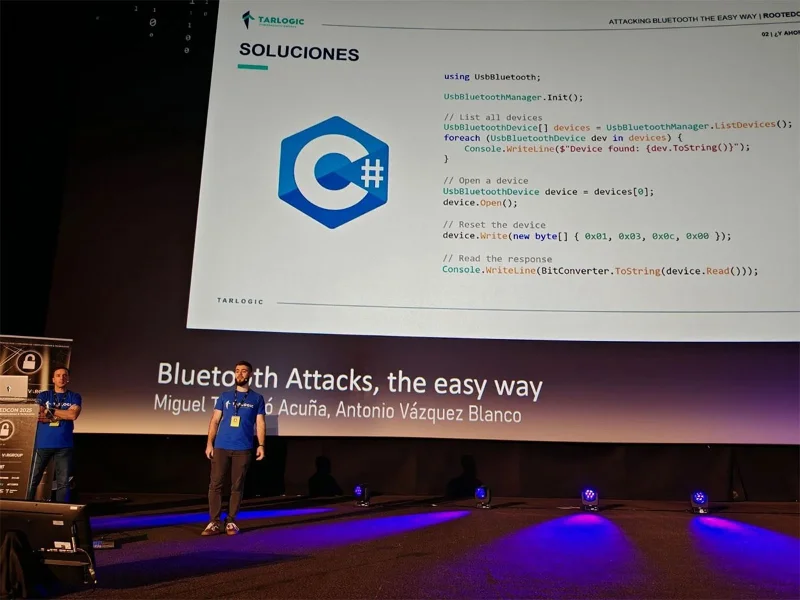
The discovery was made public by Spanish cybersecurity researchers Miguel Tarascó Acuña and Antonio Vázquez Blanco from the Tarlogic Security team. Speaking at the RootedCON conference in Madrid, they said:
Tarlogic Security has discovered a backdoor in the ESP32, a family of WiFi and Bluetooth-enabled microcontrollers found in millions of IoT devices on the market. Exploiting this backdoor would allow malicious actors to launch spoofing attacks and permanently infect sensitive devices such as mobile phones, computers, smart locks, or medical devices by bypassing code checks.
The ESP32 is one of the most widely used chips in the world for Wi-Fi + Bluetooth connectivity in IoT (Internet of Things) devices, so the risk of any backdoors existing is huge.
Backdoor in ESP32
In a presentation at RootedCON, Tarlogic researchers explained that interest in Bluetooth security research has declined, but not because the protocol or its implementations have become more secure.
Instead, most of the attacks presented last year had no working tools, were incompatible with mainstream hardware, and used outdated or unmaintained tools that are largely incompatible with modern systems.
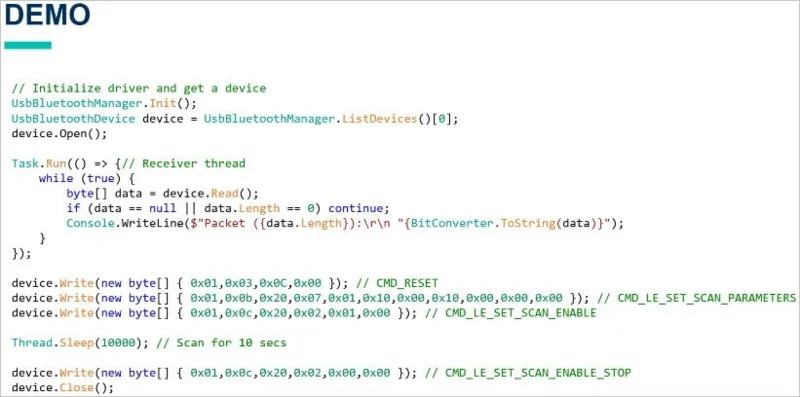
Tarlogic has developed a new C-based, hardware-independent and cross-platform USB Bluetooth driver that allows direct access to the hardware without relying on operating system specific APIs.
Armed with this new tool, which allows raw access to Bluetooth traffic, Tarlogic discovered hidden vendor-specific commands (Opcode 0x3F) in the ESP32 Bluetooth firmware, allowing low-level control of Bluetooth functions.
In total, they found 29 undocumented commands, collectively described as a “backdoor,” that can be abused for memory manipulation (read/write RAM and Flash), MAC address spoofing (device spoofing), and LMP/LLCP packet injection. The issue is currently tracked under the identifier CVE-2025-27840.
Potential risks
Risks arising from these commands include malicious deployment at the OEM level and supply chain attacks.
Depending on how the Bluetooth stack handles HCI commands on the device, remote backdoor exploitation may be possible via malicious firmware or a spoofed Bluetooth connection.
This is especially true if the attacker already has root access, installs malware, or pushes a malicious update to the device, opening up low-level access.
However, in general, having physical access to a device's USB or UART interface is much more dangerous and a more realistic attack scenario.
" In a scenario where you can compromise an IoT device running an ESP32 chip, you would be able to hide an APT (Advanced Persistent Threat) in the ESP memory and perform Bluetooth (or Wi-Fi) attacks against other devices, while also controlling the device over Wi-Fi/Bluetooth ," the team explains. " Our discovery would allow full control of the ESP32 chip and maintain persistence in the chip through commands that allow modification of RAM and Flash. Additionally, with persistence in the chip, it would be possible to spread to other devices because ESP32 allows for advanced Bluetooth attacks . "
WebTech360 will continue to update information on this issue, please pay attention.
Use a simple 2026 Halloween decorating timeline for indoor décor, outdoor displays, and fresh pumpkins, with practical adjustments for weather and events.
Mix five vivid, approachable Halloween cocktails with measured recipes, simple prep tips, and an alcohol-free option for your party guests.
Find 15 office-friendly Halloween costume ideas for 2026, with practical checks for dress codes, respectful themes, comfort, and workplace safety.
Plan a fun elementary school Halloween party with easy crafts, games, inclusive treats, costume tips, and a sample 75-minute classroom schedule.
Compare realistic side hustles for 2026 by startup cost, fees, flexibility, and income control, with current tax and scam guidance from official sources.
Upgrade your home office ergonomics with current OSHA and NIOSH guidance on chair fit, monitor height, laptop setup, lighting, and movement.
Learn why emotional intelligence matters in leadership, where it helps most, how to strengthen it, and how to tell whether your approach is working.
A practical roadmap for moving into tech without a degree: choose an accessible role, build job-ready skills, prove them with projects, and use hiring feedback to improve.
Build a credible LinkedIn personal brand in 2026 with current profile, content, newsletter, analytics, verification, and visibility guidance from LinkedIn.
Quiet quitting and quiet firing are catchy labels, not diagnoses. Learn what is verified, what depends on context, and what employees and managers can do next.








