Home
» Technology
»
Top 5 AI Tools Content Creators Need Right Now in 2026
Top 5 AI Tools Content Creators Need Right Now in 2026
Content creators do not need the largest possible AI stack. They need a small set of tools that removes the slowest parts of the workflow without flattening their voice, visual identity, or judgment. As of September 14, 2026, the most important change is that the leading creator tools are becoming broader: writing assistants now handle deeper research and multi-step work, image generators include editing and personalization, video editors have built-in generation and captioning, and workspace apps increasingly use agents rather than isolated chat boxes.
Several recent updates make that shift concrete. OpenAI updated GPT-5.6 Sol in ChatGPT on August 6, 2026, with a focus on more reliable factual answers and more focused responses. Midjourney made V8.2 its default model on July 24, adding a new Edit Model and stronger personalization. CapCut’s current AI tools hub, updated with new entries in September, now groups generation, captions, voice, upscaling, and long-video repurposing in the same ecosystem. Notion’s September 9 release added model controls for agents in business workspaces. The practical result is simple: creators can now cover most of a content pipeline with fewer applications than they needed even a year ago.
A five-tool creator stack can cover ideation and writing, visual design, video editing, image generation, and editorial planning. Interfaces and feature availability vary by plan, platform, and product version.
Your content depends on distinctive imagery or visual ideation
It is not a full layout, publishing, or asset-management tool
Notion AI
Editorial calendars, research notes, briefs, content systems, agent-assisted workflow
You need to organize production, not just generate an isolated asset
May feel redundant if you already have a strong project-management system
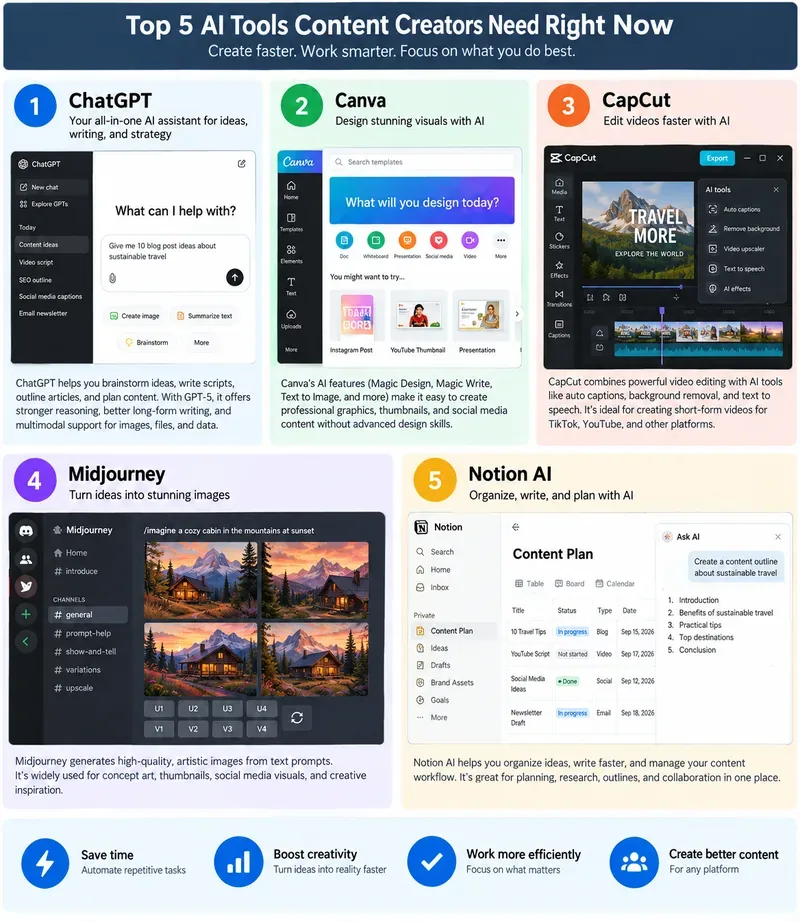
1. ChatGPT: the best all-purpose creator assistant
For most creators, ChatGPT is the easiest first recommendation because it can sit at the beginning, middle, and end of the workflow. It can help turn a vague idea into angles, compare possible hooks, build an outline, draft a script, convert a long article into social posts, generate interview questions, or critique a finished draft against a brief.
The current reason to pay attention is not simply “better text generation.” OpenAI’s August 6, 2026 update says GPT-5.6 Sol in ChatGPT was improved for factual reliability and more focused answers. Earlier, on July 9, OpenAI introduced ChatGPT Work, an agentic mode designed to carry out longer, multi-step tasks across apps and files for eligible users. For a creator, that matters because research, source gathering, document preparation, and production planning are often more time-consuming than writing the first paragraph.
Start with ChatGPT when your bottleneck is thinking: finding angles, narrowing a topic, building a content brief, organizing source material, or adapting one idea to several formats. It is especially useful for creators who publish across a blog, newsletter, YouTube, LinkedIn, or multiple social channels.
Do not treat it as an automatic publishing engine. Ask for sources, open those sources, check dates, verify quotations and numbers, and rewrite the final copy in your own editorial voice. The more a claim affects money, health, law, product specifications, or breaking news, the more important human verification becomes.
2. Canva: the fastest route from idea to publishable design
Canva earns a place in this list because most content creators need design output more often than they need a full professional design suite. Thumbnails, quote cards, carousels, lead magnets, presentation slides, channel art, simple animations, and branded social posts are recurring tasks. Canva compresses many of them into templates and a shared editor.
Its AI layer, Magic Studio, includes Magic Design, Magic Media, Magic Write, and Magic Animate. Canva also describes Magic Video as an AI-assisted editor that can assemble uploaded footage into a social-ready video with cuts, synced audio, transitions, and layout choices. That makes Canva useful when your challenge is not “Can AI make an image?” but “Can I turn this campaign into ten correctly sized, branded assets before lunch?”
Canva is a strong fit for solo creators, social teams, coaches, educators, newsletter publishers, and small brands that need visual consistency without a dedicated designer for every asset. Brand Kit and reusable templates are often more valuable than one impressive AI generation because they reduce repeated formatting work.
Its limitation is precision. For advanced compositing, detailed photo retouching, sophisticated motion graphics, or high-end print work, a specialist application may still be the better finishing tool. Also check which AI features are included in your plan and region before building a workflow around them.
3. CapCut: the practical AI video editor for high-volume social content
If video is your main output, CapCut can save more time than adding another writing assistant. Its current toolset combines a timeline editor with AI-assisted functions such as automatic captions, script-to-video workflows, background removal, voice tools, resizing, enhancement, and AI video generation. CapCut’s September 2026 tools pages also highlight Seedance 2.5-based video generation on desktop.
The most dependable everyday feature is still one of the simplest: automatic captions. CapCut documents Auto Captions across web, desktop, and mobile, with manual correction after recognition. For short-form creators, that can remove a repetitive transcription-and-timing step from every video.
CapCut is best when you publish frequently to TikTok, YouTube Shorts, Instagram Reels, or other vertical-video feeds and need fast turnaround. It is also useful for long-to-short repurposing: one longer interview or tutorial can become several short clips, captioned and reframed for different platforms.
The conditions matter. CapCut notes that some advanced functionality varies by region, device, or app version. AI captions can also mishear accents, names, technical terms, or speech over music, so always review them before publishing. If your projects require complex color workflows, detailed audio post-production, or large collaborative timelines, a more traditional nonlinear editor may still be appropriate.
4. Midjourney: the strongest choice when visual style is the product
Midjourney belongs in a creator stack when distinctive imagery is a competitive advantage: thumbnails, concept art, editorial illustrations, moodboards, campaign concepts, fantasy scenes, product-style compositions, or visual experiments that would be slow to shoot from scratch.
The current change worth knowing is Midjourney V8.2, which became the default version on July 24, 2026. Midjourney says V8.2 focuses on aesthetics, image quality, and personalization. It also introduced a new Edit Model that replaces several older reference and retexturing workflows in V8.x. The web Editor supports targeted changes, inpainting, outpainting, pan, zoom, and remix-style iteration, while Personalization Profiles and Moodboards help creators steer generations toward a repeatable visual taste.
That last point is the real reason Midjourney is useful for professional creators. One-off image generation is easy to copy. A consistent visual language is harder. Moodboards, style references, and personalization let you move from “make something pretty” toward a recognizable look that can carry across a series.
Midjourney is not the right tool for every design task. You will often still need Canva, Photoshop, or another layout editor to add exact typography, logos, legal text, or platform-specific formatting. You should also review Midjourney’s current terms and plan rules for your intended commercial use instead of assuming every generated asset has identical rights.
5. Notion AI: the tool that keeps the content machine from becoming chaos
Notion AI is the least “flashy” choice here, which is exactly why it can be valuable. Once a creator publishes regularly, the hard problem shifts from generating an individual caption to managing the system around the content: ideas, briefs, research, sponsors, assets, deadlines, revisions, publishing status, and performance notes.
Notion increasingly treats AI as part of that workspace rather than as a separate writing box. In 2026 it expanded agents, AI Meeting Notes, file support, and image generation inside pages. On September 9, Notion added model controls for agents on Business and Enterprise plans, allowing workspace owners to choose which models are available to Notion Agent and Custom Agents. That update is more relevant to teams than to a solo creator, but it shows where the product is heading: AI embedded in operational workflows.
For a creator, a practical Notion setup might include an ideas database, an editorial calendar, a content brief template, a sponsor tracker, a reusable checklist, and a page for each published asset. AI can then summarize research notes, draft a brief from a database entry, extract action items, suggest edits, or help turn meeting notes into a production plan.
Notion AI is less compelling if you already have a project-management system that everyone actually uses. Do not migrate a working workflow merely to add AI. The value comes from reducing context switching and keeping your planning, source notes, and production status connected.
You probably do not need all five on day one. Choose tools according to the type of content you publish and the bottleneck that costs you the most time.
Blog or newsletter creator: Start with ChatGPT + Canva + Notion AI. Add Midjourney only if original visuals are important to your brand.
Short-form video creator: Start with ChatGPT + CapCut + Canva. Add Midjourney for visual concepts, stylized assets, or thumbnail ideas.
YouTube educator or reviewer: Use ChatGPT for research and scripting, CapCut for fast edits and captions, Canva for thumbnails, and Notion AI for the production calendar.
Visual-first creator: Midjourney + Canva is the core pair; ChatGPT helps with concepts and captions, while Notion AI keeps campaigns organized.
Small content team: ChatGPT for research and drafting, Canva for shared brand assets, CapCut for video, and Notion for assignments and editorial status. Add Midjourney when custom visual generation justifies another subscription.
Two strong alternatives that may fit better
This top five is intentionally broad rather than universal. If your work already lives in Adobe Creative Cloud, Adobe Firefly may be a better visual-generation choice than adding another separate image tool. Adobe’s new generation and editing experience, updated September 8, 2026, brings image and video generation, editing, projects, generation history, and video timeline work into one beta workspace. See Adobe’s Firefly workspace documentation.
If voiceovers, podcasts, or multilingual localization are central to your business, ElevenLabs deserves serious consideration. Its Dubbing v2, launched May 28 and updated September 6, 2026, is designed to preserve tone, pacing, delivery, and emotional intent across more than 90 languages. See ElevenLabs Dubbing v2.
How to judge whether an AI tool is earning its place
Do not judge a tool by how impressive its demo looks. Judge it by what happens to your production week. After two to four weeks, ask four questions: Did it reduce the time from idea to publish? Did quality stay the same or improve? Did it remove repetitive work rather than add another review step? And are you using it often enough to justify its cost and learning curve?
The winning creator stack in 2026 is not the one with the most subscriptions. It is the one that protects your attention. Use AI for research, first passes, repetitive editing, formatting, transcription, versioning, and organization. Keep the decisions that make the content recognizably yours: the point of view, taste, story selection, final edit, and relationship with the audience.