5 BEST PHOTO RESTORATION SERVICES ONLINE
Do you want to find great photo restoration services that work online? To help you, we have prepared a list of good services that will help fix any problem with photos deteriorated over time or damaged due to careless handling.
Unfortunately, old photographs are prone to various types of damage. When a printed photo is damaged, and there is no negative for a new print, the only option is to restore the photo from its current state.
Photo restoration services can restore your images for about $30. They help users solve problems caused by smoke, water and fire. Besides, they can fix discolored photos, put together parts of a picture, remove any flaws. They can also color black-and-white photos.

Services: Photo recovery, portrait, wedding, product, jewelry, real estate, newborn photos, photo-editing, image manipulation, high-end retouching
Pricing: $25-50 per image
Turnaround Time: 1-3 business days
FixThePhoto is a great service for professional users. It works with photographers from over 86 countries and has edited more than 3,000K photos for the past 15 years. Although we didn’t know much about their photo restoration online service before, we read a couple of positive reviews about them and decided to contact them. They lived up to their reputation.
Turnaround: FixThePhoto is a fast service that will send you a restored photo in just one day. From sending a photo for restoration and until the completion of the work, we did not have any difficulties communicating with their team.
Repair Services: They offer the widest range of photo processing services, including old photographs restoration. This service makes your photos more colorful, restores missing parts, deletes unnecessary details from an image, etc. They can also enhance new photos by improving contrast, using filters, adjusting colors, adding or removing objects from a picture, etc. If you want to send several photos, it is more profitable to choose the Damaged Restoration Package https://fixthephoto.com/webtech/damaged-restoration-package. For a fixed price ($75) professionals will perform photo restoration on 3 of your images in 5 days. Retouchers will remove scratches, spots and dust, fix the colors, as well as restore missing details.
FixThePhoto offers three levels of photo restoration: standard, premium and extreme. You can choose any level based on your needs and budget. The standard level includes fixing slight flaws, such as spots and light scratches, restoring damaged parts of a photo, enhancing colors, etc.
With a premium level, you can ask them to fix bigger scratches and damages, add missing parts and restore everything to detail. The extreme level is suitable for those who are looking for more complex solutions. If your photo is badly damaged or has missing parts, this option is for you.
![]()
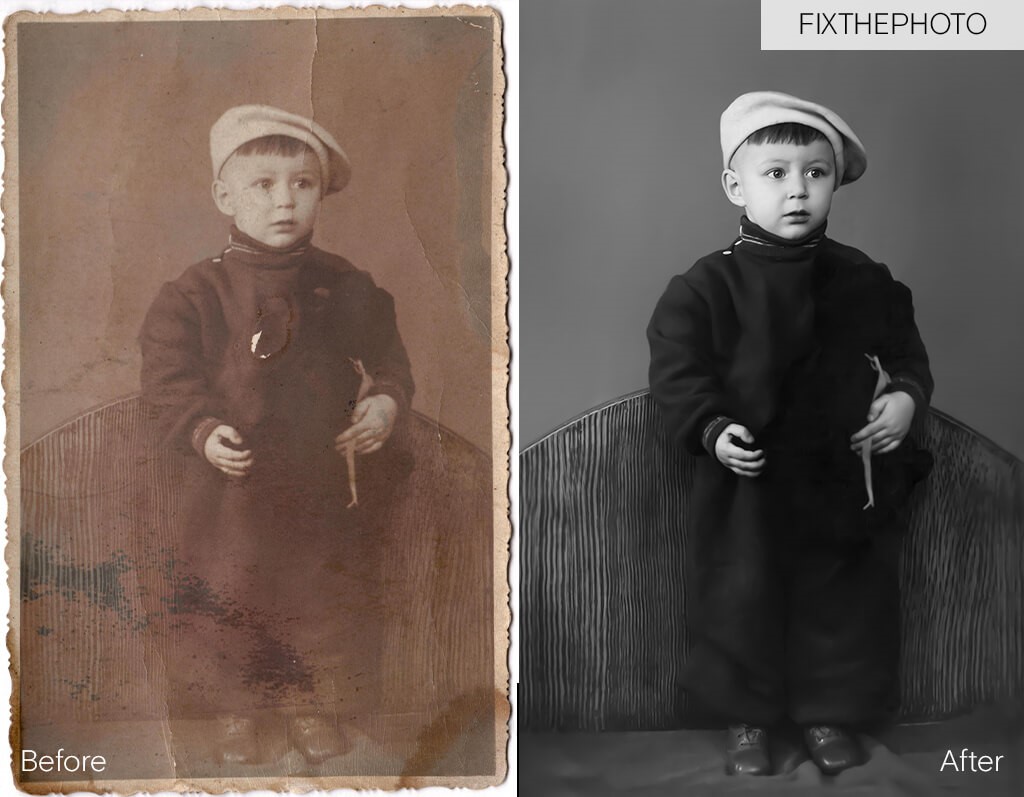
Final result:
We were pleased with the results, especially considering the fact that another service refused to edit the photo claiming that it cannot be restored. Besides, the quality of the photo has improved significantly, and all the imperfections have been eliminated.
They studied everything to the smallest detail to recreate a high-quality image, which makes them the best photo restoration service on our list. We admire the way they restored the details on the clothes, skin, and hair.
It looks like a completely new photo, as any sign of damage has disappeared. We highly recommend it!
Summing Up: This is a truly first-class service that will carry out the complex restoration. Do not doubt this company.
WeEdit.Photos http://weedit.photos/
![]()
Services Provided: Culling, color correction, glamour, beauty, body retouching, background removal, photo restoration, portrait, wedding photo editing
Pricing: $25-50 per image
Turnaround Time: 2-5 business days
WeEdit.Photos is a picture restoration online service with a wide range of photo processing tools. The service has been collaborating with photographers and advertising agencies since 2003.
It doesn’t matter what genre you prefer, the service works with different types of photos and delivers excellent results. They offer a wide range of photo-editing services for photographers, including high-quality photo-restoration services.
Turnaround: Similarly to FixThePhoto, WeEdit.Photos offers fast services and promises to send you the result in 1-3 business days. They sent us a restored photo within 2 days after placing an order, thus meeting the deadline.
Repair Services: This service offers 3 levels of photo restoration: from basic to advanced. Regardless of the level you choose, you will get high-quality photos. These services suit various needs and budgets.
Due to a discount system for regular customers, WeEdit.Photos managed to attract a great number of loyal clients.
![]()
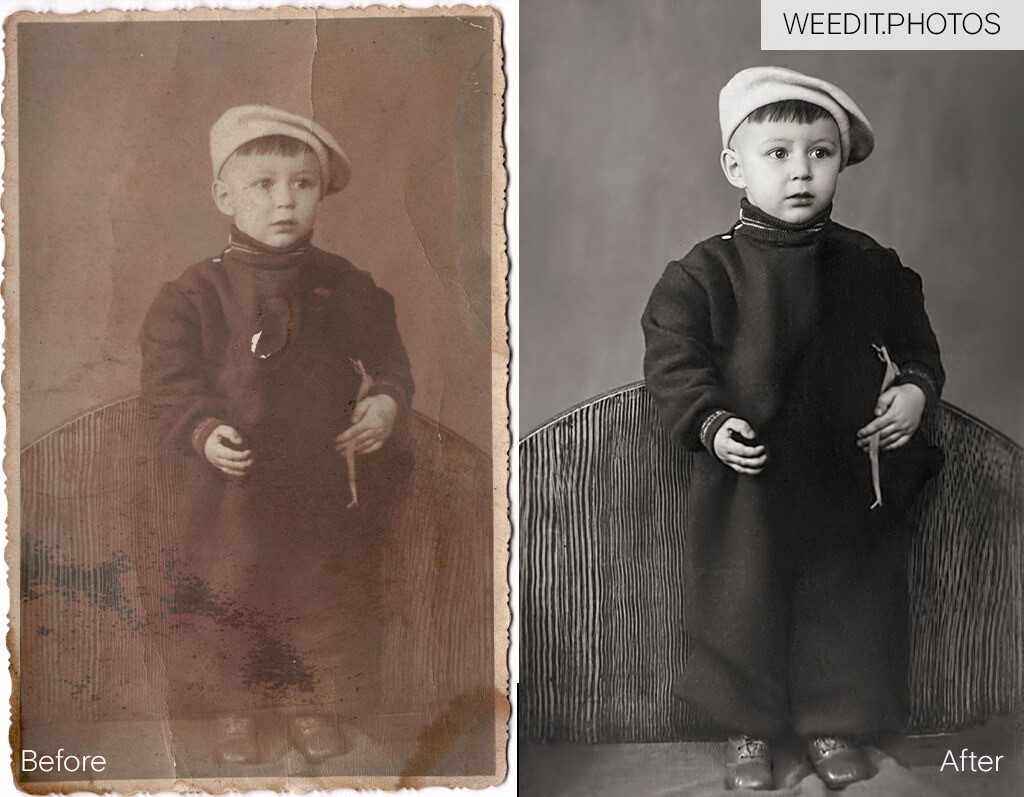
Final result: We were pleasantly surprised by the photo recovery options offered by this service. This old and shabby photo of a kid became brand new and shiny. We believe that WeEdit.Photos are professionals in their field, as they managed to give a second life to a damaged photo.
They returned the photo to its former beauty, removing unnecessary creases, spots, and scratches that prevented us from enjoying the picture. However, if you enjoy the retro look, we recommend using dust overlays https://fixthephoto.com/webtech/dust-overlay and film scratches overlays https://fixthephoto.com/webtech/film-scratches-overlays. For $18 you get 30+ overlays with a variety of effects to create vintage vibe. Besides, they used color grading to bring back the original black and white toning of the photo. Now, it looks as if it was taken with the newest camera.
The way they placed shadows on the face and hat deserves special attention. WeEdit.Photos specialists have proven their professionalism. We did not notice any sign of damage in the photo after the correction.
Summing Up: We highly recommend WeEdit.Photos as they are quite professional. Besides, they can quickly restore a photo for a reasonable price.
3. DamagedPhotoRestoration https://damagedphotorestoration.com/
![]()
Services Provided: Photo improvements, water-damaged photo recovery, colorizing photos, photo reconstruction, enlarging old photos
Pricing: $25-50
Turnaround: 2 business days
This is the best photo restoration service with 10 years of experience. During this period, DamagedPhotoRestoration managed to give a second wind to a huge number of photos, as evidenced by their portfolio. They work with highly professional specialists.
Turnaround: The duration depends on the amount of work that has to be done. On average, standard photo processing takes about 2 business days. You can set a deadline when placing an order.
Repair Services: The company offers 3 levels of editing. You can check out examples for each of them to understand which one suits your needs or budget.
Your pictures will be restored by professional photographers and designers. They will restore photos, remove flaws, recreate a person’s face and clothes, even if these areas of a photo are severely damaged.
![]()
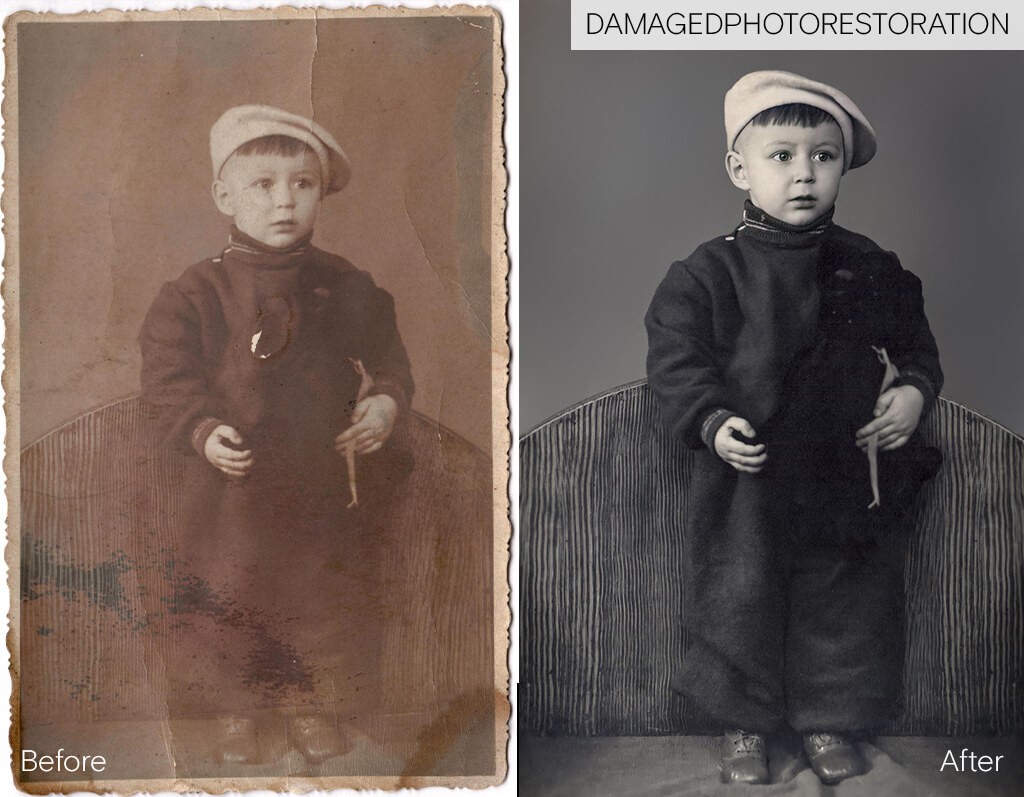
Final result: Considering the state of the photo before, we are more than satisfied with the result. This service can definitely work miracles work miracles by turning a faded old kid portrait into an image of modern quality. Besides, affordable prices were a nice bonus.
The company has a professional staff of retouchers who can remove even the smallest blemishes. The way they removed water spots on the face and managed to restore skin texture, especially in the under eye area is worth a special mention.
The after photo looks impeccable. We wouldn’t have ever guessed it used to be an old photo, as there’s no sign of deterioration left.
Summing Up: If you are looking for a professional photo restoration service at an affordable price and with a short turnaround time, we recommend considering DamagedPhotoRestoration.
4. ForeverStudios
![]()
Services Provided: Photo scanning and restoration
Pricing: $35
Turnaround: 1-4 business days
Forever Studios is a company that performs digitizing of various videotapes, 8mm film, photo and 35mm slide scanning, and photo restoration. Their site states that the team of their professionals has been doing this for 15 years, but frankly speaking we didn’t see that experience reflected in the final result.
Turnaround: They send us the first version of a restored photo in 3 days, but we had to send the picture back for revisions several times because of the numerous flaws.
Repair Services: The service claims they can repair any sort of damage, including water, sun, and fire damage, tears and rips, discoloration, scratches, creases, fading.
Final result:
The result of their restoration is pretty mediocre. Some of the flaws were not even touched, by their retouchers. More than that, they left behind lots of noticeable artifacts, and repeating patterns from the Clone Stamp Tool.
Even after several revisions they didn’t manage to achieve the result we hoped for. Either their retouchers are lazy, or incompetent. Either way It’s definitely not the result we paid for.
Summing Up: We do not recommend ForeverStudios as we received a poorly edited photo.
5. ScanCafe
![]()
Services Provided: Photo scanning and restoration
Pricing: Prices range from $1 to $88
Turnaround: 8-10 business days
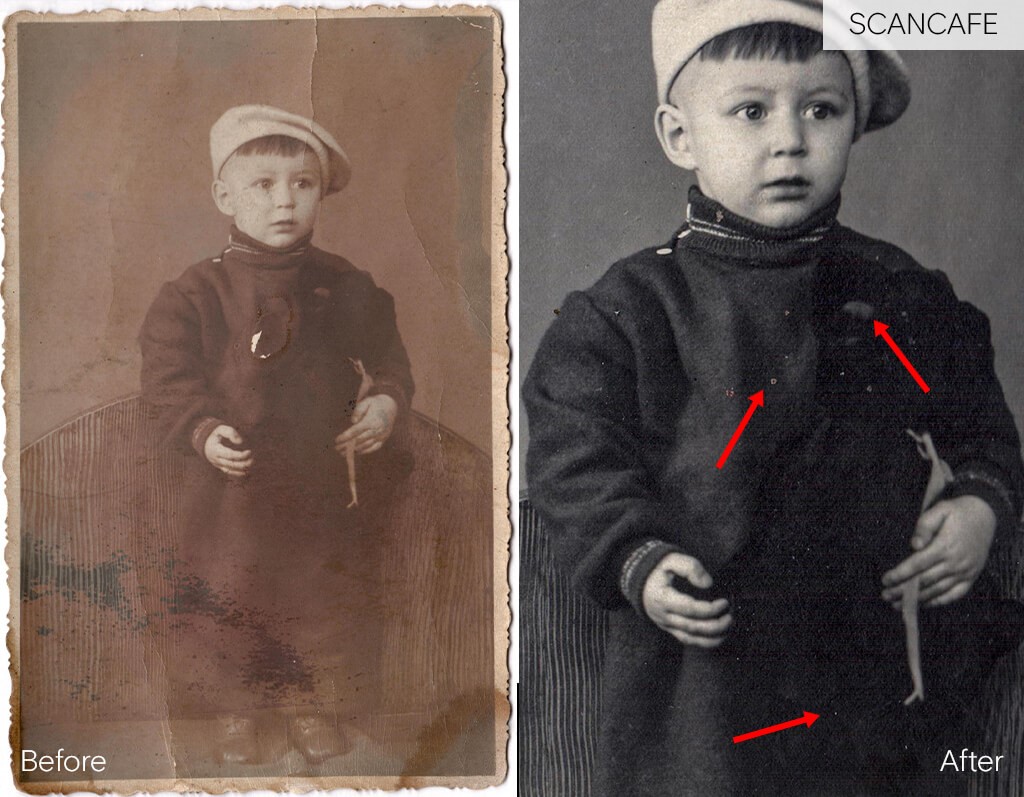
ScanCafe is a photo digitizing service that scans negatives, slides, photographs, video footage and offers photo restoration services. Since they have a narrow specialization, we expected that this service would provide much better results. It turned out to be a rather average service.
Turnaround: The turnaround time is quite long, we received the photo in 10 days, which is much longer than what other services offer.
Repair Services: The company offers three types of editing services: basic, medium and advanced. The price for the basic type is very low, which pleasantly surprised me. However, after studying their website, we found out that the basic package includes only work with colors and correction of subtle blemishes.
![]()
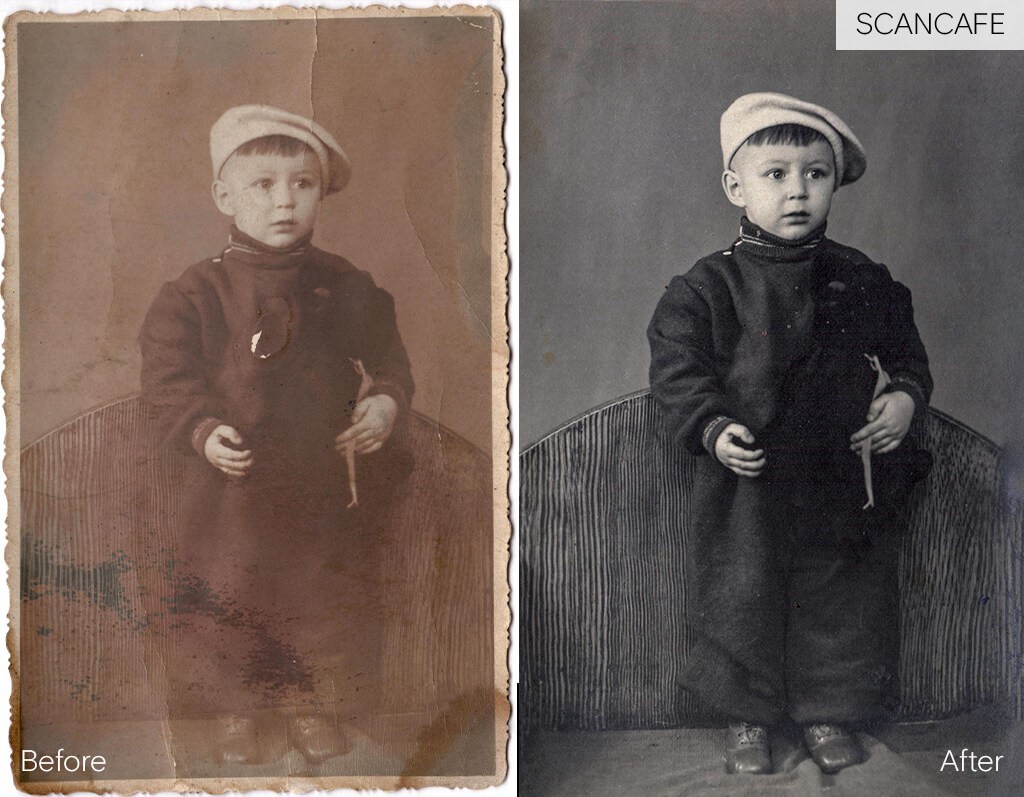
Final result: We were not satisfied with the results. We expected much more from the company that specializes in this sort of editing. First, they did not correct all the flaws. There are tons of stains and dust they left untouched.
Considering the turnaround time, we expected to see a perfect picture. Secondly, the image is so grainy that you can’t see any details. Even an amateur would have corrected those imperfections easily. This image needs further restoration, which is not what you want when you pay for any services.
Summing Up: We do not recommend using this service if you expect high-quality results and do not want to waste money.