Instructions on how to connect the amplifier with a simple TV

The connection of the amplifier to the TV not only brings louder sound, but also helps to create the most extreme, vibrant and authentic entertainment space for users. Below, WebTech360 will introduce you to some of the most popular ways to connect TVs and amplifiers today!

Use AV cable to connect TV and amplifier

AV cable line, also known as composite cable, is used to support the transmission of audio through two red and white audio wires. With two wires with different colors, the installation makes connecting the TV to the amplifier simpler and easier.

To connect the TV sound to the amplifier, do the following 2 steps:

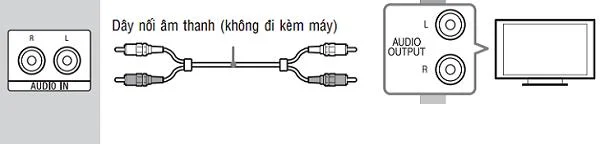
Step 1: Plug 2 cables into the AUDIO OUT port (red and white ports) on the TV. Note to remember to plug each wire with the corresponding port color.

Step 2: The 2 remaining wires at the opposite end plug directly into the amplifier with the corresponding color, and the connection is complete.
Instructions on how to connect the amplifier with a simple TV

Use AV cables that are suitable for long production TV equipment

See more:

>>  "Solve" the TV ports 

>> Some common connection ports on stereo systems, speakers

Use an HDMI cable to connect the TV to the amplifier

Using an HDMI cable is a way to connect the TV to the amplifier used by many people. However, the required condition for these 2 devices to connect together is that both the TV and the amplifier have HDMI (ARC) ports so that the output of the sound to the speaker is done correctly. Therefore, for devices using HDMI ports, it is usually not possible to connect the amplifier to the TV.

>> How to buy HDMI cable for TV?

>> How to connect a laptop to a TV via HDMI

To make the connection, do the following 2 steps:

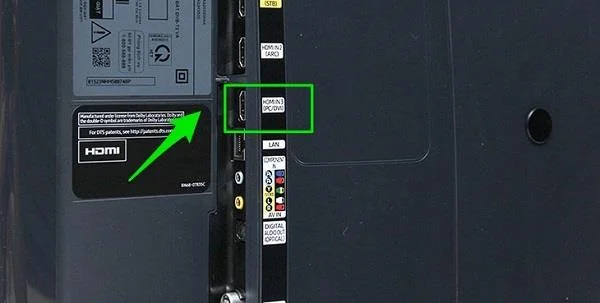
Step 1: First, determine the correct HDMI port on the TV, followed by the proceeding to plug one end of the HDMI cable into the previously searched port.

Step 2: Plug the other end of the HDMI cable into the amplifier's HDMI port for the connection to be completed.

Instructions on how to connect the amplifier with a simple TV

Connecting via HDMI is the most common method

Use optical cable

Optical cable is a digital audio connection cable, also known as an optical cable. With the wire shell structure painted with Duraflex compound to help the signal not be disturbed to the outside, the wire allows the TV to output sound to the speaker or amplifier in a vivid and realistic way.

>>  [Answer] Everything about amp symbols you should know

Instructions on how to connect the amplifier with a simple TV

Use optical cable

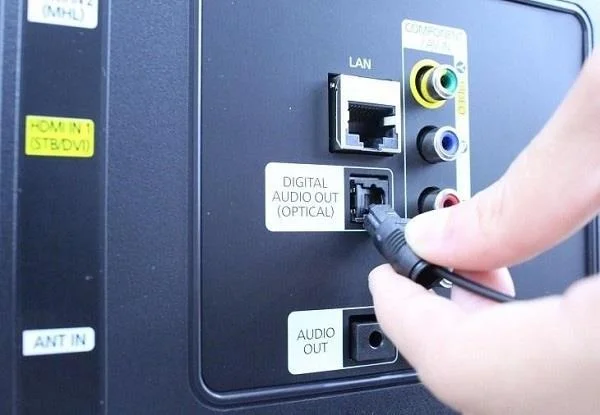
Nowadays Optical connection is becoming more and more popular on new generation smart TVs because it brings many advantages. Optical port on the TV has a square jack, usually denoted DIGITAL AUDIO OUT (OPTICAL).

The steps to connect include:

Step 1: Connect the Optical cable to the DIGITAL AUDIO OUT (OPTICAL) port on the TV of each family.

Step 2: For the other end of the cable should be plugged into the correct position at the amplifier.

However, nowadays, not all TV equipment or amps are integrated with Optical ports, so before you want to connect the TV and amiply via Optical port, you need to find out whether your TV model supports connection or not.

Above are 3 simple ways to connect amply with TV that are most commonly applied. Depending on the characteristics of each TV line, you can choose for yourself a way to switch the sound from the TV to the most suitable amplifier, bringing a true and lively entertainment space for your family after each meal. hey.

See more:

>> Instructions on how to connect a phone to a TV via bluetooth to play music

>> User guide for connecting TV to phone by MHL

>>  What is the best amplifier today? Should buy amply brand?
Leave a Comment

How to Transfer Microsoft Edge Bookmarks to a New Computer

How to Transfer Microsoft Edge Bookmarks to a New Computer

Master how to transfer Microsoft Edge bookmarks to a new computer with foolproof methods: sync via Microsoft account, export/import HTML, or cloud backups. Quick, safe steps for seamless migration.

Solving Microsoft Edge Microphone Background Noise

Solving Microsoft Edge Microphone Background Noise

Tired of annoying Microsoft Edge microphone background noise ruining your calls? Discover step-by-step solutions to solve Microsoft Edge microphone background noise for flawless video conferences and recordings in Edge.

How to Fix Microsoft Edge Extensions Crashing 2026

How to Fix Microsoft Edge Extensions Crashing 2026

Tired of Microsoft Edge extensions crashing? This step-by-step 2026 guide delivers quick, proven fixes to restore stability. Update, reset, and troubleshoot like a pro—no tech skills needed!

Solving Microsoft Edge Error 404: Page Not Found Troubleshooting

Solving Microsoft Edge Error 404: Page Not Found Troubleshooting

Stuck with Microsoft Edge Error 404 Page Not Found? Follow our proven step-by-step troubleshooting guide to fix it fast, clear cache, reset settings, and browse without interruptions. Get back online now!

Solving Microsoft Edge HTTP Error 500: Internal Server Problem

Solving Microsoft Edge HTTP Error 500: Internal Server Problem

Struggling with Microsoft Edge HTTP Error 500? Discover step-by-step fixes for Internal Server Problems, from cache clearing to advanced troubleshooting. Get back online fast!

Troubleshooting Microsoft Edge DirectX Runtime Compatibility Errors

Troubleshooting Microsoft Edge DirectX Runtime Compatibility Errors

Struggling with Microsoft Edge "DirectX Runtime" compatibility errors? Discover step-by-step fixes to resolve crashes, video glitches, and performance issues in Edge. Get back to smooth browsing today!

Troubleshooting Microsoft Edge SSL Protocol Errors (ERR_SSL_PROTOCOL_ERROR)

Troubleshooting Microsoft Edge SSL Protocol Errors (ERR_SSL_PROTOCOL_ERROR)

Struggling with ERR_SSL_PROTOCOL_ERROR in Microsoft Edge? Discover step-by-step fixes for SSL protocol errors, from clearing cache to advanced resets. Get back online fast with our ultimate guide.

How to Fix Microsoft Edge Script Error When Printing

How to Fix Microsoft Edge Script Error When Printing

Tired of Microsoft Edge "Script Error" ruining your prints? Follow our proven, step-by-step guide to fix it quickly—no tech expertise required. Works on the latest Edge versions for seamless printing.

How to Disable Microsoft Edge WebView2 Runtime Permanently

How to Disable Microsoft Edge WebView2 Runtime Permanently

Master how to disable Microsoft Edge WebView2 Runtime permanently and reclaim your PC resources for epic gaming. Step-by-step methods to stop background drain, boost FPS, and keep it gone forever – perfect for gamers!

How to Fix Microsoft Edge Too Many Redirects Error

How to Fix Microsoft Edge Too Many Redirects Error

Struggling with Microsoft Edge "Too Many Redirects" error? Discover step-by-step fixes to resolve ERR_TOO_MANY_REDIRECTS instantly. Clear cache, reset settings, and more for smooth browsing. Updated for latest Edge versions.