Keep Writer Revisions Visible When Exporting to DOCX
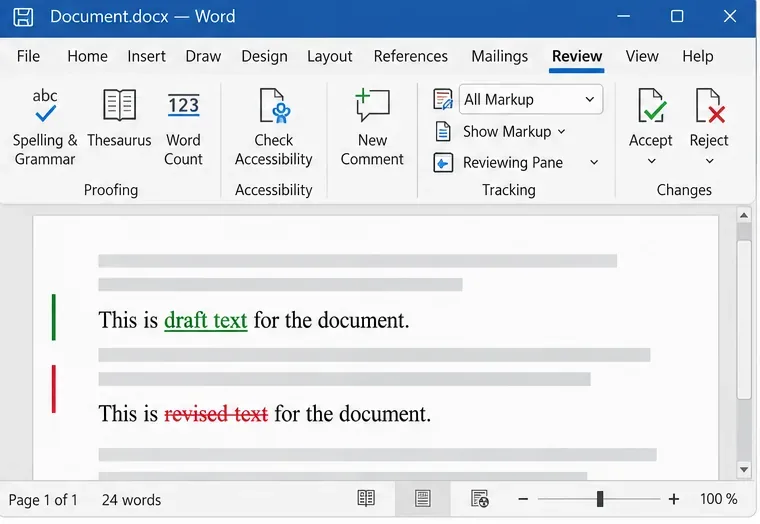
Track edits in Writer, preserve an editable ODT source, and check the exported DOCX in Word before sharing it.
Booking car shipping online is more convenient than ever, but that ease can sometimes lead to costly mistakes. Whether you are relocating, buying a vehicle out of state, or sending a car to a loved one, taking a few extra steps during the booking process can save time, money, and stress. Here are some of the most common mistakes to avoid when arranging car shipping online.
It is tempting to go straight for the lowest quote, especially when comparing multiple providers. However, extremely low prices can be a red flag. Some companies cut corners, have hidden fees, or lack proper licensing and insurance. Always check reviews, verify credentials, and make sure the company is registered with the Department of Transportation. A slightly higher price often comes with better service and peace of mind.
Many customers do not realize there are different types of car shipping services available. Open transport is more affordable but exposes your vehicle to weather and road debris, while enclosed transport offers greater protection at a higher cost. Failing to choose the right option for your vehicle’s value or condition can lead to regret later. Make sure you understand what you are paying for before confirming your booking.
Another common mistake is assuming that all car shipping companies provide the same level of insurance. Coverage can vary significantly between providers. Always ask for proof of insurance and clarify what is included. Knowing exactly what is covered in case of damage will help you avoid unpleasant surprises.
Timing plays a big role in car shipping. Waiting until the last minute can limit your options and drive-up costs. Carriers often plan routes in advance, so booking early gives you access to better pricing and scheduling flexibility. If you have specific deadlines, it is especially important to plan ahead.
When requesting quotes, accuracy matters. Providing incorrect details about your vehicle, such as size, weight, or operability, can lead to price changes or delays. Be upfront about any modifications or issues with the car. This ensures the quote you receive is realistic and prevents complications during pickup.
Many people assume car shipping is always door to door, but that is not always the case. Some locations may require meeting the carrier at a nearby accessible point. Failing to confirm these details in advance can lead to confusion on the day of pickup or delivery. Always discuss logistics with the transporter to avoid last-minute surprises.
Relying on a single quote limits your perspective. Comparing several providers helps you understand the average market rate and identify any outliers. It also gives you a better sense of service quality, communication, and reliability.
Using a reputable platform can simplify the process and connect you with vetted carriers. For example, when arranging San Francisco vehicle transport, exploring options like San Francisco car shipping can help you compare quotes and choose a reliable provider with confidence.
Booking car shipping online does not have to be complicated, but it does require attention to detail. By avoiding these common mistakes and taking the time to research your options, you can ensure a smoother, safer experience from pickup to delivery.
Track edits in Writer, preserve an editable ODT source, and check the exported DOCX in Word before sharing it.
Follow SUSE’s SP7 procedure to enable FIPS mode, reboot safely, verify the active policy, and check whether your compliance requirement calls for validated modules.
Compare YaST and cryptsetup for a new encrypted SLES data volume, choose LUKS1 or LUKS2, and verify unlock and mount behavior safely.
Create, refine, and verify a least-privilege AppArmor profile on SLES 15 SP7, with a clear note on SLES 16’s SELinux default.
Set up RMT on SLES 15, mirror entitled repositories, and verify HTTPS registration and package access from a test client.
Connect SLES 15 to AD with YaST’s SSSD-based logon management, then verify directory lookup, domain login, and Kerberos tickets.
Set up the right Live Patching path for SLES 16.0 or 15 SP7, apply eligible kernel fixes, and confirm what is active without confusing it with a reboot-required kernel update.
Load a custom SLES 15 kernel module without disabling Secure Boot. Match the running kernel, sign the .ko file, enroll a MOK key, and verify loading.
SLES 15 SP5 can migrate online to SP6, but each node must reboot. Use a tested rolling upgrade or blue-green cutover to keep workloads reachable.
Use SUSE’s supported STIG profile to scan SLES 15, test remediation, review remaining findings, and retain assessment evidence.








