In recent years, along with the explosion of the industrial revolution 4.0, terms such as artificial intelligence (AI), machine learning and deep learning are gradually becoming popular. and become concepts that citizens of the 4.0 era must grasp.
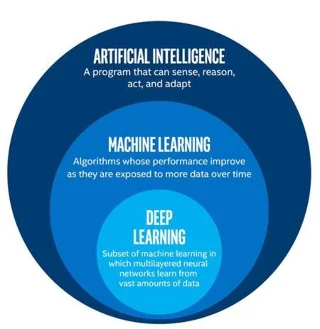
The relationship between these three concepts can be explained by thinking of them as circles, where AI – the earliest idea – is the largest circle, followed by machine learning – the concept that comes after. , and finally deep learning – which is driving the current AI boom – is the smallest circle.
Building an AI system is of course extremely complicated, but understanding it is not so difficult. Most of the current artificial intelligences are just really good guessing machines (similar to our brains). You give the system a group of data (such as the digits 1 through 10) and ask the system to create a model (x + 1, starting at 0) and make predictions. (The next number will be eleven). There's no magic, this is what the human brain does every day: use what we know to make guesses about the unknown.
What makes AI different from other computer programs is that instead of having to create specific programs for each case, we can completely teach AI (machine learning), and it also has the ability to automatically deep learning. These three concepts can be basically defined as follows:
Artificial Intelligence (AI): a machine that can mimic human behavior and thinking.
Machine learning: An AI feature that allows experts to train the AI to recognize data patterns and make predictions.
Deep learning: A small technique of machine learning, allowing machines to train themselves.
What is AI (Artificial Intelligence)?

AI can be defined as a branch of computer science that deals with the automation of intelligent behaviors. AI is a part of computer science, and therefore it must be based on sound, applicable theoretical principles of the field. Simply put: it is the intelligence of machines created by humans. This intelligence can think, think, learn, ... like human intelligence. Process data at a larger, more scale, systematic, scientific and faster level than humans.
However, at present, AI technology is still very limited. For example, Alexa – a great housekeeper, one of the most popular icons of artificial intelligence applications, but still cannot pass the Turing test.
In short, what we are doing with AI today is in the concept of “Narrow AI”. This technology is capable of performing specific tasks in a similar way to, or better than, humans. Examples of “narrow AI” in practice include Pinterest's image classification technology or facial recognition to tag friends on Facebook.
These technologies represent some aspect of human intelligence, but how can that be? Where does that wisdom come from? Let's go to the next circle: machine learning.
What is machine learning?

Machine learning – an approach of AI
Machine Learning is a broad term that refers to the act of teaching a computer to improve a task it is performing. More specifically, machine learning refers to any system where the performance of a computer when performing a task gets better after completing that task many times. In other words, the most basic ability of machine learning is to use an algorithm to analyze available information, learn from it, and then make a decision or prediction about something related. Instead of creating software with detailed instructions and actions to perform a specific task, computers are "trained" using large amounts of data and algorithms to learn how to perform the task. .
Without machine learning, current AI would be pretty limited because it gives computers the power to figure things out without being explicitly programmed. As an example of a type of machine learning, say you want a program to be able to identify cats in pictures:
- First, you give the AI a set of cat characteristics for the machine to recognize, such as coat color, body shape, size, etc.
- Next, you feed some images to the AI, where some or all of the images may be labeled “cat” so that the machine can more effectively select cat-related features and details. .
- After the machine has received all the necessary cat data, it must know how to find a cat in a picture – “If the image contains certain X, Y, or Z details, there is a 95% chance of finding a cat in a picture. Maybe it's a cat."
In general, the application of machine learning today is extremely popular and the usefulness is undisputed.
What is deep learning?

Deep learning – a technique of machine learning
It can be said that up to now, AI has achieved a lot of great strides. Think of it as a kind of machine learning with deep “neural networks” that can process data in a similar way that a human brain can. The main difference here is that humans won't have to teach a deep learning program what a cat looks like, but just give it all the necessary pictures of cats, and it will figure it out on its own. , self learning. The steps to do are as follows:
- Give the machine a lot of pictures of cats.
- The algorithm will check the image to see the common features and details between the images.
- Each image will be decoded in detail on many levels, from large, general shapes to smaller and smaller tiles. If a shape or lines are repeated many times, the algorithm will label it as an important property.
- After analyzing enough of the necessary images, the algorithm now knows which patterns provide the strongest evidence of cats, and all the humans have to do is provide the raw data.
In short: Deep learning is a type of machine learning in which the machine trains itself. Deep learning requires a lot more data input and computing power than machine learning, but it has already begun to be implemented by big tech companies like Facebook and Amazon. Among them, one of the most famous names in machine learning is AlphaGo, a computer that can play Go against itself until it can predict the most accurate moves enough to beat. many world champions.
Conclude
Deep learning has enabled the application of many real machine problems while expanding the overall field of artificial intelligence. Deep learning disrupts the ways humans work by making all kinds of assistive machines workable, close to or identical to humans. Driverless cars, better health care… All are realized in this day and age. AI is the present and future of the world. With the help of deep learning, AI can realize the sci-fi dream that we have imagined for a long time.