Drawing anime by hand without tools is very difficult, so you need to be fully prepared with the most basic skills to create a stylish, fashionable face while still looking cute.
Drawing detailed anime for beginners will start with the most basic strokes, we just need to grasp these basic strokes and we will somehow be able to shape the anime face in your own way. . There are many different ways to draw anime images, but basically there will be certain drawing methods to create anime images that are closest and most true to Japanese cartoons. Below are detailed and simple instructions on how to draw anime for beginners.
With beautiful graphic design, diverse and attractive content, anime has quickly captured the hearts of many children and teenagers around the world. It even creates interesting trends and trends.
Most of the characters in anime have cute looks with big, round, sparkling eyes, so they are very popular with teenagers, especially girls who like cute styles. They want to draw their own anime people or comic book characters in this style. Understanding that, the article below will guide you on how to draw simple anime for beginners .
How to draw simple anime characters
Draw the anime character's head and face
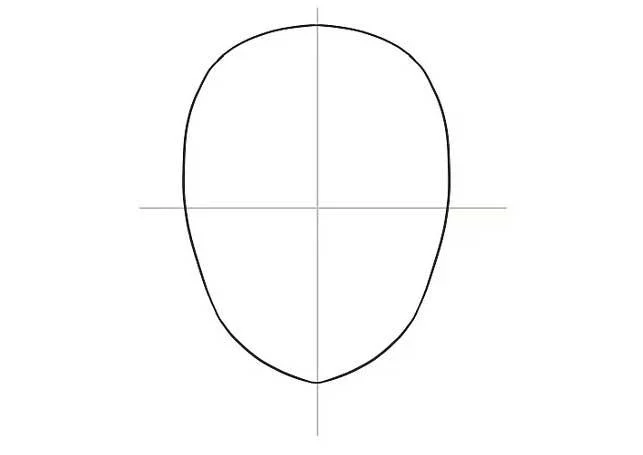
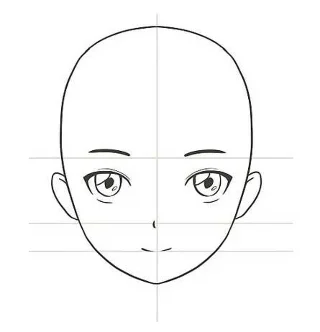
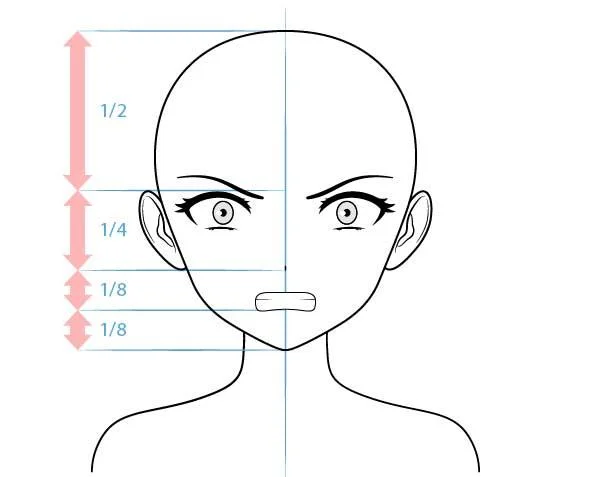
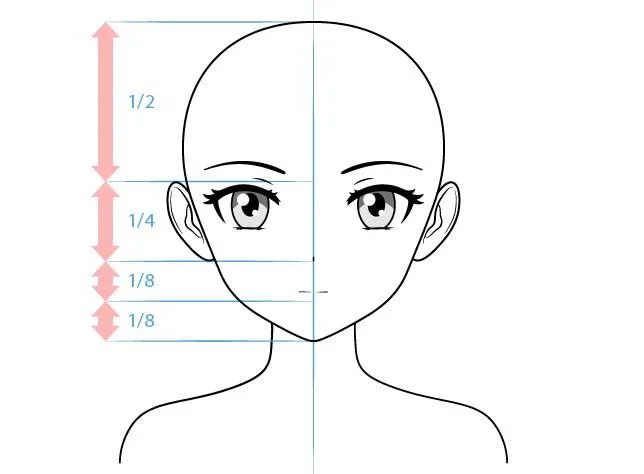
1. Draw an oval and divide it into 4 parts

This will be the basic layout for the anime character's head. The proportions don't have to be exact, but the oval should be narrower at the bottom because that will be the chin. Once the oval is complete, draw a horizontal line through its center. Then, draw a vertical line through the center of the shape & intersecting the horizontal line. Next, you will use these lines as a guide to draw your facial features.
If you want your character to have a larger face, widen the bottom of the oval and make it just a little smaller than the top. If you want your character's face to be slim, draw the lower part of the oval smaller than the upper part. There is no universal facial standard for all anime characters, so feel free to experiment with facial shapes until you achieve satisfactory results.
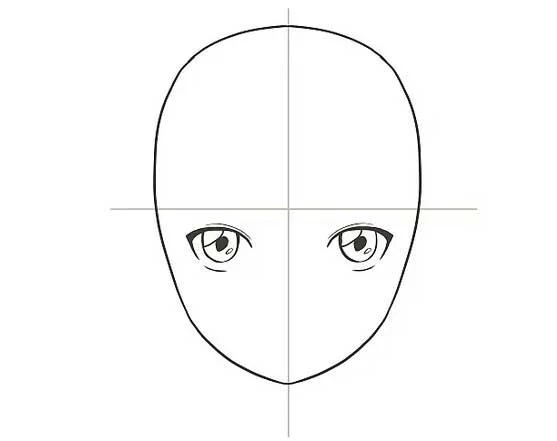
2. Draw the eyes below the horizontal line

The eyes of Japanese cartoon characters are often larger than normal, accounting for about 1/4 to 1/5 of the height of the face. To draw the eyes, start by drawing a thick upper lash line under the horizontal line on one side of the vertical line. Then, draw a downward-facing semicircle below the upper lash line and draw a black pupil in its center. Next, draw a narrow horizontal line under that circle to form the lower eyelid. Finally, shade the circle around the pupil, leaving some white space so it looks like light is reflecting in the character's eyes. Do the same for the other eye on the other side of the vertical line.
Tip: Adjust the shape and size of the eyes depending on whether you are drawing a male or female anime character. For female characters, the eye shape is usually higher and rounder, adding a bit of thick eyelashes outside the upper eyelid line. Male characters' eyes are usually shorter and smaller.
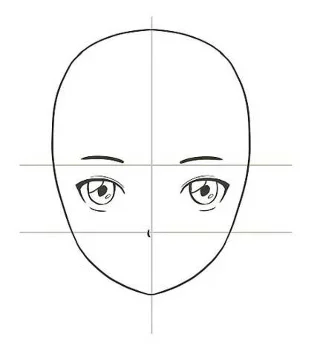
3. Outline the eyebrows on a horizontal line

Draw a long, downward curve for each eyebrow. Draw them slightly longer than the upper lash line of the eye. Then, highlight the beginning of the eyebrows in the center of the face.
If you're drawing a female anime character, draw the eyebrows a bit thinner. For male characters, draw thicker eyebrows to increase the masculinity of the face.
4. Add the nose between the horizontal line and the chin

The delicate noses of anime characters are only detected when you view the character from the side. To shape the nose, draw a short vertical line along the center of the face at a point halfway between the horizontal line and the chin. Draw this line longer if you want the character to have a big nose.
- The nose is the smallest point on a character's face.
- The nose will overlap the vertical line you drew. To see it more clearly, color it darker than the vertical line or erase the line around the nose.
- Male characters sometimes have sharper nose lines but not always. If you want your character's nose to stand out, draw a short horizontal line below the vertical line representing the bottom of the nose. You can also draw a triangular shadow on one side of the nose so it looks like the light is hitting the character from the side.
- For certain anime styles like chibi, you don't even need to draw a nose.
5. Draw the mouth between the nose and chin

Similar to the nose and mouth of anime characters, they are also simple and sophisticated. To shape the mouth, draw a horizontal line as long as the distance between the eyes. Don't worry about how to draw lips. The mouth is the second smallest feature on the face after the nose.
Curve the line up if you want the character to smile or down if you want to indicate boredom.
If you want your character to smile and show their teeth, draw an upward curve below the horizontal line you drew for the mouth. The space between the curve and the horizontal line is about half the height of the mouth. That gap will be the character's teeth.
6. Draw the ears

If you want your character to have long hair that covers their ears, skip this step. However, if designing a character with short hair, draw a small oval on each side of the head, trying to balance the two sides. Place the top of the ear in line with the horizontal line running through the center of the face, the bottom of the ear in line with the bottom of the nose. Then, draw the earlobes inside both of the ovals you just drew.
Feel free to try different sizes for your character's ears if you want them larger or smaller.
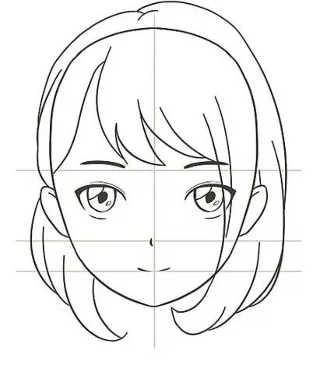
7. Draw hair on the character's head

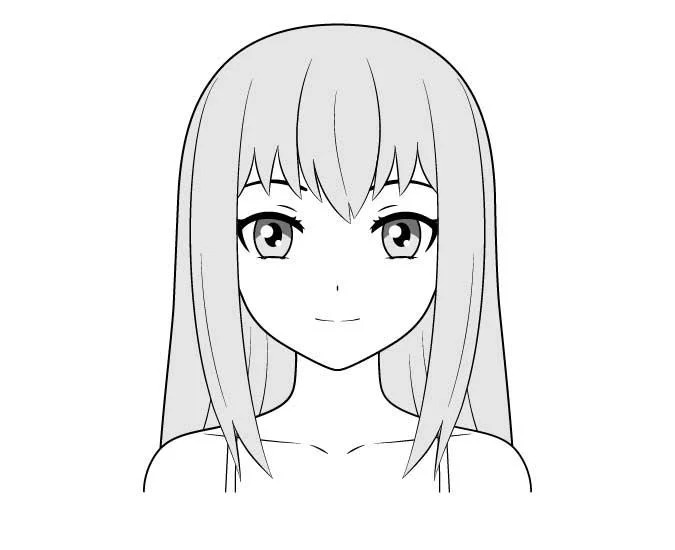
You can choose the hairstyle for your character, but in general, anime hair usually has pointed ends and is divided into many different parts. You can draw short, bouncy hairstyles, short hairstyles or long, shiny hairstyles. Whatever hairstyle you choose, avoid drawing individual strands of hair. Instead, draw large sections of hair, about 4 to 5 large curls at the ends.
If the character's hair is long, you can draw two symmetrical braids on both sides of the head with a pointed end. Or you can draw your hair in a round bun at the top of your head. Additionally, you can add bangs to your character by drawing 3 or 4 different hair sections on the forehead.
For short hairstyles, you can draw 3 or 4 different hair sections, swept to one side of the character's forehead. Or draw a hairstyle without the forehead and draw a few lines running from the hairline to the back of the head so it looks like the hairstyle is being combed back. Besides, you can also draw a chin-length bob hairstyle, divided into several thick parts as shown.
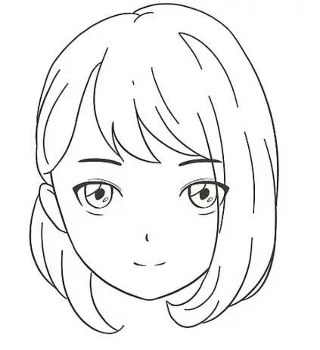
8. Erase the horizontal and vertical guide lines you originally drew

Erase them carefully so as not to accidentally remove any facial features. Ideally, you should use a small eraser when performing this task. Once you've erased both lines, you've drawn the complete head and face of the anime character.
Sketch the body of the anime character
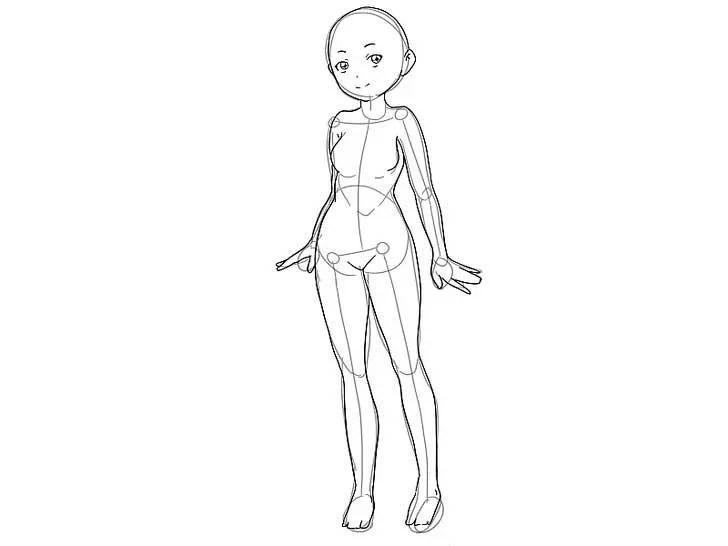
1. Draw the body layout of the stick-shaped character

Use straight lines for the arms, torso, and legs. The arms and torso are about the same length, the legs are about 1/3 longer. Then, draw triangles or ovals for the arms and legs. The hand is 1/5 the length of the arm, the foot is 1/6 the length of the leg.
- To get the right proportions, draw the stick figure layout about 7 times the height of the character's head.
- The arm line starts about 1/5 of the way you drew down for the body.
- Draw an outline of the character's body in every pose you want. For example, if you want a character to sit, draw their legs slightly bent. If you want the character to wave, draw one arm curved.
2. Sketch the general shape of the character's body

Follow the stick lines you sketched above using rough sketches of the character's arms, torso, hips, and legs. No need to worry too much about accuracy in this part. You just need to shape the body parts using basic shapes.
- Draw ovals for the upper and lower arms and legs, then draw a circle at each joint for the knees and elbows. To scale, draw the same length and size for the upper and lower arms. Draw the upper leg thicker than the lower leg.
- For the body, draw a quadrilateral that is wider at the top and narrower at the bottom. The top wide corners will become the character's shoulders.
- For the hips, draw an oval through the intersection of the torso and lower legs.
- Anime characters are usually tall and skinny, but you can experiment with different heights and body shapes.
3. Connect and refine general shapes

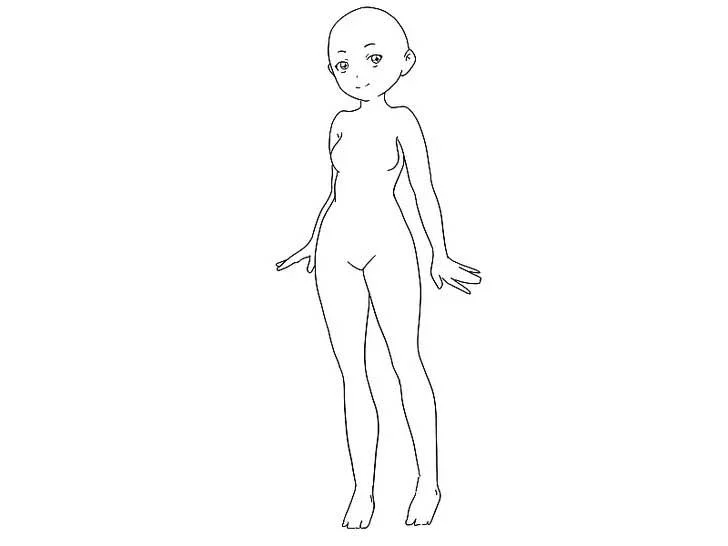
Trace the outer edges of the character's body for a seamless outline. Now let's start refining different parts of the body to make them more realistic. Once completed, you will have a detailed, complete sketch of the character's body with clearer lines.
To connect and adjust the legs, draw around the outlines of each shape, creating a pair of legs (oval for upper & lower legs, circle for knee and foot drawings). Smooth out the lines to make the legs look more realistic.
For the upper body, do the same. Round the corners of the torso for the shoulders and draw two curved lines up from the center of the torso for the neck. Then, connect the drawn shapes to attach the hips to the torso and upper legs.
Tip: If drawing a male character, expand the chest, shoulders, and waist. If drawing a female, narrow the shoulders & waist, widen the hips and round the bust.
4. Erase the stick lines and drawn shapes

Erase carefully to remove any unnecessary outlines. In the end, you will have a seamless, neat body shape as shown above.
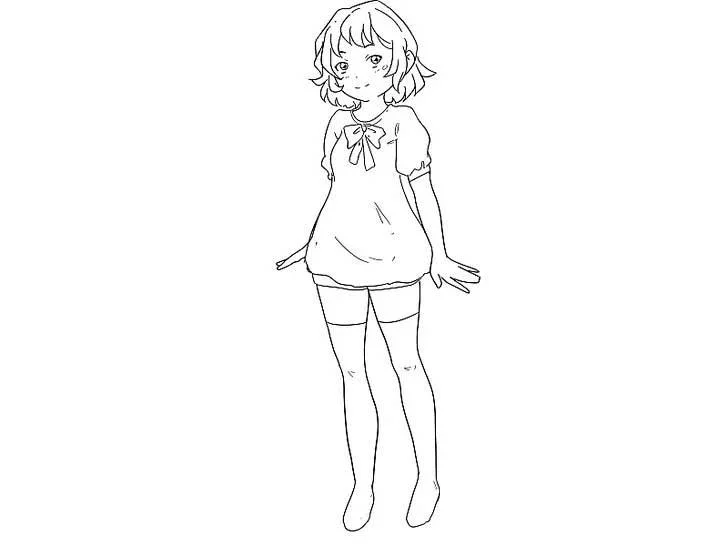
5. Add clothes to the character

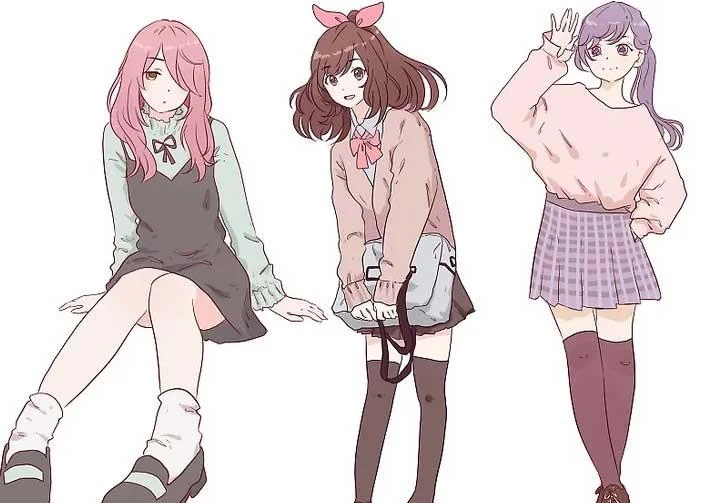
Like drawing the head and body, you need to sketch the outline first and then go into details. You can choose any outfit for the character from uniforms to dresses or traditional costumes.
How to draw anime characters with different expressions
How to draw a smiling female anime character
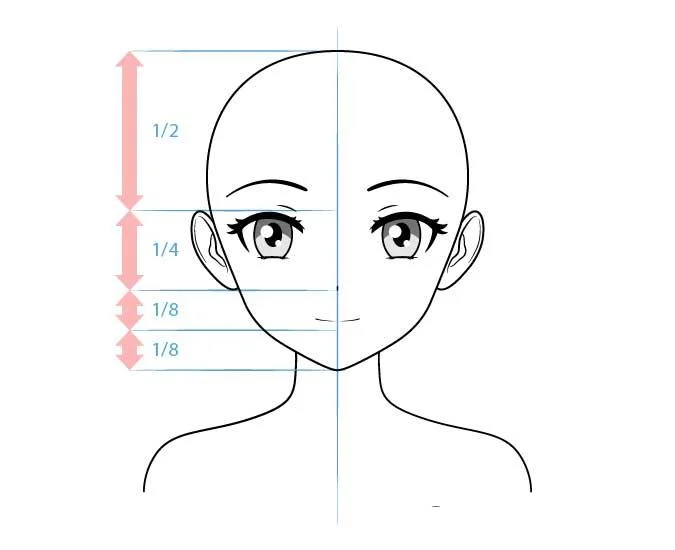
How to draw anime female characters smiling often have the following expressions:

For a smiling face, draw the eyes a little narrower, reverse the curve from the lower eyelid in its neutral state, and draw the mouth a little wider.

How to draw a happy female anime character
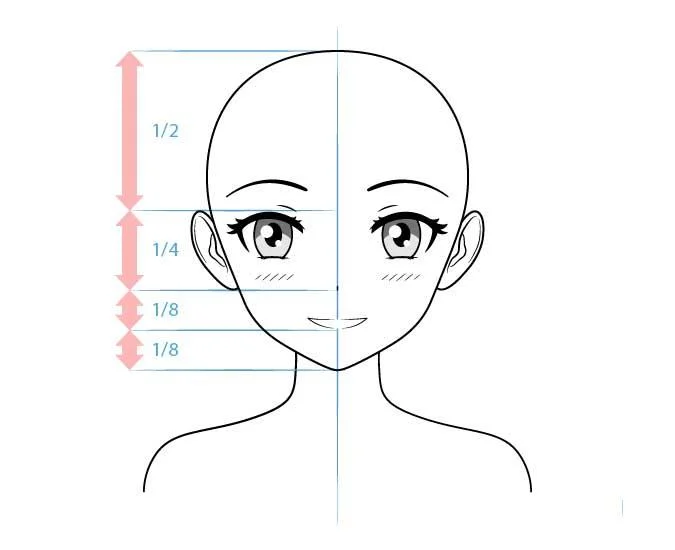
A happy facial expression resembles a smile but is often drawn with a more clearly defined mouth.

For a happy face, you can draw similarly to the instructions above but create a more open mouth with white teeth and add a little blush just below the eyes.
How to draw female villain anime characters
The antagonist or main character is the evil person who always directly confronts the male/female protagonist. This type of character usually has very few good facial features. However, not all female villains are bad. You can draw them beautiful but still exude evil.
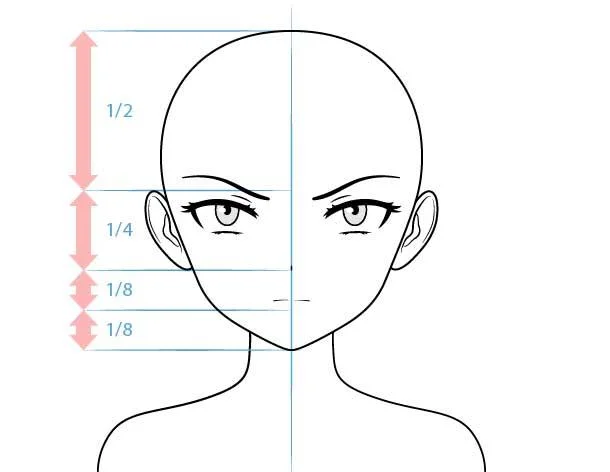
How to draw beautiful but mean anime girls is not difficult. Here is an example:

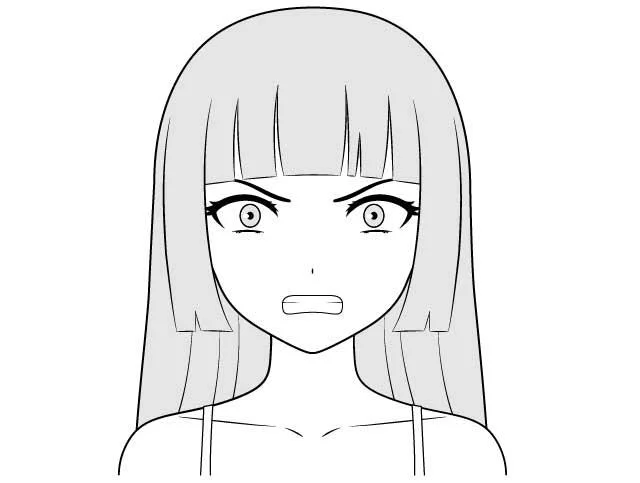
Draw small pupils and irises with the upper eyelid covering part of the eye. Don't add a shadow to the top part of the iris (if you don't want the character to have a staring look). You should also draw less highlights in the eyes and make them a bit smaller to give the villain a less friendly look. Draw the lower eyelid and mouth in an inverted (downwards) curve.
Position the lower eyebrows in a wave shape so the face looks frowning or upset. You can draw Hime Cut hair, which helps add personality to evil female characters in Japanese anime.
How to draw anime villains, going crazy
To create an evil anime character that is crazy or angry, sometimes you have to draw the irises and pupils of the eyes very small so there is a little white space around them.


Draw the eyebrows slightly lower in a wave shape like the previous example but with their inner tip slightly raised. Again, don't add shadow to the irises. Instead, focus only on the necessary reflexes.
Draw the mouth with exposed teeth, making it look like it's smiling.
You'll end up with an anime face with crazy looking eyes and a grinning mouth. The perfect expression for a villain (although it might be a bit difficult to pull this off in real life).
How to draw angry anime female villain
Angry expressions are quite common in characters playing evil roles in Japanese cartoons, especially when plans fail.


- To draw an angry face, first lower the upper eyelid and raise the lower eyelid (draw in an inverted curve). Next, draw small pupils and irises, without shading or shading like the previous drawing.
- Locate the eyebrows downwards like a wavy line.
- Draw the mouth like a bean shape with the two edges of the lips curving slightly downward, revealing the teeth.
How to draw anime Tsundere


For those who don't know, a tsundere is a character who appears bad on the outside but is actually very kind. These types of characters often have trouble expressing true emotions and are often shy and embarrassed when doing so.
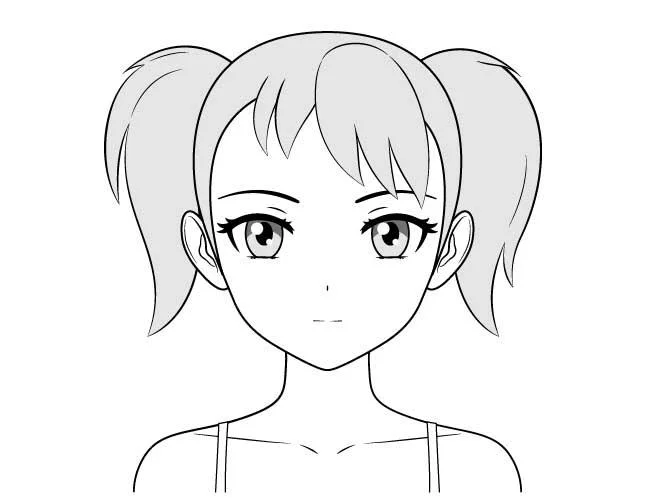
As for a normal tsundere expression, the simplest anime drawing for this character has many similarities with a normal girl.
Some small tweaks you can make are to draw the upper eyelid a little lower, and the mouth smaller so the character smiles less.
You can also draw the irises and pupils smaller than the average female anime character. This action reduces the friendliness a bit but still ensures the image of a schoolgirl or simple girl.
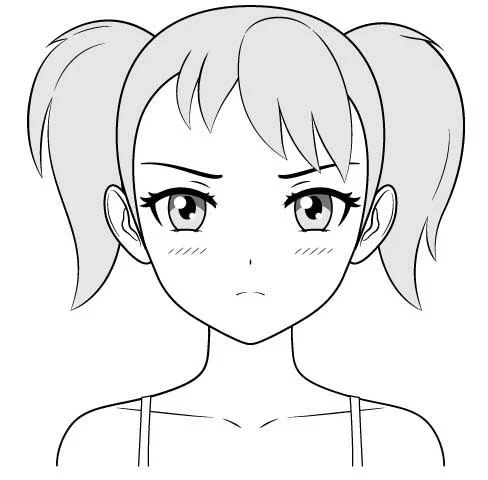
A ponytail can be a "safe" suggestion when drawing tsundere-type female characters. This hairstyle gives the character a slightly more childish or immature appearance.
Drawing angry Tsundere anime


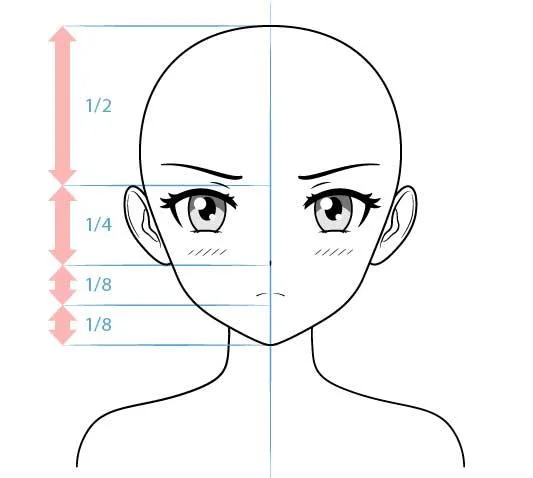
For an angry (slightly embarrassed) face, draw slightly squinted eyes and lowered eyebrows. Draw the mouth curving downwards. Finally, show off your rosy cheeks by drawing some evenly spaced stripes on both cheeks.
Above are instructions for drawing basic anime characters . Hope the article is useful to you.