Home
» PC Tips
»
Gameloop Stuck at 98% Loading – Fix 98 Error in Gameloop
Gameloop Stuck at 98% Loading – Fix 98 Error in Gameloop
I love playing Android games like PUBG & Call of Duty(COD) on my Windows 10 PC. Yesterday, I decided to play them on my PC, so I installed the Gameloop emulator.
Everything was good till that point, but while launching the Gameloop, It stuck at 98% loading. Then, I’ve decided to look online then I saw many people are having the same issue.
Here’s how you can fix the Gameloop 98% stuck issue on Windows 10 PC.
First, Tweak the Gameloop Emulator settings.
Secondly, Disable the virus while launching the Gameloop emulator. If it doesn’t work, then uninstall the Antivirus app.
Change the Gameloop Engine settings and delete the temporary folder.
Finally, Relaunch the emulator, and you will be able to use Gameloop without any loading issues.
Note: This is a small brief. Scroll down to read the complete step by step guide on how to fix 98 errors.
A Gameloop loading error is a result of multiple reasons. Apply the possible solutions below one by one and keep relaunching until you solve the error. Better still, follow these steps.
1. Disable your Antivirus
Gameloop loading 98 Error is typical in Windows 10/7/8 PCs due to the Windows defender inbuilt Antivirus. However, Windows 7 does not come with this Antivirus. Disabling the Antivirus is your first step.
Here’s how do you do it?
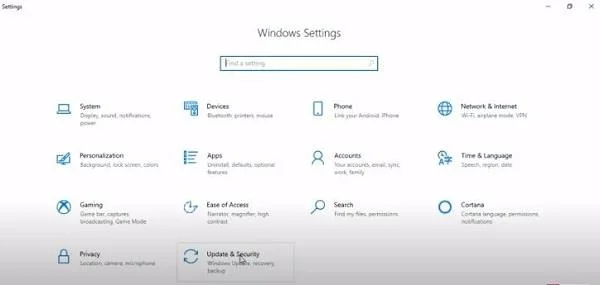
Click Windows icon and click Settings option (A page Windows Settings opens)
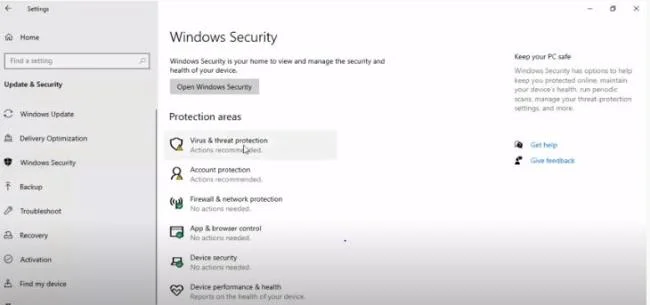
Click Update and Security and go to Windows Security.
Go to Setting >> Go to Update and Security
Click the Virus and Threat Protection option.
Select Virus and Protection
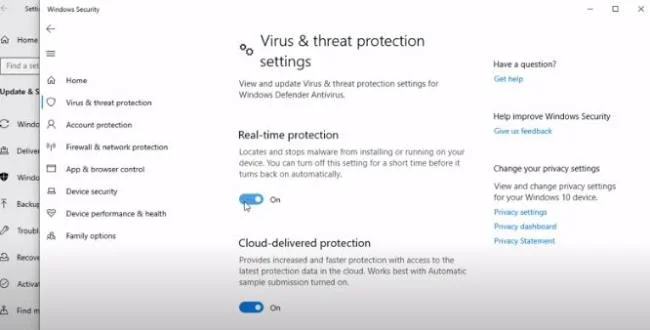
Click on the Manage Settings button at the bottom.
Deactivate services and options available like Real-Time Protection
Turn Off Real Time Protection
Restart your PC
Relaunch Gameloop
Gameloop should load fully. If the loading error persists, move to the next solution. Uninstall the Antivirus.
Download Gameloop for Windows 10
2. Uninstall Antivirus Software
Antiviruses protect your PC from impending threats such as malware. However, antivirus software does not know how to separate fun from a threat. Most antivirus software will prevent Android emulator from running.
If you ran Bluestacks for PUBG mobile games on Windows PC, expect an error loading the emulator. Therefore, you need to pause or disable the Antivirus. If this option fails, then you uninstall the Antivirus.
Follow these steps to uninstall Antivirus in Windows 10 PC,
Search and open Control Panel
Search for the Uninstall a Program tab
Scroll to the Antivirus you wish to remove
Right-click on the antivirus program
Click uninstall
Note: Always have another option of an Android emulator for PC and a different antivirus that can run alongside your Gameloop without halting or loading errors.
After installing Antivirus, try to relaunch Gameloop. If it launches, do not proceed with the other steps. If the Loading 98 Error persists, move to the next step, which is changing your Gameloop engine.
3. Change Gameloop Engine Settings
Tencent developers stated that optimized it to run on most computer devices and hardware. Nevertheless, the Gameloop emulator may not suit your CPU and graphics.
Changing Gameloop Engine settings could result in a successful relaunch.
So, how do you tweak engine settings?
Start Gameloop (It should be freezing after 98% loading)
Open Gameloop, but It should be stuck at 98%
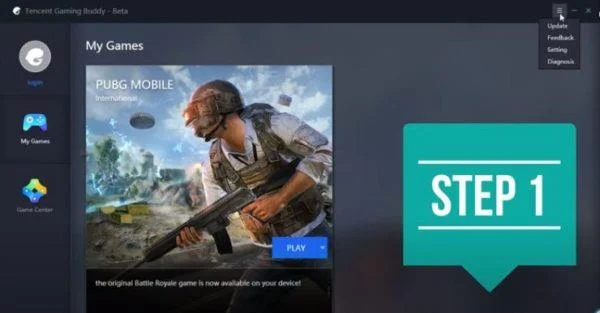
Click the “Menu” button before the”minimize icon” and click Settings
Click Menu Button at the top right corner and select Settings.
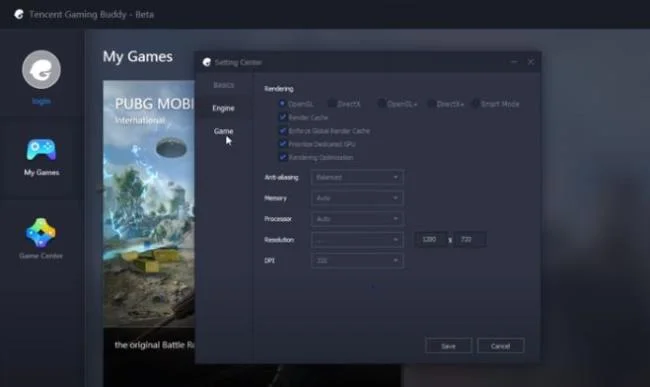
Under settings Center, there are three tabs, Basics, Game, and Engine.
Select Engine. (Here, you will see some options OpenGL, OpenGL+, Direct X, Direct X+, and Smart Mode.)
Note: Choose Open GL or Direct X if you are not sure which gaming mode is concurrent with your PC specifications.
Before you proceed, change the following options:
Enable the Render Cache option
Enable the Enforce Global Render Cache option
Be discreet when enabling Prioritize Dedicated GPU (only enable this feature when your GPU is a dedicated GPU like Nvidia or AMD.)
Enable Rendering Optimization button
Furthermore, tweak the following options
Make Anti-aliasing, Close
Set a Memory size slightly below the actual Ram of your PC
Select resolution (Remember, the game runs faster when the resolution is lower)
Select the best Dots Per Inch(DPI)-also the lowest DPI choice allows the game to run faster
Settings Center; Click Engine Select Engine (Choose Between OpenGL and DirectX)
Do not jeopardize fun in playing by choosing performance over the display quality or the vice versa. Choose a balanced option of the two.
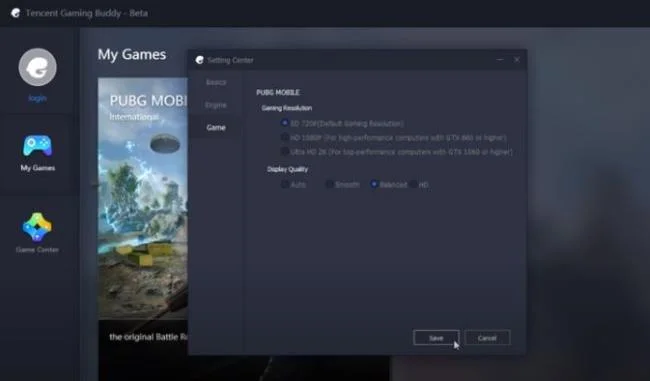
Remember, at the top, we talked about going to the “Settings Center” on your Gameloop. It brought us three options Basics, Game, and Engine, right? Now, click the Game tab and select SD or HD. Your choice depends on your system hardware.
Click “Save” once your customization concludes. (Customizations should be as below)
Settings Center; Got to Game Tab > Customize Gaming Resolution
Tip: Try each option separately and select the one that gives you the best display results.
Bottom line: Tweak Gameloop “Engine” and “Game” tab settings to concur with the hardware of your PC.
At this stage, try to reload your Gameloop Emulator. If it does not, proceed to the next step, which is to Delete Temporary Folder.
Delete Temporary Folder
Usually, Gameloop creates a temporary folder(temp folder) to store files and settings. These files are responsible for the flawless running of Gameloop. Moreover, they reduce the repetition of tasks. However, they may result in Gameloop loading issues.
Files could be damaged, virus-infected, or corrupted. You cannot open this folder to see the files. You have one subtle solution-to delete all of them, wherever they are.
Above, we talked about Gameloop creating a temporary folder. Your next question is probably, “where can I find the Gameloop Temp folder?”
Steps to Access and Delete Gameloop Temp Folder in Gameloop?
The temporary folder created by Gameloop is not easy to locate. Follows the steps below to access your Gameloop temp folder:
Open Gameloop and head to the Diagnosis option
Under the diagnosis options button, look for Path
Open path and select delete all files in Temp folder
Restart Gameloop and allow to load
If the loading is successful, then all the best in your gaming. If loading at 98% error persists, then carry out the next step. Remove and reinstall Gameloop.
Remove and Reinstall Gameloop
Now that you tried the above steps and they did not work, the options of removing and reinstalling Gameloop remains.
If you are certain that your PC meets all the requirements of a system compatible with the Gameloop Emulator. Moreover, ensure that every display driver is up to date, then go ahead. Start by uninstalling. Here’s how to do it?
Go to Control Panel
Search for Gameloop
Right-click on it
Click Uninstall a Program tab on the menu that shows
Wait for the uninstalling to conclude. Now, reinstall Gameloop following this procedure:
Download Gameloop Emulator for PC (Always download the latest version of Gameloop setup file)
Open the file and scroll to the installer file( in .exe format) and install as the screen instructs.
Note: Before starting the install, the installer downloads PUBG mobile APK.
Installation may take a while, usually because of your computer and Internet speed.
Pro Tip: Wait until the installation concludes. Keep yourself busy as you wait to avoid the temptation of interrupting the installation process.
Finally, run Gameloop and check whether the loading error is fixed.
If the 98% stuck error persists, talk to me through comments or contact us page and I will get back to you ASAP.
Sometimes this the 98% stuck error may not be the only problem you experience when loading Gameloop. Here are more Gameloop errors you may encounter and how to solve them.
Fix all other Gameloop Emulator Errors
As you enjoy your PC gaming on Gameloop previously referred to Tencent Gaming Buddy(TGB), some issues may surface. The issues could derail your gaming experience. It feels better when you can solve the problems. Here are some of those issues and how you can solve them.
1. Fix Gameloop Lagging Issues
Gaming is uncomfortable when you experience multiple glitches. Glitches result from hardware and software of your device not being concurrent with your emulator.
In case you run your Gameloop on a Windows 10 OS, some settings can help alleviate freeze issues. Customize those settings following this procedure:
Right-click the Gameloop icon and select Open File Location
Search for App Market, right-click it and open Properties
In this tab, click Compatibility
Scroll down to Compatibility mode (Here, you can select the preferred OS version depending on your PC)
Pro Tip: Press Run compatibility troubleshooter in case of any problems and choose recommended settings
Select Run program as administrator and click Apply
Bonus Tip: In case your PC runs on Windows 7 OS, download DirectX and install from the Internet
Usually, Windows 8/10 PC comes with pre-installed DirectX
Close every tab and re-open Gameloop and head to settings
Click the Engine tab. Choose OpenGL in case your PC has a good GPU and OpenGL+ in case you have a reliable graphics processor.
Alternative option: Choose DirectX for a good CPU and DirectX+ for your strong CPU.
Now, check all boxes if you have Prioritized GPU like AMD and Nvidia. Uncheck the boxes, if not.
Retain Close for Anti-aliasing and select a RAM lower than that of your PC and the preferred resolution.
Lastly, click the Game Tab, choose between SD or HD and select the smooth display quality
Hit Save and a enjoy a lag-free gaming experience
2. Gameloop Audio Issues/Mic Not Working/Fix Voice Chat
The audio problem is a common issue among most gamers. Here is a simple way through which you can fix your audio issues as below:
On Windows, go to Sound Settings. Under Sound Options, you will find App volume and device preferences.
Under preferences(above), you will see output and input in Default. Change input and output to the USB option.
Note: As you tweak these settings, ensure Gameloop is open and running in the background. You should be able to see Gameloop or Tencent Gaming Buddy listed under running apps.
Right-click Sound Icon, then click Open Sound, then Advanced options and uncheck every option under Exclusive Mode.
Note: In case the audio does not get to your speakers, check your drivers. If installed, turn on PUBG mobile, go to settings, then sound settings and increase the volume of media.
3. Fix Gameloop Keys Not Working Issue
You can fix keys on Gameloop by resetting them by following the procedure below:
Go to Game tab and click Settings
Click Controls then select Customize
Click Reset button
Head to Gameloop(TGB) keymap settings
Set KeyMapping Mode and Game Resolution as the same
Click Reset and Save
4. Update Graphics Driver Error/ Failed to Initialize Rendering Engine
First, download a Driver Booster File on your PC
Open download and click install
Choose “No Thanks” for Advanced System Care
Click Next button
Allow Driver Booster to Install
Open the Driver Booster and scan for outdated Driver( In your case graphics driver)
Download and update files
Once complete, Restart your PC, open Gameloop, and make necessary changes
Hurrah! Your Graphics Driver is up to date
Note: Driver Booster is compatible with Windows 7, 8, and 10 PCs.
5. Failed to Start the Emulator/Failed to Start the Engine
Here, you can apply a Process Hacker following this procedure:
Download Process Hacker and Install
Once the install is complete, Run it as Administration
Use the Search box to find “AOW” (The file is in the form of aow***.exe.
Terminate the process
Once terminated, run PUBG on Gameloop.
Note: Process Hacker is compatible with Windows XP/Vista/7/8/8.1/10.
Conclusion
Fixing your typical loading at 98% error should no longer be a problem. The steps chronicled above should help with that. Here, you will also find other Gameloop errors and how to fix them. Solving Gameloop errors should now be a no-brainer.
Why is my Gameloop Emulator not working?
Your Gameloop or Tencent Gaming Buddy(TGB) may not be working because of antivirus software in your PC. You can fix the error by disabling the antivirus or uninstall it. Moreover, you can install an antivirus that can run parallel with the emulator.
What is 0xc000007b error?
This error is usually an image file format. It means that the emulator is running an emulator 64.dll on a 32 bit. You may have the files for 64 on the wrong bit.
How do I fix 0xc000007b error?
First right click on Gameloop.
Select “Properties”.
Click the Compatibility tab and Click “Run compatibility troubleshooter.”.
Check the “Run this program as an administrator” button.
Relaunch Gameloop and see if this method fixes the error.