Set Arabic and Hebrew Paragraphs to Right-to-Left in Writer
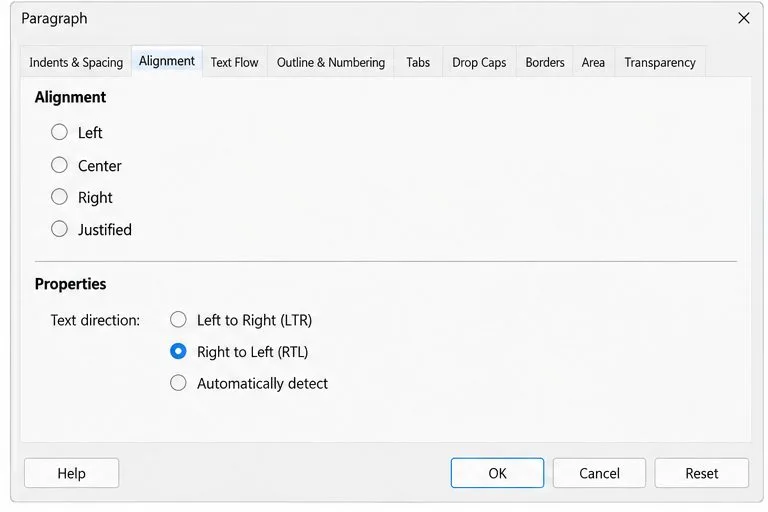
Enable Writer’s bidirectional controls, set RTL paragraph flow, and check mixed Arabic or Hebrew text without disrupting English words and numbers.
If Calibri or Arial is missing in LibreOffice, first decide whether you need the exact Microsoft font files or only a close layout substitute. On Debian- or Ubuntu-based Linux, installing Carlito for Calibri and Liberation Sans for Arial is usually the simplest fix: both are documented as metric-compatible, which helps preserve line lengths and page breaks. They are substitutes, not the Microsoft fonts. For the exact typefaces, use a properly licensed source and check its terms before copying font files between computers.
LibreOffice uses fonts made available by the operating system. A document can still specify “Calibri” or “Arial” while your computer renders a different available font in its place. That fallback may change character shapes, line wrapping, and pagination, even if the document opens normally. Start by checking which font the operating system resolves for the requested name rather than reinstalling LibreOffice.
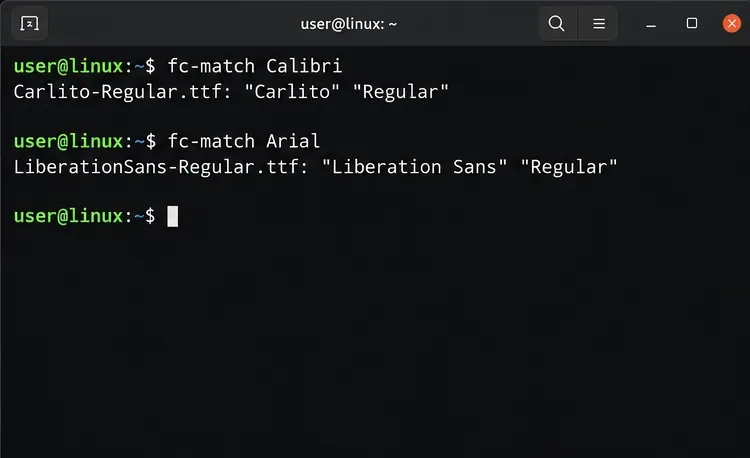
On Linux, run fc-match for each family:
fc-match Calibri
fc-match Arial
If the output names Carlito, Liberation Sans, or another family, the system is resolving a substitute. For more explicit output, use fc-match -f '%{family}: %{file}\n' Calibri. The exact result depends on fonts already installed and local font configuration. On Windows, check Settings > Personalization > Fonts; on macOS, check Font Book. Those checks identify whether the operating system can see the family, but do not establish that a particular font file is licensed for transfer.
Microsoft’s font information lists Calibri as included with Microsoft products and services where applicable, rather than offering a general standalone download. Microsoft’s Windows font guidance also says redistribution is generally not allowed and cautions against copying Windows fonts to other computers or servers. So an internet download labeled “Calibri” is not automatically a legitimate or safe source. If exact glyphs and text metrics are mandatory, obtain the fonts through a source whose license covers your use and installation; do not extract or share files unless the applicable license allows it.
If your main concern is document layout, the substitute route is often enough. Debian describes Carlito as metric-compatible with Calibri. Debian describes Liberation fonts as having the same metrics as Arial, Times, and Courier. Metric compatibility helps preserve spacing, but it does not make the letterforms identical or guarantee pixel-for-pixel matching. Choose Carlito and Liberation Sans when you need a practical Linux fallback; seek the exact typefaces only when visual identity, brand requirements, or precise document reproduction requires them.
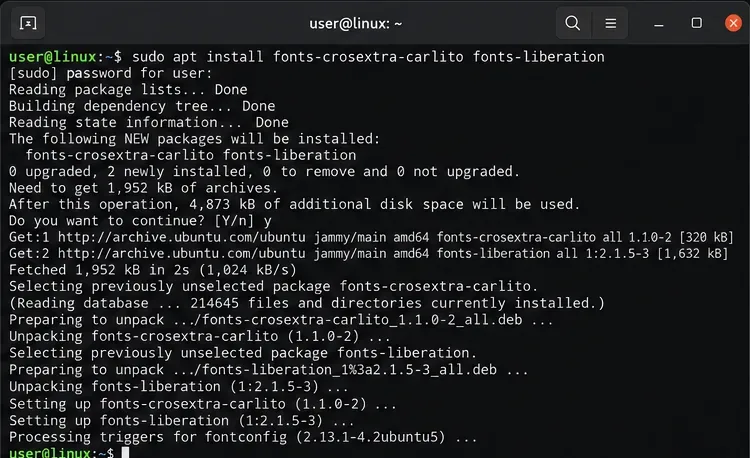
On Debian and Ubuntu, install the packages from the distribution repositories:
sudo apt update
sudo apt install fonts-crosextra-carlito fonts-liberation
Other Debian-based distributions may use the same package names, but repository availability can vary. Use your distribution’s package manager to look up the package names before substituting commands from another system. These packages provide metric-compatible fonts; they do not turn Carlito into Calibri or Liberation Sans into Arial.
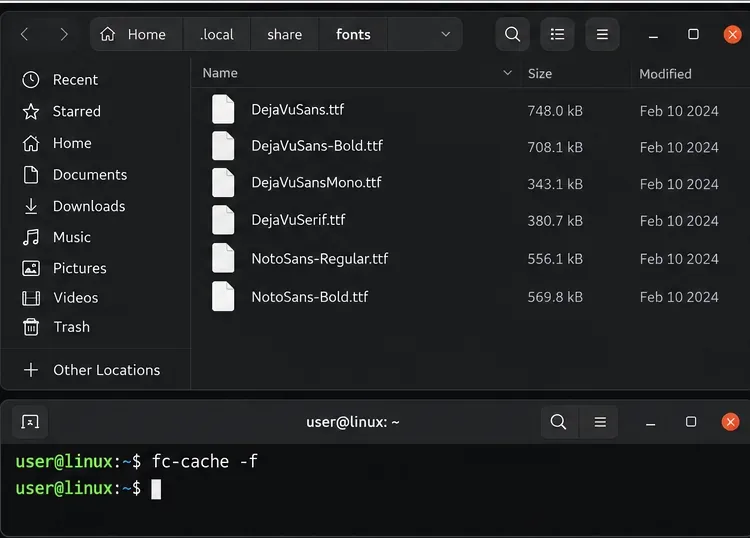
If you have a font file you are entitled to install, the normal Linux per-user location is ~/.local/share/fonts/. Create the directory if needed, place the licensed font files there, and refresh the cache:
mkdir -p ~/.local/share/fonts
fc-cache -f
Do not download proprietary font files from unverified font sites. If you are unsure whether your license permits installation on a second computer, stay with the distribution-provided substitutes until you confirm the terms.
Close every LibreOffice window after installing fonts, then reopen the application. If LibreOffice was already running, it may not refresh its font list until the process fully exits. Recheck fc-match Calibri and fc-match Arial in the terminal. For the substitute setup, the expected families are Carlito and Liberation Sans.
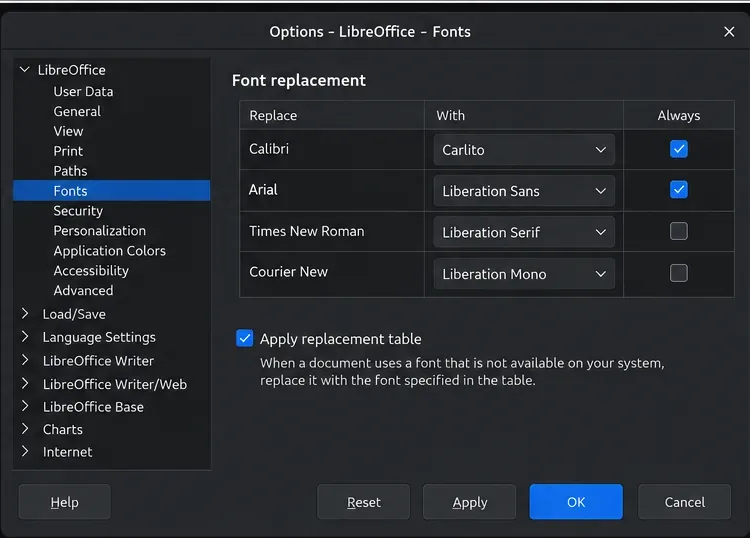
If a document still renders with an unwanted fallback, configure LibreOffice’s own replacement table. Open Tools > Options > LibreOffice > Fonts (on macOS, open LibreOffice > Preferences, then the same Fonts section). Enable Apply replacement table, add Calibri in the Replace column and Carlito in the With column; add Arial and Liberation Sans as a second mapping. Choose the replacement only when you intend it to apply. The Always setting can apply even when the original font is installed; if it is unchecked, replacement applies only when the requested font is unavailable.
A replacement rule controls rendering and printing; it does not change the font name stored in the document’s formatting. That is useful when you want to view an existing file locally without rewriting its styles. If you need to deliver a document with substitute fonts actually specified, change the document’s styles or selected text deliberately and save a separate copy.
Open a page that previously wrapped incorrectly and compare headings, tables, and page breaks. Then export a copy to PDF and inspect the same areas. Carlito and Liberation Sans can reduce layout shifts because their metrics match the respective Microsoft families, but font rendering, font versions, and document content can still affect line breaks. If the file must look identical on another computer, test it on that target system or ask the sender to provide an approved PDF. For official details, see Microsoft’s Calibri font entry, Microsoft’s font redistribution FAQ, Debian’s Carlito package details, Debian’s Liberation package details, and LibreOffice’s font replacement documentation.
Enable Writer’s bidirectional controls, set RTL paragraph flow, and check mixed Arabic or Hebrew text without disrupting English words and numbers.
Install metric-compatible Linux fonts or map LibreOffice fallbacks, while keeping Microsoft font licensing and layout differences in view.
Add usable text fields, check boxes, and drop-downs in Writer, then export a PDF recipients can complete and save.
Fix missing or substituted fonts in LibreOffice Writer PDFs, choose the right export profile, and verify which fonts are embedded before sharing.
Convert a folder of Word documents to PDF with LibreOffice commands, handle nested folders safely, and verify the output before sharing.
Set a custom LibreOffice Writer template as the default so new documents open with your preferred styles and page layout.
Install a compatible Java runtime, enable it in LibreOffice, and troubleshoot an empty JRE list without changing unrelated settings.
Build a small LibreOffice container, convert office documents without a GUI, and verify PDF output while limiting host-file access.
Reduce oversized LibreOffice presentation files by compressing embedded photos, choosing sensible image settings, and checking slide quality before sharing.
Match LibreOffice’s page dimensions to your printer, check printable margins, and correct scaling before printing a custom-size document.