Facebook continuously innovates its platform, offering exciting features that connect people. Facebook Messenger enhances your text conversations, especially during festive seasons, by incorporating a playful gift messaging feature.

This unique feature allows you to send a digital gift wrapped message without incurring any costs, making it a delightful way to brighten someone's day.
How to Create a Gift Message on Messenger
Sending a gift on Messenger is a straightforward process. Here is the step-by-step guide to create and send your gift message:
- Open the Facebook Messenger app on your iPhone or Android device.
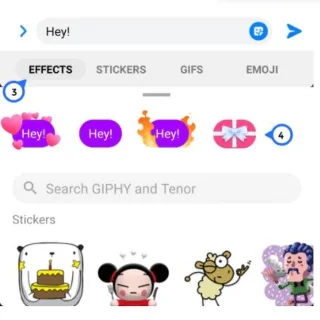
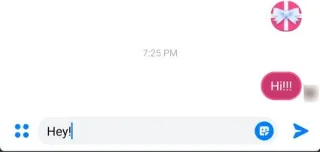
- Select the recipient of your message, and tap on the message box to compose your message. Ensure you enter your message first, as the gift icon will not appear otherwise.
- Press the down arrow icon at the bottom of your screen to close the keyboard without sending your message.
- Tap the magnifying glass icon on the right side of the message box, which changes from a smiley face to a magnifying glass after typing.
- Select the star icon (Effects), then pick the gift icon to automatically send your message wrapped as a gift!

- The recipient will see the gift icon upon receiving the message. Tapping on it will reveal your message.

How to Unsend a Gift Message
If you've mistakenly sent a gift message, you can easily retract it:
- Open Facebook Messenger and navigate to the recipient's messages.
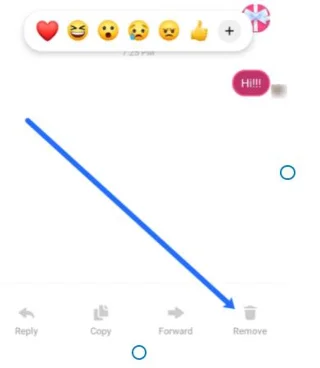
- Long-press the gift icon and select Remove from the options.
- Choose Unsend and confirm when prompted.

Note: When you unsend a message on Facebook Messenger, the recipient will receive a notification indicating that a message was removed, though they won’t know your original message content.
Troubleshooting: Gift Option Not Appearing
If you can't find the gift option in Messenger, check the following:
- Ensure you have typed text in the message box.
- Verify that you are not attempting to send the message to a group chat.
- Confirm that you are not using Messenger via a web browser.
- Make sure your Messenger app is updated to the latest version.
Other Fun Effects in Messenger
Besides gift messages, Messenger offers many exciting effects to enhance your chats. Options like hearts, confetti, and fire can make your messages even more vibrant. Just follow the same steps to utilize these effects.
Conclusion
Sending a gift-wrapped message in Messenger is simple and adds an extra layer of joy to your text conversations. By utilizing these features, you can create memorable moments with your loved ones instantly!
Frequently Asked Questions
Can I gift wrap an image?
No, currently, you cannot gift wrap an image or another attachment in Messenger. Tapping an image will send it directly without gift wrapping.
Do I need the Facebook app to use Messenger?
No, you can use Messenger independently. Just download the Messenger app, sign in using your credentials, and enjoy sending gift-wrapped messages without needing Facebook.










Tommy Dude -
I’m excited to try this! But I hope my friends appreciate my quirky gifts haha!
David F. -
This will definitely make gift-giving easier! I loved your examples!
Michael Smith -
Can anyone tell me if there are limitations on the types of gifts you can send? I want to make sure I get it right!
Brad the Helper -
Thanks for such a detailed explanation! Can't wait to spread some joy with gift messages
Linda Mèo -
I’ve been looking for instructions like this. I'm really excited to share gifts with my family!
Amy Nguyen -
Just tried sending a gift and my friend loved it! Thanks for the clear instructions. You made my day
Cindy Joy -
Just a heads up: there are different types of gifts. Don’t send something too generic
Cathy Flowers -
Just practiced sending a gift message, and I can’t believe how easy it is! Thanks for the step-by-step
Emily Johnson -
Thank you so much for this! I never knew how to send a gift message on Messenger. It seems so simple now
Mark the Wise -
What a fantastic post! And if you send a gift message, does the receiver get notified immediately?
Tina K. -
I love this! I'll definitely be sharing this article with all my friends who need gifting tips
Bobby Happy -
Just did it! Totally amazed at how quick and easy it was to send a gift. Thanks
Jane R. -
This was a lifesaver! Definitely trying it for Christmas gifts
Samurai Nick -
Love this! I can finally send surprise gifts just in time for the holidays
Chris Brown -
Question: Do you have to have the recipient in your friend list to send a gift message? I’m curious
Michael V. -
This guide is just what I needed to make my friends smile through Messenger!
John Doe -
Amazing! I was so confused about this feature before. Thanks for breaking it down
Amy Lee -
This is such a helpful guide! I love sending little surprises to my friends. Definitely trying it this weekend!
Lisa P. -
Wanna know if there's a way to send a gift message to someone who isn't a friend? Asking for a friend
Jake 123 -
Does anyone have suggestions for the best gifts to send? I need creative ideas if possible.
Anna Blue -
Thank you for this information! I love sending virtual gifts, and this is just what I needed!
Grace V. -
I appreciate the effort in writing this article. It certainly clears up the confusion around gift messages
Michelle N. -
Does this work on the Messenger app only or also on the website version? Thanks
George M. -
I had no idea sending a gift was this simple! This made my life 10 times better
Laura C. -
I kind of wish there were more gift options available on Messenger. Any idea if they plan on expanding this?
Isaac N. -
Can we personalize gift messages? I’d love to add a little note to my gift!
Hannah Pond -
This article is super useful! I've been lost trying to figure this out on my own
Ryan Q. -
For some reason, I can't access the gift section. Has anyone else faced this issue? Any tips
Olivia Sweet -
Big thanks for sharing this! My best friend has a birthday coming up, and now I can send her a cool surprise
Elle G. -
Can we send gift messages internationally? Need to surprise my sister in another country!
Sarah Kim -
Great tips! I can't wait to use this feature for my friend's birthday next week
Kevin IT -
Anyone else thought the old way was too complicated? This makes it so much easier to spread joy
Chloe Sky -
This is so cute! I feel like I can finally express my love through Messenger gifts.
David 29 -
Awesome post! I just tried sending a gift using these steps, and it worked perfectly! My friend loved it
James Miller -
This seems like such a fun way to connect with friends! Can’t wait to start gifting
Megan 44 -
I think I might actually send a gift message tonight! This tutorial is top-notch