Coffee Culture: How to Brew the Perfect Cup at Home

Fix bitter, sour, or weak coffee at home with a practical guide to beans, grind size, water, ratio, temperature, pour-over technique, and tasting.
Subtitles can be a highly convenient feature of your Hisense TV. Whether you’re watching an action-packed movie or a dramatic TV show from a different country, subtitles in your native tongue allow you to bridge the language gap. As a result, you can enjoy more content. But how exactly do you turn on subtitles?
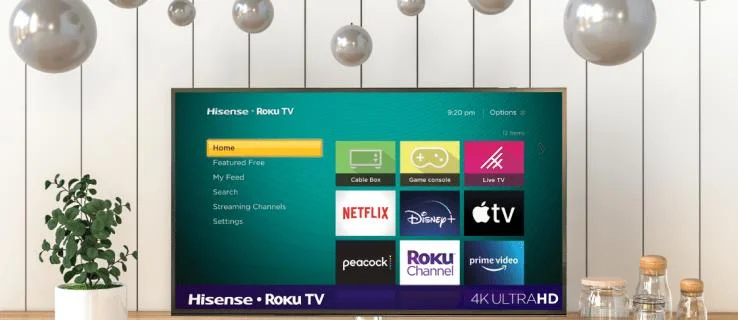
Here’s what you’ll need to do to enable or disable subtitles on your Hisense TV:
You can also change the language of the subtitles by following these steps:
Before you can activate or deactivate Netflix subtitles on a Hisense TV, you’ll first need to connect your device to your Netflix profile. Follow these steps:
Disney Plus on Hisense lets you enjoy popular shows and movies with subtitles. To enable them:
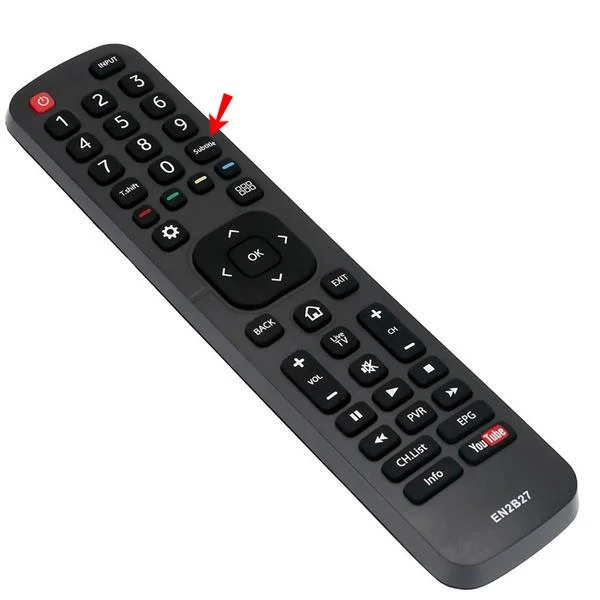
Your Hisense remote typically features a CC button located under the “9” key or near the red, blue, and yellow keys. It is usually green. Pressing it will open your CC options.
Enabling subtitles on your Hisense TV enhances your viewing experience, breaking down language barriers and improving audio clarity. Whether you’re enjoying foreign films or just want to understand your favorite shows better, subtitles are a great asset.
Do you watch your Hisense TV content with subtitles? Are they distracting or helpful? Share your thoughts in the comments section below.
Fix bitter, sour, or weak coffee at home with a practical guide to beans, grind size, water, ratio, temperature, pour-over technique, and tasting.
Learn beginner-friendly winter houseplant care for light, watering, humidity, temperature, fertilizer, pests, and the mistakes that commonly damage plants.
Declutter your home without chasing perfection. Learn which spaces to tackle first, how clutter may affect stress and attention, and how to keep results manageable.
Discover which smart kitchen gadgets are genuinely useful, what to check before buying, how to set them up, and common beginner mistakes to avoid.
Functional beverages promise energy, hydration, gut support, protein, and more. Learn which benefits have evidence, what labels can hide, and how to choose wisely.
Learn practical zero-waste cooking habits that reduce food waste, stretch groceries, use leftovers safely, and turn edible scraps into useful meals.
Plan a cozy dinner party with the right guest count, make-ahead menu, warm atmosphere, food-safety basics, and a realistic hosting timeline.
Refresh your home for fall 2026 with budget-friendly decor trends, practical tradeoffs, and smart ways to add warmth, texture, and personality.
Compare practical meal-prep methods by time, flexibility, texture, cost, and food safety so you can build a weekday system that actually fits your life.
Make five reliable fall comfort-food recipes with clear doneness cues, troubleshooting tips, storage guidance, and realistic ways to adjust texture and flavor.







Jess H. -
I've written down all the steps. This is going to help my parents a lot! They're having subtitles issues too
Amy D. -
OMG, I was flipping through menus for hours! You saved me so much time. Big thanks!
Tommy Pet -
Just tried it out, and it works like a charm. Subtitles are on, and I can finally understand everything
Nicko V. -
Can this process change if the TV updates? Let me know if anyone has experienced issues after a software update!
Michael Always -
This is a lifesaver during movie nights! Subtitles really help when the audio isn’t clear. Appreciate it!
Tina from London -
I love how straightforward your guide is! It makes it feel like anyone can operate their Hisense TV
Sarah M. -
I used to think I needed help from tech support. Now I know I can handle this myself. So empowering!
Rick M. -
I found this feature by accident. Glad I did! I’m always looking for more tips like this
LucyPaw -
The step-by-step format is really effective! I appreciate your effort in writing this
Tom K. -
Thank you for the detailed explanations! Subtitles have become my best friend in binge-watching
MaxPower89 -
Honestly, I’m shocked I didn't know this sooner! Thanks for shining a light on such an essential feature!
John Smith -
I had no idea turning on subtitles on my Hisense TV was this easy! Thanks for the clear instructions
Linda Joy -
Saved me so much time, I can't thank you enough! This will make family movie nights so much smoother
Linda P. -
Such a useful piece! I didn’t know Hisense TVs had this feature. Can't wait to use it
Kathy C. -
Do you think there are plans for future updates that might change this process? Curious minds want to know
Sarah K -
This was a light bulb moment for me. Subtitles can change the whole viewing experience
Lisa Grant -
Great post! Have you ever thought about adding tips for different streaming services too? That would be super useful
Kevin IT -
I wonder if this method works for all streaming apps on Hisense TVs? Can anyone confirm
Hana J -
So grateful for this article! Subtitles bring a whole new layer of understanding to my shows!
Mike the Geek -
Just getting familiar with my Hisense TV, and this is exactly the kind of information I needed. Thanks a ton
Julie A. -
I just shared this article with my friends. You never know who might need subtitles for their shows!
CrazyCatLady -
Haha, I just had a blast showing my friends how to do this! Your article made me the TV master!
Patty R. -
For someone who’s not tech-savvy, this article is a breath of fresh air! You made it feel so simple.
Shorty34 -
Nice article, but I think it could use some screenshots? Some of us are visual learners
George the Gamer -
I love tech tips like this. Subtitles are my secret weapon for strategy games too
Emily-Rose -
I’ve been struggling with this for ages! Your guide is super helpful. Now I can enjoy my favorite shows without missing anything
Bruce the Movie Buff -
Subtitles helped me watch foreign films! What’s your favorite foreign movie
Happy Viewer -
Btw, are there any other models of TVs that have a similar process? Would be nice to know for my friend’s TV