Home
» Family
»
Smart Kitchen Gadgets Worth the Hype: A Beginner’s Guide to What Actually Helps
Smart Kitchen Gadgets Worth the Hype: A Beginner’s Guide to What Actually Helps
Smart kitchen gadgets are worth the hype when they remove a specific source of friction: guessing whether food is done, hovering over a pressure cooker, repeating the same temperature settings, or following a complicated recipe. They are much less compelling when “smart” mainly means an app you rarely open.
For a first-time buyer, the easiest way to choose is to start with the cooking problem you want to solve, then decide whether sensors, connectivity, or guided automation actually solve it. Product and app details in this guide were checked against official U.S. manufacturer and support pages in September 2026; availability, software features, subscriptions, and pricing can change.
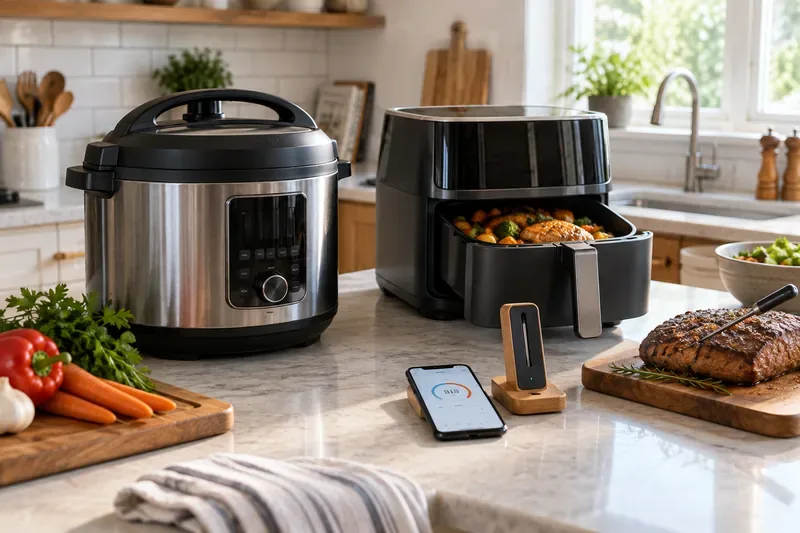
A practical smart-kitchen setup can combine a multi-cooker, sensor-guided air fryer, and wireless food thermometer without turning the counter into a wall of screens.
First, What Makes a Kitchen Gadget “Smart”?
In this guide, a smart kitchen gadget does more than run on electricity. It uses at least one of three capabilities: connectivity, sensing, or automation.
Connectivity means the appliance can communicate with a phone or cloud service, usually through Wi-Fi or Bluetooth. This can enable remote monitoring, notifications, recipe syncing, or software updates.
Sensing means the gadget measures something about the food or cooking environment, such as internal temperature, ambient temperature, or humidity.
Automation means the appliance can change time, temperature, fan speed, pressure, or another setting during a cook instead of asking you to manage every adjustment manually.
The important distinction is that connectivity alone does not make an appliance more useful. A phone notification is convenient, but a temperature probe that changes your cooking decisions can have a much bigger impact.
What Should a Beginner Prepare Before Buying?
1. Write down the meals you already cook
Do not begin with a product page. Begin with your last two weeks of meals. If you regularly roast chicken, grill steaks, or smoke meat, a connected thermometer can remove guesswork. If you batch-cook beans, soups, rice, and stews, a smart multi-cooker may earn its counter space. If you mostly reheat leftovers, a $1,000-plus cooking system is unlikely to pay back its complexity.
2. Check counter space, storage, and cleanup
Smart functions do not make a bulky appliance smaller. Measure the place where the gadget will live, including clearance for lids, baskets, steam, and ventilation. Also check which removable parts are dishwasher safe. A device that is impressive during cooking but unpleasant to clean often becomes cabinet storage.
3. Check how dependent the gadget is on its app
Ask three questions before buying: Can the device perform its core function without the app? Does it require an account? Are important features tied to a subscription?
This matters because connected-kitchen software changes over time. Anova’s current app page says its devices retain manual control and basic device features through a free tier, while a paid Premium tier adds more recipes, guides, smart notifications, cook history, and other software features. Anova also says it is developing a unified app experience in 2026. Review the current Anova app-plan page immediately before buying rather than assuming an older review still describes the software model.
4. Verify your network requirements
Some connected appliances still have specific Wi-Fi requirements. The MEATER Pro Duo setup guide, for example, requires a stable 2.4 GHz Wi-Fi network during pairing. Its official support page also says a MEATER Cloud account is required to use the app. Check the manufacturer’s setup instructions before purchase if your home network uses enterprise authentication, hidden networks, VPN-based filtering, or other nonstandard settings. See the MEATER Pro Duo pairing instructions for a concrete example.
5. Separate convenience from food safety
A smart thermometer can make cooking easier, but an estimated finish time is not the same thing as a verified safe internal temperature. The U.S. Department of Agriculture recommends using a food thermometer and publishes minimum internal temperatures for different foods. For example, whole cuts of beef, pork, veal, and lamb are listed at 145°F with a three-minute rest, while poultry is listed at 165°F. Keep the USDA safe minimum internal temperature chart as the reference, not a social-media cooking hack.
Smart Kitchen Gadgets That Are Actually Worth Considering
Category
What the smart feature adds
Best for
Main trade-off
Beginner verdict
Wireless food thermometer
Live internal/ambient temperature, alerts, estimated timing
Roasting, grilling, smoking, air frying
Battery, app, and connection management
Worth it for many cooks
Smart multi-cooker
Remote monitoring, guided recipes, program control
Batch meals, soups, beans, pressure cooking
Large footprint and learning pressure-cooking rules
Worth it if used weekly
Sensor-guided combi air fryer
Food probe plus automated heat/moisture stages
Meat-focused weeknight cooking
More expensive than a basic air fryer
Worth it for the right routine
Sous vide circulator
Precise water temperature and remote monitoring
Steak, poultry, fish, meal prep
Long cook times, bags/containers, app-plan complexity
Connected monitoring plus controlled indoor smoking
Smoke flavor without an outdoor smoker
Specialized use and significant counter space
Niche, but genuinely distinctive
1. Wireless food thermometers: the easiest smart upgrade to justify
For many beginners, this is the best place to start because the gadget improves an existing cooking method instead of asking you to learn a completely new one. You still use your oven, grill, smoker, or air fryer; the probe simply gives you better information.
The MEATER Pro Duo is a useful example of what the category can do in 2026. Its official product page describes two probes, built-in Wi-Fi in the charger, multiple temperature sensors per probe, app-based guided cooking, and estimated cook/rest timing. That combination is valuable when you are cooking two proteins or want to monitor a roast without repeatedly opening the oven.
Worth it if: you cook meat frequently and temperature uncertainty is a real problem. Skip it if: you mostly cook stovetop dishes, vegetables, pasta, or foods where a simple instant-read thermometer already solves the problem.
2. Smart multi-cookers: worth it when the appliance itself is already useful
A multi-cooker combines several cooking methods in one appliance. The smart layer can add remote status, guided recipes, and app control, but the real value still comes from pressure cooking, slow cooking, steaming, sautéing, rice cooking, and similar functions.
The Instant Pot Pro Plus 6QT Smart Multi-Cooker pairs Wi-Fi connectivity with a 10-in-1 cooking platform and the Instant Connect app. Instant Pot says the app can provide guided recipes, progress monitoring, setting adjustments, and function changes from a phone.
That can be genuinely useful for a busy household, but do not confuse remote control with permission to ignore pressure-cooking safety. Read the official manual, learn natural versus quick steam release, and use manufacturer guidance for high-starch or expanding foods.
Worth it if: you already want a pressure cooker or multi-cooker and expect to use it several times a week. Skip the smart premium if: you only want occasional rice or slow cooking and would be satisfied with physical controls.
3. Sensor-guided combi air fryers: smarter than an app-only air fryer
A combi appliance combines multiple cooking techniques or heat/moisture controls in one chamber. That can make the smart features more meaningful because the device has more variables to manage.
The Dreo ChefMaker, for example, uses a food probe, convection heating, and a water atomization system. Dreo says its automated cooking programs use temperature data to manage cooking time, heating, and moisture. This is a stronger case for “smart” cooking than simply turning a conventional air fryer on from a phone.
Worth it if: you frequently cook proteins and want the appliance to manage doneness with fewer manual adjustments. Skip it if: frozen fries, reheating, and basic crisping are your main jobs; a standard air fryer may already do those well.
4. Sous vide circulators: fantastic precision, but only if the method appeals to you
Sous vide means cooking food in a sealed bag in a precisely controlled water bath. The main advantage is temperature consistency: instead of a hot oven gradually pushing heat into the center, the water bath holds a chosen temperature around the food.
The Anova Precision Cooker 3.0 has 1100 watts of power, dual-band Wi-Fi, onboard time/temperature controls, and remote monitoring through the Anova app. Its physical controls matter because they preserve useful core operation even when you do not want to interact with the phone.
Worth it if: you enjoy planning ahead, value repeatable doneness, and do not mind finishing some foods with a sear. Skip it if: you want dinner in 20 minutes or dislike dealing with water baths and sealed bags.
5. Thermomix TM7: impressive for beginners who want a guided cooking system
The Thermomix TM7 is less a single-purpose gadget and more a connected cooking platform. Thermomix says it combines more than 20 appliance functions, uses a touchscreen for interactive guided cooking, and connects to the Cookidoo recipe service.
Its appeal is easy to understand for a beginner: the machine can guide you through recipes while controlling time, temperature, and speed. The trade-off is commitment. Thermomix’s U.S. product page lists the TM7 as a premium-priced appliance, and its Cookidoo page describes a paid annual subscription after the included trial period.
Worth it if: guided recipes, integrated weighing, chopping, mixing, steaming, and heating would replace several appliances you actually use. Do not buy it merely because it is technologically impressive. At this price level, schedule a demo, examine your weekly meals, and decide whether its workflow fits you.
6. Smart indoor smokers: the rare smart gadget that enables a new indoor technique
The GE Profile Smart Indoor Smoker is interesting because the technology is not only about an app. GE says the unit uses wood pellets for smoke flavor and an active smoke-filtration system designed to convert smoke output before it reaches the room.
Its Wi-Fi features use the SmartHQ app for remote monitoring, control, notifications, and software updates, according to the official GE support page.
Worth it if: you specifically want smoked foods but cannot or do not want to run an outdoor smoker. Skip it if: smoked food is an occasional craving. This is a specialty appliance, and its value depends almost entirely on how often you use that specialty.
How Should a Beginner Set Up a Smart Kitchen Gadget?
You do not need an elaborate smart-home system. A calm first setup is more reliable than connecting every feature immediately.
Read the safety and cleaning sections first. Pay special attention to heat limits, pressure release, probe placement, ventilation, and which parts can get wet.
Test the appliance locally. Learn the physical buttons or touchscreen before depending on the app. You should know how to stop a cook without reaching for your phone.
Install the official app and update firmware if prompted. Use the manufacturer’s app-store links or support page rather than a look-alike app.
Pair near the router for the first setup. If pairing fails, check whether the appliance expects 2.4 GHz Wi-Fi, Bluetooth, location permission, or a cloud account.
Start with one simple, familiar food. A chicken breast, rice dish, soup, or basic roast teaches you more about the appliance than a complicated recipe with ten ingredients.
Verify the result independently. For meat, check final internal temperature with a food thermometer. For pressure cooking, confirm the valve and pressure have released according to the manual before opening.
Common Beginner Mistakes to Avoid
Buying the app instead of the appliance
Recipe libraries and glossy dashboards can change. Heating performance, probe accuracy, physical controls, capacity, cleaning, and safety design are the parts you live with every day. Judge those first.
Assuming every smart feature is automatic
Remote monitoring may only show status. Guided recipes may still require you to add ingredients, stir, flip, sear, or change attachments. Read what the device actually controls rather than inferring it from the word “smart.”
Ignoring ongoing costs
Subscriptions, replacement probes, bags, pellets, filters, seals, and specialty accessories can change the real cost of ownership. Create a one-year cost estimate before buying an expensive system.
Choosing a gadget that duplicates what you already own
If your oven has an excellent temperature probe, a second connected probe may add little. If you already have a pressure cooker you love, app control alone may not justify replacement. The strongest smart purchases solve a gap instead of creating overlap.
Depending on cloud features for basic cooking
Apps, accounts, servers, and wireless standards can change over a product’s lifespan. Whenever possible, favor devices that remain useful through local controls when internet service is unavailable.
A Simple Buying Order for Your First Smart Kitchen
If you are starting from scratch, spend in the order of problems solved, not the number of features advertised.
First purchase: a smart thermometer if you regularly roast, grill, or smoke meat. It adds information without changing your whole cooking routine.
Second purchase: a smart multi-cooker or sensor-guided air fryer if you want a device that can take over recurring weeknight tasks.
Third purchase: sous vide if precision cooking sounds enjoyable and you are comfortable with longer cook times.
Premium step: an all-in-one guided system only after you know it can replace several tools and match the meals you actually make.
Specialty step: an indoor smoker or other niche appliance when the cooking technique itself—not the connectivity—is something you expect to use often.
So, Which Smart Kitchen Gadgets Are Really Worth the Hype?
The most convincing smart kitchen gadgets use technology to make cooking decisions better, not merely more connected. Wireless thermometers are easy to recommend because sensors directly reduce guesswork. Smart multi-cookers and sensor-guided air fryers can be excellent when they automate foods you already cook. Sous vide circulators reward people who value precision. High-end guided systems such as Thermomix can be transformative for the right household, but their price and ecosystem make them a deliberate purchase rather than a default recommendation.
Before buying, ask one final question: What will this gadget let me do more reliably, more safely, or with less attention than the tools I already own? If you can answer that in one sentence, the smart feature may be earning its place in your kitchen. If the answer is mostly “it has an app,” keep shopping.