Home
» How to
»
Instructions to turn off Oppo screenshot sound
Instructions to turn off Oppo screenshot sound
On Oppo, there is an option to turn off the screenshot sound without having to install another supporting application to turn off the screenshot sound on Android phones . Then your screenshot operation on Oppo will not be revealed, not affecting the surrounding users. The article below will guide you to turn off the Oppo screenshot sound.
How to turn off Oppo screenshot sound
Step 1:
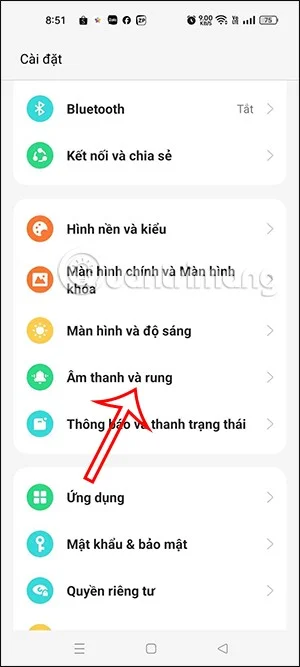
On the Oppo phone interface, click on Settings then click on Sound and vibration to adjust.
Step 2:
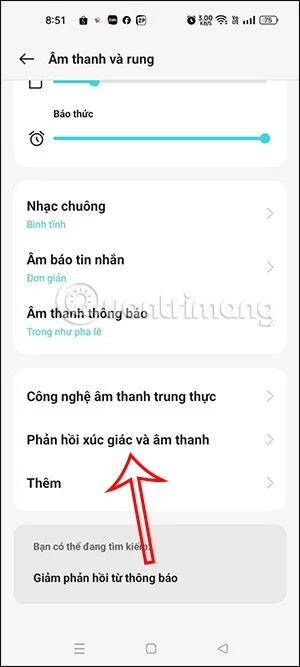
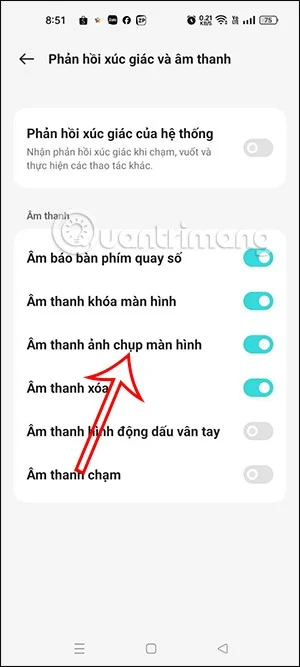
Moving to the next customization interface, users click on the Haptic feedback and sound item below to adjust the sound on the phone. In this interface, you will see that the phone defaults to the screen capture sound.
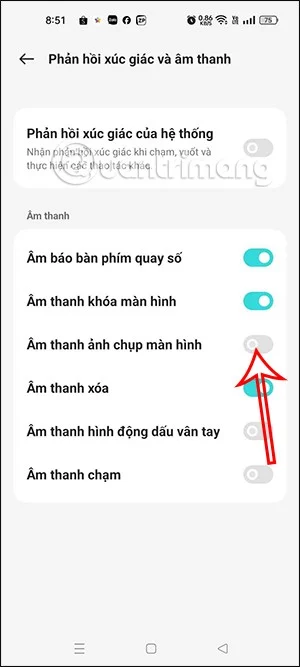
We will slide the white circle button to the left to turn off screenshot mode on Oppo phone .
So when taking a screenshot on an Oppo phone, there will be no sound like before. If you want to use the sound again, just re-enable this mode.