Leftover Halloween Candy and Pumpkins: What to Do Next

Sort leftover Halloween candy safely, share or repurpose sealed treats, and choose food use or compost for pumpkins based on their condition.
Even at the present time, when humanity possesses extremely modern giant ground observatories, as well as advanced space telescope systems, capturing images of an exoplanet is still quite rare and often considered a miracle.
Exoplanets are planets located outside the Solar System. Basically, exoplanets belong to a planetary system but follow the orbit of a star, black hole, remnant or another planet instead of following the orbit of the Sun. Therefore, they contain countless strange characteristics and properties that are considered valuable knowledge stores for astronomy researchers.
These exoplanets are usually very far from Earth, and are small and dim compared to the stars they orbit, making them extremely difficult to study directly. That's why most observations of exoplanets have so far been made by studying them through their host stars. But now, with the launch of the world's most advanced space telescope, James Webb, imaging exoplanets has become easier. James Webb recently sent back a direct image of a gas giant planet — and it's one of the coldest exoplanets ever observed.
The planet, called Epsilon Indi Ab, is located 12 light years away and has an estimated temperature of just 35 degrees Fahrenheit (2 degrees Celsius). Epsilon Indi Ab’s cool climate compared to most known exoplanets requires scientists to take full advantage of James Webb’s state-of-the-art equipment to conduct in-depth research.
“ Cold planets appear very faint, and most of their radiation is in the mid-infrared ,” explains researcher Elisabeth Matthews of the Max Planck Institute for Astronomy in Germany. “ James Webb is good at observing objects in the mid-infrared, which is extremely difficult to do from the ground. Good spatial resolution is also needed to separate the planet and the star in the image, and James Webb’s large mirror system is particularly useful in this regard .”
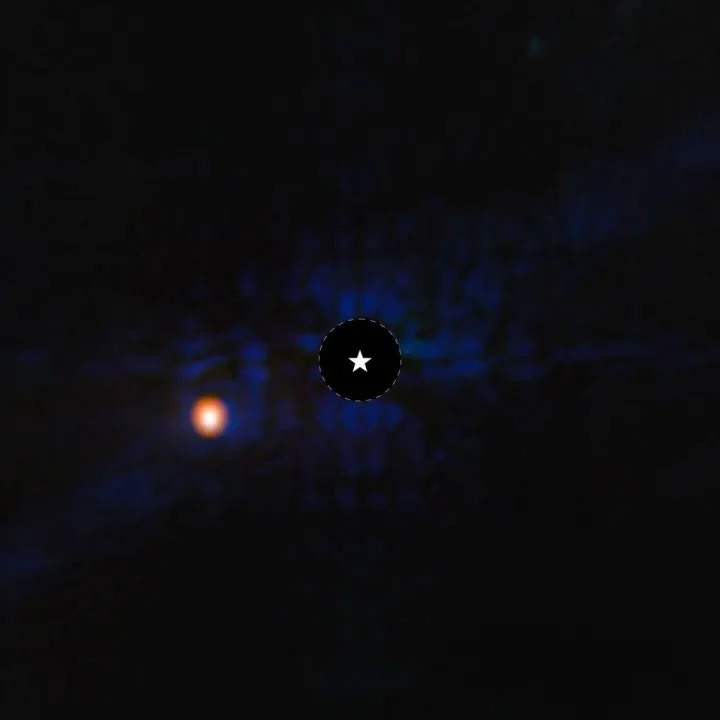
The image above was taken with James Webb's MIRI instrument. The instrument has an instrument called a coronagraph, which is a disk that blocks out light from very bright sources (in this case, the planet's host star) so that the fainter objects nearby (Epsilon Indi Ab) can be observed. Relatively speaking, there is a clearer separation between the planet and the star here.
The planet is quite similar to Jupiter, although warmer and slightly larger. There are some signs that it may have a cloudy atmosphere, or that it may contain heavy elements like carbon. But the researchers want to collect more data using spectroscopy to get a better look at the planet's atmosphere before drawing any conclusions.
Studying Epsilon Indi Ab is expected to help astronomers better understand the gas giant planets in our solar system, as well as many other distant exoplanets.
Sort leftover Halloween candy safely, share or repurpose sealed treats, and choose food use or compost for pumpkins based on their condition.
Compare workplace Halloween costume choices by respect, dress code, mobility, and safety—and learn when a subtle accessory or a policy check is the better option.
Find a couples costume that fits your style, budget, and comfort level, from Addams Family classics to original inside-joke duos.
Need a last-minute high school Halloween costume? Compare 10 easy closet-based ideas by prep time, comfort, school-day practicality, and simple safety checks.
Use a simple 2026 Halloween decorating timeline for indoor décor, outdoor displays, and fresh pumpkins, with practical adjustments for weather and events.
Mix five vivid, approachable Halloween cocktails with measured recipes, simple prep tips, and an alcohol-free option for your party guests.
Find 15 office-friendly Halloween costume ideas for 2026, with practical checks for dress codes, respectful themes, comfort, and workplace safety.
Plan a fun elementary school Halloween party with easy crafts, games, inclusive treats, costume tips, and a sample 75-minute classroom schedule.
Compare realistic side hustles for 2026 by startup cost, fees, flexibility, and income control, with current tax and scam guidance from official sources.
Upgrade your home office ergonomics with current OSHA and NIOSH guidance on chair fit, monitor height, laptop setup, lighting, and movement.