5 Halloween Cocktails That Are Easy to Serve at Your 2026 Bash

Mix five vivid, approachable Halloween cocktails with measured recipes, simple prep tips, and an alcohol-free option for your party guests.
While rolling out ChatGPT paid subscription plans to individual users brings in significant revenue, OpenAI's commitment to supporting the AI developer community remains strong.
Viewing AI agents as the future of the artificial intelligence industry, OpenAI acknowledges that building robust, “industrial-grade” agents with current tools is difficult. To address this, the company has just announced a new toolkit that simplifies the creation of advanced AI agents capable of handling complex, multi-stage operations for both developers and enterprises.
Responses API: New Tools for Developers
Responses API is a new “primitive” API that allows developers to leverage OpenAI’s built-in tools to build their own agents. Responses API combines the simplicity of Chat Completions with the tooling power of Assistants API. With a single Responses API call, developers can perform complex tasks using multiple tools, including web search, file search, and calculator, and handle multiple interactions with the model.
With the Responses API, developers can also easily store data to evaluate agent performance with features like tracing and evaluations. The Responses API will replace the Assistants API in mid-2026.
Responses API comes with the following built-in tools:
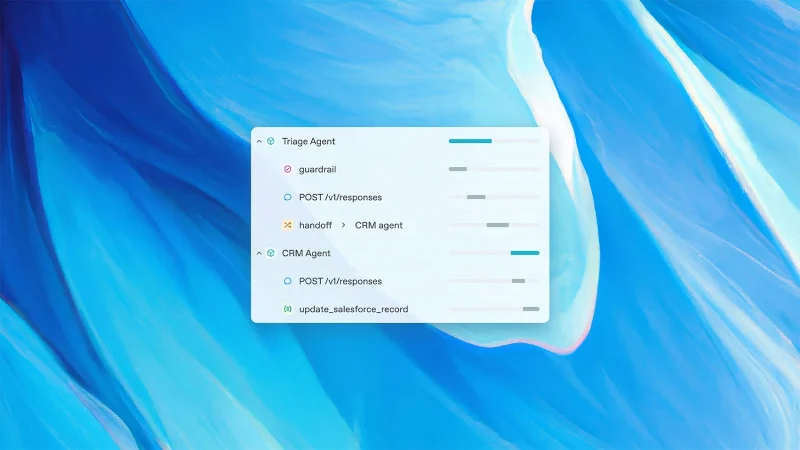
Agents SDK: Multi-Agent workflow support
In addition to the new underlying tools, OpenAI is also announcing a new Agents SDK to help developers coordinate multi-agent workflows. It comes with improvements over the Swarm experimental agents SDK that OpenAI released last year:
The Agents SDK will work with the Responses API and Chat Completions API. Developers can also use the same SDK with non-OpenAI AI models if they support the Chat Completions API endpoint.
OpenAI is committed to enhancing its platform with deeper API integrations and new tools for deploying, evaluating, and optimizing agents, especially as models with improved agentic capabilities emerge.
Mix five vivid, approachable Halloween cocktails with measured recipes, simple prep tips, and an alcohol-free option for your party guests.
Find 15 office-friendly Halloween costume ideas for 2026, with practical checks for dress codes, respectful themes, comfort, and workplace safety.
Plan a fun elementary school Halloween party with easy crafts, games, inclusive treats, costume tips, and a sample 75-minute classroom schedule.
Compare realistic side hustles for 2026 by startup cost, fees, flexibility, and income control, with current tax and scam guidance from official sources.
Upgrade your home office ergonomics with current OSHA and NIOSH guidance on chair fit, monitor height, laptop setup, lighting, and movement.
Learn why emotional intelligence matters in leadership, where it helps most, how to strengthen it, and how to tell whether your approach is working.
A practical roadmap for moving into tech without a degree: choose an accessible role, build job-ready skills, prove them with projects, and use hiring feedback to improve.
Build a credible LinkedIn personal brand in 2026 with current profile, content, newsletter, analytics, verification, and visibility guidance from LinkedIn.
Quiet quitting and quiet firing are catchy labels, not diagnoses. Learn what is verified, what depends on context, and what employees and managers can do next.
Fractional executives offer senior leadership without a full-time hire. Learn when the model works, what to ask, and the risks to manage.








