
Keep Writer Revisions Visible When Exporting to DOCX
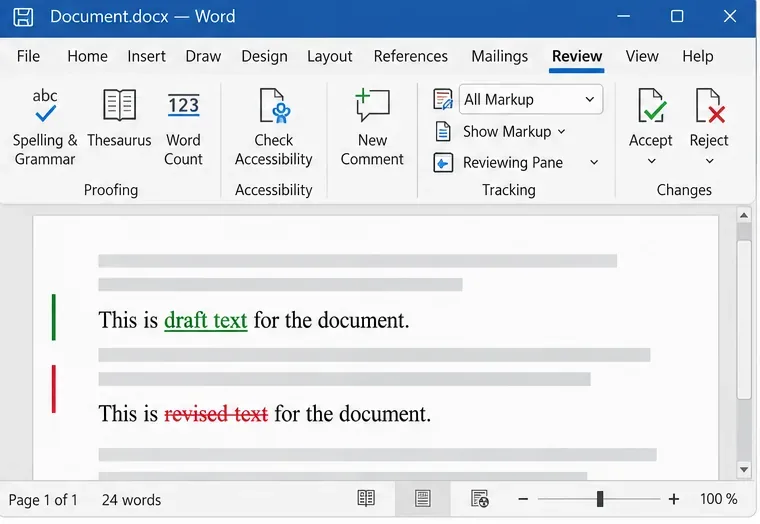
Track edits in Writer, preserve an editable ODT source, and check the exported DOCX in Word before sharing it.
Encountering the dreaded Microsoft Edge Remote Desktop 0x204 error? 😩 This pesky issue often pops up when trying to connect via the web-based Remote Desktop client in Edge, showing "The connection was denied because of server configuration." Don't worry—it's a common frustration for remote workers, but we've got your back with straightforward, tested fixes that restore access quickly.
In this guide, we'll break down the causes and deliver actionable steps to solve Microsoft Edge Remote Desktop 0x204 error. Follow along, and you'll be connected in no time. Let's dive in! ⭐
The Remote Desktop 0x204 error typically stems from server-side restrictions or client mismatches. Key culprits include:
Understanding these helps you target the fix precisely. Pro tip: Test on another browser like Chrome first to isolate if it's Edge-specific. 👆
Start with the simplest solutions and escalate. Most users resolve it in under 10 minutes!
Often, stale data is the villain. Here's how:
edge://settings/clearBrowserData.Success rate? High for cache-related issues! 👍
Ensure you're on the latest versions:
Ports matter! Use this checklist:
| 🔧 Action | Steps | Expected Outcome |
|---|---|---|
| Allow RDP Port 3389 | Windows Defender Firewall → Advanced → Inbound Rules → New Rule → Port 3389 TCP/UDP. | Opens connection pathway. |
| Disable VPN/Proxy Temporarily | Settings → Network → VPN → Disconnect; Proxy → Manual setup off. | Eliminates interference. |
| Flush DNS | Command Prompt (Admin): ipconfig /flushdns then netsh winsock reset. |
Refreshes network stack. |
Run these as admin for best results. Restart after changes.
If it's a cert error:
New-SelfSignedCertificate -DnsName yourserver.yourdomain.com.For deeper dives, check Microsoft's official guide: RDP Certificate Troubleshooting.
Only if basics fail. Backup registry first!
regedit.HKEY_LOCAL_MACHINE\SYSTEM\CurrentControlSet\Control\Terminal Server\WinStations\RDP-Tcp.Reboot and test. This often nails stubborn Remote Desktop 0x204 cases.
Implement these, and Microsoft Edge Remote Desktop 0x204 error becomes history! 🎉
Q: Does this affect only Edge?
A: Mostly—Chrome/Firefox web clients can bypass Edge-specific glitches.
Q: What if I'm not the server admin?
A: Focus on client-side fixes (1-3 above). Contact your IT team for certs/firewall.
Q: Error persists after all steps?
A: Run Edge in InPrivate mode or try the full RDP app from Microsoft Store.
Fixed it? Share your success in the comments below—we love hearing your wins! 👏 If this guide helped, bookmark it for later. Your smooth remote sessions await!
Track edits in Writer, preserve an editable ODT source, and check the exported DOCX in Word before sharing it.
Follow SUSE’s SP7 procedure to enable FIPS mode, reboot safely, verify the active policy, and check whether your compliance requirement calls for validated modules.
Compare YaST and cryptsetup for a new encrypted SLES data volume, choose LUKS1 or LUKS2, and verify unlock and mount behavior safely.
Create, refine, and verify a least-privilege AppArmor profile on SLES 15 SP7, with a clear note on SLES 16’s SELinux default.
Set up RMT on SLES 15, mirror entitled repositories, and verify HTTPS registration and package access from a test client.
Connect SLES 15 to AD with YaST’s SSSD-based logon management, then verify directory lookup, domain login, and Kerberos tickets.
Set up the right Live Patching path for SLES 16.0 or 15 SP7, apply eligible kernel fixes, and confirm what is active without confusing it with a reboot-required kernel update.
Load a custom SLES 15 kernel module without disabling Secure Boot. Match the running kernel, sign the .ko file, enroll a MOK key, and verify loading.
SLES 15 SP5 can migrate online to SP6, but each node must reboot. Use a tested rolling upgrade or blue-green cutover to keep workloads reachable.
Use SUSE’s supported STIG profile to scan SLES 15, test remediation, review remaining findings, and retain assessment evidence.








