Home
» Technology
»
Understanding the Dependency Between Salesforce and AWS: What Actually Depends on What
Understanding the Dependency Between Salesforce and AWS: What Actually Depends on What
You open Salesforce and a feature is slow, unavailable, or returning an error. At the same time, you notice reports of an AWS problem. It is tempting to conclude that “Salesforce runs on AWS, so AWS must be the cause.” Sometimes that may be directionally correct, but the real dependency is more nuanced. Salesforce uses AWS extensively, especially through Hyperforce, while some Salesforce environments and services use other infrastructure. An AWS incident can therefore affect some Salesforce workloads without necessarily taking down every Salesforce customer or every Salesforce product.
The practical question is not simply whether Salesforce uses AWS. It does. The useful question is which part of your Salesforce service is hosted where, which AWS region or service it depends on, and whether the problem is in Salesforce, AWS, your own integration, or the network path between them. This guide explains that dependency from the easiest checks to the deeper architectural details, then shows how to verify your own situation.
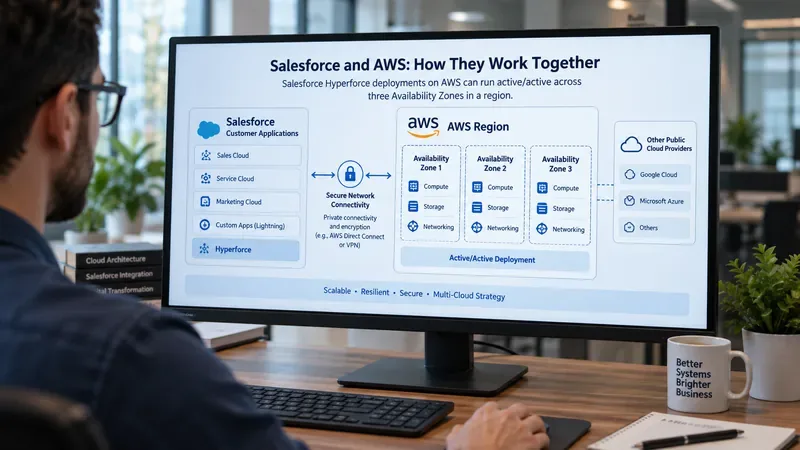
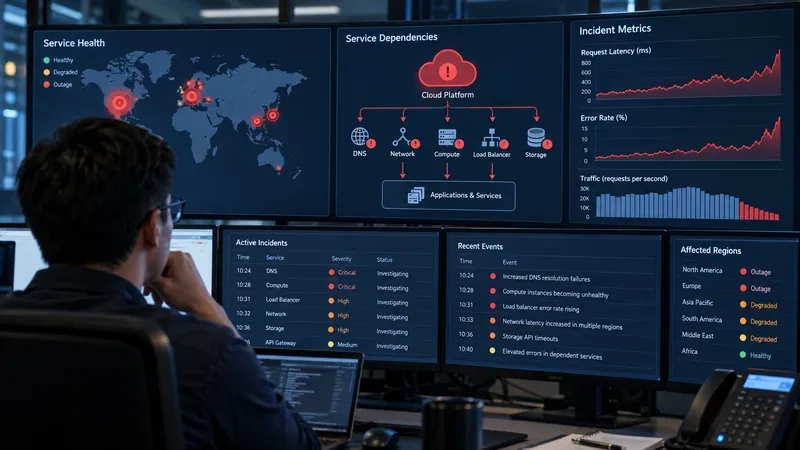
A cloud operations workstation displays a conceptual view of Salesforce Hyperforce running across three AWS Availability Zones. The screen is illustrative rather than an actual Salesforce or AWS console.
First, understand what Salesforce means by Hyperforce
Hyperforce is Salesforce’s public-cloud infrastructure architecture for delivering Salesforce applications in regional cloud environments. Salesforce describes Hyperforce as the infrastructure behind Customer 360 and uses public-cloud providers to expand regional availability, data residency, security controls, and scalability.
As of September 2026, Salesforce says Hyperforce is available on Amazon Web Services in multiple countries and is also expanding to Google Cloud Platform. That distinction matters: “Salesforce uses AWS” is true, but “every Salesforce org runs only on AWS” is not. Salesforce also still operates some Salesforce-managed first-party infrastructure, and individual services can run on infrastructure separate from the core org.
The dependency is substantial but layered. AWS has been a major strategic cloud provider for Salesforce for years, and AWS describes the companies as having a global strategic partnership. Salesforce uses AWS infrastructure for Hyperforce deployments and has also integrated Salesforce products with AWS services such as Amazon Connect and Amazon Bedrock.
For a customer, it helps to separate the relationship into three layers:
Layer
What depends on AWS
What it means operationally
Salesforce hosting layer
A Salesforce org or service may run on Hyperforce hosted in an AWS region.
An AWS regional or underlying infrastructure issue can become relevant to Salesforce availability for that hosted workload.
Salesforce product-service layer
Some Salesforce add-ons or supporting services can run on AWS separately from the core Salesforce org.
A feature may fail even when the core CRM remains healthy.
Customer integration layer
Your company may connect Salesforce to your own AWS workloads, APIs, Amazon Connect, data pipelines, or private networking.
The problem can be in your AWS account or network path even when Salesforce itself is operating normally.
This layered model is the key to troubleshooting. A status page that says “Salesforce is operational” does not prove your AWS-hosted integration is healthy. Conversely, a broad AWS event does not prove that your particular Salesforce instance is affected.
Why an AWS outage does not automatically mean Salesforce is down
Salesforce says Hyperforce instances use an active/active model across three Availability Zones within the relevant region. An Availability Zone, or AZ, is an isolated location inside an AWS region. In an active/active design, application capacity operates across multiple zones rather than keeping one zone idle as a cold standby. Salesforce says traffic is distributed across active application servers in all three zones and database replication maintains consistency across zones.
That architecture is intended to reduce dependence on any single availability zone. If one AZ has a localized problem, the design can help the service continue through the other zones. But a multi-AZ architecture does not eliminate every possible failure mode. A region-wide service problem, control-plane issue, networking disruption, software fault, dependency failure, or application-level incident can still affect availability.
So the correct mental model is: Salesforce on AWS is designed to be resilient within an AWS region, but it still has infrastructure dependencies that can matter during larger AWS events.
Some Salesforce services can fail independently of the core org
This is where many incident investigations go wrong. Salesforce explicitly notes that certain services can run on separate infrastructure while integrating with the customer’s org. For example, Salesforce documentation for Sales Engagement, Einstein Activity Capture, Salesforce Inbox, and Einstein Conversation Insights states that those services are hosted on AWS infrastructure separate from the org’s Salesforce Core infrastructure.
That means a user could see a situation such as:
Salesforce login and core CRM records work normally.
A specific productivity or Einstein-related service is degraded.
The issue is tied to separate infrastructure rather than the core Salesforce org.
1. Check Salesforce Trust before assuming AWS is responsible
Start with Salesforce’s official status and trust information. Find the status of your specific Salesforce instance rather than relying on generic reports that “Salesforce is down.” Salesforce explains how to identify an org’s instance in View Instance Information for Your Salesforce Organization.
In Salesforce Setup, use the Quick Find box to locate Company Information, then look for the Instance field. Salesforce notes that two-letter instance prefixes such as AP0 indicate Salesforce-managed first-party infrastructure, while three-letter prefixes such as GBR10 indicate Hyperforce infrastructure.
2. Determine whether your Hyperforce org is on AWS
A Hyperforce instance is not automatically synonymous with AWS forever. Salesforce says Hyperforce is available on AWS and is expanding to Google Cloud Platform. Its documentation advises customers who need to determine whether a particular Hyperforce instance is on AWS or GCP to contact Salesforce Customer Support.
This is increasingly important for incident correlation. You should not map “Hyperforce” to “AWS” solely from the word itself.
3. Check the specific AWS region only if it is relevant
If you have confirmed that your org or affected Salesforce service runs on AWS, identify the region. Salesforce’s current location documentation lists Hyperforce regions and their public-cloud provider. For example, Salesforce lists AWS-backed Hyperforce regions in locations including Sydney, Mumbai, Tokyo, Singapore, London, Frankfurt, Canada Central, and several U.S. regions.
Then compare the Salesforce incident with the official AWS Health information relevant to that region and service. Avoid treating a problem in one AWS region as evidence for an unrelated Salesforce region.
4. Separate Salesforce hosting from your own AWS integration
If Salesforce itself is healthy, inspect your integration path. Typical customer-side dependencies include API gateways, Lambda functions, Amazon Connect, databases, queues, private endpoints, VPNs, DNS, and corporate network controls. A failure in one of these components can appear to users as a “Salesforce problem” because the error occurs inside a Salesforce workflow.
A useful test is to ask: Can the same Salesforce operation succeed without calling our AWS service? If yes, the core org may be healthy while the integration path is failing.
What about AWS Direct Connect?
Some organizations use AWS Direct Connect, a private network connection into AWS, to support networking requirements for Hyperforce on AWS. Salesforce documents a use case for routing certain Hyperforce email traffic through AWS Direct Connect for organizations with private-connectivity, compliance, or data-residency requirements.
This creates another dependency layer. When private connectivity is involved, an incident can sit between the user and Salesforce rather than inside Salesforce itself. The relevant Salesforce documentation is Route Email Through AWS Direct Connect for Hyperforce.
Why Salesforce is moving toward a multi-cloud Hyperforce model
Salesforce describes Hyperforce as designed to operate across multiple public-cloud providers. This reduces the architectural assumption that one hyperscaler must be the permanent substrate for all Salesforce workloads. Salesforce’s 2026 documentation says Hyperforce is available on AWS and that Google Cloud Platform support is being introduced in selected regions, subject to Salesforce’s roadmap disclosures.
For customers, this does not mean that an existing Salesforce org automatically fails over from AWS to Google Cloud during an AWS outage. Multi-cloud support is primarily about where Salesforce can deploy and operate its platform. You should not assume cross-provider failover unless Salesforce explicitly documents it for the service you use.
How the Salesforce and AWS partnership goes beyond hosting
The relationship is not only infrastructure hosting. AWS and Salesforce describe a broader strategic partnership around data, AI, contact-center capabilities, integration, and procurement. AWS’s official partnership page highlights integrations involving Salesforce products and AWS technologies, including generative AI and data-management capabilities. You can review that relationship on the official AWS and Salesforce partnership page.
This matters during architecture reviews because there are two different dependency questions:
Where does Salesforce itself run? That is a hosting dependency.
Which AWS services have you chosen to connect to Salesforce? That is an integration dependency you control.
Those two dependencies have different owners, monitoring paths, recovery procedures, and support teams.
A practical incident checklist
When users report that Salesforce is unavailable or partially broken, work through these checks in order:
Confirm the exact affected Salesforce feature, not just “Salesforce.”
Find your Salesforce instance and check its official Salesforce Trust status.
Determine whether the org is on Salesforce-managed infrastructure or Hyperforce.
If it is Hyperforce, verify whether the relevant deployment uses AWS.
Identify the AWS region only after you know it is relevant.
Check whether the failing function is a separate Salesforce service hosted independently of the core org.
Test whether your own AWS integrations, private networking, DNS, APIs, or contact-center services are the actual failing dependency.
Record timestamps and request IDs so Salesforce Support or AWS Support can correlate the failure.
How to verify your conclusion
You know your diagnosis is getting stronger when the evidence lines up across layers. If Salesforce Trust reports an incident for your exact instance and the affected feature matches the symptoms, the Salesforce side is strongly implicated. If Salesforce is healthy but your AWS integration tests fail in the same time window, the customer-side AWS dependency is a better lead. If only one Salesforce add-on is affected while core CRM functions remain normal, investigate that service’s separate infrastructure and status.
Do not stop at “AWS had an outage” or “Salesforce looked down.” The dependable answer comes from matching your instance, your product, your region, and your integration path.
Bottom line
Salesforce has a deep dependency on AWS, especially because many Hyperforce deployments and supporting services run on AWS infrastructure. But the dependency is not universal or one-dimensional. Salesforce also operates first-party infrastructure, is expanding Hyperforce across multiple public-cloud providers, and can host individual services separately from the customer’s core org.
For operations teams, the best approach is to treat Salesforce and AWS as a dependency graph rather than a single stack. Identify where the core org runs, map separately hosted Salesforce services, document every customer-managed AWS integration, and monitor each layer independently. That gives you a much faster path from “Salesforce is broken” to the specific component that actually needs attention.