Home
» Technology
»
Gooroom Security: What Trusted Boot and Isolation Actually Do
Gooroom Security: What Trusted Boot and Isolation Actually Do
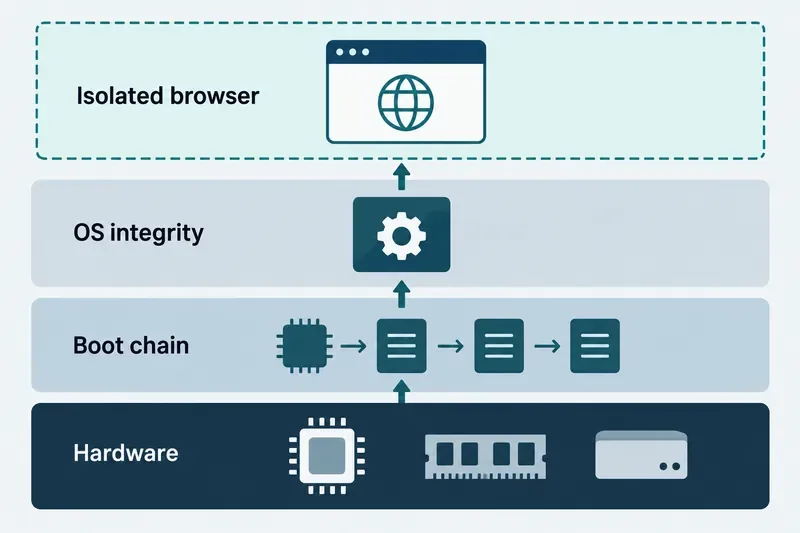
Gooroom’s security model is best understood as layers: trusted boot establishes confidence in software loaded at startup, while operating-system and browser protections address threats after startup. Treat these as complementary controls, not as a guarantee that every program runs in a sandbox. Public Gooroom materials describe trusted boot, OS protection, executable protection, and browser protection, but do not document a universal per-application sandbox or prove that every device ships with identical settings.
Conceptual view of the security layers discussed in Gooroom materials: hardware, boot chain, OS integrity, and browser protection.
What “trusted boot” means in Gooroom
Trusted boot describes a process that checks whether startup components are authorized or intact as control passes from one stage to the next. In a typical chain, platform firmware starts a bootloader; the bootloader then loads the kernel and related components. If a verification step rejects a component, a system can block startup or report a problem, depending on configuration. This differs from checking a downloaded file after the operating system is running.
Gooroom’s official security overview presents trusted boot as one part of its security framework, below operating-system and application protections. Separately, the Gooroom GRUB project’s release notes list native UEFI Secure Boot support in its upstream-based code history. That is evidence that the bootloader code supports Secure Boot; it is not evidence that a particular Gooroom image, computer firmware, or installation has Secure Boot enabled, keys enrolled, or every boot component verified. Public materials reviewed do not specify one current hardware root of trust, signing-key arrangement, or mandatory configuration for all deployments.
How OS protection and isolation fit in
Boot checks address the path into the operating system. Runtime protection is intended to reduce what malicious or unauthorized code can do after login. Gooroom’s security framework materials name OS protection, executable protection, and browser protection as separate functions. The product overview also depicts a lightweight hypervisor. A hypervisor can create a boundary between environments, but its presence alone does not tell you which process is isolated, what resources it can access, or whether isolation is active in your installed edition.
“Sandbox” is a general security concept: software runs with constrained access to files, devices, or other processes, so a compromise has less room to spread. Gooroom’s public materials support discussing browser and OS protection as framework components, but do not provide enough current detail to claim that every ordinary desktop application runs in its own sandbox. Do not infer per-tab isolation, virtual-machine isolation, automatic rollback, or complete containment unless the documentation for your exact release confirms it.
The project’s public OS-protector repository also describes Shadow-box, a virtualization-based kernel monitoring framework with a lightweight hypervisor and a security monitor. Its README discusses kernel integrity monitoring and notes operational constraints, including disabling some kernel and power-management features for that implementation. The repository helps explain the project’s technical direction, but does not establish that the feature is enabled in every current Gooroom build or suitable for every workstation configuration.
What this model can and cannot protect
At startup: a properly configured trusted-boot chain can make unauthorized changes to boot components harder to load unnoticed. Its value depends on firmware, enrolled trust keys, signed components, and the actual boot path.
After startup: OS, executable, and browser protections may limit selected threats or access paths. Their scope depends on implementation, policy, and release.
Outside those boundaries: these controls do not automatically prevent phishing, credential theft, unsafe user decisions, vulnerable applications, or attacks through unprotected services. They do not replace updates, backups, account controls, or network defenses.
Encryption is separate. Trusted boot may help establish confidence in startup software, but it does not mean files on a powered-off device are encrypted. Confirm disk-encryption status independently if protection against device loss is part of your requirement.
What to verify on a Gooroom device
Because public descriptions do not define a single universal configuration, verify the controls on the exact computer and release you operate. Ask the administrator or vendor for the release-specific security guide and policy. Confirm whether the machine boots in UEFI mode, whether Secure Boot is enabled in firmware, and whether the installed bootloader and kernel are accepted by the configured trust keys. Avoid changing firmware keys or disabling Secure Boot on a managed device without approval; either change can affect startup and organizational policy.
Verify runtime protections separately. Look for documented status indicators or management policy for OS, executable, and browser protection. Ask what is isolated, which data and devices remain reachable from that environment, how updates change policy, and what logs appear when a check fails. A product brochure is an architecture overview, not a status report for your endpoint.
How to read the evidence
The primary references are the Gooroom GRUB release notes, the Gooroom OS-protector repository, and the Hancom Gooroom security overview (published August 19, 2022). The brochure describes framework components; repository documentation describes code and constraints; neither proves what is active on your installation. I found no verified recent announcement in these sources that changes the basic distinction between trusted boot and runtime protection. Check release-specific documentation before making a security decision.