Home
» How to
»
How to change your avatar and cover photo Zalo
How to change your avatar and cover photo Zalo
Video Guide: How to Change Your Avatar and Cover Photo on Zalo
Changing your avatar and cover photo on Zalo is not only a way to express your personality, but it can also help others recognize you easily. Similar platforms like Facebook, Skype, and Viber offer similar features.
Image Specifications for Zalo
To create an appealing Zalo cover photo and avatar, ensure they meet the following specifications:
On the main Zalo interface, click on the three horizontal dots icon at the bottom right corner, then tap on the avatar icon to access your personal page. Here, click on the three dots icon in the top right corner and select Update Avatar or Update Wallpaper.
Step 2: Choose Your Avatar
In your personal page, click the avatar icon for options to:
View Avatar
Take a New Photo
Select an Existing Image
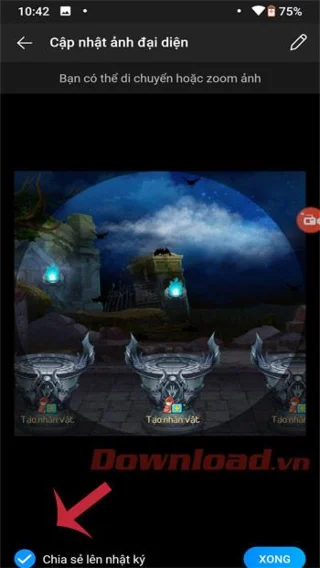
You can choose an existing photo from your library, adjust it as needed, and if you don't want others to see this change, uncheck the Share to Diary box before clicking Accomplished.
Step 3: Change Background Image
To change the background image, simply click on the background image area, select Take New Photo or Select Existing Image, and then adjust as needed. Press the Done button to finalize your changes.
Video Tutorial for Changing Your Zalo Images on Mobile
Additional Tips: Adding a Festive Photo Frame on Zalo
Step 1: Access the Diary Tab
Open the Zalo application and switch to the Diary tab. Click the Select Frame button located under the status posting area, which showcases festive themes.
Here, you will find various Christmas-themed frames to try. Choose one that complements your representative photo.
Step 2: Share Your Festive Avatar
After selecting the frame, you have the option to write a message up to 300 characters to share with your friends. If you want to use a different photo with the frame, click Change Photo. Otherwise, click Change Avatar to save your new look.
Now that you know how to change your avatar and cover photo, remember that frequent updates can help you stay relevant among your contacts. However, changing both images and your personal information may confuse others. Be mindful of your updates!
I wish you success in customizing your Zalo account!
(31) Comments
Quang IT -
I used to think changing my cover photo was complicated. After your post, it’s a breeze! Thanks for sharing
Oliver -
I had trouble with the cover dimensions, but this guide has made it so simple! Huge help
Tommy -
Such a big help! I had no idea where to start. Now I feel like a pro with customizing my Zalo profile
Huyền Lizzie -
Just did it! I feel so proud of my new avatar, thanks to your guide! 😊
Amy Nguyen -
Great tips! I didn't know you could adjust the size of the avatar before uploading. That’s a game changer
Naomi Chan -
Any tips on what types of photos work best for avatars? Would love some expert advice on that
Jake S. -
Anyone else get nervous before changing their photos? I feel way better after following these steps
Linda A -
I didn’t think updating my cover photo would be so easy! Thank you for the guide!
Duy Sinh 6789 -
I actually refreshed my whole profile after reading this! Looks so much better now. Cheers
Mèo con -
OMG I just forgot how to do this! Thanks for the reminder. Gonna update my profile right away!
Hugh -
This is a lifesaver! I’ve always struggled with alignment of my photos. Now I know the right sizes
Hương Đà Nẵng -
Thank you for this! I was totally lost. Now I can finally customize my account
Emily Smith -
This article is really helpful! Changing my Zalo avatar was so easy after following your steps. Thanks a ton
Tyler -
I can’t believe I finally figured out how to do this! Photo updates coming soon
Fiona M -
I really appreciate the effort put into this article. Changes can be so daunting, but you made it easy
Sara Kim -
What a great post! I love how you explained everything so clearly. Definitely going to try this out now
Mark Anderson -
Would love to see some examples of great Zalo cover photos. Anyone have suggestions?
John Doe -
I’ve always struggled with updating my cover photo. This guide has made it much clearer. Appreciate the detailed instructions!
Lucy Lily -
Wow, just changed my avatar and it feels so refreshing! Love how easy it is now with these steps
Jenna Lee -
I appreciate this post! The instructions were succinct and very useful. I’ll share this with my friends
Phúc IT -
Spent ages searching for how to upload a new cover. Wish I had seen this sooner. Thank you!
David 1985 -
Does anyone know if Zalo has a specific dimension requirement for the cover photo? I want to make sure mine looks perfect.
Jim Brown -
Does changing your avatar also affect privacy settings? I want to make sure my updates are only visible to friends
Grace Wang -
The step-by-step guide was super clear! So happy with my new profile look!
Sunny J -
Found the perfect avatar photo through this guide! So cute, can’t wait to upload
Steve Rogers -
If you ever feel like your profile is boring, just follow this guide to freshen it up! Totally recommend
Thùy Linh -
Can I use animated images for my avatar? I saw some cool ones online, but I'm not sure they are allowed.
Chris P. -
Love it! Everything looks so different after changing the avatar. Makes me feel like a new user!
Anna Beats -
Very informative! I love how personalizing our profiles can reflect our moods and styles. Great job
David N. -
What a fantastic post! Personalizing my avatar is something I always wanted to do. Can’t wait to try!
Linh mèo -
Thanks for the clear steps! I was able to change both my avatar and cover photo within minutes





















Quang IT -
I used to think changing my cover photo was complicated. After your post, it’s a breeze! Thanks for sharing
Oliver -
I had trouble with the cover dimensions, but this guide has made it so simple! Huge help
Tommy -
Such a big help! I had no idea where to start. Now I feel like a pro with customizing my Zalo profile
Huyền Lizzie -
Just did it! I feel so proud of my new avatar, thanks to your guide! 😊
Amy Nguyen -
Great tips! I didn't know you could adjust the size of the avatar before uploading. That’s a game changer
Naomi Chan -
Any tips on what types of photos work best for avatars? Would love some expert advice on that
Jake S. -
Anyone else get nervous before changing their photos? I feel way better after following these steps
Linda A -
I didn’t think updating my cover photo would be so easy! Thank you for the guide!
Duy Sinh 6789 -
I actually refreshed my whole profile after reading this! Looks so much better now. Cheers
Mèo con -
OMG I just forgot how to do this! Thanks for the reminder. Gonna update my profile right away!
Hugh -
This is a lifesaver! I’ve always struggled with alignment of my photos. Now I know the right sizes
Hương Đà Nẵng -
Thank you for this! I was totally lost. Now I can finally customize my account
Emily Smith -
This article is really helpful! Changing my Zalo avatar was so easy after following your steps. Thanks a ton
Tyler -
I can’t believe I finally figured out how to do this! Photo updates coming soon
Fiona M -
I really appreciate the effort put into this article. Changes can be so daunting, but you made it easy
Sara Kim -
What a great post! I love how you explained everything so clearly. Definitely going to try this out now
Mark Anderson -
Would love to see some examples of great Zalo cover photos. Anyone have suggestions?
John Doe -
I’ve always struggled with updating my cover photo. This guide has made it much clearer. Appreciate the detailed instructions!
Lucy Lily -
Wow, just changed my avatar and it feels so refreshing! Love how easy it is now with these steps
Jenna Lee -
I appreciate this post! The instructions were succinct and very useful. I’ll share this with my friends
Phúc IT -
Spent ages searching for how to upload a new cover. Wish I had seen this sooner. Thank you!
David 1985 -
Does anyone know if Zalo has a specific dimension requirement for the cover photo? I want to make sure mine looks perfect.
Jim Brown -
Does changing your avatar also affect privacy settings? I want to make sure my updates are only visible to friends
Grace Wang -
The step-by-step guide was super clear! So happy with my new profile look!
Sunny J -
Found the perfect avatar photo through this guide! So cute, can’t wait to upload
Steve Rogers -
If you ever feel like your profile is boring, just follow this guide to freshen it up! Totally recommend
Thùy Linh -
Can I use animated images for my avatar? I saw some cool ones online, but I'm not sure they are allowed.
Chris P. -
Love it! Everything looks so different after changing the avatar. Makes me feel like a new user!
Anna Beats -
Very informative! I love how personalizing our profiles can reflect our moods and styles. Great job
David N. -
What a fantastic post! Personalizing my avatar is something I always wanted to do. Can’t wait to try!
Linh mèo -
Thanks for the clear steps! I was able to change both my avatar and cover photo within minutes