Hair Bob 2020 Summer: 80 beautiful trendy cuts
2020 summer bob haircuts most beautiful and trendy worn by the stars and proposed by famous hairdressers. Lots of images and ideas to inspire you!
The article would like to introduce some uses when opening different pressure cookers and their uses.

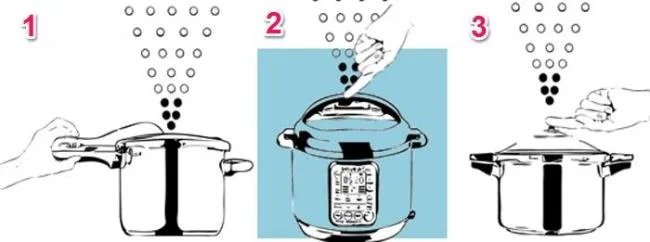
This is the method of opening the pot by releasing the pressure air through the exhaust valve, which is also the fastest way to open the lid, only takes about 2 to 3 minutes. Users should use this opening when cooking fast food and vegetables.
The way to release pressure is:
- Use the handle holding the handle to unlock the drain valve (1) for quick pressure release
- Use your hand to pull the pressure release valve pin (2) - Applies to electronic pressure cookers
- Use hand to pull the pressure release valve pin (3) - Applies to mechanical pressure cooker
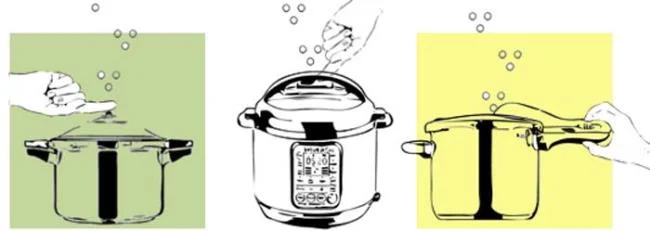
Note that the drain valve is very hot, so you can wear insulated gloves to open the drain valve or use tools (chopsticks, tongs) to hold the drain valve. After releasing all the pressure in the pot, where the drain valve no longer sounds, open the lid. Opening it earlier is dangerous.
See also: How to discharge pressure of electronic pressure cookers

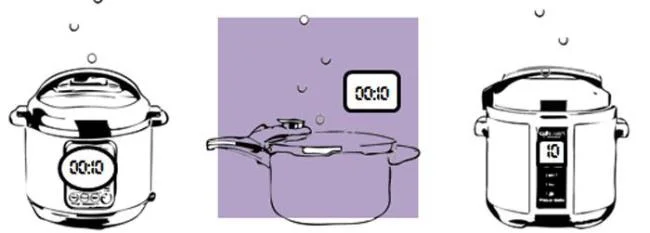
This method is similar to opening the lid with rapid air discharge, but users will reduce the air discharge rate more slowly, about 5 to 10 minutes. If you are using a mechanical pressure cooker and cannot adjust the speed of the exhaust gas, you should discharge the air in batches, locking the valve every 10 seconds to prevent bubbles from spilling out of the valve.
This method is used when cooking difficult dishes like rice, cereals, beans, and vegetables, but there is no time to use the natural pressure relief mentioned below.

This is just how to reduce the pressure by cutting the heat with the pressure cooker, letting the pot cool itself down and reducing the pressure naturally. After 10 to 15 minutes, the user will release the remaining pressure in the pot using the slow-pressure air release method (Method 2). This is recommended for grains as they will continue to be steam-cooked in the pot when the heat is gone.

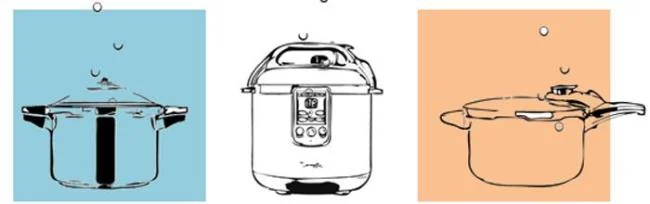
This is the slowest method of reducing pressure, which can take anywhere from 10 to 30 minutes depending on the type of pot (electric pressure cookers take longer because of the heat retention mechanism) and the amount of food in the pot. This method allows the pressure to drop completely naturally after the heat has been turned off. That is, the user does not take any action on the exhaust valve, and let the pot drain all the air in the pot until there is no sound before opening the pot.
This is recommended when cooking foods that are foamy and swollen like cereals, rice, beans and fruit. Meats should also be used this way to prevent the broth from evaporating too quickly. When the broth is stewed, you should also let it cool naturally because when the pressure is released quickly, the bones and the spices will vibrate, making the broth cloudy.

Reducing the pressure by putting the pressure cooker on the stove and putting it directly into cold water or immersing it in a tub of cold water can be dangerous to the user. Water can block the pressure relief valve, evaporate and cause burns, sudden temperature changes can deform the metal layer of the pot, so you should not use these methods to open the pressure cooker.
Using a pressure cooker also requires a few tips to ensure the food is always delicious and nutritious. Hopefully the article has provided you with more information on how to properly open the pot to make your family meal more delicious and safe for users.
2020 summer bob haircuts most beautiful and trendy worn by the stars and proposed by famous hairdressers. Lots of images and ideas to inspire you!
Many hairstyles for straight hair to be copied and the tutorials to learn how to make them in a few simple steps. Here are the most beautiful hairstyles.
Does eating durian while breastfeeding affect breast milk taste or cause digestive issues? Find out whether nursing mothers should eat durian.
Learn how to replicate Renée Zellweger’s beautiful makeup from the BAFTAs, featuring useful tips and a list of products for an elegant and luminous look.
Discover the best washing machine brands such as Hitachi, Candy, Midea, Beko, and Whirlpool with our detailed reviews. WebTech360 helps you choose the best washing machine that suits your needs.
Available in the Vietnamese market since 2001, Darling TV is gradually becoming familiar to users. Discover if Darling TV is good and durable, alongside the top 3 models worth buying.
Deciding whether to buy a Hitachi or Samsung refrigerator is challenging, as both brands are synonymous with quality and luxury.
Discover how to effectively use the Toshiba AW-A800SV washing machine control panel with our detailed guide!
WebTech360 provides simple steps for updating software on your Toshiba Smart TV to enhance performance and access new features.
Are longans harmful for pregnant women? Discover safe consumption practices for longan during pregnancy and the potential risks involved.
Discover the trendy men
Learn how to use Skype on your Smart TV TCL for seamless communication. This guide covers installation, login, camera connection, and more.
Learn how to bookmark websites on your Skyworth Smart TV for easy access to your favorite content with WebTech360.
When running a newly purchased refrigerator, you notice the sides heating up, raising concerns about a potential fault. This article from WebTech360 provides insights into this phenomenon.
Discover why buying a Panasonic refrigerator could be the right choice for you. Learn about its advantages, technologies, and energy efficiency.
Struggling with Microsoft Edge Certificate Mismatch warning? Discover step-by-step troubleshooting fixes for this common SSL error. Clear cache, update Edge, and more for secure browsing.
Struggling with a sluggish Microsoft Edge? Discover how to reset Microsoft Edge to default factory settings in minutes. Step-by-step guide with visuals to fix crashes, pop-ups, and performance issues effortlessly.
Struggling with YouTube black screen on Microsoft Edge in 2026? Discover proven, step-by-step troubleshooting fixes to restore smooth video playback instantly. Quick solutions that work!
Tired of Microsoft Edge sidebar not opening glitch? Discover quick, effective troubleshooting steps to restore your sidebar instantly. Step-by-step guide with latest fixes for seamless browsing.
Tired of Microsoft Edge "Firewall" blocking your games? Discover proven, step-by-step fixes to unblock games quickly. Get back to seamless gaming with our ultimate guide – no tech skills needed!
Unlock why Microsoft Edge surpasses Chrome in 2026 with blazing speed, unbeatable battery life, AI power, and ironclad privacy. Discover game-changing features that make Edge the smartest switch for power users.
Struggling with PDF Preview Handler Errors in Microsoft Edge? Discover step-by-step fixes to restore seamless PDF previews in File Explorer. Quick troubleshooting, registry tweaks, and prevention tips for the latest Edge versions. Get it fixed now!
Discover how to effortlessly manage Microsoft Edge multiple profiles and sync across devices. Create, switch, sync favorites, passwords, and more for personalized browsing without hassle.
Struggling with Microsoft Edge HSTS Attack Warning? Get the ultimate 2026 fixes with step-by-step guides to resolve this frustrating security alert fast. Clear cache, reset settings, and stay secure!
Struggling with Microsoft Edge Core Isolation not turning on? Discover step-by-step fixes for Core Isolation issues, including BIOS tweaks, driver updates, and Windows repairs to boost your security instantly.
Struggling with Game Bar Party Chat audio not working? Discover step-by-step troubleshooting for Xbox Game Bar voice chat issues. Quick fixes for no sound, mic problems, and more on Windows. Get back to gaming!
Struggling with Microsoft Edge Update Error 0x80073712? Discover step-by-step fixes like SFC scan, DISM repair, and Edge reset to resolve it fast. No tech skills needed!
Tired of Microsoft Edge "Private Connection" warnings blocking your browsing? Get step-by-step solutions to solve Microsoft Edge Private Connection errors fast. Secure, updated fixes for seamless surfing.
Struggling with Microsoft Edge "Result_Code_Hung" Error? Discover proven, step-by-step fixes to resolve hangs and crashes instantly. Get smooth browsing back today!
Learn how to delete Microsoft Edge history, cache, and cookies completely with this step-by-step guide. Clear your browsing data fast and securely in the latest Edge version for ultimate privacy.