Home
» How to
»
How to tune channels on regular Skyworth TV
How to tune channels on regular Skyworth TV
Video: How to Tune Channels on Regular Skyworth TV
Welcome to Our Channel Setup Guide
In this article, WebTech360 provides you with a comprehensive guide on how to tune in to Skyworth TV, enhancing your viewing experience with a variety of entertainment channels.
Benefits of Tuning Channels on Your Skyworth TV
When you successfully tune channels on your TV, you gain access to a wide range of programs that allow you to:
Benefit
Description
Stay Informed
Watch news, entertainment, and sports programs for the latest updates.
Enjoy Diverse Content
Access movies, comedies, operas, and unique art shows.
Participate in Engaging Shows
Follow exciting TV games and reality shows.
Step-by-Step Guide to Tune Channels on Skyworth TV
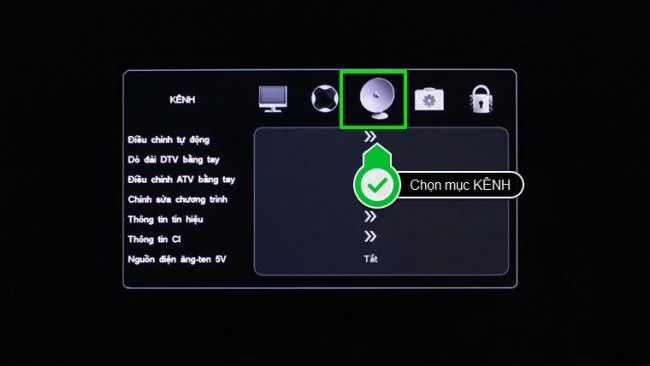
Step 1: Press the MENU button on your remote to enter the TV's main settings interface. Then, select CHANNEL (the icon with an antenna image).
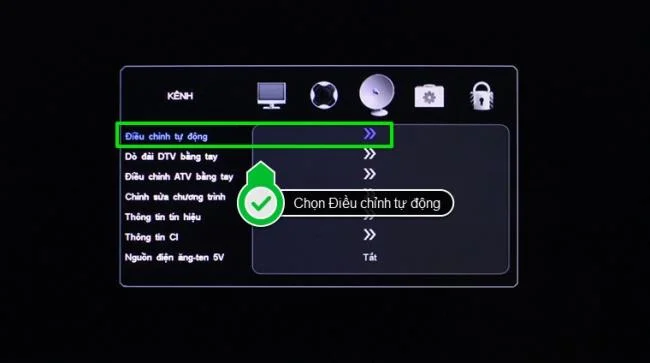
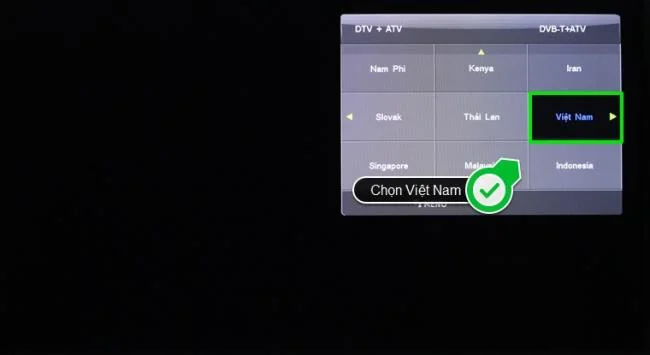
Press the MENU button on the remoteSelect the CHANNEL item in the TV menuStep 2: In the CHANNEL menu, select Automatic Adjustment. When prompted, select your country (Vietnam) to start tuning.
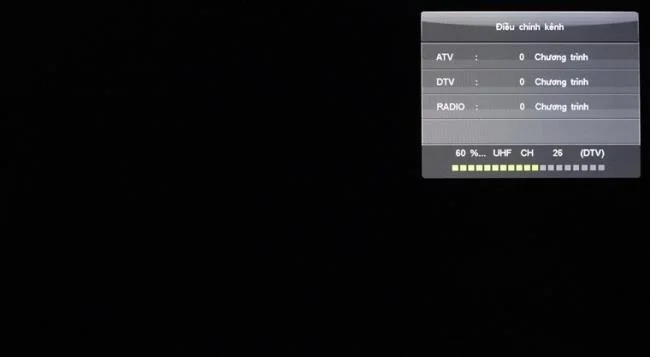
Select Auto AdjustSelect Country as VietnamThe TV is searching for channelsStep 3: Once tuning is complete, enjoy a variety of special TV programs.
Enjoy entertainment on TV
By following the above steps, you can tune in to regular TV channels and DVB-T2 digital channels on your Skyworth TV. If you own a Skyworth TV with DVB-S2 satellite digital capabilities, such as the 32-inch Skyworth LED TV, you'll need to install a satellite dish, making the process slightly more complex. For detailed assistance, refer to the tutorial linked below:












Hương Đà Nẵng -
My TV is now tuning perfectly! I’m surprised how many channels I’ve been missing out on
Chloe Smith -
I just tuned my channels, and I’m so thrilled! Thank you for this clear instruction
Tina K. -
This tutorial rocks! I can’t believe how easy it was after all the stress I had!
Jackie -
This is a blessing! So many new shows to explore. Cheers to more family movie nights
Timothy -
I’m a total newbie with TVs, but this guide made sense! Thanks a million
John Doe -
Thanks for sharing! I think I’ll be tuning my TV every weekend now, just to stay updated on channels.
Liam the Explorer -
Can anyone recommend a good movie channel? Now that I have more options, I'm looking for suggestions
Geoffrey -
Finally! I’ve been meaning to do this for months and just couldn’t figure it out. You’re a lifesaver
Jess -
Grateful for the help! If only I could figure out my cable setup as easily as this
Sammy -
Would love to hear some common issues people face while tuning channels. What should I look out for?
Mary P. -
I felt like I was going to pull my hair out trying to tune my channels. This really helped me a lot
Owen -
Awesome! I just shared this article with my friends. They really need to catch up on channels
Linda L -
Anyone tried the auto-tuning feature? Does it really work better, or should I stick to manual
Julia W. -
I’m glad I found this! It took just a few minutes to follow the instructions, and everything worked perfectly
Hà Nội Girl -
I’d love to know how to do this with my smart TV. Anyone can help
Tommy123 -
I never realised there were so many channels available. I followed your guide, and now I have a ton of new options
Cathy -
Good to know this guide covers all aspects. I struggled with this previously, but will follow these steps next time
Quang vn -
Wow, very detailed! I’m going to try this out tonight. Hopefully, I can finally catch up on my favorite shows
Jake F. -
Is it possible to tune channels automatically, or is manual really the only way with Skyworth
Nick -
Loved the article! Can you provide info about resetting the TV if the channels go missing again
Tim Baker -
Anyone else had issues with signal quality after tuning? Just curious if that’s a common problem
Mèo con -
Haha, I actually thought I’d broke my TV when the channels wouldn’t tune! Thanks for saving my day
Frankie The Techie -
Just wanted to drop a note of appreciation! Your insights helped me when I got stuck on channel searching. Keep it up
Mike -
Your article saved my weekend plans! I thought I wouldn’t be able to watch the game on time!
Maxine -
I loved reading your article! This method should be a go-to for anyone with old TVs.
Sarah O'Neil -
Great tips! I had a hard time with my TV before, but this made it so much easier
Leo -
Such a well-written article! I followed every step and completed tuning in less than 10 minutes
Sunny Dayz -
I was feeling really lost with my TV setup. This guide is perfect, and I feel like a pro now
Viet Nam -
Totally relatable! I went through the same chaos, but your tips helped a lot
Kristen T. -
I appreciate how straightforward this guide is! I wish I found it sooner; it would have saved me hours
Emily Johnson -
This guide is incredibly helpful! I struggled with tuning my Skyworth TV for weeks. Thanks a lot
Huyền Lizzie -
I couldn't believe how easy it was! Just followed the steps, and voila, I have all my channels
Phúc IT -
So happy to see this! My parents really needed help with their TV, and this will help them a ton!
Sandy -
Thanks for the detailed breakdown! I appreciate the clarity. Finally tuned everything correctly after ages!
Pet Lover Alice -
My cat was starting to get bored with the same old shows. Now we have more channels, and he loves it! Thanks!
Daniel -
Question: Does this tuning process apply to all Skyworth models? I have an older version
Ronald M. -
How often should I retune my Skyworth TV? Just want to make sure I’m always updated