10 useful shortcuts to increase productivity on Microsoft Edge
Keyboard shortcuts are a great productivity tool, especially for those whose jobs involve a lot of typing.
A fairly annoying feature for users when surfing the web, particularly in the Microsoft Edge browser, is the feature that automatically plays videos when you visit a website, especially when using Facebook , when you surf new feed, sometimes you will startle because the sound automatically comes from a certain page.
In the recent update of Windows 10 build 17704, Microsoft has improved quite a lot for the Microsoft Edge browser, including a new feature that allows users to control the ability to automatically run media on the browser when opening a website. any. For specific shutdowns, please see below this article.
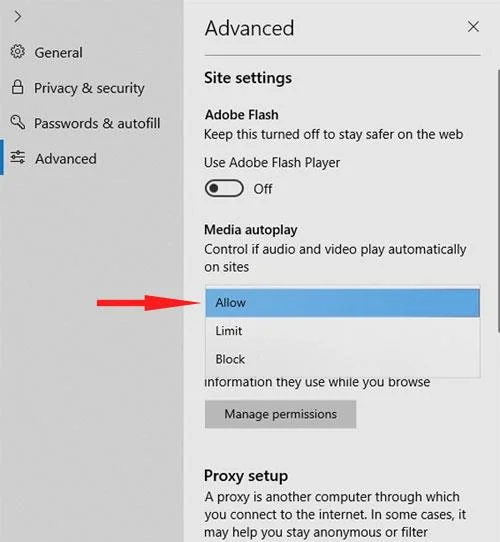
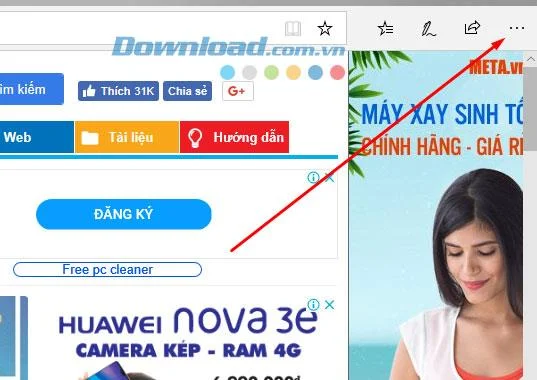
Step 1: If you're using a version of Windows Insider, you can test this feature by clicking the Edge menu button (the three horizontal dots icon in the right corner). Click Advanced.

Step 2: In Media Autoplay section, you can choose 3 modes which are:
Based on your interests and surfing habits, please choose accordingly.

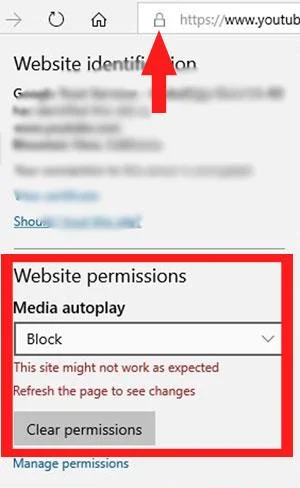
Step 3: In addition, you can also personalize each page by visiting that page, clicking the lock button next to the address bar and selecting Media Autoplay, then you will also have 3 options that are Allow , Limit and Block similar to the above.

Turning off the auto-play mode on Microsoft Edge will help you reduce the hassle of surfing the web, especially when you leave the speaker out, there will be some video clips that are "troll" and have a slightly sensitive sound, because So you should turn off autoplay mode, avoid unnecessary misunderstandings.
Keyboard shortcuts are a great productivity tool, especially for those whose jobs involve a lot of typing.
Google Chrome is the world's most popular browser, but that doesn't mean you have to use it. There are plenty of great Chrome alternatives that will help you leave Google behind for good, and here are the best.
The feeling of playing your favorite game while your browser downloads something in the background or plays epic music on YouTube is unmatched. However, some browsers are better suited for these situations.
Quantrimang will introduce you how to add, edit or delete saved passwords on the Microsoft Edge web browser as well as export passwords as CSV files.
Microsoft Edge has some features that users want in Google Chrome but without having to download extensions.
It's that time again! December is the time for platforms and services to summarize, count and announce their achievements throughout the year. Edge is no exception.
Microsoft Edge and Chrome both work well on Windows 11 PCs, but once you try Brave, you probably won't go back. Here's why people now prefer Brave over other options.
Microsoft's new Chromium-based Edge browser drops support for EPUB eBook files. You'll need a third-party EPUB reader app to view EPUB files on Windows 10. Here are some good free options to choose from.
Setting Microsoft Edge as the default browser on your Android phone means that the operating system will always launch Edge whenever it is busy performing a browser-related task.
In Edge on Windows, you can set Copilot as the default experience for new tabs. This feature is turned off by default, and many Edge users prefer it that way.
If you're using the uBlock Origin extension on Google Chrome or Microsoft Edge, you should probably start looking for alternative browsers or extensions.
Are you tired of seeing your computer battery drain faster while browsing the web? You need a browser with battery saving mode and these are the best options.
How to add Internet Download Manager to Chrome, Firefox, Coc Coc browsers is too familiar to users. Adding IDM to Microsoft Edge is probably still unknown to many.
If Microsoft Edge is your main browser on Windows, you definitely need to know the Microsoft Edge keyboard shortcuts below.
Master how to completely uninstall Microsoft Edge from Windows 11 in 2026. Step-by-step, no-trace removal for gamers seeking max performance. Say goodbye to bloatware!
Discover how to reset Microsoft Edge to default settings in 2026 effortlessly. Fix crashes, slowdowns, and pop-ups with proven step-by-step methods for a fresh, blazing-fast browser.
Tired of Microsoft Edge "Certificate Not Trusted" warnings blocking your browsing? Discover proven troubleshooting Microsoft Edge "Certificate Not Trusted" warnings steps to resolve SSL errors securely and regain smooth access. Works on latest Edge versions.
Discover how to safely remove your Microsoft Edge profile and personal data without risks. Our expert guide ensures a clean slate while protecting your important info – perfect for privacy pros!
Discover simple, step-by-step instructions on how to change Microsoft Edge home page and startup settings. Customize your browser for a faster, personalized experience today!
Tired of Microsoft Edge update errors crashing your Windows 11 browsing? This ultimate guide delivers proven, step-by-step fixes for common issues like 0x80070005, stuck updates, and more. Update Edge effortlessly today!
Struggling with "This Site is Not Secure" error in Edge? Discover step-by-step fixes to restore secure browsing instantly. Clear cache, update certs, and more—no tech skills needed!
Tired of the frustrating Microsoft Edge "404 Not Found" error? Discover quick, proven fixes to resolve 404 errors in Edge browser. Step-by-step guide with latest tips for smooth browsing.
Tired of Microsoft Edge "Out of Memory" error crashing your streaming sessions? Get step-by-step fixes to resolve it fast, boost performance, and stream smoothly without interruptions. Updated with the latest tips.
Struggling with Troubleshooting Microsoft Edge "Cortana and Copilot" AI? Get proven fixes for crashes, unresponsiveness, and errors in the latest Edge versions. Restore your AI assistant effortlessly!
Struggling with the Edge Browser "Clock Behind" error on Windows 11? Discover proven, step-by-step fixes to sync your clock, clear caches, and restore smooth browsing. Quick solutions that work!
Tired of Microsoft Edge video stuttering and frame drops ruining your streaming? Discover proven troubleshooting steps to restore smooth playback in this comprehensive guide. Fix it fast!
Struggling with the Microsoft Edge BitLocker recovery loop error? Discover simple, step-by-step fixes to escape the endless loop and regain access to your PC without data loss. Updated with the latest solutions.
Struggling with the Microsoft Edge "Core Isolation" Settings Error? Discover proven step-by-step solutions to resolve it fast, restore smooth browsing, and boost your PC security. Works on latest Windows versions.
Master Solving Microsoft Edge "Ultimate Performance" Settings with this expert guide. Boost speed, fix lags, and optimize for peak browsing efficiency—step-by-step now!