Instructions to recover hacked Telegram account

Telegram has a fairly high account security, but there will also be some cases of account hacking, account and personal information theft. If you suspect that your Telegram account is being logged in illegally, then handle it quickly according to the instructions below.

Log out of Telegram account remotely

If you notice someone else using your Telegram account, or if you accidentally forget to log out of your Telegram account, you need to check and log out of all Telegram accounts.

Contact Telegram Team

In case you have not been able to handle it in time and let your Telegram account fall into the hands of someone else, we can contact Telegram's support team.

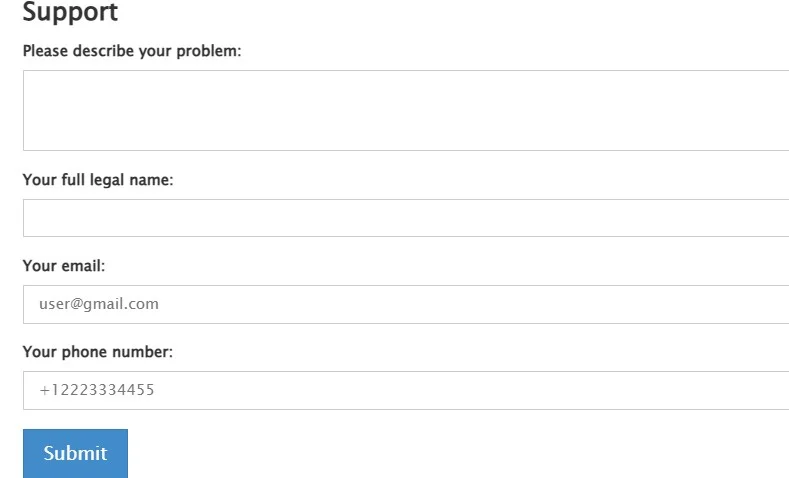
Since you no longer have access to your Telegram account, you will have to contact support via the platform's official website. All you need to do is describe your problem, leave your personal and contact information, and press Send below.
Instructions to recover hacked Telegram account

Create new Telegram account

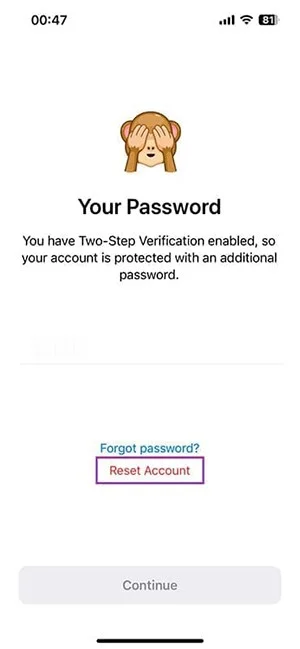
Suppose you can’t recover your Telegram account but want to continue using the app with the same phone number. The only way is to delete your old account and create a new one. In case you have Telegram 2-factor verification , you need to follow the instructions below.

You will enter your phone number then click on Forgot password and select Reset Account to reset your account. The old account will be deleted after 7 days. After that, you can create a new account with your phone number and continue using Telegram.

Instructions to recover hacked Telegram account

Leave a Comment

Enable SLES Live Patching and Verify a Kernel Fix

Enable SLES Live Patching and Verify a Kernel Fix

Set up the right Live Patching path for SLES 16.0 or 15 SP7, apply eligible kernel fixes, and confirm what is active without confusing it with a reboot-required kernel update.

Install and Sign Custom Kernel Modules on SLES 15 Secure Boot

Install and Sign Custom Kernel Modules on SLES 15 Secure Boot

Load a custom SLES 15 kernel module without disabling Secure Boot. Match the running kernel, sign the .ko file, enroll a MOK key, and verify loading.

Keep Services Available During a SLES 15 SP5 to SP6 Upgrade

Keep Services Available During a SLES 15 SP5 to SP6 Upgrade

SLES 15 SP5 can migrate online to SP6, but each node must reboot. Use a tested rolling upgrade or blue-green cutover to keep workloads reachable.

Apply the SLES 15 STIG Safely with OpenSCAP

Apply the SLES 15 STIG Safely with OpenSCAP

Use SUSE’s supported STIG profile to scan SLES 15, test remediation, review remaining findings, and retain assessment evidence.

Restore Cockpit Access to SUSE Linux Enterprise Server

Restore Cockpit Access to SUSE Linux Enterprise Server

Trace a failed Cockpit connection through DNS, port 9090, the systemd socket, firewalld, TLS, and login settings using current SUSE guidance.

Configure Reliable Ethernet Failover with SLES 15 Bonding

Configure Reliable Ethernet Failover with SLES 15 Bonding

Create a redundant Ethernet connection on SLES 15 with YaST and Wicked, configure active-backup bonding, and verify both ports and failover.

Build a Reusable AutoYaST Profile for SLES 15 Installs

Build a Reusable AutoYaST Profile for SLES 15 Installs

Turn an existing SLES 15 system into a reviewed AutoYaST profile, validate it, and use it to deploy a test server with fewer manual steps.

SLES 15 KVM Setup: Make Selected VMs Start at Boot

SLES 15 KVM Setup: Make Selected VMs Start at Boot

Install the SLES 15 KVM and libvirt tools, enable the right host service, and configure selected virtual machines to start after a reboot.

Diagnose a SUSE Server That Hangs at the systemd Shutdown Screen

Diagnose a SUSE Server That Hangs at the systemd Shutdown Screen

Use systemd jobs and the previous boot journal to locate a slow service, mount, or storage dependency, then correct it without masking the cause.

Open Only the Web Traffic Your SLES 15 Server Needs

Open Only the Web Traffic Your SLES 15 Server Needs

Use firewall-cmd to inspect the active zone, allow HTTP safely, preserve SSH access, and verify that the rule survives a reload on SLES 15.