New ransomware strain discovered that specializes in stealing login information from Chrome browser

A new strain of ransomware called Qilin has been discovered using a relatively sophisticated, highly customizable tactic to steal account login information stored in the Google Chrome browser.

The Sophos X-Ops global security research team observed credential harvesting techniques during its Qilin incident response, indicating an alarming shift in the way this dangerous ransomware strain operates.

Overview of the attack process

The attack analyzed by Sophos researchers began with the Qilin malware successfully accessing the target network using compromised credentials on a VPN gateway without multi-factor authentication (MFA).

This was followed by an 18-day period of malware “hibernation,” suggesting that the hackers had purchased access to the network through an initial access broker (IAB). Qilin likely spent time mapping the network, identifying key assets, and conducting reconnaissance.

After the first 18 days, the malware moves laterally to domain controllers and modifies Group Policy Objects (GPOs) to execute a PowerShell script ('IPScanner.ps1') on all machines logged into the domain network.

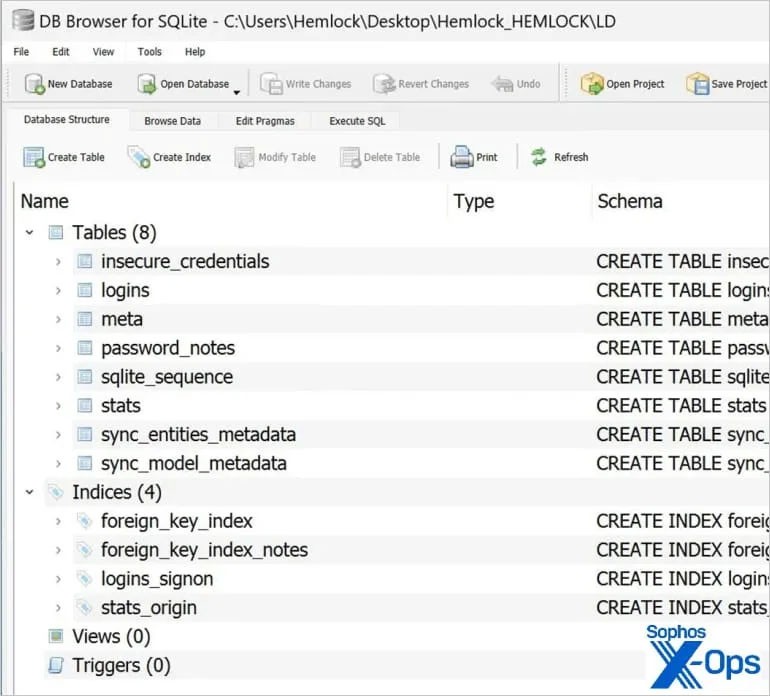
This script is executed by a batch script ('logon.bat'), and is also included in the GPO. It is designed to collect login information stored in Google Chrome.

The batch script is configured to run (and trigger a PowerShell script) every time a user logs in to their machine. In parallel, the stolen credentials are saved on the 'SYSVOL' partition under the name 'LD' or 'temp.log'.

New ransomware strain discovered that specializes in stealing login information from Chrome browser

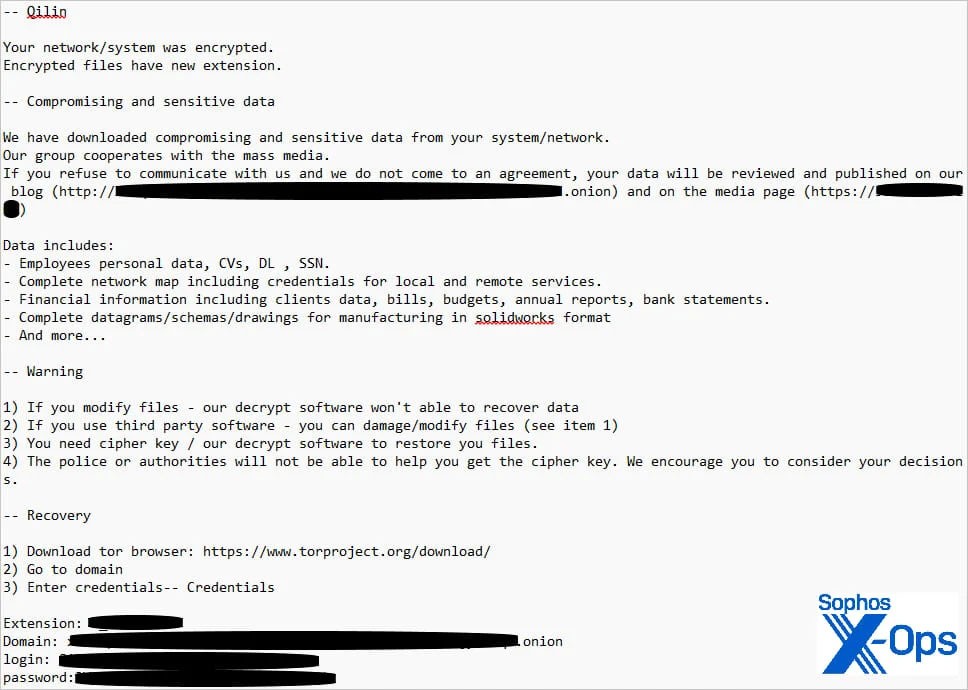
After sending the files to Qilin’s command and control (C2) server, local copies and associated event logs were deleted to conceal the malicious activity. Finally, Qilin deployed the ransomware payload and encrypted data on the compromised machines.

Another GPO and a separate command file ('run.bat') are also used to download and execute the ransomware on all machines in the domain.

New ransomware strain discovered that specializes in stealing login information from Chrome browser

Complexity in defense

Qilin's approach to Chrome credentials sets a troubling precedent that could make protecting against ransomware attacks more difficult.

Because the GPO is applied to all machines in the domain, every device where the user is logged on is subject to the credential collection process.

This means that the script is capable of stealing credentials from all machines across the system, as long as those machines are connected to the domain and have a user logged in during the time the script is running.

Such widespread credential theft can allow hackers to launch follow-up attacks, resulting in a security incident that spans multiple platforms and services, making response efforts much more cumbersome. It also creates a persistent threat that lingers long after the ransomware incident is resolved.

Organizations can mitigate risk by implementing strict policies that prohibit storing secrets in web browsers. Additionally, implementing multi-factor authentication is key to protecting accounts from being taken over, even in the event of a compromised credential.

Finally, implementing principles of least privilege and network segmentation can significantly hinder a threat actor's ability to spread across a compromised network.
Leave a Comment

How to Fix Microsoft Teams Error K Security

How to Fix Microsoft Teams Error K Security

Struggling with Microsoft Teams "Error K" Security? Follow our step-by-step guide to fix it quickly—no tech expertise needed. Get back to seamless collaboration today!

How to Fix Microsoft Teams Update Error 0x80070002

How to Fix Microsoft Teams Update Error 0x80070002

Struggling with Microsoft Teams Update Error 0x80070002? Discover step-by-step fixes to resolve it quickly. Clear cache, repair files, and get back to seamless updates today!

Solving Microsoft Teams Web Error Browser Login

Solving Microsoft Teams Web Error Browser Login

Tired of Microsoft Teams "Web Error" blocking your browser login? Follow our step-by-step guide with proven fixes to resolve Teams web login issues fast and securely. Get back to work!

How to Fix Microsoft Teams Error O Offline

How to Fix Microsoft Teams Error O Offline

Stuck with Microsoft Teams "Error O" Offline? Discover proven, step-by-step fixes to get back online fast. Clear cache, restart, and more – no tech skills needed!

Where is Microsoft Teams in Outlook? Locating the Missing Icon

Where is Microsoft Teams in Outlook? Locating the Missing Icon

Frustrated by the missing Microsoft Teams icon in Outlook? Learn exactly where to find it, why it disappears, and proven steps to restore it for effortless meetings. Updated for the latest versions!

Solving Microsoft Teams Windows 10 Error Login Issues

Solving Microsoft Teams Windows 10 Error Login Issues

Struggling with Microsoft Teams "Windows 10 Error" login issues? Get instant fixes for cache clears, updates, and more. Step-by-step solutions to solve Microsoft Teams login error on Windows 10 fast and frustration-free.

Solving Microsoft Teams Website Error Tab Not Loading

Solving Microsoft Teams Website Error Tab Not Loading

Tired of the frustrating Microsoft Teams "Website Error" where tabs won’t load? Get step-by-step fixes to resolve it quickly and boost your productivity. Essential troubleshooting for seamless Teams experience.

How to Fix Microsoft Teams Web Error 503 Service Unavailable

How to Fix Microsoft Teams Web Error 503 Service Unavailable

Tired of the frustrating Microsoft Teams "Web Error" 503 Service Unavailable? Discover proven, step-by-step fixes for Teams 503 error on web. Get back online fast with our expert guide. Works on all browsers!

How to Fix Microsoft Teams Win 7 Error Compatibility

How to Fix Microsoft Teams Win 7 Error Compatibility

Struggling with Microsoft Teams "Win 7 Error" compatibility? Discover step-by-step fixes to restore seamless video calls and chats on unsupported Windows versions. Quick, reliable solutions inside!

Troubleshooting Microsoft Teams Breakout Rooms License Errors

Troubleshooting Microsoft Teams Breakout Rooms License Errors

Master troubleshooting Microsoft Teams Breakout Rooms license errors with this step-by-step guide. Quick fixes for common license issues, admin checks, and prevention tips to get your meetings running smoothly.

How to Fix Microsoft Teams Version History Error

How to Fix Microsoft Teams Version History Error

Struggling with Microsoft Teams "Version History" Error? Discover proven, step-by-step fixes to restore access instantly. Clear cache, update Teams, and more—no tech skills needed!

Solving Microsoft Teams Joining Error: Meeting ID Not Found

Solving Microsoft Teams Joining Error: Meeting ID Not Found

Tired of the frustrating Microsoft Teams Joining Error: Meeting ID Not Found? Get step-by-step fixes to rejoin meetings fast. Updated with the latest Teams patches for seamless collaboration. Solve it now!

Troubleshooting Microsoft Teams Video Error Green Screen

Troubleshooting Microsoft Teams Video Error Green Screen

Struggling with Microsoft Teams "Video Error" green screen? Discover proven, step-by-step troubleshooting fixes for seamless video calls. Quick solutions inside!

How to Fix Microsoft Teams How Teams Works Tutorial Error

How to Fix Microsoft Teams How Teams Works Tutorial Error

Struggling with the Microsoft Teams "How Teams Works" Tutorial Error? Discover proven, step-by-step fixes to resolve it quickly. Clear cache, update, and more for seamless onboarding. Works on latest versions!

How to Fix Microsoft Teams Error Today on Windows 10

How to Fix Microsoft Teams Error Today on Windows 10

Tired of the frustrating Microsoft Teams "Error Today" on Windows 10? Discover proven, step-by-step fixes to resolve it quickly and restore smooth teamwork. No tech skills needed!