Home
» How to
»
Some useful keyboard shortcuts when using KMPlayer
Some useful keyboard shortcuts when using KMPlayer
Discover essential keyboard shortcuts for KMPlayer to enhance your music and movie experience. Maximize your efficiency with these practical tips.
Video Some useful keyboard shortcuts when using KMPlayer
KMPlayer is one of the most popular music and movie player software currently used by many people. So do you know how to use shortcuts in KMPlayer to manipulate faster in the application yet?
Summary of useful keyboard shortcuts when using KMPlayer
1. Play / stop the picture:
Esc: Stop the image and minimize the player to the system tray.
2. Rewind / Rewind:
Right / Left Arrow Keys: Move back or forward 5 seconds.
Ctrl + Right / left arrow : Move back or forward 30 seconds.
Alt + Right / left arrow: Move back or forward 1 minute.
Ctrl + Alt + Right / left arrow: Move back or forward 10 minutes.
3. Increase or decrease the volume:
Up arrow key: Increase the volume.
Down arrow key: Decrease the volume.
M key: Mute sound.
4. Change the frame size:
Enter: Switch between full screen and window mode.
Ctrl + Enter and Ctrl + Alt + Enter: Two different full screen modes.
Alt + 1: Reduce screen size by 50%.
Alt + 2:
Alt + 3: Increase 1.5 times the size of the old one.
5. Adjust contrast, saturation and brightness level:
Note: The keys are arranged in order of increase, reset (reset) and decrease.
Z, X, C: Increase / decrease H / W contrast.
V, B, N: Increase / decrease the right level S / W.
A, S, D: Increase / decrease saturation H / W.
G, H, J: Increase / decrease saturation S / W.
Q, W, E : Increase / decrease light level H / W.
T, Y, U: Increase / decrease light level S / W.
6. Highlight Video or Audio:
P: Mark the playback position.
Alt + up / down arrow : Mark the next / previous position.
7. Turn on Album Art:
Ctrl + Alt + L: Activate / change player interface.
8. Shortcut subtitles:
Alt + O: Download subtitles.
Alt + X: Show / hide subtitles.
Alt + Q: Download the subtitle editor.
Alt + F1, F2, F3: Increase, decrease or reset the font size.
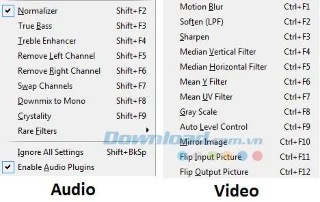
9. Settings for Audio, Video:
Please refer to the list of shortcuts corresponding to the settings for video or audio as shown below:
10. Some other shortcut keys:
F1: Open the Help section.
F2: Open Preferences.
Alt + E: Open the playlist editor (Playlist Editor).
Alt + G: Control Box.
Ctrl + Z: Close the currently playing file.
Alt + F4: Close the program.
Hopefully, with the above series of hotkeys will help you use KMPlayer more effectively, manipulate quickly and experience the interesting features that this software brings. In addition, you can use some free music and movie software such as Windows Media Player , FLV Media Player , Media Player Classic ...
I wish you successful implementation!
(33) Comments
Chloe Adams -
I feel more confident using KMPlayer now! These shortcuts will make navigating so much easier!
Emily Johnson -
I love KMPlayer! These shortcuts make my movie watching so much more enjoyable. Thank you for compiling this list
Anna Belle -
Big thanks for this! I've recently switched to KMPlayer and couldn’t figure out the efficient ways to use it.
Hương Đà Nẵng -
Does anyone know if these shortcuts work in the mobile version as well? I find it so useful to use keyboard shortcuts on my laptop!
Linh IT -
Thanks for sharing! I've been looking for ways to improve my KMPlayer experience, and these shortcuts are just what I needed
Tom Hardy -
I personally like using the full-screen mode shortcut. It makes my movie nights way more immersive
Jessica Green -
I usually find shortcuts confusing, but this list is clear and easy to understand. I appreciate it
Phúc IT -
Keyboard shortcuts are essential, especially when you watch videos often. This list will definitely enhance my productivity
Sunny Day -
It's so easy to forget the shortcuts while watching movies. This article is going on my favorites list
Mèo con -
These shortcuts are lifesavers! I can now navigate through movies without pulling my hair out. Thanks a million!
Hương KT -
Sharing this with my friends! These shortcuts are a must-know for anyone using KMPlayer. Appreciate your effort!
Beanie Baby -
LOL I tried the speed control shortcut while watching a fast-paced action movie. It was hilarious! Such a cool feature
Sophie White -
Anyone knows if these shortcuts are customizable? I’d love to create my own to suit my needs
Kevin Blue -
Great info! I feel like my KMPlayer usage is about to become much more efficient. Thanks for putting this together!
Linda Grey -
Wow, I just learned something new today! The keyboard shortcuts mentioned in your post are a real time saver.
Linh mèo -
I’ve been using KMPlayer for years and didn’t realize how much I was missing out on by not using shortcuts. Thanks for sharing!
Michael King -
These shortcuts are great, but is there a way to view them within the KMPlayer itself? Sometimes I forget!
Thùy Linh -
Awesome article! I especially liked the part about toggling subtitles. It's a game changer for me, thanks
Hùng Chiến -
Can anyone tell me if these shortcuts are available in all versions of KMPlayer? I just want to be sure
Daisy White -
Thanks for this! I’ve been looking for ways to improve my video watching, and this is a huge help
Ngọc Trâm -
OMG! I can't believe I found this post! I'm always struggling with navigating KMPlayer. These shortcuts are going to help SO much
Huy Công -
This is exactly what I needed! I always get lost in the interface, but these shortcuts sound like a lifesaver
Vũ Minh -
Can't wait to try these out! Thanks for sharing this valuable information. My movie nights are about to get a lot better!
Alex Brown -
Very helpful post! I had no idea KMPlayer had so many keyboard shortcuts. Can't wait to put them into practice
Huyền Lizzie -
I appreciate how you laid everything out so clearly. I’m not very tech-savvy, but I could follow along easily.
John Smith -
Great tips! I never knew about those keyboard shortcuts in KMPlayer. They will definitely make my viewing experience much smoother
Hải Nguyễn -
I can't believe I was using KMPlayer for so long without knowing these shortcuts! Thanks for opening my eyes
Duy Sinh 6789 -
I just tried some of the shortcuts you mentioned. I can't believe how much time they save! Definitely sharing this post with my friends
Sarah Lee -
I love KMPlayer! The shortcuts really improve the user experience. I’ll be using these from now on
Joyce Kim -
If you use KMPlayer a lot, you really need to take advantage of these shortcuts. It makes everything so much smoother
Quang vn -
Can anyone explain how to set custom shortcuts in KMPlayer? The default ones are great, but I wanna tweak them a bit
Huyền Trang -
I never thought I could enjoy watching movies more until I read this! Gonna learn these shortcuts ASAP
Chris Parker -
This is a fantastic resource! Is there a way to create your own shortcuts or are they fixed?










Chloe Adams -
I feel more confident using KMPlayer now! These shortcuts will make navigating so much easier!
Emily Johnson -
I love KMPlayer! These shortcuts make my movie watching so much more enjoyable. Thank you for compiling this list
Anna Belle -
Big thanks for this! I've recently switched to KMPlayer and couldn’t figure out the efficient ways to use it.
Hương Đà Nẵng -
Does anyone know if these shortcuts work in the mobile version as well? I find it so useful to use keyboard shortcuts on my laptop!
Linh IT -
Thanks for sharing! I've been looking for ways to improve my KMPlayer experience, and these shortcuts are just what I needed
Tom Hardy -
I personally like using the full-screen mode shortcut. It makes my movie nights way more immersive
Jessica Green -
I usually find shortcuts confusing, but this list is clear and easy to understand. I appreciate it
Phúc IT -
Keyboard shortcuts are essential, especially when you watch videos often. This list will definitely enhance my productivity
Sunny Day -
It's so easy to forget the shortcuts while watching movies. This article is going on my favorites list
Mèo con -
These shortcuts are lifesavers! I can now navigate through movies without pulling my hair out. Thanks a million!
Hương KT -
Sharing this with my friends! These shortcuts are a must-know for anyone using KMPlayer. Appreciate your effort!
Beanie Baby -
LOL I tried the speed control shortcut while watching a fast-paced action movie. It was hilarious! Such a cool feature
Sophie White -
Anyone knows if these shortcuts are customizable? I’d love to create my own to suit my needs
Kevin Blue -
Great info! I feel like my KMPlayer usage is about to become much more efficient. Thanks for putting this together!
Linda Grey -
Wow, I just learned something new today! The keyboard shortcuts mentioned in your post are a real time saver.
Linh mèo -
I’ve been using KMPlayer for years and didn’t realize how much I was missing out on by not using shortcuts. Thanks for sharing!
Michael King -
These shortcuts are great, but is there a way to view them within the KMPlayer itself? Sometimes I forget!
Thùy Linh -
Awesome article! I especially liked the part about toggling subtitles. It's a game changer for me, thanks
Hùng Chiến -
Can anyone tell me if these shortcuts are available in all versions of KMPlayer? I just want to be sure
Daisy White -
Thanks for this! I’ve been looking for ways to improve my video watching, and this is a huge help
Ngọc Trâm -
OMG! I can't believe I found this post! I'm always struggling with navigating KMPlayer. These shortcuts are going to help SO much
Huy Công -
This is exactly what I needed! I always get lost in the interface, but these shortcuts sound like a lifesaver
Vũ Minh -
Can't wait to try these out! Thanks for sharing this valuable information. My movie nights are about to get a lot better!
Alex Brown -
Very helpful post! I had no idea KMPlayer had so many keyboard shortcuts. Can't wait to put them into practice
Huyền Lizzie -
I appreciate how you laid everything out so clearly. I’m not very tech-savvy, but I could follow along easily.
John Smith -
Great tips! I never knew about those keyboard shortcuts in KMPlayer. They will definitely make my viewing experience much smoother
Hải Nguyễn -
I can't believe I was using KMPlayer for so long without knowing these shortcuts! Thanks for opening my eyes
Duy Sinh 6789 -
I just tried some of the shortcuts you mentioned. I can't believe how much time they save! Definitely sharing this post with my friends
Sarah Lee -
I love KMPlayer! The shortcuts really improve the user experience. I’ll be using these from now on
Joyce Kim -
If you use KMPlayer a lot, you really need to take advantage of these shortcuts. It makes everything so much smoother
Quang vn -
Can anyone explain how to set custom shortcuts in KMPlayer? The default ones are great, but I wanna tweak them a bit
Huyền Trang -
I never thought I could enjoy watching movies more until I read this! Gonna learn these shortcuts ASAP
Chris Parker -
This is a fantastic resource! Is there a way to create your own shortcuts or are they fixed?