How to mark yourself safe on Facebook

Facebook 's Safety Check feature will help you let everyone in your friend list know you are safe after any incident in your area. Below is how to use Safety Check to mark yourself as safe on Facebook .

How to mark yourself safely on Facebook

This process is similar on mobile or desktop.
How to mark yourself safe on Facebook

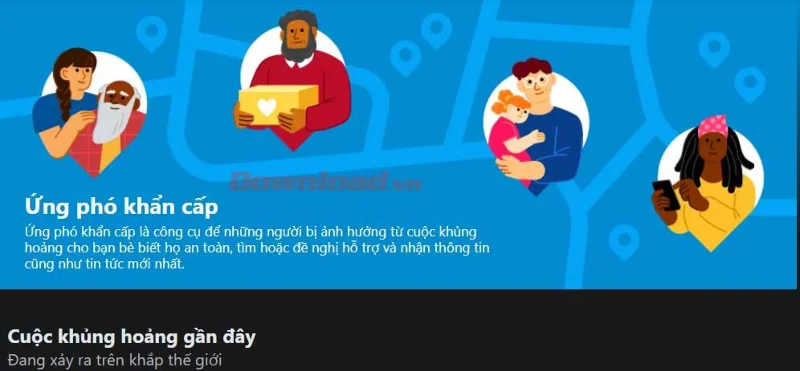
Emergency Response page on Facebook

  1. Go to the Crisis Response page on Facebook: https://www.facebook.com/crisisresponse/.
  2. You'll see a list of ongoing crises, including events that are affecting people you know.
  3. Click the Learn More button on the crisis you want to learn about.
  4. You will see a message asking about your safety.
  5. Select I'm Safe to share a post informing your friends about your condition.

How to mark yourself safe on Facebook

Click I'm Safe if you are safe

Facebook uses location data to show incidents that target you. However, in some cases, such as when traveling, you may be able to flag yourself as safe during an event outside your usual area of ​​residence.

If this is the case, you will see a Facebook message asking if you are in the affected area after clicking the Learn More button about a specific event. Answer Yes so that the Safety Check banner appears.

When people in your location post events related to the event or news outlets report on a catastrophic event, you'll also see a safety verification notification on your Facebook home page.

The Learn More page also has Home and Safety Check tabs at the top. The Home tab provides general information about disasters along with tips on protecting yourself and submitting requests for help, donations, etc.

How to check your friends' safety

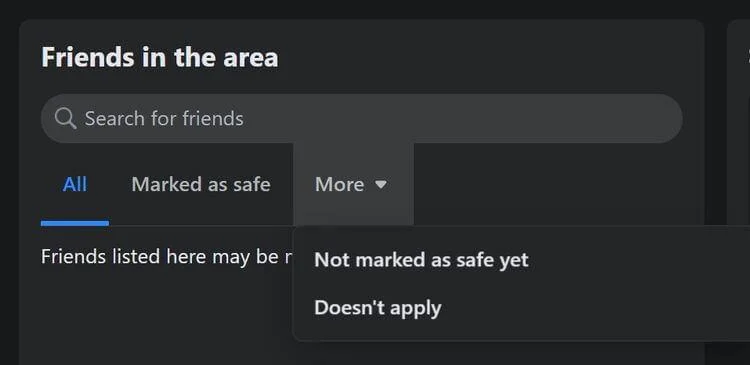
You can also go to the Safety Check tab to contact an affected friend if you don't see their status on this page.

1. Select More > Not marked as safe yet.
How to mark yourself safe on Facebook

2. Also, use Search for friends in Friends in the area .
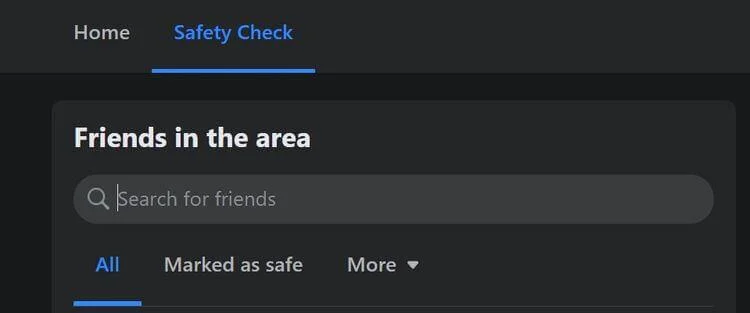
How to mark yourself safe on Facebook

As long as you have Facebook friends in the affected area, you'll see Ask If Safe next to their name.

Above is how to use the Safety Check feature on Facebook . Hope the article is useful to you.

Leave a Comment

Solving Microsoft Edge Privacy Error and Connection Not Private

Solving Microsoft Edge Privacy Error and Connection Not Private

Tired of Microsoft Edge Privacy Error or Connection Not Private warnings? Get instant, step-by-step fixes for secure browsing. Clear cache, reset settings, and more – no tech skills needed!

How to Fix Microsoft Edge Taskbar Icon Overlapping Fix

How to Fix Microsoft Edge Taskbar Icon Overlapping Fix

Tired of Microsoft Edge taskbar icon overlapping cluttering your screen? Follow our proven step-by-step fixes for a clean taskbar. Quick solutions that work on the latest Edge versions – no tech skills needed!

How to Fix Microsoft Edge Audio Out of Sync Error

How to Fix Microsoft Edge Audio Out of Sync Error

Tired of Microsoft Edge audio out of sync ruining your videos? Follow our expert, step-by-step guide with the latest fixes to eliminate audio lag and desync issues instantly. Restore smooth playback today!

Troubleshooting Edge Browser Slow Navigation on Windows 11

Troubleshooting Edge Browser Slow Navigation on Windows 11

Tired of sluggish Edge browser navigation on Windows 11? This ultimate troubleshooting guide delivers quick, effective fixes for slow loading, laggy tabs, and poor performance. Restore lightning-fast browsing today!

Solving Microsoft Edge Side-by-Side Configuration Error

Solving Microsoft Edge Side-by-Side Configuration Error

Stuck with Microsoft Edge "Side-by-Side Configuration" Error? Follow our proven, step-by-step fixes to resolve it fast and restore smooth browsing. No tech skills needed!

Troubleshooting Microsoft Edge Webcam Privacy Error

Troubleshooting Microsoft Edge Webcam Privacy Error

Struggling with Microsoft Edge Webcam Privacy Error? Follow our proven step-by-step guide to troubleshoot and fix it quickly. Regain webcam access in minutes with simple, effective solutions.

Best Extensions for Microsoft Edge Productivity in 2026

Best Extensions for Microsoft Edge Productivity in 2026

Unlock peak efficiency with the Best Extensions for Microsoft Edge Productivity in 2026. From tab mastery to AI-powered tasks, these top picks will transform your browsing into a productivity powerhouse. Install now and save hours daily!

How to Fix Microsoft Edge Out of Memory While Browsing

How to Fix Microsoft Edge Out of Memory While Browsing

Tired of Microsoft Edge "Out of Memory" crashes? Get proven, step-by-step solutions to fix Microsoft Edge out of memory while browsing. Boost speed and stability today!

How to Use Microsoft Edge for Remote Work and Education

How to Use Microsoft Edge for Remote Work and Education

Master how to use Microsoft Edge for remote work and education. Discover workspaces, collections, Immersive Reader, and productivity tips to boost efficiency and focus.

How to Use Microsoft Edge Sandbox for Safe Browsing

How to Use Microsoft Edge Sandbox for Safe Browsing

Discover how to harness Microsoft Edge Sandbox for safe browsing. Step-by-step guide to enable, optimize, and maximize security against threats while browsing effortlessly. Stay protected today!

Solving Microsoft Edge Profile Error on Every Launch

Solving Microsoft Edge Profile Error on Every Launch

Struggling with Microsoft Edge Profile Error every time you launch? Discover proven, step-by-step fixes to resolve the issue instantly. No more frustration – get back to browsing smoothly!

How to Fix Microsoft Edge Access Denied on Specific Sites

How to Fix Microsoft Edge Access Denied on Specific Sites

Struggling with Microsoft Edge "Access Denied" on specific sites? Discover proven, step-by-step fixes for Microsoft Edge Access Denied errors. Clear cache, tweak settings, and regain access fast—no tech skills needed!

How to Use Microsoft Edge Built-in VPN for Secure Browsing

How to Use Microsoft Edge Built-in VPN for Secure Browsing

Step-by-step guide: Learn how to use Microsoft Edge built-in VPN for secure browsing. Boost privacy, bypass restrictions, and stay protected effortlessly. Enable now!

How to Fix Microsoft Edge High CPU Usage and System Lag

How to Fix Microsoft Edge High CPU Usage and System Lag

Tired of Microsoft Edge high CPU usage causing system lag? Get proven, step-by-step fixes to optimize your browser, reduce lag, and boost performance fast. Latest solutions inside!

Troubleshooting Microsoft Edge Youtube Black Screen Fix

Troubleshooting Microsoft Edge Youtube Black Screen Fix

Struggling with YouTube black screen on Microsoft Edge? Discover proven troubleshooting Microsoft Edge "Youtube Black Screen" fix steps: clear cache, disable hardware acceleration, and more for seamless video playback. Quick, easy solutions inside!