How to split files, cut large files into many small files
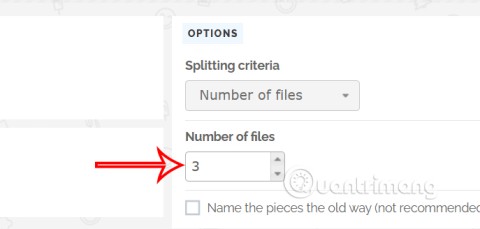
Splitting files, cutting large files into smaller parts will help you store and share them more easily. Here are ways to split files that you can apply.
WinRAR generates numerous temporary and junk files during its usage, leading to a sluggish computer system. Addressing this issue is vital to maintain optimal performance.
Follow this simple guide to set up automatic deletion of temporary files using WinRAR without any additional software or hassle.
| Step | Action |
|---|---|
| 1 |
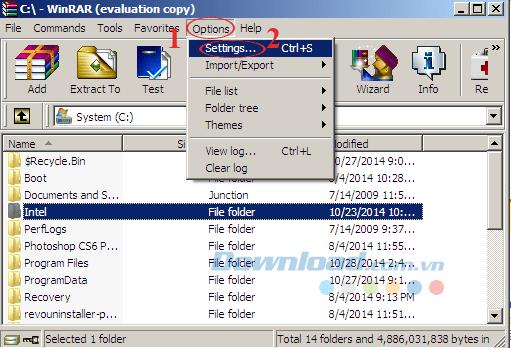
Open WinRAR. On the main interface, click on the Options tab, then select Settings... (or use Ctrl + S).
|
| 2 |
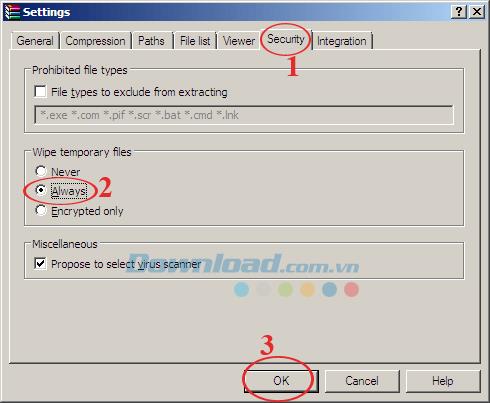
In the Settings window, navigate to the Security tab. Here, you'll find the Wipe temporary files section with three options:
|
You've successfully implemented automatic deletion of temporary files in just two easy steps, enhancing the efficiency of your computer.
Besides this, WinRAR also offers functionality to repair corrupted files, split compressed files, and create self-extracting files efficiently. You can also explore WinZip and 7-Zip software for free file compression and extraction.
Wishing you great success!
Splitting files, cutting large files into smaller parts will help you store and share them more easily. Here are ways to split files that you can apply.
How to block WinRAR from opening JAR files in 3 steps. If you don't want WinRAR to open JAR files, you have a way to do it. Below is a step-by-step guide to configuring WinRAR not to open
How to use WinRAR on Mac in 4 simple steps, When it comes to extracting RAR archives, WinRAR is always the top choice. In this article, let's find out
How to quickly update WinRAR in just 4 steps. Updating WinRAR regularly will help you take advantage of the latest features of this famous decompression software.
Deleting the original file after compressing with WinRAR saves disk space for the computer.
WinRAR after a long time will use a lot of temporary files, junk files make your computer system run much slower. So how to fix and delete all temporary files WinRAR?
When downloading documents or games from the internet, we often encounter cases where the downloaded file is in a self-extracting format (* .exe) or has a password protected? So how are they made? What software to use to do it?
The following article will make a 7-Zip and WinRAR comparison, so that we can see which tool is better and should choose 7-Zip or WinRAR to compress and decompress data.
Currently there are quite a few tools to help compress and decompress data, but in terms of popularity and most used are 7-Zip and WinRAR. The following article will guide you how to protect compressed files with password
Tired of Microsoft Teams shortcut error preventing you from opening the app? Follow our expert, step-by-step guide with the latest fixes for instant resolution. Works on Windows, Mac & web – no tech skills needed!
Tired of Microsoft Teams Task Management Sync Error halting your workflow? Follow our proven, step-by-step fixes to resolve sync issues fast and restore seamless task collaboration. No tech expertise needed!
Struggling with Microsoft Teams Wiki Error Formatting? This step-by-step guide reveals proven fixes for common wiki tab issues, ensuring smooth editing and collaboration in Teams. Get back to productive wikis fast!
Struggling with Microsoft Teams installation error on Linux? Discover step-by-step fixes for Ubuntu, Fedora & more. Resolve dependency issues, crashes, and errors quickly with our ultimate guide. Get Teams running smoothly today!
Struggling with Microsoft Teams "Error Page" not loading? Get step-by-step fixes for desktop, web, and mobile. Solve Microsoft Teams Error Page issues quickly and resume seamless teamwork today.
Tired of Microsoft Teams "Error Screenshot" blocking your workflow? Get proven, step-by-step solutions to resolve screenshot errors in Teams instantly and boost productivity. No tech skills needed!
Tired of Microsoft Teams "Error U" User blocking your chats? Get proven, step-by-step fixes to clear cache, reset, and restore seamless collaboration instantly.
Unlock the precise locations of Microsoft Teams registry keys on Windows 11. Step-by-step guide to find, access, and safely tweak them for optimal performance and troubleshooting. Essential for IT pros and Teams enthusiasts.
Tired of Microsoft Teams "Training Error" Video Lag ruining your meetings? Follow our step-by-step guide with the latest fixes for smooth video calls—no more frustration!
Frustrated by Microsoft Teams "Error occurred" during sign-in? Discover proven, step-by-step fixes to get back online fast. Clear cache, reset app, and more for seamless login. Works on Windows, Mac & web.
Struggling with Microsoft Teams "Call Error" Disconnecting? Discover proven, step-by-step fixes for call drops, network issues, and more. Get back to seamless meetings fast with our expert troubleshooting guide.
Stuck in Microsoft Teams Error 2603 login loop? Get proven step-by-step fixes to resolve the issue fast and restore seamless teamwork. Clear cache, reset, reinstall – all covered!
Tired of Microsoft Teams voice call errors? Follow our step-by-step guide to troubleshoot no audio, echo, or call drops. Proven fixes for crystal-clear calls every time.
Struggling with Microsoft Teams "Workflows Error" in Power Automate? Discover proven, step-by-step fixes to resolve connection issues, permissions, and more. Get your workflows running smoothly today!
Tired of Microsoft Teams crashes, black screens, and sign-in loops? Unlock Reddit's most popular, proven fixes to resolve common Microsoft Teams errors quickly and get back to productive meetings. Step-by-step guides inside!