Hackers Use Malicious Google Ads to Steal Users Microsoft Accounts

With Google's popularity, scammers are taking advantage of the company's services to commit malicious acts. Bad actors are pushing malicious ads onto Google's results pages, and while this tactic isn't new, this new method is aimed at stealing users' Microsoft login credentials.

Fake Microsoft Ads Stealing People's Accounts

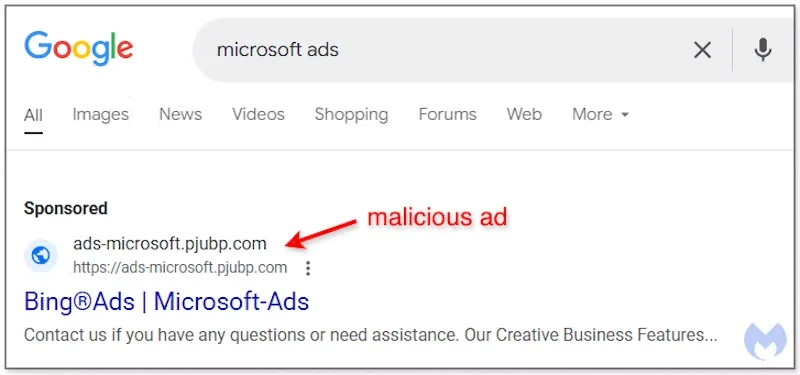
In a report by Malwarebytes, the attack starts when someone searches for a Microsoft Ad program. Google serves up relevant sponsored links for the search term, and one of them is a fake copy of the Microsoft Ads site. It has a different URL than the real site, which is usually a giveaway.
Hackers Use Malicious Google Ads to Steal Users' Microsoft Accounts
An example of a fake Microsoft Ads site used as a sponsored link

However, people often trust Google's search results so much that they blindly click on the first result they see. And if the scammer is skilled enough, they can make their sponsored links look almost identical to the real ones, even if the URL looks strange.

The fake Microsoft Ads site has a number of measures in place to keep unwanted visitors out. For example, if a bot tries to parse the site or someone visits via VPN, the site will serve a fake landing page to distract them. And if you try to go directly to the URL without going through the fake ad, the site will instead show you a video of Rick Astley singing “Never Gonna Give You Up.”

However, if you access it through Google Ads, you'll see a fake Microsoft login page asking you to enter your username, password, and two-factor authentication code. If you provide this information, the scammer can use it to steal your Microsoft account.

Given the way the attack targets people who want to use Microsoft Ads to advertise their products, it's unlikely you'll see it. However, it's a good example of how these scams work, as they can impersonate almost any website.

Leave a Comment

Analyzing an Attack (Part 3)

Analyzing an Attack (Part 3)

In part 2 of this series, we have left all the necessary information required for an attack on the victim's network.

Microsoft 365 will disable ActiveX due to excessive hacker abuse

Microsoft 365 will disable ActiveX due to excessive hacker abuse

Microsoft Office has supported ActiveX for years as an option for document extensibility and automation, but it's also a serious security vulnerability.

Analyzing an Attack (Part 1)

Analyzing an Attack (Part 1)

This series will be based on a network vulnerability. What will be introduced in the article is already a real attack, starting from reconnaissance to enumeration, exploiting network services and ending with exploitation strategies sending notifications. All these steps will be observed at the data packet level, and then explained in detail.

A major cybersecurity company was just hacked and lost 440GB of data.

A major cybersecurity company was just hacked and lost 440GB of data.

The world-famous cybersecurity company Fortinet has just officially confirmed that a large amount of user data was stolen from the company's Microsoft Sharepoint server, and was posted on a hacker forum early in the morning of September 15.

New ransomware strain discovered that specializes in stealing login information from Chrome browser

New ransomware strain discovered that specializes in stealing login information from Chrome browser

A new strain of ransomware called Qilin has been discovered using a relatively sophisticated, highly customizable tactic to steal account login information stored in the Google Chrome browser.

Analyzing an Attack (Part 2)

Analyzing an Attack (Part 2)

We showed you in part one the information that can be observed while opening the packet sequence sent by Nmap. The sequence sent starts with an ICMP echo response to determine if the computer or network has been assigned an IP address.

How to Fix Microsoft Teams Error K Security

How to Fix Microsoft Teams Error K Security

Struggling with Microsoft Teams "Error K" Security? Follow our step-by-step guide to fix it quickly—no tech expertise needed. Get back to seamless collaboration today!

How to Fix Microsoft Teams Update Error 0x80070002

How to Fix Microsoft Teams Update Error 0x80070002

Struggling with Microsoft Teams Update Error 0x80070002? Discover step-by-step fixes to resolve it quickly. Clear cache, repair files, and get back to seamless updates today!

Solving Microsoft Teams Web Error Browser Login

Solving Microsoft Teams Web Error Browser Login

Tired of Microsoft Teams "Web Error" blocking your browser login? Follow our step-by-step guide with proven fixes to resolve Teams web login issues fast and securely. Get back to work!

How to Fix Microsoft Teams Error O Offline

How to Fix Microsoft Teams Error O Offline

Stuck with Microsoft Teams "Error O" Offline? Discover proven, step-by-step fixes to get back online fast. Clear cache, restart, and more – no tech skills needed!

Where is Microsoft Teams in Outlook? Locating the Missing Icon

Where is Microsoft Teams in Outlook? Locating the Missing Icon

Frustrated by the missing Microsoft Teams icon in Outlook? Learn exactly where to find it, why it disappears, and proven steps to restore it for effortless meetings. Updated for the latest versions!

Solving Microsoft Teams Windows 10 Error Login Issues

Solving Microsoft Teams Windows 10 Error Login Issues

Struggling with Microsoft Teams "Windows 10 Error" login issues? Get instant fixes for cache clears, updates, and more. Step-by-step solutions to solve Microsoft Teams login error on Windows 10 fast and frustration-free.

Solving Microsoft Teams Website Error Tab Not Loading

Solving Microsoft Teams Website Error Tab Not Loading

Tired of the frustrating Microsoft Teams "Website Error" where tabs won’t load? Get step-by-step fixes to resolve it quickly and boost your productivity. Essential troubleshooting for seamless Teams experience.

How to Fix Microsoft Teams Web Error 503 Service Unavailable

How to Fix Microsoft Teams Web Error 503 Service Unavailable

Tired of the frustrating Microsoft Teams "Web Error" 503 Service Unavailable? Discover proven, step-by-step fixes for Teams 503 error on web. Get back online fast with our expert guide. Works on all browsers!

How to Fix Microsoft Teams Win 7 Error Compatibility

How to Fix Microsoft Teams Win 7 Error Compatibility

Struggling with Microsoft Teams "Win 7 Error" compatibility? Discover step-by-step fixes to restore seamless video calls and chats on unsupported Windows versions. Quick, reliable solutions inside!

Troubleshooting Microsoft Teams Breakout Rooms License Errors

Troubleshooting Microsoft Teams Breakout Rooms License Errors

Master troubleshooting Microsoft Teams Breakout Rooms license errors with this step-by-step guide. Quick fixes for common license issues, admin checks, and prevention tips to get your meetings running smoothly.

How to Fix Microsoft Teams Version History Error

How to Fix Microsoft Teams Version History Error

Struggling with Microsoft Teams "Version History" Error? Discover proven, step-by-step fixes to restore access instantly. Clear cache, update Teams, and more—no tech skills needed!

Solving Microsoft Teams Joining Error: Meeting ID Not Found

Solving Microsoft Teams Joining Error: Meeting ID Not Found

Tired of the frustrating Microsoft Teams Joining Error: Meeting ID Not Found? Get step-by-step fixes to rejoin meetings fast. Updated with the latest Teams patches for seamless collaboration. Solve it now!

Troubleshooting Microsoft Teams Video Error Green Screen

Troubleshooting Microsoft Teams Video Error Green Screen

Struggling with Microsoft Teams "Video Error" green screen? Discover proven, step-by-step troubleshooting fixes for seamless video calls. Quick solutions inside!

How to Fix Microsoft Teams How Teams Works Tutorial Error

How to Fix Microsoft Teams How Teams Works Tutorial Error

Struggling with the Microsoft Teams "How Teams Works" Tutorial Error? Discover proven, step-by-step fixes to resolve it quickly. Clear cache, update, and more for seamless onboarding. Works on latest versions!

How to Fix Microsoft Teams Error Today on Windows 10

How to Fix Microsoft Teams Error Today on Windows 10

Tired of the frustrating Microsoft Teams "Error Today" on Windows 10? Discover proven, step-by-step fixes to resolve it quickly and restore smooth teamwork. No tech skills needed!









